
Zeebe服务学习1-简单部署与实现demo
1.Zeebe是什么?
Camunda公司研发的工作流引擎Zeebe,目标是对微服务的编排。具体详细介绍可以参考官网:https://zeebe.io/what-is-zeebe/
2.背景
随着微服务的发展,大家都单体服务进行了拆分,解耦,这样做引发了另外的一个问题:之前一个接口实现的功能,现在需要调用几个接口才能完成。如何解决这些原子性的接口呢?
这时候我们想到了Zeebe服务。
3.服务部署
3.1 第一步:安装环境,不管你是Linux系统还是Win系统,首先需要安装上docker,因为我的机器是Win系统,本文就是介绍Windows系统下安装使用情况
确保机器已经安装docker(没有安装的可以下载docker-win,进行安装)

3.2 第二步:在cmd里面执行命令:
docker run --name zeebe -p 26500:26500 camunda/zeebe:latest
至此,Zeebe服务已经安装成功了。
4.demo
4.1 第一步:创建一个控制台项目,这个应该都会
4.2 第二步:在项目中引用Zeebe客户端的nuget包,目前版本是0.11.0

4.3 第三步:建模,使用Zeebe Modeler工具进行建模
我需要实现的流程是:
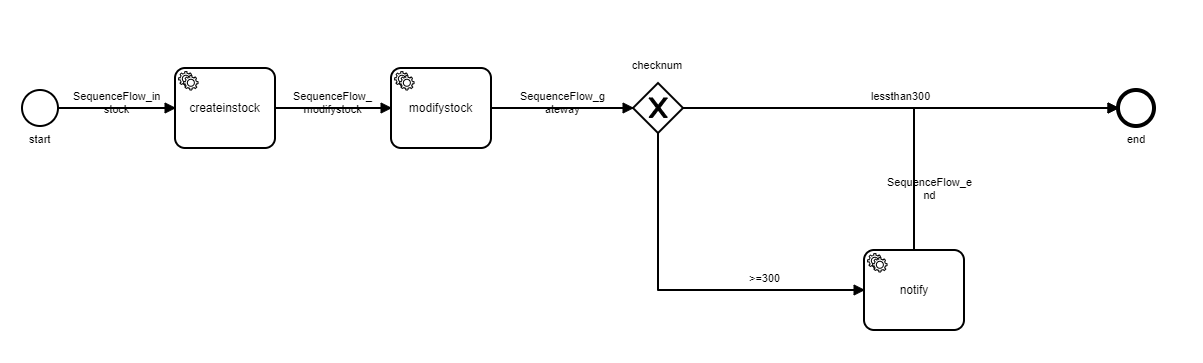
具体的BPMN代码如下:
<?xml version="1.0" encoding="UTF-8"?>
<bpmn:definitions xmlns:bpmn="http://www.omg.org/spec/BPMN/20100524/MODEL" xmlns:bpmndi="http://www.omg.org/spec/BPMN/20100524/DI" xmlns:dc="http://www.omg.org/spec/DD/20100524/DC" xmlns:zeebe="http://camunda.org/schema/zeebe/1.0" xmlns:xsi="http://www.w3.org/2001/XMLSchema-instance" xmlns:di="http://www.omg.org/spec/DD/20100524/DI" id="Definitions_1011qyd" targetNamespace="http://bpmn.io/schema/bpmn" exporter="Zeebe Modeler" exporterVersion="0.6.2">
<bpmn:process id="instock-process" name="instock-process" isExecutable="true">
<bpmn:startEvent id="start" name="start">
<bpmn:outgoing>SequenceFlow_instock</bpmn:outgoing>
</bpmn:startEvent>
<bpmn:serviceTask id="createinstock" name="createinstock">
<bpmn:extensionElements>
<zeebe:taskDefinition type="createinstock" retries="3" />
<zeebe:ioMapping>
<zeebe:input source="InStockData" target="InStockData" />
</zeebe:ioMapping>
</bpmn:extensionElements>
<bpmn:incoming>SequenceFlow_instock</bpmn:incoming>
<bpmn:outgoing>SequenceFlow_modifystock</bpmn:outgoing>
</bpmn:serviceTask>
<bpmn:sequenceFlow id="SequenceFlow_instock" name="SequenceFlow_instock" sourceRef="start" targetRef="createinstock" />
<bpmn:serviceTask id="modifystock" name="modifystock">
<bpmn:extensionElements>
<zeebe:taskDefinition type="modifystock" retries="3" />
<zeebe:ioMapping>
<zeebe:input source="StockData" target="StockData" />
</zeebe:ioMapping>
</bpmn:extensionElements>
<bpmn:incoming>SequenceFlow_modifystock</bpmn:incoming>
<bpmn:outgoing>SequenceFlow_gateway</bpmn:outgoing>
</bpmn:serviceTask>
<bpmn:sequenceFlow id="SequenceFlow_modifystock" name="SequenceFlow_modifystock" sourceRef="createinstock" targetRef="modifystock" />
<bpmn:exclusiveGateway id="checknum" name="checknum">
<bpmn:incoming>SequenceFlow_gateway</bpmn:incoming>
<bpmn:outgoing>morethan300</bpmn:outgoing>
<bpmn:outgoing>lessthan300</bpmn:outgoing>
</bpmn:exclusiveGateway>
<bpmn:sequenceFlow id="SequenceFlow_gateway" name="SequenceFlow_gateway" sourceRef="modifystock" targetRef="checknum" />
<bpmn:serviceTask id="notify" name="notify">
<bpmn:extensionElements>
<zeebe:taskDefinition type="notify" retries="3" />
</bpmn:extensionElements>
<bpmn:incoming>morethan300</bpmn:incoming>
<bpmn:outgoing>SequenceFlow_end</bpmn:outgoing>
</bpmn:serviceTask>
<bpmn:sequenceFlow id="morethan300" name=">=300" sourceRef="checknum" targetRef="notify">
<bpmn:conditionExpression xsi:type="bpmn:tFormalExpression">stocknum>=300</bpmn:conditionExpression>
</bpmn:sequenceFlow>
<bpmn:endEvent id="end" name="end">
<bpmn:incoming>lessthan300</bpmn:incoming>
<bpmn:incoming>SequenceFlow_end</bpmn:incoming>
</bpmn:endEvent>
<bpmn:sequenceFlow id="lessthan300" name="lessthan300" sourceRef="checknum" targetRef="end">
<bpmn:conditionExpression xsi:type="bpmn:tFormalExpression">stocknum<300</bpmn:conditionExpression>
</bpmn:sequenceFlow>
<bpmn:sequenceFlow id="SequenceFlow_end" name="SequenceFlow_end" sourceRef="notify" targetRef="end" />
</bpmn:process>
<bpmndi:BPMNDiagram id="BPMNDiagram_1">
<bpmndi:BPMNPlane id="BPMNPlane_1" bpmnElement="instock-process">
<bpmndi:BPMNShape id="_BPMNShape_StartEvent_2" bpmnElement="start">
<dc:Bounds x="112" y="159" width="36" height="36" />
<bpmndi:BPMNLabel>
<dc:Bounds x="119" y="202" width="23" height="14" />
</bpmndi:BPMNLabel>
</bpmndi:BPMNShape>
<bpmndi:BPMNShape id="ServiceTask_0zssdcw_di" bpmnElement="createinstock">
<dc:Bounds x="265" y="137" width="100" height="80" />
</bpmndi:BPMNShape>
<bpmndi:BPMNEdge id="SequenceFlow_0yllvib_di" bpmnElement="SequenceFlow_instock">
<di:waypoint x="148" y="177" />
<di:waypoint x="265" y="177" />
<bpmndi:BPMNLabel>
<dc:Bounds x="163" y="159" width="88" height="27" />
</bpmndi:BPMNLabel>
</bpmndi:BPMNEdge>
<bpmndi:BPMNShape id="ServiceTask_1db0jmn_di" bpmnElement="modifystock">
<dc:Bounds x="481" y="137" width="100" height="80" />
</bpmndi:BPMNShape>
<bpmndi:BPMNEdge id="SequenceFlow_1uaplin_di" bpmnElement="SequenceFlow_modifystock">
<di:waypoint x="365" y="177" />
<di:waypoint x="481" y="177" />
<bpmndi:BPMNLabel>
<dc:Bounds x="383" y="159" width="80" height="27" />
</bpmndi:BPMNLabel>
</bpmndi:BPMNEdge>
<bpmndi:BPMNShape id="ExclusiveGateway_1sjnk3d_di" bpmnElement="checknum" isMarkerVisible="true">
<dc:Bounds x="723" y="152" width="50" height="50" />
<bpmndi:BPMNLabel>
<dc:Bounds x="722" y="128" width="51" height="14" />
</bpmndi:BPMNLabel>
</bpmndi:BPMNShape>
<bpmndi:BPMNEdge id="SequenceFlow_1hhfiqd_di" bpmnElement="SequenceFlow_gateway">
<di:waypoint x="581" y="177" />
<di:waypoint x="723" y="177" />
<bpmndi:BPMNLabel>
<dc:Bounds x="610" y="159" width="85" height="27" />
</bpmndi:BPMNLabel>
</bpmndi:BPMNEdge>
<bpmndi:BPMNShape id="ServiceTask_016w4wa_di" bpmnElement="notify">
<dc:Bounds x="954" y="319" width="100" height="80" />
</bpmndi:BPMNShape>
<bpmndi:BPMNEdge id="SequenceFlow_1ffqddr_di" bpmnElement="morethan300">
<di:waypoint x="748" y="202" />
<di:waypoint x="748" y="359" />
<di:waypoint x="954" y="359" />
<bpmndi:BPMNLabel>
<dc:Bounds x="839" y="341" width="32" height="14" />
</bpmndi:BPMNLabel>
</bpmndi:BPMNEdge>
<bpmndi:BPMNShape id="EndEvent_01b3gni_di" bpmnElement="end">
<dc:Bounds x="1208" y="159" width="36" height="36" />
<bpmndi:BPMNLabel>
<dc:Bounds x="1217" y="202" width="19" height="14" />
</bpmndi:BPMNLabel>
</bpmndi:BPMNShape>
<bpmndi:BPMNEdge id="SequenceFlow_00imkpl_di" bpmnElement="lessthan300">
<di:waypoint x="773" y="177" />
<di:waypoint x="1208" y="177" />
<bpmndi:BPMNLabel>
<dc:Bounds x="961" y="159" width="60" height="14" />
</bpmndi:BPMNLabel>
</bpmndi:BPMNEdge>
<bpmndi:BPMNEdge id="SequenceFlow_0c9jvp6_di" bpmnElement="SequenceFlow_end">
<di:waypoint x="1004" y="319" />
<di:waypoint x="1004" y="177" />
<di:waypoint x="1208" y="177" />
<bpmndi:BPMNLabel>
<dc:Bounds x="977" y="245" width="85" height="27" />
</bpmndi:BPMNLabel>
</bpmndi:BPMNEdge>
</bpmndi:BPMNPlane>
</bpmndi:BPMNDiagram>
</bpmn:definitions>
4.4 第四步:写代码
(1)客户端代码:
 internal class Program

    {

        private static readonly string DemoProcessPath = Path.Combine(AppDomain.CurrentDomain.BaseDirectory, "Resources", "instock-process.bpmn");

        private static readonly string ZeebeUrl = "127.0.0.1:26500";

        private static dynamic WorkflowInstanceVariables = new

        {

            stocknum = 100

        };

        public static async Task Main(string[] args)

        {

            InitClient.Initialize();

            // create zeebe client

            var client = ZeebeClient.NewZeebeClient(ZeebeUrl);

            // deploy

            // var deployResponse = await client.NewDeployCommand().AddResourceFile(DemoProcessPath).Send();

            // create workflow instance

            // var workflowKey = deployResponse.Workflows[0].WorkflowKey;//2251799813685495

            // 模拟调用

            var workflowInstance = await client

                .NewCreateWorkflowInstanceCommand()

                .WorkflowKey(2251799813685495)

                .Variables(JsonConvert.SerializeObject(WorkflowInstanceVariables))

                .Send();

        }

}
(2)服务端代码:
 internal class Program

    {

        private static Dictionary<string, string> JobTypeAndMethod = new Dictionary<string, string>()

        {

            { "createinstock","InStockJobHandler"},

            { "modifystock","StockJobHandler"},

            { "notify","NotifyJobHandler"}

        };

        private static readonly string ZeebeUrl = "127.0.0.1:26500";

        public static async Task Main(string[] args)

        {

            InitClient.Initialize();

            // create zeebe client

            var client = ZeebeClient.NewZeebeClient(ZeebeUrl);

            // open job worker

            await OpenJobWorkers(client);

        }

        private static Task OpenJobWorkers(IZeebeClient client)

        {

            using (var signal = new EventWaitHandle(false, EventResetMode.AutoReset))

            {

                foreach (var item in JobTypeAndMethod)

                {

                    client.NewWorker()

                        .JobType(item.Key)

                        .Handler(JobHandlerFactory.GetJobType(item.Value))

                        .MaxJobsActive(5)

                        .Name(item.Key)

                        .AutoCompletion()

                        .PollInterval(TimeSpan.FromSeconds(1))

                        .Timeout(TimeSpan.FromSeconds(10))

                        .Open();

                }

                // blocks main thread, so that worker can run

                signal.WaitOne();

            }

            return Task.CompletedTask;

        }

    }
客户端的代码中,只有第一次会将BPMN文件进行部署,Zeebe服务会返回一个Key,之后如果建模数据不发生改变的情况下,就可以直接使用key进行调用即可了,如果发生变化需要再一次部署才行;
每次部署都会改变工作流程的Version值(默认获取的事latestVersion)。
至此,一个简单的Zeebe Demo实现了。
Zeebe服务学习1-简单部署与实现demo的更多相关文章
- Zeebe服务学习2-状态机
1.什么是状态机? 第一次接触到这个名词,感觉自己是明白这个东东是啥的,但是后来发现,emm-,是的,只是理解了这个词而已. 贴一下官方介绍: 有限状态机,(英语:Finite-state machi ...
- Zeebe服务学习3-Raft算法与集群部署
1.背景Zeebe集群里面保证分布式一致性问题,是通过Raft实现的,其实这个算法用途比较广泛,比如Consul网关,也是通过Raft算法来实现分布式一致性的. 首先简单介绍一下Raft: 在学术界, ...
- Zeebe服务学习5-多实例特性实践
一.背景 在0.21版本之前,Zeebe不支持多实例元素,在2019年10月9号发布的0.21版本中,加入这一特性, 主要是体现在Zeebe Modeler 0.7.0以及之后的版本中. 二.特性介绍 ...
- 学习写简单的RPC框架demo
学习实现一个简单的RPC框架. 工程主要目录分级结构: rpc-common: 公共基础包,能力提供包 rpc-provider: 服务提供者 rpc-consumer:服务消费者 rpc-servi ...
- 学习写简单Spring源码demo
最近在研究怎么实现简单的Spring的源码,通过注解的方式来实现对bean的加载管理. 首先先来看下我的工程结构: (1)spring-common:定义了常用的枚举常量,工具类(如FileUtils ...
- Glue4Net简单部署基于win服务的Socket程序
smark 专注于高并发网络和大型网站架规划设计,提供.NET平台下高吞吐的网络通讯应用技术咨询和支持 Glue4Net简单部署基于win服务的Socket程序 在写一些服务应用的时候经常把要它部署到 ...
- SpringCloud微服务学习笔记
SpringCloud微服务学习笔记 项目地址: https://github.com/taoweidong/Micro-service-learning 单体架构(Monolithic架构) Mon ...
- 微服务技术栈简单介绍,Eureka和Ribbon的引入和使用
一.了解微服务架构 1.微服务技术栈 整体框架 整体学习规划路线2.微服务与单体架构的区别 单体架构:将业务的所有功能集中在一个项目中开发,打成一个包部署 优势 结构简单 部署成本低 缺点 耦合度高, ...
- XenApp简单部署
作者:MR.Yangwj 目录 XenApp简单部署... 1 一. XenApp安装... 1 (一) 服务器配置任务... 9 1) 许可证服务器配置... 9 ...
随机推荐
- C++实现邻接表
对于无向图(V0,V1),(V1,V2),(V2,V3),(V0,V2)对应的邻接表表示就是 在代码中,你要单独对V1.V2.V3创建一种结构体类型.在对后面的节点0,1,2,3创建一种结构体类型 代 ...
- 最小生成树 Prim和Kruskal
感觉挺简单的,Prim和Dijkstra差不多,Kruskal搞个并查集就行了,直接上代码吧,核心思路都是找最小的边. Prim int n,m; int g[N][N]; int u,v; int ...
- 头疼的Python 脚本报错
Python 脚本报错 检查是否用了制表符.变量声明前面不能用制表符,只能用空格,版本为2.7.14
- [Golang]-6 超时处理、非阻塞通道操作、通道的关闭和遍历
目录 超时处理 非阻塞通道操作 通道的关闭 通道遍历 超时处理 超时 对于一个连接外部资源,或者其它一些需要花费执行时间的操作的程序而言是很重要的. 得益于通道和 select,在 Go中实现超时操作 ...
- OpenStack Train版-1.安装基础环境&服务
1. 服务组件的密码 密码名称 描述 ADMIN_PASS admin用户密码 CINDER_DBPASS 块设备存储服务的数据库密码 CINDER_PASS 块设备存储服务的 cinder 密码 D ...
- 数字千万别用puts!
为了图省事我好几次都习惯的用puts输出一些确定答案,比如直接puts("-1"); 每次都wa到心态崩溃才想起来数字不能用puts...
- hdu 4465 Candy (非原创)
LazyChild is a lazy child who likes candy very much. Despite being very young, he has two large cand ...
- Clipboard API
Clipboard API click copy click copy demo clickGetNewsLink(data_ref = `newsLink`) { let that = this; ...
- Sentry 中文版
Sentry 中文版 汉化 https://sentry.io/settings/account/details/ 打开用户设置 User settings 语言选择中文 Simplified Chi ...
- SASS CSS3 koala
CSS with superpowers Sass: Syntactically Awesome Style Sheets http://sass-lang.com/ Sass is the most ...