
MVC登录
前言
最近没什么好写的,准备把MVC的登录再写一下,巩固一下
HTML
@{

    Layout = null;

}

<!DOCTYPE html>

<html>

<head>

    <meta name="viewport" content="width=device-width" />

    <title>登录 - 瑰园美食</title>

    <link rel="icon" href="~/Content/Images/Icon/Logo.png" />

    <link href="~/Plugin/layui/css/layui.css" rel="stylesheet" />

    <link href="~/Content/Css/LoginStyle.css" rel="stylesheet" />

</head>

<body>

    <h1>

        <span>瑰园美食</span>

        <span>享受美食带来的欢乐~</span>

    </h1>

    <div class="LoginFrom">

        <h2>登录</h2>

        <div class="LoginFrom_Input">

            <input spellcheck="false" class="Input_User" type="text" placeholder="账号" />

            <input class="Input_Pass" type="password" placeholder="密码" />

            <input class="SuccessButton" type="button" value="点我登录" />

            <div class="OAO_YC"><span></span><p>自动登录</p></div>

            <input class="ForgetPass" type="button" value="忘记密码" />

            <input class="RegisterUser" onclick="window.location.href='/Main/Register'" type="button" value="注册账户" />

        </div>

    </div>

    <footer>

        <p>2019 Yolx</p>

    </footer>

    <script src="~/Plugin/layui/layui.all.js"></script>

    <script>

        var User = document.querySelectorAll(".Input_User")[0];

        var Pass = document.querySelectorAll(".Input_Pass")[0];

        var xhr1 = new XMLHttpRequest();

        var SuccessButton = document.querySelectorAll(".SuccessButton")[0]

        SuccessButton.onclick = function () {

            if (User.value == "" || Pass.value == "") {

                alert("请填写完整!")

            } else {

                xhr1.open("Get", "/Main/UserLogin?User=" + User.value + "&Pass=" + Pass.value + "");

                xhr1.responseType = "json";

                xhr1.send();

                xhr1.onreadystatechange = function () {

                    if (xhr1.status == 200 && xhr1.readyState == 4) {

                        if (xhr1.response.MsgState == true) {

                            window.location.href = "/Main/Index"

                        } else {

                            alert(xhr1.response.MsgText);

                        }

                    }

                }

            }

        }

        //控件

        document.querySelectorAll(".OAO_YC")[0].onclick = function () {

            if (this.className.indexOf("OAO_YC_On") == -1) {

                //开启

                this.classList.add("OAO_YC_On");

            } else {

                //关闭

                this.classList.remove("OAO_YC_On");

            }

        }

    </script>

</body>

</html>
CSS
body {

    margin: 0;

    padding: 0;

    background-image: url('../Images/LoginBG.jpg');

    background-repeat: no-repeat;

    background-size: 100%;

}

h1 {

    position: fixed;

    top: 50%;

    left: 10%;

    transform: translateY(-50%);

    color: #fff;

}

    h1 span {

        display: block;

        font-size: 3vh;

    }

        h1 span:nth-child(1) {

            font-size: 5vh;

            position: relative;

            padding: 0.5vh 0px 1vh;

        }

            h1 span:nth-child(1):after {

                content: '';

                position: absolute;

                left: 0;

                top: 0;

                width: 9.8vh;

                height: 0.35vh;

                background: #fff;

            }

.LoginFrom {

    width: 24vw;

    height: 40vh;

    position: fixed;

    top: 50%;

    right: 10%;

    transform: translateY(-50%);

    background: rgba(255, 255, 255, .8);

    border-radius: 0.5vh;

    overflow: hidden;

}

    .LoginFrom h2 {

        text-align: center;

        padding: 2vh;

        background: #fff;

        font-size: 2vh;

    }

    .LoginFrom .LoginFrom_Input {

        width: 100%;

        padding: 2vh 0px;

    }

        .LoginFrom .LoginFrom_Input input {

            border: 0;

            width: 80%;

            height: 5vh;

            display: block;

            padding: 0 1vh;

            font-size: 2vh;

            margin: 1vh auto;

            box-sizing: content-box;

            position: relative;

        }

.ForgetPass, .RegisterUser {

    font-size: 1vh !important;

    position: absolute !important;

    background: none;

    width: auto !important;

    height: auto !important;

    bottom: 0px;

}

.SuccessButton {

    background:#fff;

}

.SuccessButton:after {

    content:'';

    position:absolute;

    left:0px;

    bottom:0px;

    height:2px;

    width:10px;

    background:#67b968;

}

/*.SuccessButton:hover {

    border-bottom:1vh solid #67b968;

}*/

.ForgetPass {

    left:0px;

}

.RegisterUser {

    right:0px;

}

footer {

    position: fixed;

    bottom: 0px;

    left: 0px;

    width: 100%;

}

    footer p {

        text-align: center;

        color: rgba(255, 255, 255, 0.8);

        padding: 1.5vh 0px;

        font-size: 1.5vh;

    }

/*开关组*/

.OAO_YC {

    width: 7vh;

    height: 3vh;

    background: #fff;

    border-radius: 1vh;

    padding: .5vh;

    transition: all ease 0.5s;

    position: relative;

    overflow: hidden;

    margin: 1vh 3.8vh;

}

    .OAO_YC p {

        position: absolute;

        top: 0px;

        left: 0px;

        margin: 0;

        padding: 0;

        font-size: 1.5vh;

        height: 100%;

        width: 8vh;

        text-align: center;

        line-height: 2.7em;

        opacity: 0;

        transition: all ease 0.5s;

    }

    .OAO_YC:hover p {

        opacity: 1;

    }

    .OAO_YC:hover span {

        opacity: 0.3;

    }

    .OAO_YC span {

        height: 100%;

        background: #e47575;

        border-radius: 1vh;

        display: block;

        width: 3.7vh;

        transition: all ease 0.5s;

    }

.OAO_YC_On {

    transition: all ease 0.5s;

}

    .OAO_YC_On span {

        transform: translateX(3vh);

        background: #67b968;

}
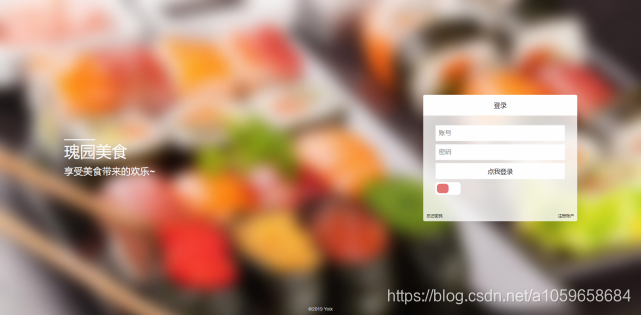
页面效果
控制器代码
//用户登录
public ActionResult UserLogin(string User, string Pass)
{
    msg.MsgState = false;

    try

    {

        var listUser = (from tbUser in MyModel.PW_User

                        where tbUser.UserName == User.Trim() && tbUser.UserPass == Pass.Trim()

                        select tbUser).Single();

        Session["UserName"] = User;

        Session["UserID"] = listUser.UserID;

        msg.MsgState = true;

        msg.MsgText = "登录成功";

    }

    catch (Exception e)

    {

        msg.MsgText = "信息错误";

    }

    return Json(msg, JsonRequestBehavior.AllowGet); ;

}
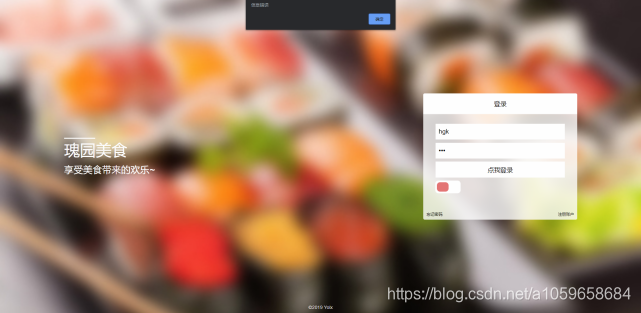
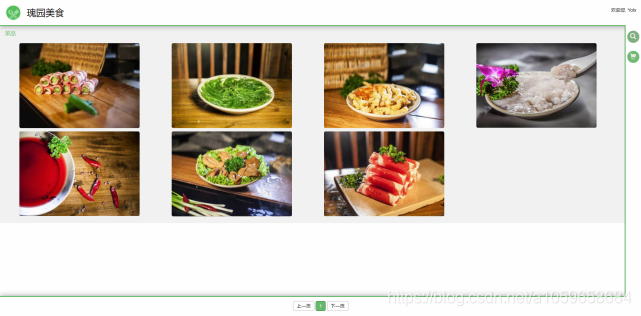
登录效果
后言
本文结束了,如果觉得本技术文章对你有帮助请给我点个赞,如果有什么不足的地方,给我提意见,让我加以改进
MVC登录的更多相关文章
- Spring mvc登录拦截器
自己实现的第一个Spring mvc登录拦截器 题目要求:拒绝未登录用户进入系统,只要发现用户未登录,则将用户请求转发到/login.do要求用户登录 实现步骤: 1.在spring的配置文件中添加登 ...
- MVC 登录认证与授权及读取登录错误码
最近悟出来一个道理,在这儿分享给大家:学历代表你的过去,能力代表你的现在,学习代表你的将来. 十年河东十年河西,莫欺少年穷 学无止境,精益求精 最近在自学MVC,遇到的问题很多,索性一点点总结下 ...
- MVC登录校验
利用MVC自带的过滤器可现实简单的登录校验 在项目目录下创建一个BaseController控制器,让需要验证的控制器继承这个BaseController 需要让BaseController继承Con ...
- MVC登录前准备写好cookie
Insus.NET写过一系列的MVC的练习,昨天学习了jQuery的验证<在MVC应用程序中使用jQuery的验证>http://www.cnblogs.com/insus/p/34626 ...
- MVC 登录后重定向回最初请求的 URL FormsAuthentication.RedirectFromLoginPage
在传统的Asp.net webForm 中如果使用 Form身份验证.登录后重定向到最初请求的页面只需使用 FormsAuthentication.RedirectFromLoginPage 但在MV ...
- Spring MVC登录注册以及转换json数据
项目结构; 代码如下: BookController package com.mstf.controller; import javax.servlet.http.HttpServletRespons ...
- ASP.NET MVC 登录验证
好久没写随笔了,这段时间没 什么事情,领导 一直没安排任务,索性 一直在研究代码,说实在的,这个登录都 搞得我云里雾里的,所以这次我可能也讲得不是 特别清楚,但是 我尽力把我知道的讲出来,顺便也对自 ...
- MVC登录案例
1.在Controllers文件夹里面新建一个控制器HomeController;2.在默认的Index方法里面添加一个视图,名字跟Controller中的方法名一样叫Index,添加后的视图文件会在 ...
- AngularJS与ASP.NET MVC登录超时解决方案
问题: 1.在Action中判断Ajax请求的方法Request.IsAjaxRequest()始终是false 2.返回给前台StatusCode和HttpUnauthorizedResult,前台 ...
随机推荐
- java对象相等
https://www.dutycode.com/post-140.html 简单来首,Object方法里的equals也是直接判断两个引用是否指向同一个地址,即引用同一个对象 public bool ...
- [Java并发包学习八]深度剖析ConcurrentHashMap
转载自https://blog.csdn.net/WinWill2012/article/details/71626044 还记得大学快毕业的时候要准备找工作了,然后就看各种面试相关的书籍,还记得很多 ...
- ribbon源码(3) 配置模块
ribbon的很多功能可以通过配置进行调整,ribbon通过IClientConfig来获取配置信息,用户可以通过实现IClientConfig来管理配置. ribbon也提供了默认的实现(Defau ...
- windows服务器中创建账号及管理相关的net命令
本文测试环境:windows server 2012 R2 Datacenter 实例要求: 1.创建账号,加入到远程桌面组,能实现远程桌面登录 2.指定Full name .及Description ...
- jfinal3连接sqlserver2012 使用generator生成model 拉取所有的表
修改MetaBuilder中的getTablesResultSet方法,在schemaPattern的下面一行增加 schemaPattern=dialect instanceof SqlServer ...
- burp suite 之 Repeater(中继器)
Repeater:对HTTP请求的修改,通常用于上传攻击 通过抓包后将请求包通过选项卡发送到 Repeater下 右下角 显示 页面大小为18809字节 可以自定义添加主机 大小写敏感 正则表达式 文 ...
- Spring 配置文件配置事务
一.引入事务的头文件 xmlns:tx="http://www.springframework.org/schema/tx" http://www.springframework. ...
- Pyinstaller打包通用流程
Pyinstaller打包通用流程 前言 什么是Pyinstaller Pyinstaller是用于打包python项目的一个工具, 可以将项目代码打包成可执行文件, 在其他机器上使用. 通俗的说, ...
- 044 01 Android 零基础入门 01 Java基础语法 05 Java流程控制之循环结构 06 使用do-while循环实现猜字游戏
044 01 Android 零基础入门 01 Java基础语法 05 Java流程控制之循环结构 06 使用do-while循环实现猜字游戏 本文知识点:do-while循环深入运用 案例练习 案例 ...
- JavaScript reduce()的使用
语法 arr.reduce(callback(accumulator, currentValue, index, array), initialValue) 参数 callback 执行数组中每个值 ...