
linux下hue的安装与部署
一、Hue 简介
Hue是一个开源的Apache Hadoop UI系统,最早是由Cloudera Desktop演化而来,由Cloudera贡献给开源社区,它是基于Python Web框架Django实现的。通过使用Hue我们可以在浏览器端的Web控制台上与Hadoop集群进行交互来分析处理数据,例如操作HDFS上的数据,运行MapReduce Job等等。很早以前就听说过Hue的便利与强大,一直没能亲自尝试使用,下面先通过官网给出的特性,通过翻译原文简单了解一下Hue所支持的功能特性集合:
默认基于轻量级sqlite数据库管理会话数据,用户认证和授权,可以自定义为MySQL、Postgresql,以及Oracle
基于文件浏览器(File Browser)访问HDFS
基于Hive编辑器来开发和运行Hive查询
支持基于Solr进行搜索的应用,并提供可视化的数据视图,以及仪表板(Dashboard)
支持基于Impala的应用进行交互式查询
支持Spark编辑器和仪表板(Dashboard)
支持Pig编辑器,并能够提交脚本任务
支持Oozie编辑器,可以通过仪表板提交和监控Workflow、Coordinator和Bundle
支持HBase浏览器,能够可视化数据、查询数据、修改HBase表
支持Metastore浏览器,可以访问Hive的元数据,以及HCatalog
支持Job浏览器,能够访问MapReduce Job(MR1/MR2-YARN)
支持Job设计器,能够创建MapReduce/Streaming/Java Job
支持Sqoop 2编辑器和仪表板(Dashboard)
支持ZooKeeper浏览器和编辑器
支持MySql、PostGresql、Sqlite和Oracle数据库查询编辑器
二、Hue的架构
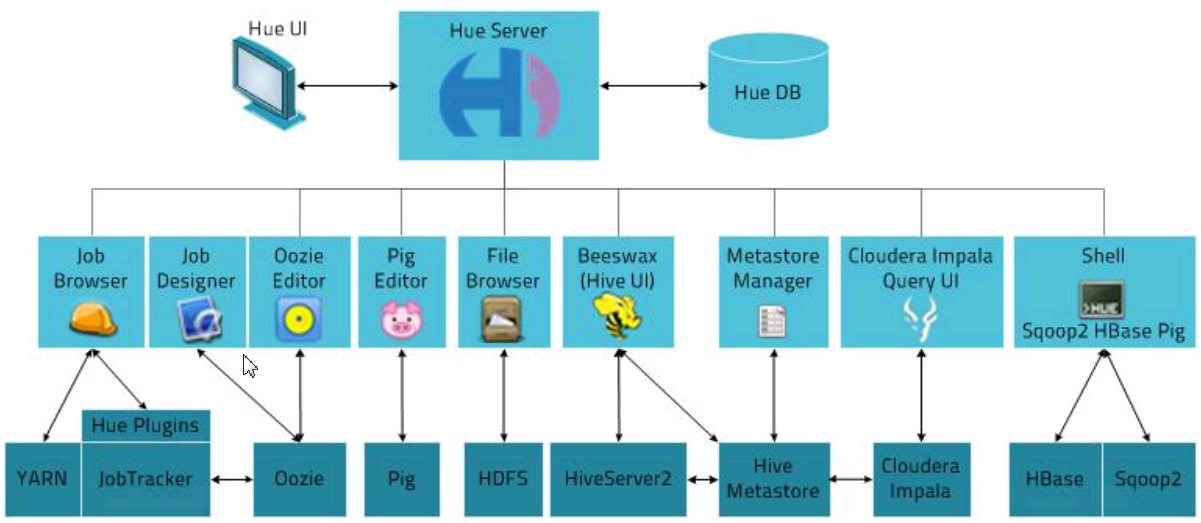
三、安装与部署
1、下载
hue官网:http://gethue.com/

配置文档:http://archive.cloudera.com/cdh5/cdh/5/hue-3.7.0-cdh5.3.6/manual.html#_install_hue

源码:https://github.com/cloudera/hue

这里我们直接用下载Hue:http://archive.cloudera.com/cdh5/cdh/5/hue-3.7.0-cdh5.3.6.tar.gz
2、安装系统包
yum install ant asciidoc cyrus-sasl-devel cyrus-sasl-gssapi gcc gcc-c++ krb5-devel libtidy libxml2-devel libxslt-devel openldap-devel python-devel sqlite-devel openssl-devel mysql-devel gmp-devel
在安装系统包的时候遇到的问题:
sqlite-devel不能从镜像下载,这里我是用了手动下载tar包,安装编译。下载地址: http://www.sqlite.org/sqlite-autoconf-3070500.tar.gz
tar zxf sqlite-autoconf-3070500.tar.gz

cd sqlite-autoconf-3070500

./configure

make

sudo make install
3、编译Hue
tar -zxvf hue-3.7.0-cdh5.3.6.tar.gz

mv hue-3.7.0-cdh5.3.6 hue
cd hue
make apps
编译Hue时遇到的问题:
a、
OpenSSL/crypto/crl.c:6:23: error: static declaration of ‘X509_REVOKED_dup’ follows non-static declaration

 static X509_REVOKED * X509_REVOKED_dup(X509_REVOKED *orig) {

                       ^

In file included from /usr/include/openssl/ssl.h:156:0,

                 from OpenSSL/crypto/x509.h:17,

                 from OpenSSL/crypto/crypto.h:30,

                 from OpenSSL/crypto/crl.c:3:

/usr/include/openssl/x509.h:751:15: note: previous declaration of ‘X509_REVOKED_dup’ was here

 X509_REVOKED *X509_REVOKED_dup(X509_REVOKED *rev);

               ^

error: command 'gcc' failed with exit status 1

make[2]: *** [/mnt/hue/desktop/core/build/pyopenssl/egg.stamp] Error 1

make[2]: Leaving directory `/mnt/hue/desktop/core'

make[1]: *** [.recursive-env-install/core] Error 2

make[1]: Leaving directory `/mnt/hue/desktop'

make: *** [desktop] Error 2
解决办法:
将/usr/include/openssl/x509.h文件下:
这两行删除,必须删除,采用注释的方式不行:
X509_REVOKED *X509_REVOKED_dup(X509_REVOKED *rev);
X509_REQ *X509_REQ_dup(X509_REQ *req);
4、配置hue.ini文件
cd /mnt/hue/desktop/conf
  secret_key=jFE93j;2[290-eiw.KEiwN2s3['d;/.q[eIW^y#e=+Iei*@Mn<qW5o

  # Webserver listens on this address and port

  http_host=master

  http_port=8888

  # Time zone name

  time_zone=Asia/Shanghai
5、启动
cd /mnt/hue/build/env/bin

启动的时候遇到的问题:
Couldn't get user id for user hue
首先说明出现此问题的原因是因为你使用的root用户安装了hue,然后在root用户下使用的build/env/bin/supervisor
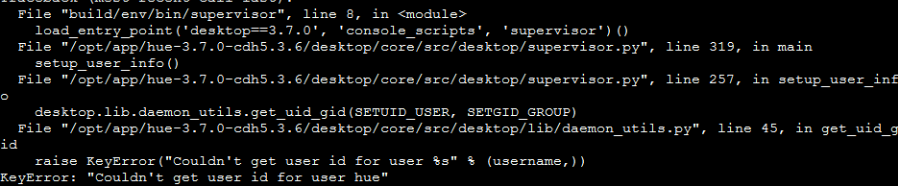
解决办法:
a、创建个普通用户,并给添加密码:
[root@master bin]# useradd hue

[root@master bin]# passwd hue
然后设置好密码
b、给刚才解压的hue文件改变拥有者属性,通过 chown -R 用户名 文件地址。
[root@master bin]# chown -R hue /mnt/hue
最后,我们使用 su 命令切换用户,到hue文件夹下执行运行hue的命令就可以了。

然后在页面上登录:192.168.200.100:8888
输入用户和密码:


四、Hue与HDFS、MYSQL、Hive、Zookeeper集成配置
Hue集成zookeeper:
进入目录:/mnt/hue/desktop/conf,配置hue.ini
[zookeeper]

  [[clusters]]

    [[[default]]]

      # Zookeeper ensemble. Comma separated list of Host/Port.

      # e.g. localhost:2181,localhost:2182,localhost:2183

      host_ports=master:2181,slave01:2181,slave02:2181

      # The URL of the REST contrib service (required for znode browsing)

      ## rest_url=http://localhost:9998
A、 启动zk(master、slave01、slave02)
zkServer.sh start
B、 启动hue
进入目录/mnt/hue/build/env/bin:
./ supervisor

C、访问192.168.200.100:8888页面
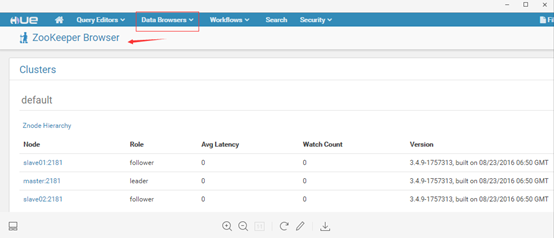
Hue集成MYSQL
进入目录:/mnt/hue/desktop/conf,配置hue.ini
# mysql, oracle, or postgresql configuration.

      [[[mysql]]]

      # Name to show in the UI.

       nice_name="My SQL DB"

      # For MySQL and PostgreSQL, name is the name of the database.

      # For Oracle, Name is instance of the Oracle server. For express edition

      # this is 'xe' by default.

      ## name=mysqldb

      # Database backend to use. This can be:

      # 1. mysql

      # 2. postgresql

      # 3. oracle

      engine=mysql

      # IP or hostname of the database to connect to.

       host=master

      # Port the database server is listening to. Defaults are:

      # 1. MySQL: 3306

      # 2. PostgreSQL: 5432

      # 3. Oracle Express Edition: 1521

          port=3306

      # Username to authenticate with when connecting to the database.

       user=root

      # Password matching the username to authenticate with when

      # connecting to the database.

       password=010209

      # Database options to send to the server when connecting.

      # https://docs.djangoproject.com/en/1.4/ref/databases/

          ## options={}
启动hue:
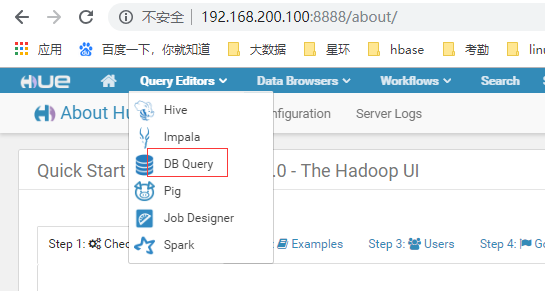
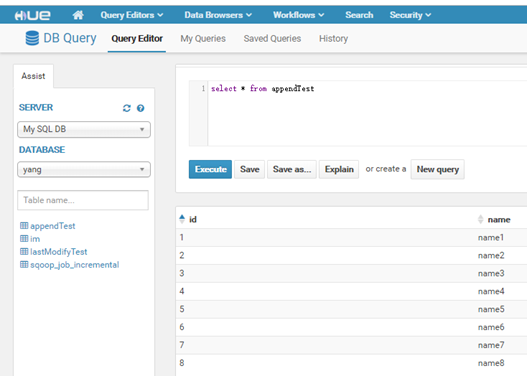
对比mysql数据库:
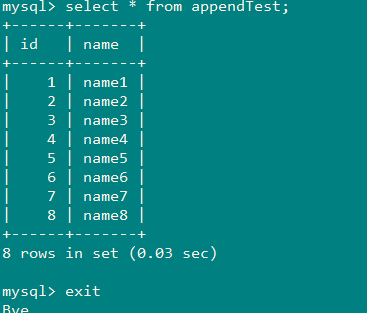
Hue集成hive
A、进入目录:/mnt/hue/desktop/conf,配置hue.ini
# Host where HiveServer2 is running.

  # If Kerberos security is enabled, use fully-qualified domain name (FQDN).

  hive_server_host=master

  # Port where HiveServer2 Thrift server runs on.

  hive_server_port=10000

  # Hive configuration directory, where hive-site.xml is located

  hive_conf_dir=/mnt/hive/conf

  # Timeout in seconds for thrift calls to Hive service

  server_conn_timeout=120

  # Choose whether Hue uses the GetLog() thrift call to retrieve Hive logs.

  # If false, Hue will use the FetchResults() thrift call instead.

      ## use_get_log_api=true
B、配置hue与hive集成需要启动hiveserver2的相关参数(hive-site.xml):
    <property>

        <name>hive.server2.thrift.port</name>

        <value>10000</value>

    </property>

    <property>

        <name>hive.server2.thrift.bind.host</name>

        <value>master</value>

   </property>

   <property>

        <name>hive.metastore.uris</name>

        <value>thrift://192.168.200.100:9083</value>

       </property>
C、启动
1、启动hive之前先启动hdfs:start-dfs.sh
2、启动hive相关服务
hive --service metastore &
hive --service hiveserver2 &


3、启动hue
配置环境变量之后可以这样使用,没有配置的话,请到相关目录下执行:

4、访问HUE页面
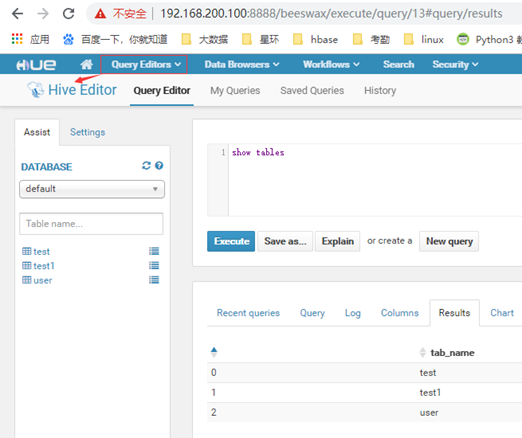
当每执行一次查询成功的时候,hiveserver2就会打印ok

D、Hue集成hive遇到的问题:
启动hive的hue之后,访问hue页面,连接hive数据库时,始终超时:
相关错误信息:
Error in sasl_client_start (-4) SASL(-4): no mechanism available: No worthy mechs found
解决办法:
查看是否少了cyrus-sasl-plain cyrus-sasl-devel cyrus-sasl-gssapi中的rpm包,缺少谁就安装谁
yum install cyrus-sasl-plain cyrus-sasl-devel cyrus-sasl-gssapi
Hue集成HDFS
A、进入目录:/mnt/hue/desktop/conf,配置hue.ini
# HA support by using HttpFs

    [[[default]]]

      # Enter the filesystem uri

      fs_defaultfs=hdfs://master:8020

      # NameNode logical name.

      ## logical_name=

      # Use WebHdfs/HttpFs as the communication mechanism.

      # Domain should be the NameNode or HttpFs host.

      # Default port is 14000 for HttpFs.

      webhdfs_url=http://master:50070/webhdfs/v1

      hadoop_hdfs_home=/mnt/hadoop

      hadoop_bin=/mnt/hadoop/bin

      # Change this if your HDFS cluster is Kerberos-secured

      ## security_enabled=false

      # Default umask for file and directory creation, specified in an octal value.

      ## umask=022

      # Directory of the Hadoop configuration

      ## hadoop_conf_dir=$HADOOP_CONF_DIR when set or '/etc/hadoop/conf'

          hadoop_conf_dir=/mnt/hadoop/etc/hadoop
B、启动hdfs,和HUE,访问页面:
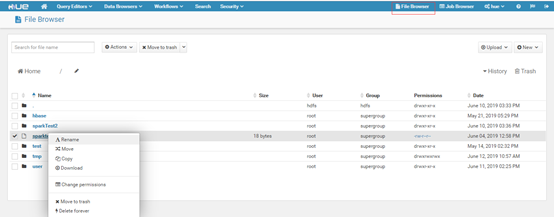
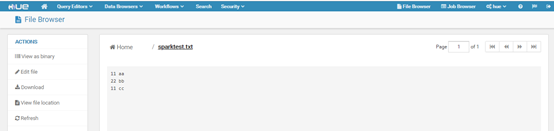
可以看到我们可以通过hue对hdfs上的文件进行操作,删除等等,还可以直接查看文件:点击sparktest.txt,如下:
linux下hue的安装与部署的更多相关文章
- Linux下Redis的安装和部署
一.Redis介绍 Redis是当前比较热门的NOSQL系统之一,它是一个key-value存储系统.和Memcache类似,但很大程度补偿了Memcache的不足,它支持存储的value类型相对更多 ...
- Linux下svn的安装与部署
最近工作碰到一个问题,我和一个同伙负责开发一个管理系统,基于原来的代码上进行修改,每当他修改之后,我要再修改都要和他确定是不是最新的文件,才能进行修改.非常影响工作的效率,所以在网上找了关于svn的使 ...
- Redis学习笔记之Linux下Redis的安装和部署
0x00 Redis介绍 Redis是当前比较热门的NOSQL系统之一,它是一个key-value存储系统.和Memcache类似,但很大程度补偿了Memcache的不足,它支持存储的value类型相 ...
- linux下redis的安装与部署
一.Redis介绍 Redis是当前比较热门的NOSQL系统之一,它是一个key-value存储系统.和Memcache类似,但很大程度补偿了Memcache的不足,它支持存储的value类型相对更多 ...
- Linux下Redis的安装和部署 详细
一.Redis介绍 Redis是当前比较热门的NOSQL系统之一,它是一个key-value存储系统.和Memcache类似,但很大程度补偿了Memcache的不足,它支持存储的value类型相对更多 ...
- linux下nagios的安装与部署
一.Nagios简介 Nagios是一款开源的电脑系统和网络监视工具,能有效监控Windows.Linux和Unix的主机状态,交换机路由器等网络设置,打印机等.在系统或服务状态异常时发出邮件或短信报 ...
- linux下redis的安装与部署及基础命令
<1>下载安装文件:redis-3.2.5.tar.gz 放在opt目录下 <2> tar -zxvf redis-3.2.5.tar.gz,备份redis.conf到自己的目 ...
- Linux下Tomcat的安装和部署
一.安装tomcat 1.下载tomcat安装包apache-tomcat-7.0.62.tar.gz和jdk1.7 2.安装tomcat,将apache-tomcat-7.0.62.tar.gz复制 ...
- Linux下Kafka单机安装配置方法(图文)
Kafka是一个分布式的.可分区的.可复制的消息系统.它提供了普通消息系统的功能,但具有自己独特的设计.这个独特的设计是什么样的呢 介绍 Kafka是一个分布式的.可分区的.可复制的消息系统.它提供了 ...
随机推荐
- 第11.9节 Python正则表达式的贪婪模式和非贪婪模式
在使用正则表达式时,匹配算法存在贪婪模式和非贪婪模式两种模式,在<第11.8节 Pytho正则表达式的重复匹配模式及元字符"?". "*". " ...
- PyQt(Python+Qt)学习随笔:窗口的布局设置及访问
老猿Python博文目录 老猿Python博客地址 在Qt Designer中,可以在一个窗体上拖拽左边的布局部件,在窗口中进行布局管理,但除了基于窗体之上进行布局之外,还需要窗体本身也进行布局管理才 ...
- Oracle表操作-创建及增删改查
数据类型: 1.CHAR:定长字符类型,默认长度是1,最长不超过2000字节. 2.CARCHAR2(length):可变字符类型,默认长度是1,最长不超过4000字符. 3.NUMBER(P,S): ...
- python——sklearn完整例子整理示范(有监督,逻辑回归范例)(原创)
sklearn使用方法,包括从制作数据集,拆分数据集,调用模型,保存加载模型,分析结果,可视化结果 1 import pandas as pd 2 import numpy as np 3 from ...
- pandas 处理缺失值(连续值取平均,离散值fillna"<unk>")
# 2.1处理缺失值,连续值用均值填充 continuous_fillna_number = [] for i in train_null_ix: if(i in continuous_ix): me ...
- 【题解】HDU4625 JZPTREE
题目链接 题意 给定一棵 n 点的树,定义 \(dis(u,v)\) 为树上路径长度.对于每个点,定义 \(E_u=\sum_{v=1}^n dis(u,v)^k\) ,其中 k 为给定数. 求每个 ...
- celery 原理和组件
Celery介绍 https://www.cnblogs.com/xiaonq/p/11166235.html#i1 1.1 celery应用举例 Celery 是一个 基于python开发的分布式异 ...
- Samba:error nt_status_host_unreachable
安装Samba之后: smbclient -L server0.example.com 出现报错:error nt_status_host_unreachable 解决方法:server端把S ...
- apt-get could not get lock /var/lib/dpkg/lock报错
用apt-get命令安装一些软件包时,报这个错 could not get lock /var/lib/dpkg/lock 出现这个问题的原因可能是有另外一个程序正在运行,导致资源被锁不可用.而导致资 ...
- 听说特斯拉花了4个月研发出新ERP,然后很多人都疯了
欢迎关注微信公众号:sap_gui (ERP咨询顾问之家) 最近这件事儿在SAP圈里炒的挺火的,最主要是因为这几个关键词: 放弃SAP.4个月.自研ERP: 这则新闻一出来,很多人都兴高采烈,都要疯了 ...