
回顾:Linq To SQL语法 - 实体类
第一篇博客,还望各位大神勿喷
小弟在此代码奉上........
借用NorthWind数据库,实现一个商品展示的小功能。上代码:
添加对Linq的引用
 using System.Data.Linq;//添加对Linq的引用

 using System.Data.Linq.Mapping;//配置对象和映射关系的命名空间
由于图简单,所以写了很少的字段,继续代码
    [Table(Name = "Products")]

    public class Product

    {

        [Column(Name = "ProductID", DbType = "int identity(1,1) not null", IsPrimaryKey = true, IsDbGenerated = true, AutoSync = AutoSync.OnInsert, CanBeNull = true)]

        public int ProductID { get; set; }

        [Column(Name = "ProductName", DbType = "nvarchar(40) not null")]

        public string ProductName { get; set; }

        [Column(Name = "CategoryID", DbType = "int", CanBeNull = true)]

        public int CategoryID { get; set; }

        [Column(Name = "UnitPrice", DbType = "money")]

        public decimal? Price { get; set; }

    }
     [Table(Name = "Categories")]

     public class Categoty

     {

         [Column(Name = "CategoryID", DbType = "int identity(1,1) not null", IsPrimaryKey = true, IsDbGenerated = true, CanBeNull = true, AutoSync = AutoSync.OnInsert)]

         public int ID { get; set; }

         [Column(Name = "CategoryName", DbType = "nvarchar(15) not null")]

         public string CategoryName { get; set; }

         [Column(Name = "Description", DbType = "ntext null")]

         public string Description { get; set; }

         private EntitySet<Products> _products;

         [Association(Name = "C_P", IsForeignKey = false, OtherKey = "CategoryID", ThisKey = "ID", Storage = "_products")]

         public IList<Products> Products

         {

             get { return _products; } //上级接受下级参数,直接返回,上级:Category  下级:Product

             set { _products.Assign(value); }//下级接受上级参数,使用Assign方法进行向上转换

         }

     }
上面分别是两个类:商品类Product与商品类别Category,下面继续创建上下文对象
  public class NorthwindDBContext : DataContext

     {

         private static readonly string conn = ConfigurationManager.ConnectionStrings["Myconn"].ConnectionString;//数据库的连接

         public NorthwindDBContext()

             : base(conn) { }

         public NorthwindDBContext(string connection)

             : base(connection) { }

         public Table<Categoty> Category;

         public Table<Products> Products;

     }
接下来就是展示页面了,创建一个aspx页面吧,扔两个控件上去
 <body>

     <form id="form1" runat="server">

     <div>

         <asp:DropDownList ID="DropDownListCategory" runat="server">

         </asp:DropDownList>

         <asp:Button ID="Button1" runat="server" Text="Button" onclick="Button1_Click" />

         <asp:GridView ID="GridView1" runat="server">

         </asp:GridView>

     </div>

     </form>

 </body>
页面现在也有了,后台代码:
 public partial class ProductsList : System.Web.UI.Page

     {

         Model.NorthwindDBContext db = new Model.NorthwindDBContext();

         protected void Page_Load(object sender, EventArgs e)

         {

             if (!IsPostBack)

             {

                 var query = db.Products.Count();

                 BandCategory();

             }

         }

         private void BandCategory()

         {

             var allCate = from c in db.Catrgorys select c;

             this.DropDownListCategory.DataValueField = "ID";

             this.DropDownListCategory.DataTextField = "Name";

             this.DropDownListCategory.DataSource = allCate;

             this.DropDownListCategory.DataBind();

         }

         protected void Button1_Click(object sender, EventArgs e)

         {

             BandProduct();

         }

         private void BandProduct()

         {

             //生成日志文件,方便程序出错查看生成的SQL语句

             db.Log = new StreamWriter(Server.MapPath("~/log.txt"), true);

             int cid = int.Parse(this.DropDownListCategory.SelectedValue);

             List<Model.Product> lst = db.Products.ToList();

             var Products = db.Products.Where(x => x.CategoryID == cid);

             //拿到类别对象

             //var cate = db.Category.Where(x => x.CategoryID == cid).First();

             this.GridView1.DataSource = Products;//cate.Product;两种方法都行

             this.GridView1.DataBind();

             db.Log.Flush();

             db.Log.Close();

         }
最后效果:

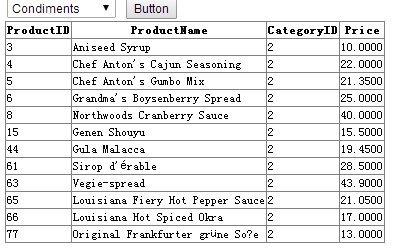
表示刚工作学生路过,大神勿喷...以后会陆续分享一些工作心得的
回顾:Linq To SQL语法 - 实体类的更多相关文章
- LINQ to SQL 建立实体类
使用LINQ to SQL时,需要首先建立用于映射数据库对象的模型,也就是实体类.在运行时,LINQ to SQL 根据LINQ表达式或查询运算符生成SQL语句,发送到数据库进行操作.数据库返回后,L ...
- 步步学LINQ to SQL:为实体类添加关系【转】
[IT168 专稿]本文详细为你阐述了如何在你的应用程序中实现LINQ to SQL.附件的示例程序包括了这里探讨的所有代码,还提供了一个简单的WPF图形界面程序来显示通过数据绑定返回的结果集. 第一 ...
- LINQ to SQL 建立实体类 (转)
http://www.cnblogs.com/DebugLZQ/archive/2012/11/14/2770449.html 使用LINQ to SQL时,需要首先建立用于映射数据库对象的模型,也就 ...
- Linq to SQL 语法查询(链接查询,子查询 & in操作 & join,分组统计等)
Linq to SQL 语法查询(链接查询,子查询 & in操作 & join,分组统计等) 子查询 描述:查询订单数超过5的顾客信息 查询句法: var 子查询 = from c i ...
- FreeSql (二十四)Linq To Sql 语法使用介绍
原本不支持 IQueryable 主要出于使用习惯的考虑,如果继承 IQueryable,编写代码的智能总会提示出现一堆你不想使用的方法(对不起,我有强迫症),IQueryable 自身提供了一堆没法 ...
- [转]LINQ To SQL 语法及实例大全
转载自:http://blog.csdn.net/pan_junbiao/article/details/7015633 LINQ to SQL语句(1)之Where Where操作 适用场景:实现过 ...
- .net 根据匿名类生成实体类,根据datatable生成实体类,根据sql生成实体类
在开发中可能会遇到这几种情况 1.EF或LINQ查询出来的匿名对象在其它地方调用不方便,又懒的手动建实体类 2.通过datatable反射实体需要先建一个类 ,头痛 3.通过SQL语句返回的实体也需要 ...
- LINQ To SQL 语法及实例大全
http://blog.csdn.net/pan_junbiao/article/details/7015633 http://blog.csdn.net/pan_junbiao/article/de ...
- Linq to sql语法
LINQ to SQL语句(1)之Where Where操作 适用场景:实现过滤,查询等功能. 说明:与SQL命令中的Where作用相似,都是起到范围限定也就是过滤作用的,而判断条件就是它后面所接的子 ...
随机推荐
- Foj1675数论
http://acm.fzu.edu.cn/problem.php?pid=1675 首先必须知道一点数论的基本公式 (a-b) %c =0 -----> a%c=b%c 首先通过大数取余求出目 ...
- YOU邮件
include("class.phpmailer.php");include("class.smtp.php");//获取一个外部文件的内容$mail ...
- CMD 下 进入 ORACLE
.sqlplus /nolog .connect sys/orcl@ORCL as sysdba .select sysdate from dual exit;
- 深入浅出Java 重定向和请求转发的区别
深入浅出Java 重定向和请求转发的区别 <span style="font-family:FangSong_GB2312;font-size:18px;">impor ...
- 成绩转换 AC 杭电
成绩转换 Time Limit: 2000/1000 MS (Java/Others) Memory Limit: 65536/32768 K (Java/Others) Total Submi ...
- El表达式和fn函数一起使用
如下: ${a%1>0?a:(fn:substringBefore(a, "."))}
- COJ 0981 WZJ的数据结构(负十九)树综合
WZJ的数据结构(负十九) 难度级别:E: 运行时间限制:3500ms: 运行空间限制:262144KB: 代码长度限制:2000000B 试题描述 WZJ的数据结构中有很多都是关于树的.这让很多练习 ...
- Android studio 开发中 用git实现批量忽略特定文件的方法
git实现批量忽略特定文件的方法 在用AndroidStudio开发项目的时候,3个人协同开发,那么用Git同步代码,会将模块中的大量iml文件同步,每次都会提交和更新,一个一个的去忽略他们,显然是最 ...
- codevs1033 蚯蚓的游戏问题
题目描述 Description 在一块梯形田地上,一群蚯蚓在做收集食物游戏.蚯蚓们把梯形田地上的食物堆积整理如下: a(1,1) a(1,2)…a(1,m) a(2,1) a(2,2) a(2 ...
- Findbugs初探-使用idea获取findbugs插件
/* * 整天忙于无限重复的黑盒测试,不论是写脚本,还是手工测,都难以脱离黑&&灰盒测试,所以忽然间想,大学时期学过的所有课程就这样扔掉吗?不好!既然选择了做测试,那么就要一直坚持下去 ...