LAMP 是服务器系统中开源软件的一个完美组合。它是 Linux 、Apache HTTP 服务器、MySQL 数据库、PHP(或者 Perl、Python)的第一个字母的缩写代码。对于很多系统管理员来说安装 LAMP 除了是必备的技能外,都已经具有驾轻就熟的操作他们的能力了。不过新手们通常希望有没完没了的这方面的教程来告诉自己怎么做,下面我就和大家说说我的方法步骤。

LAMP 是服务器系统中开源软件的一个完美组合。它是 Linux 、Apache
HTTP 服务器、MySQL 数据库、PHP(或者 Perl、Python)的第一个字母的缩写代码。对于很多系统管理员来说安装
LAMP 除了是必备的技能外,都已经具有驾轻就熟的操作他们的能力了。不过新手们通常希望有没完没了的这方面的教程来告诉自己怎么做,下面我就和大家说说我的方法步骤。

现在,很多时候我们需要用 MariaDB 来代替 MySQL 了。在这里我会告诉大家 MariaDB 的安装过程。

我的测试主机名为:server.linux.cn,测试 IP 地址为:192.168.1.200/24

安装 Apache


Apache 是​​一个开源的跨平台的 Web 服务器。它提供了一个全方位的 Web 服务器功能,包括CGI,SSL 和virtual domains (虚拟域)。


安装命令非常简单,只需要打开一个终端,在终端中输入如下命令:

[root@server ~]# yum install httpd -y

安装完毕后,需要设置让 Apache 服务启动,并且在每次服务器重启的时候都自动启动,输入如下命令来完成:

[root@server ~]# /etc/init.d/httpd start

[root@server ~]# chkconfig httpd on

如果您想通过您的防火墙活路由器来远程连接,那么需要允许 Apache 服务接管服务器的 80 端口:

[root@server ~]# vi /etc/sysconfig/iptables

[...]

-A INPUT -p udp -m state --state NEW --dport 80 -j ACCEPT

-A INPUT -p tcp -m state --state NEW --dport 80 -j ACCEPT

[...]

重新启动 iptables :

[root@server ~]# /etc/init.d/iptables restart

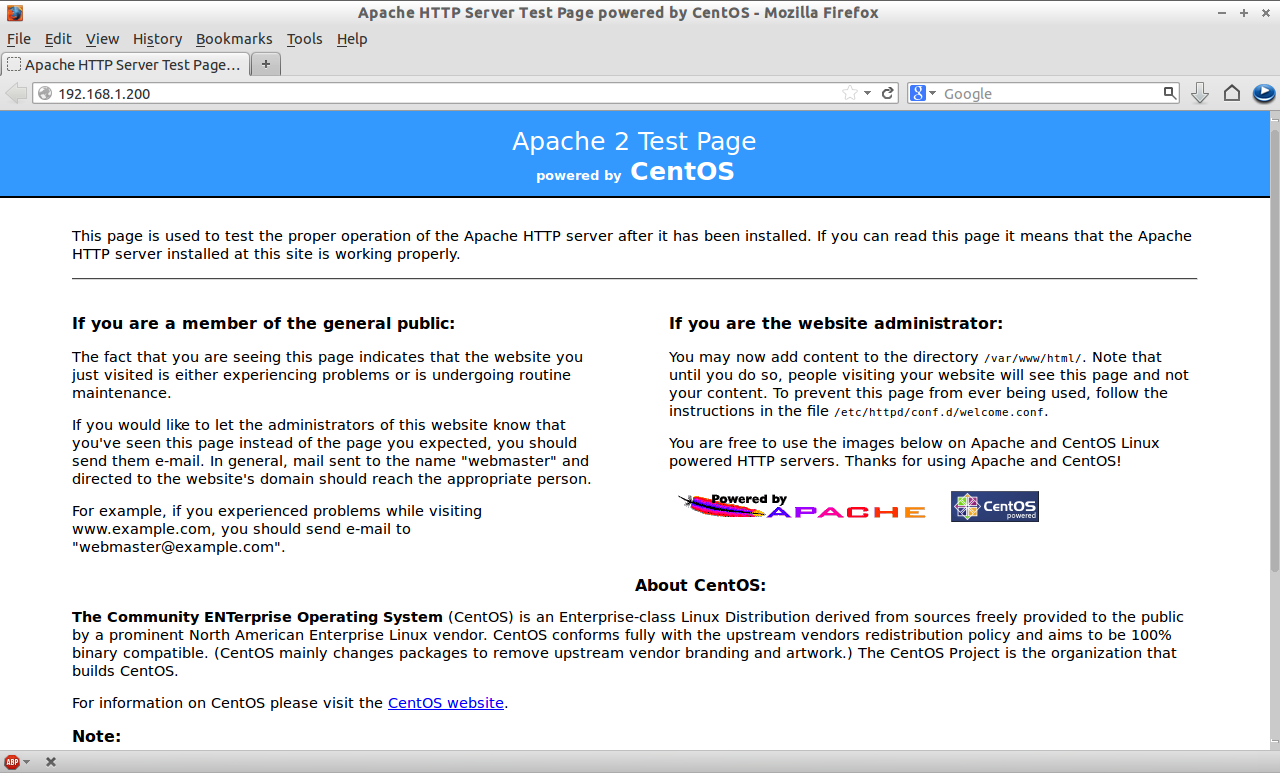
打开您的浏览器访问 http://localhost/ 或者 http://server-ip-address/ 测试 Apache 安装是否成功。

安装 MariaDB

MariaDB 是一个替换 MySQL 的产品。功能强大而可靠。安装前,如果您的服务器中安装有 MySQL ,那么您需要删除它。删除命令:

[root@server ~]# yum remove mysql* mysql-server mysql-devel mysql-libs

为了让 MariaDB 同时兼容 MySQL,我们需要安装 REMI 库来解决兼容性和安装 MariaDB 时软件包依赖性问题。安装命令:

[root@server ~]# rpm -ivh http://rpms.famillecollet.com/enterprise/remi-release-6.rpm

安装兼容 mysql55 包命令:

[root@server ~]# yum --enablerepo=remi-test --disablerepo=remi install compat-mysql55

为 MariaDB 创建一个 repository 文件,并在其中输入如下代码:

32 位系统:

[root@server ~]# vi /etc/yum.repos.d/mariadb.repo

# MariaDB 5.5 CentOS repository list - created 2013-06-06 07:42 UTC

# http://mariadb.org/mariadb/repositories/

[mariadb]

name = MariaDB

baseurl = http://yum.mariadb.org/5.5/centos6-x86

gpgkey=https://yum.mariadb.org/RPM-GPG-KEY-MariaDB

gpgcheck=1

64 位系统:

[root@server ~]# vi /etc/yum.repos.d/mariadb.repo

# MariaDB 5.5 CentOS repository list - created 2013-06-06 07:53 UTC

# http://mariadb.org/mariadb/repositories/

[mariadb]

name = MariaDB

baseurl = http://yum.mariadb.org/5.5/centos6-amd64

gpgkey=https://yum.mariadb.org/RPM-GPG-KEY-MariaDB

gpgcheck=1

保存并退出该文件,并运行 yum update 命令:

[root@server ~]# yum update

现在开始安装 MariaDB :

[root@server ~]# yum install MariaDB-devel MariaDB-client MariaDB-server -y

安装完毕后,启动 MariaDB 服务,并让它在每次重启服务器后自动启动。

[root@server ~]# /etc/init.d/mysql start

Starting MySQL... SUCCESS!

[root@server ~]# chkconfig mysql on

为 MySQL 的 root 设置密码,默认情况下,MySWL root 密码是空的。为了防止未经授权的用户访问 MySQL 我们需要设置 root 用户密码:

[root@server ~]# /usr/bin/mysql_secure_installation

/usr/bin/mysql_secure_installation: line 379: find_mysql_client: command not found


NOTE: RUNNING ALL PARTS OF THIS SCRIPT IS RECOMMENDED FOR ALL MariaDB

      SERVERS IN PRODUCTION USE!  PLEASE READ EACH STEP CAREFULLY!


In order to log into MariaDB to secure it, we'll need the current

password for the root user.  If you've just installed MariaDB, and

you haven't set the root password yet, the password will be blank,

so you should just press enter here.


Enter current password for root (enter for none): 

OK, successfully used password, moving on...


Setting the root password ensures that nobody can log into the MariaDB

root user without the proper authorisation.


You already have a root password set, so you can safely answer 'n'.


Change the root password? [Y/n] y

New password: 

Re-enter new password: 

Password updated successfully!

Reloading privilege tables..

 ... Success!


By default, a MariaDB installation has an anonymous user, allowing anyone

to log into MariaDB without having to have a user account created for

them.  This is intended only for testing, and to make the installation

go a bit smoother.  You should remove them before moving into a

production environment.


Remove anonymous users? [Y/n] 

 ... Success!


Normally, root should only be allowed to connect from 'localhost'.  This

ensures that someone cannot guess at the root password from the network.


Disallow root login remotely? [Y/n] 

 ... Success!


By default, MariaDB comes with a database named 'test' that anyone can

access.  This is also intended only for testing, and should be removed

before moving into a production environment.


Remove test database and access to it? [Y/n] 

 - Dropping test database...

ERROR 1008 (HY000) at line 1: Can't drop database 'test'; database doesn't exist

 ... Failed!  Not critical, keep moving...

 - Removing privileges on test database...

 ... Success!


Reloading the privilege tables will ensure that all changes made so far

will take effect immediately.


Reload privilege tables now? [Y/n] 

 ... Success!


Cleaning up...


All done!  If you've completed all of the above steps, your MariaDB

installation should now be secure.


Thanks for using MariaDB!

安装 PHP

PHP(PHP 是:Hypertext Preprocessor 的缩写)是一种广泛使用的开放源码的通用脚本语言,适合于 Web 开发,可嵌入到 HTML 中。

安装 PHP 命令:

[root@server ~]# yum install php -y

创建一个的 “testphp.php” 的文件在 Apache 的文档根目录文件夹,在其中如入如下代码。命令:

[root@server ~]# vi /var/www/html/testphp.php

<?php

phpinfo();

?>

重新启动 httpd 服务:

[root@server ~]# /etc/init.d/httpd restart

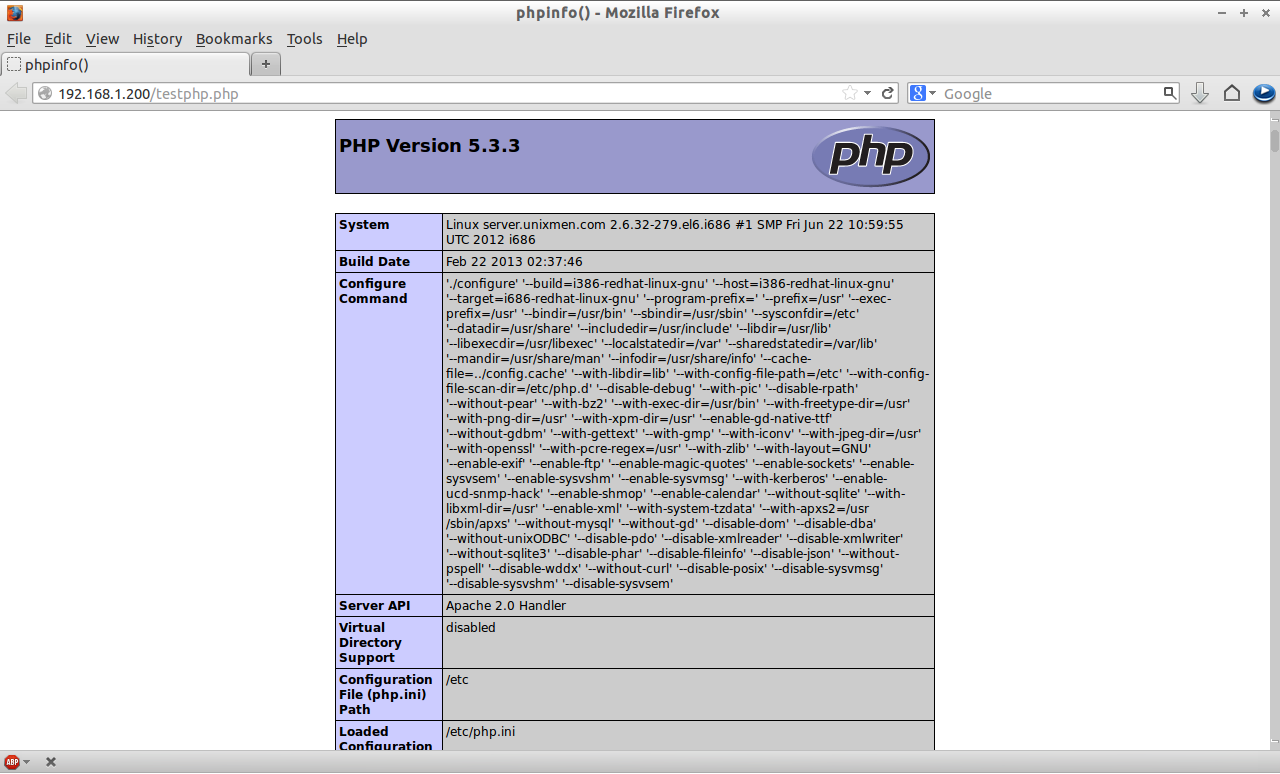
用浏览器打开 http://server-ip-address/testphp.php 。它会显示关于 PHP 的详细信息,比如版本,建立日期等。

如果您需要安装所有的 PHP 模块,可以输入 yum install php* -y 来安装,安装完毕后重启 httpd 服务。重启服务后,您可以用浏览器打开 http://server-ip-address/testphp.php 来查看您刚才安装的模块情况。

安装 nstall phpMyAdmi

根据您的情况来选择是否安装 nstall phpMyAdmin 。


phpMyAdmin 是一个免费开源的 MySQL 管理工具。默认情况下 CentOS/RHEL/Scientific Linux 官方库中没有 phpMyAdmin。所以我们需要从 EPEL 库中安装。

首先,我们需要添加 EPEL 库:

[root@server ~]# rpm -ivh http://dl.fedoraproject.org/pub/epel/6/i386/epel-release-6-8.noarch.rpm

现在我们可以安装 phpMyAdmin 了。安装命令:

[root@server ~]# yum install phpmyadmin -y

安装完毕后,我们需要配置的 phpMyAdmin。打开 phpmyadmin.conf 的文件。查找以“<Directory” 开头到 </Directory> 包含的部分,如下命令所示:

[root@server ~]# vi /etc/httpd/conf.d/phpMyAdmin.conf


Alias /phpMyAdmin /usr/share/phpMyAdmin

Alias /phpmyadmin /usr/share/phpMyAdmin


## Comment the following Section ##

#<Directory /usr/share/phpMyAdmin/>

#   <IfModule mod_authz_core.c>

#     # Apache 2.4

#     <RequireAny>

#       Require ip 127.0.0.1

#       Require ip ::1

#     </RequireAny>

#   </IfModule>

#   <IfModule !mod_authz_core.c>

#     # Apache 2.2

#     Order Deny,Allow

#     Deny from All

#     Allow from 127.0.0.1

#     Allow from ::1

#   </IfModule>

#</Directory>

打开 config.inc.php 文件,将 cookie 改为 http。

[root@server ~]# cp /usr/share/phpMyAdmin/config.sample.inc.php /usr/share/phpMyAdmin/config.inc.php 

[root@server ~]# vi /usr/share/phpMyAdmin/config.inc.php

[...] 

/* Authentication type */

$cfg['Servers'][$i]['auth_type'] = 'http';

[...]

重新启动 Apache 服务:

[root@server ~]# /etc/init.d/httpd restart

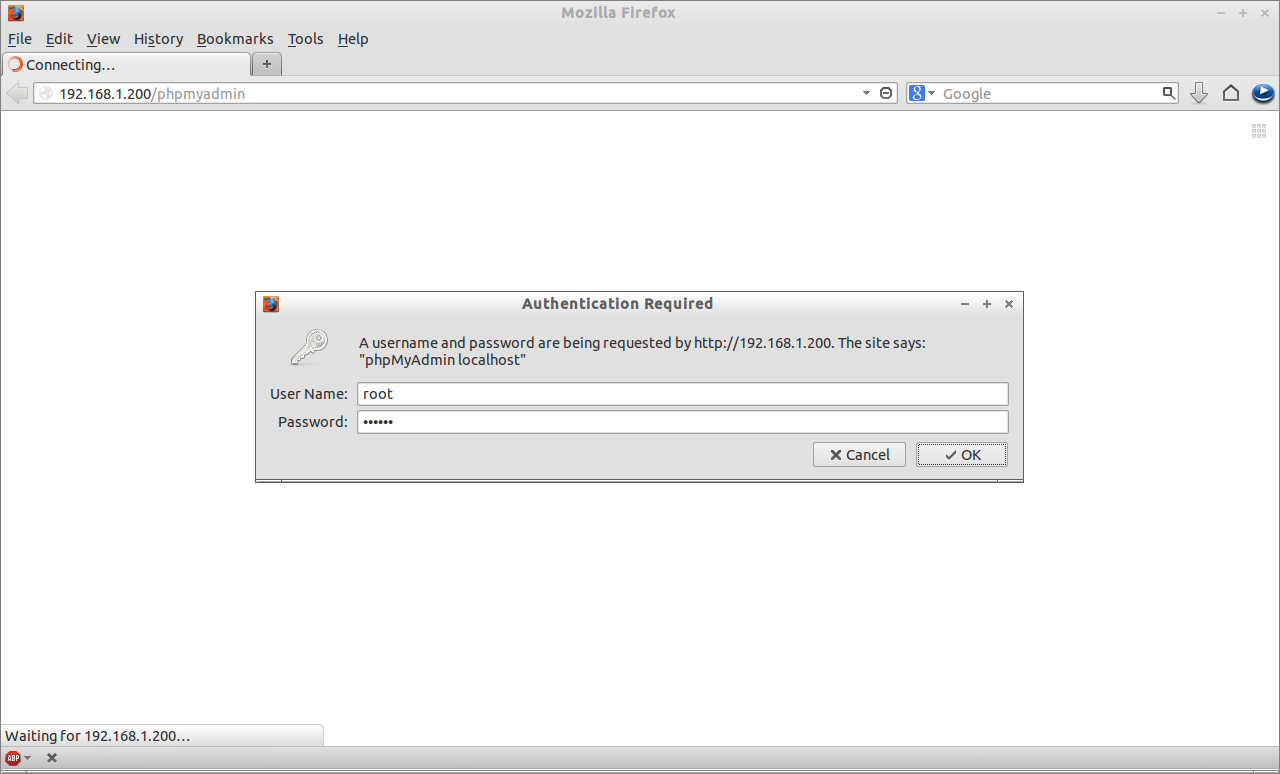
现在,您可以访问 phpmyadmin 控制太来管理 MySQL 了。打开一个浏览器,访问:http://server-ip-address/phpmyadmin/ 。需要输入您的 MySQL 用户名和密码,如果您按前面的步骤设置了密码的话。我设置的是 “root” 和 “centOS”。

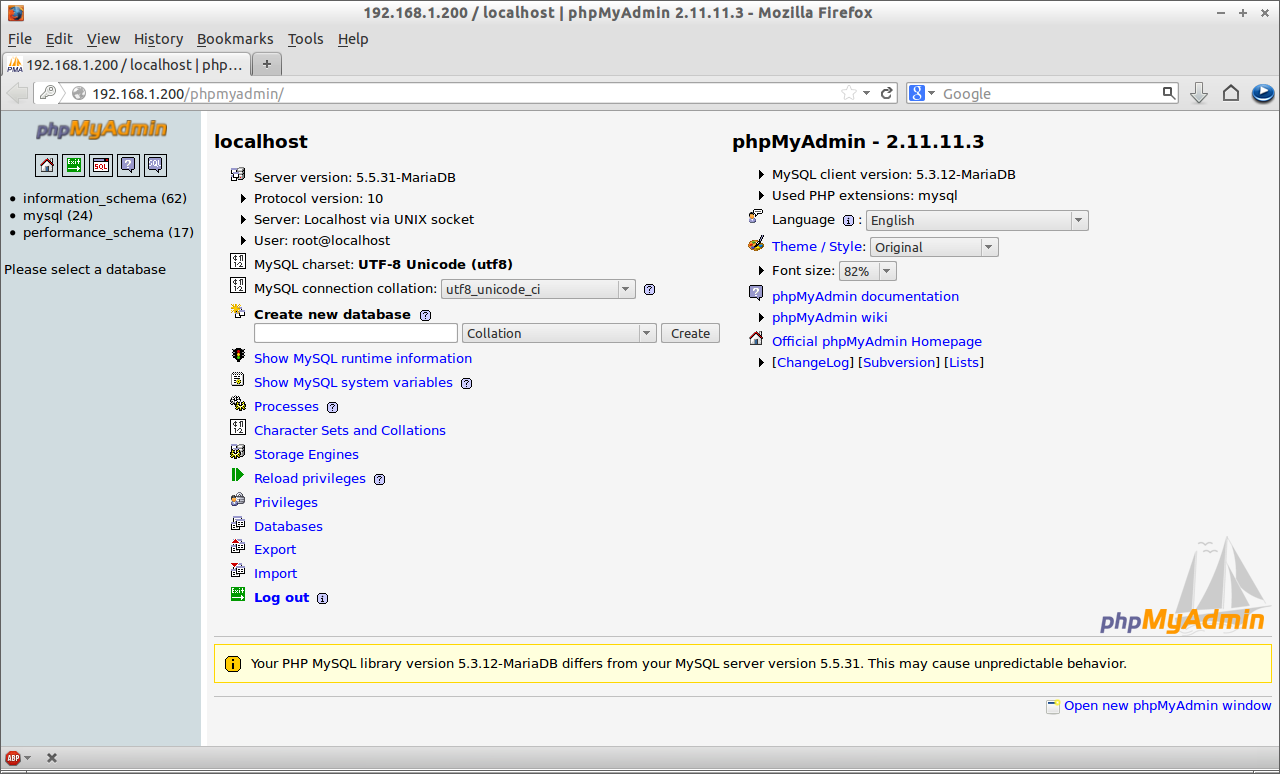
您将被重定向到 phpMyAdmin 的 Web 主界面:

现在,您能够通过 phpMyAdmin 管理您的 MariaDB 数据库了。

好了,您的 LAMP 服务器已经安装完毕并运行起来了。


在CentOS/RHEL/Scientific Linux 6下安装 LAMP的更多相关文章

  1. Install LAMP Server (Apache, MariaDB, PHP) On CentOS/RHEL/Scientific Linux 7

    Install LAMP Server (Apache, MariaDB, PHP) On CentOS/RHEL/Scientific Linux 7 By SK  - August 12, 201 ...

  2. Setup FTP Server On CentOS, RHEL, Scientific Linux 6.5/6.4/6.3

    setsebool allow_ftpd_full_access onsetsebool -P ftp_home_dir on vsftpd (Very Secure File Transport P ...

  3. linux之 CentOS/RHEL/Scientific Linux 6 & 7上安装Telnet

    声明: 在安装和使用Telnet之前,需要记住以下几点. 在公网(WAN)中使用Telnet是非常不好的想法.它会以明文的格式传输登入数据.每个人都可以看到明文.如果你还是需要Telnet,强烈建议你 ...

  4. centos 64位linux系统下安装appt命令

    首先,安装apktool包 1. wget http://android-apktool.googlecode.com/files/apktool-install-linux-r04-brut1.ta ...

  5. Setup VSFTPD Server with Virtual Users On CentOS, RHEL, Scientific Linux 6.5/6.4/6.3

    We have already shown you How to Setup VSFTPD Server on CentOS 6.5/6.4 in our previous article. In t ...

  6. linux环境下安装sphinx中文支持分词搜索(coreseek+mmseg)

     linux环境下安装sphinx中文支持分词搜索(coreseek+mmseg) 2013-11-10 16:51:14 分类: 系统运维 为什么要写这篇文章? 答:通过常规的三大步(./confi ...

  7. 【android开发】如何在Linux平台下安装JDK环境

    原文:http://android.eoe.cn/topic/android_sdk Linux平台JDK安装 本文主要描述如何在Linux平台下安装JDK环境.进入网页:http://www.ora ...

  8. Linux系统下安装Gitlab

    Linux系统下安装Gitlab 一.简介 GitLab是利用 Ruby on Rails 一个开源的版本管理系统,实现一个自托管的Git项目仓库,可通过Web界面进行访问公开的或者私人项目.它拥有与 ...

  9. 尚学linux课程---10、linux环境下安装python

    尚学linux课程---10.linux环境下安装python 一.总结 一句话总结: 直接在官网下载python的源码包即可,然后在linux下安装 linux下安装软件优先想到的的确是yum,但是 ...

随机推荐

  1. PGA与SGA

    当用户进程连接到数据库并创建一个对应的会话时,Oracle服务进程会为这个用户专门设置一个PGA区,用来存储这个用户会话的相关内容.当这个用户会话终止时,数据库系统会自动释放这个PAG区所占用的内存. ...

  2. LintCode-删除元素

    题目描述: 给定一个数组和一个值,在原地删除与值相同的数字,返回新数组的长度. 元素的顺序可以改变,并且对新的数组不会有影响. 样例 给出一个数组 [0,4,4,0,0,2,4,4],和值 4 返回 ...

  3. javascript学习笔记(window .alert 是什么)

    <script language="javascript"> var abc="25"; window .alert(abc); </scri ...

  4. C/C++中的内存管理

    一.内存的分配方式 1. 程序代码区 2. 静态数据区 3. 动态数据区 二.动态内存 1. 在栈上创建的内存 2. 从堆上分配的内存 3. 小结 三.指针与内存 1. 操作内存 2. 指针与数组 3 ...

  5. mrtg监控网络流量简单配置

    Mrtg服务器搭建(监控网络流量) [日期:2012-07-03] 来源:Linux社区  作者:split_two [字体:大 中 小]   [实验环境] 监控机:Red Hat linux 5.3 ...

  6. VC编程中如何设置对话框的背景颜色和静态文本颜色

    晚上编一个小程序,涉及到如何设置对话框的背景颜色和静态文本颜色.这在VC6.0中本来是一句话就搞定的事.在应用程序类中的InitInstance()函数添加: //设置对话框背景和文本颜色 SetDi ...

  7. podoWeb极品流氓软件

    用firefox做页面网络性能测试, 打开网页就会发现页面不停的去请求googleapi.com上的jquery Or swfobject.js,页面就此卡住,一直在等待类似这两个请求的返回,知道Ab ...

  8. APUE学习之---------------进程

    离职了,交接期也有足够的时间了,可以在好好的再看一下APUE,想想上次详细的看还是在两年之前,虽然中间也偶尔会翻出来看看,但是由于工作上交集相对比较少一直没有去细读一下.现在正好是一段空挡期可以好好看 ...

  9. Andorid Binder进程间通信---Binder本地对象,实体对象,引用对象,代理对象的引用计数

    本文參考<Android系统源码情景分析>,作者罗升阳. 一.Binder库(libbinder)代码: ~/Android/frameworks/base/libs/binder --- ...

  10. Backbone入门教程

    *:first-child { margin-top: 0 !important; } body>*:last-child { margin-bottom: 0 !important; } /* ...