
CSS3 笔记一(Rounded Corners/Border Images/Backgrounds)
CSS3 Rounded Corners
- The border-radius property is a shorthand property for setting the four border-*-radius properties.
syntax
border-radius: 1-4 length|% / 1-4 length|%|initial|inherit;
| Property | Description |
|---|---|
| border-radius | A shorthand property for setting all the four border-*-*-radius properties |
| border-top-left-radius | Defines the shape of the border of the top-left corner |
| border-top-right-radius | Defines the shape of the border of the top-right corner |
| border-bottom-right-radius | Defines the shape of the border of the bottom-right corner |
| border-bottom-left-radius | Defines the shape of the border of the bottom-left corner |
Example
 #rcorners7 {

     border-radius: 50px;     background: #73AD21;

     padding: 20px;

     width: 200px;

     height: 150px;

 }

 #rcorners8 {

     border-radius: 15px/50px; /* elliptical corners */

     background: #73AD21;

     padding: 20px;

     width: 200px;

     height: 150px;

 }

 #rcorners9 {

     border-radius: 50%;

     background: #73AD21;

     padding: 20px;

     width: 200px;

     height: 150px;

 }
CSS3 Border Images
1> border-image
- The border-image property is a shorthand property.
syntax
border-image: source slice width outset repeat|initial|inherit;
2> border-image-source
- The border-image-source property specifies the path to the image to be used as a border
border-image-source: none|image|initial|inherit;
3> border-image-slice
- The border-image-slice property specifies how to slice the image.
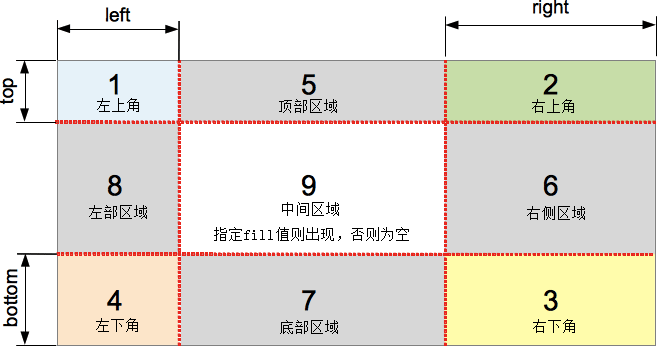
- The image is always sliced into nine sections: four corners, four edges and the middle.(九宫格)
- The number(s) represent pixels for raster images or coordinates for vector images.(纯数字不需单位)
border-image-slice: number|%|fill|initial|inherit;


4> border-image-width
- The border-image-width property specifies the width of the border image.
syntax
border-image-width: number|%|auto|initial|inherit;
5> border-image-outset
- The border-image-outset property specifies the amount by which the border image area extends beyond the border box.
syntax
border-image-outset: length|number|initial|inherit;
6> border-image-repeat
- The border-image-repeat property specifies whether the border image should be repeated, rounded or stretched.
syntax
border-image-repeat: stretch|repeat|round|initial|inherit;
| Value | Description | |
|---|---|---|
| stretch | Default value. The image is stretched to fill the area | |
| repeat | The image is tiled (repeated) to fill the area | |
| round | The image is tiled (repeated) to fill the area. If it does not fill the area with a whole number of tiles, the image is rescaled so it fits | |
| space | The image is tiled (repeated) to fill the area. If it does not fill the area with a whole number of tiles, the extra space is distributed around the tiles | |
| initial | Sets this property to its default value. | |
| inherit | Inherits this property from its parent element. |

CSS3 Backgrounds
1> background
- CSS3 allows you to add multiple background images for an element.
- The different background images are separated by commas, and the images are stacked on top of each other, where the first image is closest to the viewer.
syntax
background: color image position/size repeat origin clip attachment initial|inherit;
2> background-clip
- The background-clip property specifies the painting area of the background.
syntax
background-clip: border-box|padding-box|content-box|initial|inherit;
| Value | Description |
|---|---|
| border-box | Default value. The background is clipped to the border box |
| padding-box | The background is clipped to the padding box |
| content-box | The background is clipped to the content box |
| initial | Sets this property to its default value. |
| inherit | Inherits this property from its parent element. |



3> background-origin
- The background-origin property specifies where the background image is positioned.
syntax
background-origin: padding-box|border-box|content-box|initial|inherit;
| Value | Description |
|---|---|
| padding-box | Default value. The background image starts from the upper left corner of the padding edge |
| border-box | The background image starts from the upper left corner of the border |
| content-box | The background image starts from the upper left corner of the content |
| initial | Sets this property to its default value. |
| inherit | Inherits this property from its parent element. |
Difference between background-clip and background-origin
- The background-clip CSS property specifies whether an element's background, either the color or image, extends underneath its border.
- The background-origin CSS property determines the background positioning area, that is the position of the origin of an image specified using the background-image CSS property.
4> background-size
- The background-size property specifies the size of the background images.
background-size: auto|length|cover|contain|initial|inherit;
| Value | Description |
|---|---|
| auto | Default value. The background-image contains its width and height |
| length |
Sets the width and height of the background image. The first value sets the width, the second value sets the height. If only one value is given, the second is set to "auto" |
| percentage |
Sets the width and height of the background image in percent of the parent element. The first value sets the width, the second value sets the height. If only one value is given, the second is set to "auto". |
| cover | Scale the background image to be as large as possible so that the background area is completely covered by the background image. Some parts of the background image may not be in view within the background positioning area |
| contain | Scale the image to the largest size such that both its width and its height can fit inside the content area |
| initial | Sets this property to its default value. |
| inherit | Inherits this property from its parent element. |
CSS3 笔记一(Rounded Corners/Border Images/Backgrounds)的更多相关文章
- 【CSS3】Advanced1:Rounded Corners
1.Border radius The border-radius property can be used to working clockwise from top-left set border ...
- CSS3笔记
CSS/CSS3在线手册:http://www.css119.com/book/css/ CSS3实现水平垂直居中:http://bbs.html5cn.org/thread-87300-1-1. ...
- css3动画使用技巧之—border旋转时的应用。
<html> <head> <title>css3动画border旋转时的应用.</title> <meta charset="UTF- ...
- CSS3笔记(一)
最开始的时候 CSS3产生的一个新属性是一个浏览器的私有的,然后W3C 可能会拿来采用做个标准,再没公布标准之前就只能用私有属性(加前缀)来表达各自厂商的实现,主要是CSS3刚出现那会儿,它暗示该CS ...
- CSS3笔记之第四天
CSS3 2D 转换 了解2D变换方法: translate() rotate() scale() skew() matrix() translate()方法,根据左(X轴)和顶部(Y轴)位置给定的参 ...
- CSS3笔记之第一天
通过展示实例来初步学习CSS3 1.背景 设置背景色:background-color:#b0c4de; 设置背景图片:background-image:url('paper.gif'); 设置背景图 ...
- CSS3笔记4
1.CSS3盒子模型 <!DOCTYPE html> <html lang="en"> <head> <meta charset=&quo ...
- 前端CSS3笔记
第1章CSS3简介 如同人类的的进化一样,CSS3是CSS2的“进化”版本,在CSS2基础上,增强或新增了许多特性, 弥补了CSS2的众多不足之处,使得Web开发变得更为高效和便捷. 1.1 CS ...
- CSS3笔记-加强版
属性选择器: E[attr]只使用属性名,但没有确定任何属性值 E[attr="value"]指定属性名,并指定了该属性的属性值 E[attr~="value&quo ...
随机推荐
- hdu 2102 BFS
原题链接 思路:bfs搜一发 AC代码: #include "map" #include "queue" #include "math.h" ...
- mac终端命令大全全全全全全全全全
OSX 的文件系统 OSX 采用的Unix文件系统,所有文件都挂在跟目录 / 下面,所以不在要有Windows 下的盘符概念. 你在桌面上看到的硬盘都挂在 /Volumes 下. 比如接上个叫做 US ...
- 讨论一下hibernate如何动态注册一个动态生成的实体类
如何动态生成实体类请参考这篇博文:http://www.cnblogs.com/anai/p/4269858.html 下面说说得到实体类后,如何能使用hibernate的接口来进行数据访问. 我们都 ...
- 关于Java擦除特性
package thinkingInJava; /* * 模拟擦除 */ public class SimpleHolder { private Object obj ; public void se ...
- HSV色彩空间
HSV是把H(色相),S(饱和度),V(亮度)当做色值来定位颜色的空间.色相的取值范围是0~360度,用来表示颜色的类别.其中红色是0度,绿色是120度,蓝色是240度.饱和度的取值范围是0%~100 ...
- 数据库---T-SQL语句提纲
T-SQL语句: 创建表:create table Name(Code varchar(50)) 主键:primary key自增长列:auto_increment外键关系:references非空: ...
- requirejs解决异步模块加载方案
他首先会遍历enableRegistry取出其中定义的模块,并且将没有加载成功的模块标识注入noLoads数组,如果过期了这里就会报错 如果上述没问题还会做循环依赖的判断,主要逻辑在breakCycl ...
- NFS服务器搭建
1. 安装nfs-kernel-server,然后编辑/etc/exports. /sambadata/nfsserver 10.0.0.0/255.255.255.0(fsid=0,all_s ...
- asp.net identity 2.2.0 在WebForm下的角色启用和基本使用(一)
基本环境:asp.net 4.5.2 仔细看了在Webform下,模板就已经启动了角色控制,已经不用再进行设置了.直接调用相关类就可以了.这和原来在网站根目录下配置Web.config完全不同了. 相 ...
- book
http://www.ed2000.com/ShowFile.asp?FileID=61391 e-itbook.com