
CSS3 笔记一(Rounded Corners/Border Images/Backgrounds)
CSS3 Rounded Corners
- The border-radius property is a shorthand property for setting the four border-*-radius properties.
syntax
border-radius: 1-4 length|% / 1-4 length|%|initial|inherit;
| Property | Description |
|---|---|
| border-radius | A shorthand property for setting all the four border-*-*-radius properties |
| border-top-left-radius | Defines the shape of the border of the top-left corner |
| border-top-right-radius | Defines the shape of the border of the top-right corner |
| border-bottom-right-radius | Defines the shape of the border of the bottom-right corner |
| border-bottom-left-radius | Defines the shape of the border of the bottom-left corner |
Example
 #rcorners7 {

     border-radius: 50px;     background: #73AD21;

     padding: 20px;

     width: 200px;

     height: 150px;

 }

 #rcorners8 {

     border-radius: 15px/50px; /* elliptical corners */

     background: #73AD21;

     padding: 20px;

     width: 200px;

     height: 150px;

 }

 #rcorners9 {

     border-radius: 50%;

     background: #73AD21;

     padding: 20px;

     width: 200px;

     height: 150px;

 }
CSS3 Border Images
1> border-image
- The border-image property is a shorthand property.
syntax
border-image: source slice width outset repeat|initial|inherit;
2> border-image-source
- The border-image-source property specifies the path to the image to be used as a border
border-image-source: none|image|initial|inherit;
3> border-image-slice
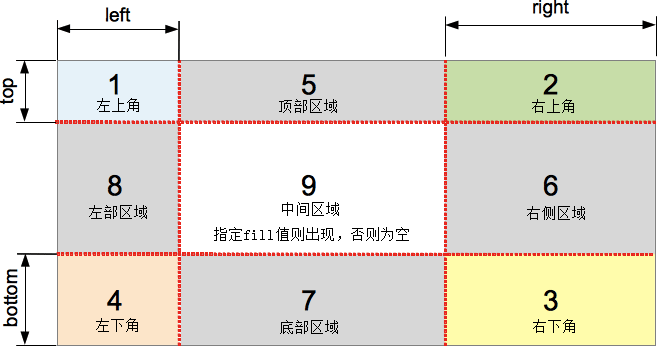
- The border-image-slice property specifies how to slice the image.
- The image is always sliced into nine sections: four corners, four edges and the middle.(九宫格)
- The number(s) represent pixels for raster images or coordinates for vector images.(纯数字不需单位)
border-image-slice: number|%|fill|initial|inherit;


4> border-image-width
- The border-image-width property specifies the width of the border image.
syntax
border-image-width: number|%|auto|initial|inherit;
5> border-image-outset
- The border-image-outset property specifies the amount by which the border image area extends beyond the border box.
syntax
border-image-outset: length|number|initial|inherit;
6> border-image-repeat
- The border-image-repeat property specifies whether the border image should be repeated, rounded or stretched.
syntax
border-image-repeat: stretch|repeat|round|initial|inherit;
| Value | Description | |
|---|---|---|
| stretch | Default value. The image is stretched to fill the area | |
| repeat | The image is tiled (repeated) to fill the area | |
| round | The image is tiled (repeated) to fill the area. If it does not fill the area with a whole number of tiles, the image is rescaled so it fits | |
| space | The image is tiled (repeated) to fill the area. If it does not fill the area with a whole number of tiles, the extra space is distributed around the tiles | |
| initial | Sets this property to its default value. | |
| inherit | Inherits this property from its parent element. |

CSS3 Backgrounds
1> background
- CSS3 allows you to add multiple background images for an element.
- The different background images are separated by commas, and the images are stacked on top of each other, where the first image is closest to the viewer.
syntax
background: color image position/size repeat origin clip attachment initial|inherit;
2> background-clip
- The background-clip property specifies the painting area of the background.
syntax
background-clip: border-box|padding-box|content-box|initial|inherit;
| Value | Description |
|---|---|
| border-box | Default value. The background is clipped to the border box |
| padding-box | The background is clipped to the padding box |
| content-box | The background is clipped to the content box |
| initial | Sets this property to its default value. |
| inherit | Inherits this property from its parent element. |



3> background-origin
- The background-origin property specifies where the background image is positioned.
syntax
background-origin: padding-box|border-box|content-box|initial|inherit;
| Value | Description |
|---|---|
| padding-box | Default value. The background image starts from the upper left corner of the padding edge |
| border-box | The background image starts from the upper left corner of the border |
| content-box | The background image starts from the upper left corner of the content |
| initial | Sets this property to its default value. |
| inherit | Inherits this property from its parent element. |
Difference between background-clip and background-origin
- The background-clip CSS property specifies whether an element's background, either the color or image, extends underneath its border.
- The background-origin CSS property determines the background positioning area, that is the position of the origin of an image specified using the background-image CSS property.
4> background-size
- The background-size property specifies the size of the background images.
background-size: auto|length|cover|contain|initial|inherit;
| Value | Description |
|---|---|
| auto | Default value. The background-image contains its width and height |
| length |
Sets the width and height of the background image. The first value sets the width, the second value sets the height. If only one value is given, the second is set to "auto" |
| percentage |
Sets the width and height of the background image in percent of the parent element. The first value sets the width, the second value sets the height. If only one value is given, the second is set to "auto". |
| cover | Scale the background image to be as large as possible so that the background area is completely covered by the background image. Some parts of the background image may not be in view within the background positioning area |
| contain | Scale the image to the largest size such that both its width and its height can fit inside the content area |
| initial | Sets this property to its default value. |
| inherit | Inherits this property from its parent element. |
CSS3 笔记一(Rounded Corners/Border Images/Backgrounds)的更多相关文章
- 【CSS3】Advanced1:Rounded Corners
1.Border radius The border-radius property can be used to working clockwise from top-left set border ...
- CSS3笔记
CSS/CSS3在线手册:http://www.css119.com/book/css/ CSS3实现水平垂直居中:http://bbs.html5cn.org/thread-87300-1-1. ...
- css3动画使用技巧之—border旋转时的应用。
<html> <head> <title>css3动画border旋转时的应用.</title> <meta charset="UTF- ...
- CSS3笔记(一)
最开始的时候 CSS3产生的一个新属性是一个浏览器的私有的,然后W3C 可能会拿来采用做个标准,再没公布标准之前就只能用私有属性(加前缀)来表达各自厂商的实现,主要是CSS3刚出现那会儿,它暗示该CS ...
- CSS3笔记之第四天
CSS3 2D 转换 了解2D变换方法: translate() rotate() scale() skew() matrix() translate()方法,根据左(X轴)和顶部(Y轴)位置给定的参 ...
- CSS3笔记之第一天
通过展示实例来初步学习CSS3 1.背景 设置背景色:background-color:#b0c4de; 设置背景图片:background-image:url('paper.gif'); 设置背景图 ...
- CSS3笔记4
1.CSS3盒子模型 <!DOCTYPE html> <html lang="en"> <head> <meta charset=&quo ...
- 前端CSS3笔记
第1章CSS3简介 如同人类的的进化一样,CSS3是CSS2的“进化”版本,在CSS2基础上,增强或新增了许多特性, 弥补了CSS2的众多不足之处,使得Web开发变得更为高效和便捷. 1.1 CS ...
- CSS3笔记-加强版
属性选择器: E[attr]只使用属性名,但没有确定任何属性值 E[attr="value"]指定属性名,并指定了该属性的属性值 E[attr~="value&quo ...
随机推荐
- My租房网
阶段一:采用分页top关键字进行查询 实现6条~~10条出租信息 阶段2:查询指定客户发布的租房信息 查询客户张三的信息,使用连接查询实现. 阶段3:按区县制作房屋出租清单
- traits的使用
trait的作用是可以在任何地方使用trait中的方法. trait的定义与定义类相同,定义实例如下: trait tSoneTrait{ //定义一些属性 function someFunction ...
- HDU3177 贪心
Crixalis's Equipment Time Limit: 2000/1000 MS (Java/Others) Memory Limit: 32768/32768 K (Java/Oth ...
- map的用法
Map是c++的一个标准容器,她提供了很好一对一的关系,在一些程序中建立一个map可以起到事半功倍的效果,总结了一些map基本简单实用的操作!1. map最基本的构造函数: map<stri ...
- 面试题-->写一个函数,返回一个数组中所有元素被第一个元素除的结果
package com.rui.test; import java.util.Random; /** * @author poseidon * @version 1.0 * @date:2015年10 ...
- time模块目录下自己建立一个名为log的文件夹
使用python调用ping命令,然后在日志中记录ping的结果,用来监测网络连通情况. 代码: [python]from time import *from subprocess import *w ...
- Jquery EasyUI使用总结(一)
1,弹出Iframe,新窗口 //打开编辑页面要加载的数据 function ShowDialog(id, url, width, height, onLoadFunc) { $("#&qu ...
- Android百分比布局支持库介绍——com.android.support:percent(转)
转载自http://www.apkbus.com/forum.php?mod=viewthread&tid=244752&extra=&_dsign=0b699c42 在此之前 ...
- Codeigniter2.25部署Linux(php5.6)
1).默认路由:修改system/core/Router.php 中第146行.如下图所示.ps:转换成小写我也是醉了...注释的代表是codeigniter作者写的,而上面的是我更改的 2).mod ...
- 配置fabric-crashlytics教程
1. 注册账户 登录网站 https://try.crashlytics.com/ 来注册新的账户,审核通过时间为几个小时或者1到2天不等.然后注册时候输入的邮箱就会收到如下的邀请涵 2. acco ...