
(1)第一个ASP.NET Web API
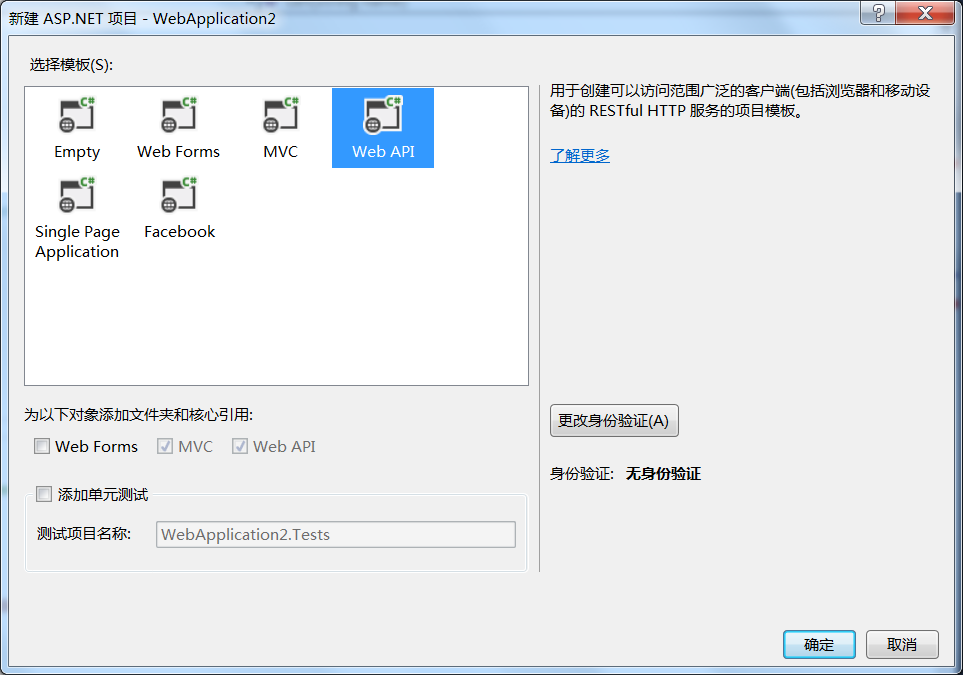
。
protected void Application_Start()
{
AreaRegistration.RegisterAllAreas();
//配置API路由
GlobalConfiguration.Configure(WebApiConfig.Register);
FilterConfig.RegisterGlobalFilters(GlobalFilters.Filters);
RouteConfig.RegisterRoutes(RouteTable.Routes);
BundleConfig.RegisterBundles(BundleTable.Bundles);
}
App_Start/WebApiConfig.cs
public static class WebApiConfig
{
public static void Register(HttpConfiguration config)
{
// Web API configuration and services
// Web API routes
config.MapHttpAttributeRoutes();
config.Routes.MapHttpRoute(
name: "DefaultApi",
routeTemplate: "{controller}/{id}",
defaults: new { id = RouteParameter.Optional }
);
}
}
Storages.cs
using System;
using System.Collections.Generic;
using System.Linq;
using System.Web;
namespace TmplWebApiDemo.Models
{
public class Storages
{
public static IEnumerable<Student> Students { get; set; }
public static IEnumerable<Teacher> Teachers { get; set; }
static Storages()
{
Students = new List<Student>
{
new Student{Id =1,Name="张三",Age =11,Gender=false},
new Student{Id =2,Name="李四",Age =21,Gender=true},
new Student{Id =3,Name="王五",Age =22,Gender=false},
new Student{Id =4,Name="赵飞燕",Age =25,Gender=true},
new Student{Id =5,Name="王刚",Age =31,Gender=true}
};
Teachers = new List<Teacher>
{
new Teacher{Id =1,Name="老师1",Age =11,Gender=false},
new Teacher{Id =2,Name="老师2",Age =21,Gender=true},
new Teacher{Id =3,Name="老师3",Age =22,Gender=false},
new Teacher{Id =4,Name="老师4",Age =25,Gender=true}
};
}
}
public class Person
{
public int Id { get; set; }
public string Name { get; set; }
public int Age { get; set; }
public bool Gender { get; set; }
}
public class Student : Person
{
}
public class Teacher : Person
{
}
}
/// <summary>
/// 学生资源集合
/// </summary>
public class StudentsController : ApiController
{
//c r u d
/// <summary>
/// GET / Students/
/// </summary>
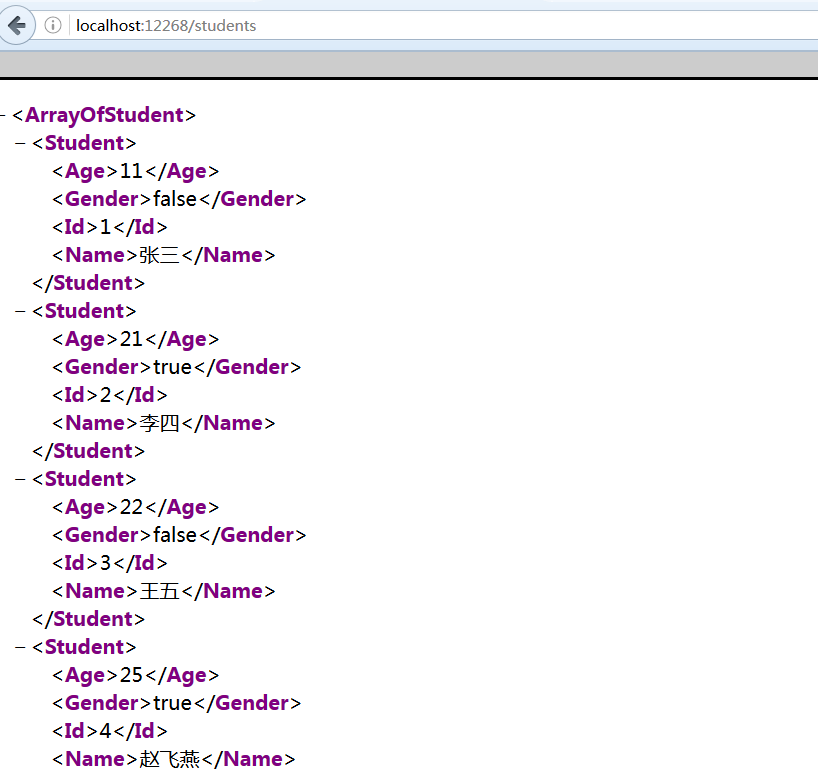
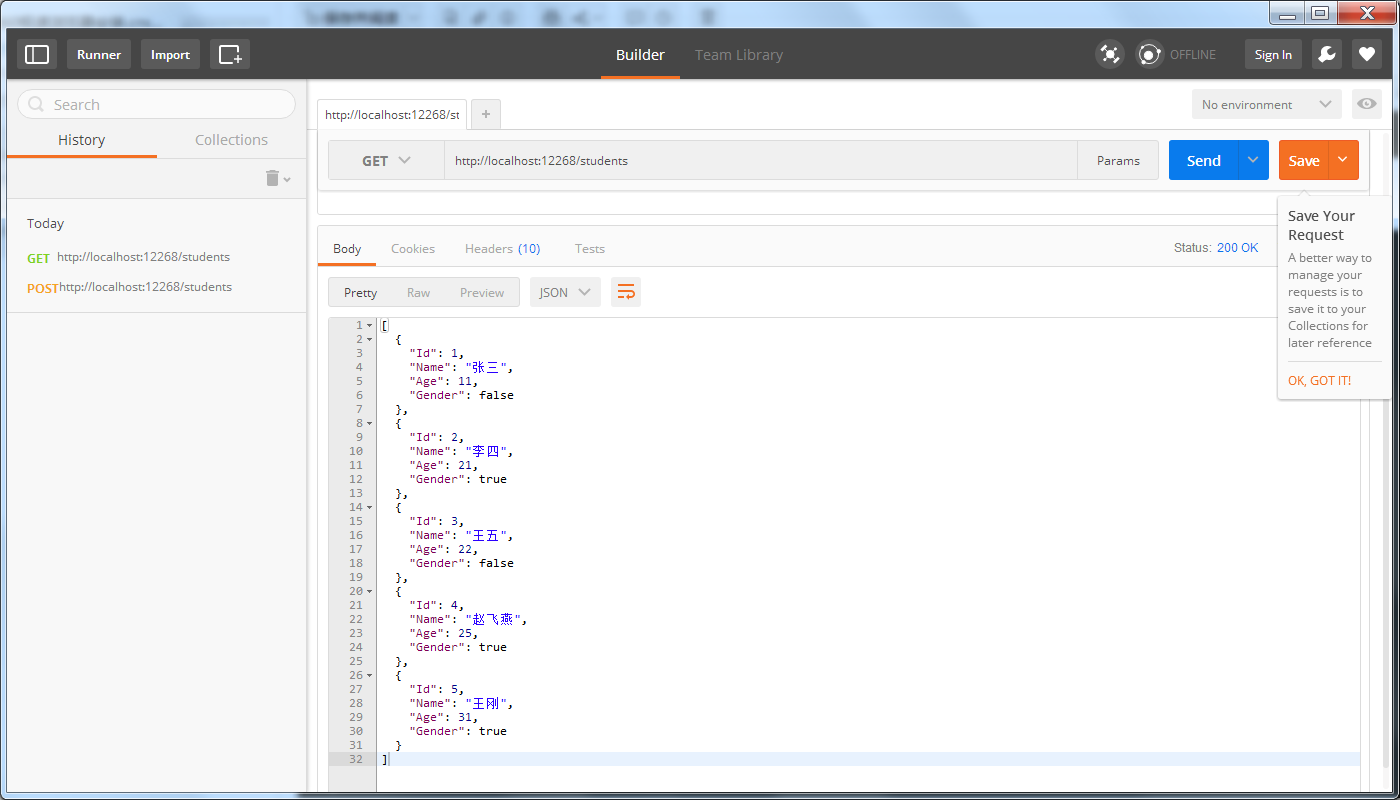
public IEnumerable<Student> Get()
{
return Storages.Students;
}
/// <summary>
/// GET / students/zhangsan return entity
/// </summary>
/// <returns></returns>
public Student Get(string name)
{
return Storages.Students.FirstOrDefault(s => s.Name.Equals(name, StringComparison.InvariantCultureIgnoreCase));
}
}
(1)第一个ASP.NET Web API的更多相关文章
- 【ASP.NET Web API教程】1.1 第一个ASP.NET Web API
Your First ASP.NET Web API (C#)第一个ASP.NET Web API(C#) By Mike Wasson|January 21, 2012作者:Mike Wasson ...
- 一个ASP.NET Web API 2.0应用
在一个空ASP.NET Web项目上创建一个ASP.NET Web API 2.0应用 由于ASP.NET Web API具有与ASP.NET MVC类似的编程方式,再加上目前市面上专门介绍ASP.N ...
- 在一个空ASP.NET Web项目上创建一个ASP.NET Web API 2.0应用
由于ASP.NET Web API具有与ASP.NET MVC类似的编程方式,再加上目前市面上专门介绍ASP.NET Web API 的书籍少之又少(我们看到的相关内容往往是某本介绍ASP.NET M ...
- 第一个ASP.NET Web API (C#)程序
本文翻自http://www.asp.net/web-api/overview/getting-started-with-aspnet-web-api 绝对手工制作,如有雷同,实属巧合. 转载请注明. ...
- 如何创建一个Asp .Net Web Api项目
1.点击文件=>新建=>项目 2.创建一个Asp .NET Web项目 3.选择Empty,然后选中下面的MVC和Web Api,也可以直接选择Web Api选项,注意将身份验证设置为无身 ...
- ASP.NET Web API 记录请求响应数据到日志的一个方法
原文:http://blog.bossma.cn/dotnet/asp-net-web-api-log-request-response/ ASP.NET Web API 记录请求响应数据到日志的一个 ...
- How ASP.NET Web API 2.0 Works?[持续更新中…]
一.概述 RESTful Web API [Web标准篇]RESTful Web API [设计篇] 在一个空ASP.NET Web项目上创建一个ASP.NET Web API 2.0应用 二.路由 ...
- ASP.NET Web API中的依赖注入
什么是依赖注入 依赖,就是一个对象需要的另一个对象,比如说,这是我们通常定义的一个用来处理数据访问的存储,让我们用一个例子来解释,首先,定义一个领域模型如下: namespace Pattern.DI ...
- OData services入门----使用ASP.NET Web API描述
http://www.cnblogs.com/muyoushui/archive/2013/01/27/2878844.html ODate 是一种应用层协议,设计它的目的在于提供一组通过HTTP的交 ...
随机推荐
- homework160809207刘兆轩
# include <stdio.h> int main() { float a,b,c,m,n,l,k,j,i; printf("请输入三个数:\n"); scanf ...
- Unity调用Android方法
步骤 废话不多说,直接来步骤吧1.创建工程,弄大概像这样一个界面2.在unity中写好代码,像这样,记得给界面绑定好事件啥的 using UnityEngine; using UnityEngine. ...
- Opencv二值图像的分布直方图
Mat img; ]; int main() { VideoCapture video(); if (!video.isOpened()) { ; } Mat img; Mat img1, img2, ...
- PHP中interface与 implements 关键字
类中接口的应用 1.关键字:interface 2.关键字:implements 1.接口的介绍与创建 接口:一种成员属性全部为抽象或常量的特殊抽象类. 规则: 1.类中全部为抽象方法. 2.抽象方法 ...
- Linux下ffmpeg的各种编解码器的安装
首先要安装各种解码器 1.lame tar -zxvf lame- cd lame- ./configure --enable-shared make make install 2.libogg ...
- PHP入门笔记
PHP是一种创建动态交互性站点的强有力的服务器端脚本语言.PHP其代码可以直接嵌入HYML代码.PHP语法非常类似于Perl和C,常常搭配Apache一起使用. 1.PHP是指超文本预处理器(Hype ...
- 【leetcode】Validate Binary Search Tree
Validate Binary Search Tree Given a binary tree, determine if it is a valid binary search tree (BST) ...
- linux学习中遇到的各种故障与解决方法
一.nginx 二.apache 三.mysql 四.tomcat 五.oracle 六.python python安装mysqldb(mysql-devel包)出现错误: error: comman ...
- android课件和源代码
ppt.rar 代码.rar 也可以自己从这里下载http://pan.baidu.com/share/link?shareid=1287391506&uk=2634355140
- vs2013 控制台程序exe图标
工程右击选择添加resource->Icon. 在工程目录就会生成 工程名.rc 和 XX.ico文件. 重新编译程序,就会生成有图标的exe. 对应的配置在 工程名.rc 文件里,用记事 ...