
(1)第一个ASP.NET Web API
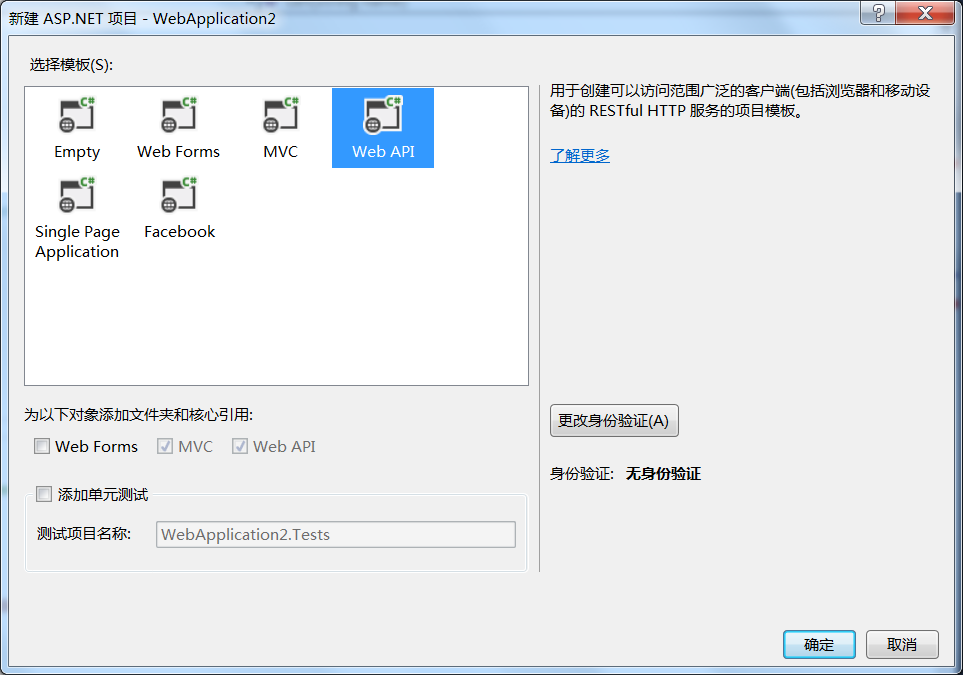
。
protected void Application_Start()
{
AreaRegistration.RegisterAllAreas();
//配置API路由
GlobalConfiguration.Configure(WebApiConfig.Register);
FilterConfig.RegisterGlobalFilters(GlobalFilters.Filters);
RouteConfig.RegisterRoutes(RouteTable.Routes);
BundleConfig.RegisterBundles(BundleTable.Bundles);
}
App_Start/WebApiConfig.cs
public static class WebApiConfig
{
public static void Register(HttpConfiguration config)
{
// Web API configuration and services
// Web API routes
config.MapHttpAttributeRoutes();
config.Routes.MapHttpRoute(
name: "DefaultApi",
routeTemplate: "{controller}/{id}",
defaults: new { id = RouteParameter.Optional }
);
}
}
Storages.cs
using System;
using System.Collections.Generic;
using System.Linq;
using System.Web;
namespace TmplWebApiDemo.Models
{
public class Storages
{
public static IEnumerable<Student> Students { get; set; }
public static IEnumerable<Teacher> Teachers { get; set; }
static Storages()
{
Students = new List<Student>
{
new Student{Id =1,Name="张三",Age =11,Gender=false},
new Student{Id =2,Name="李四",Age =21,Gender=true},
new Student{Id =3,Name="王五",Age =22,Gender=false},
new Student{Id =4,Name="赵飞燕",Age =25,Gender=true},
new Student{Id =5,Name="王刚",Age =31,Gender=true}
};
Teachers = new List<Teacher>
{
new Teacher{Id =1,Name="老师1",Age =11,Gender=false},
new Teacher{Id =2,Name="老师2",Age =21,Gender=true},
new Teacher{Id =3,Name="老师3",Age =22,Gender=false},
new Teacher{Id =4,Name="老师4",Age =25,Gender=true}
};
}
}
public class Person
{
public int Id { get; set; }
public string Name { get; set; }
public int Age { get; set; }
public bool Gender { get; set; }
}
public class Student : Person
{
}
public class Teacher : Person
{
}
}
/// <summary>
/// 学生资源集合
/// </summary>
public class StudentsController : ApiController
{
//c r u d
/// <summary>
/// GET / Students/
/// </summary>
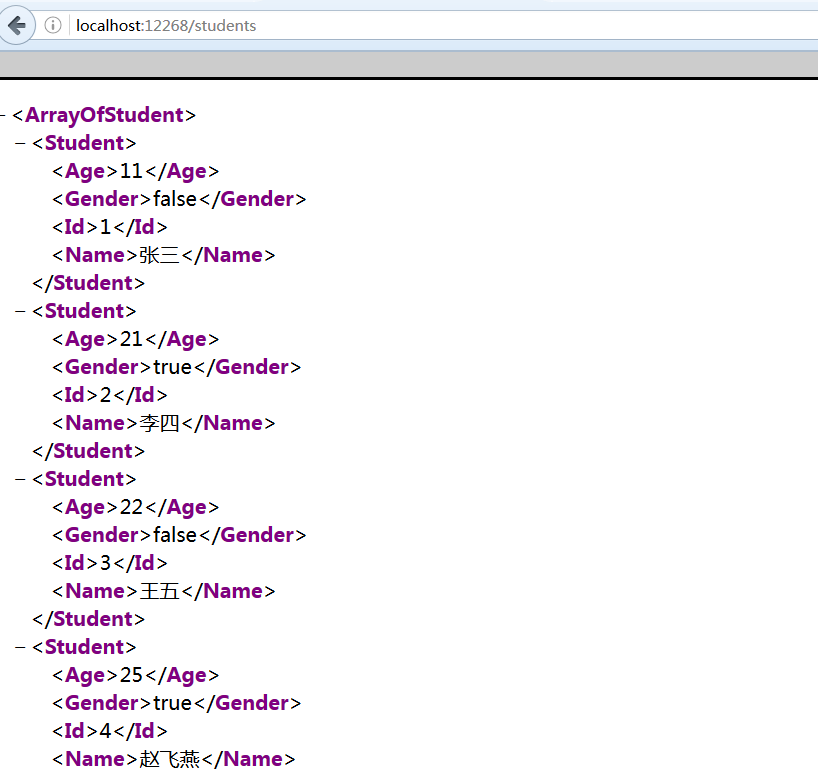
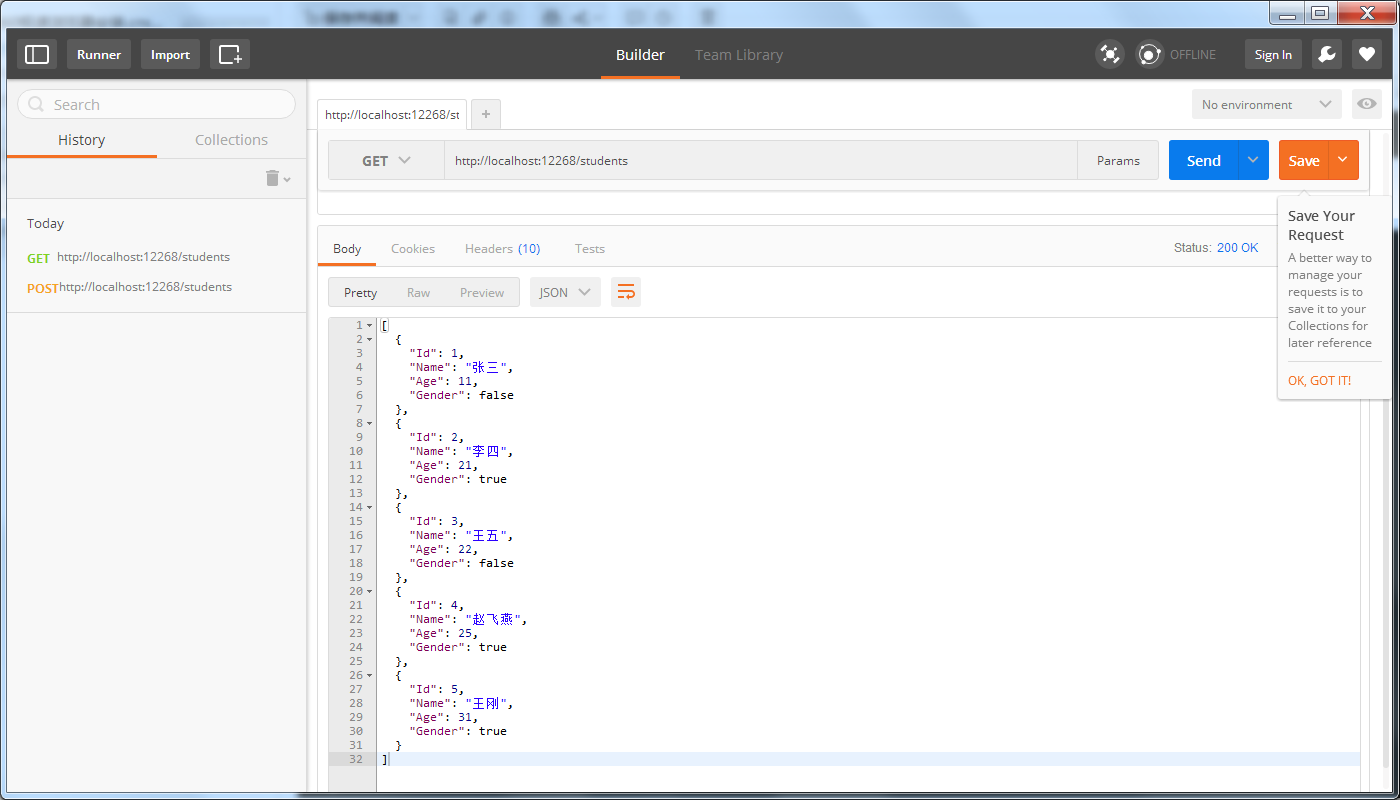
public IEnumerable<Student> Get()
{
return Storages.Students;
}
/// <summary>
/// GET / students/zhangsan return entity
/// </summary>
/// <returns></returns>
public Student Get(string name)
{
return Storages.Students.FirstOrDefault(s => s.Name.Equals(name, StringComparison.InvariantCultureIgnoreCase));
}
}
(1)第一个ASP.NET Web API的更多相关文章
- 【ASP.NET Web API教程】1.1 第一个ASP.NET Web API
Your First ASP.NET Web API (C#)第一个ASP.NET Web API(C#) By Mike Wasson|January 21, 2012作者:Mike Wasson ...
- 一个ASP.NET Web API 2.0应用
在一个空ASP.NET Web项目上创建一个ASP.NET Web API 2.0应用 由于ASP.NET Web API具有与ASP.NET MVC类似的编程方式,再加上目前市面上专门介绍ASP.N ...
- 在一个空ASP.NET Web项目上创建一个ASP.NET Web API 2.0应用
由于ASP.NET Web API具有与ASP.NET MVC类似的编程方式,再加上目前市面上专门介绍ASP.NET Web API 的书籍少之又少(我们看到的相关内容往往是某本介绍ASP.NET M ...
- 第一个ASP.NET Web API (C#)程序
本文翻自http://www.asp.net/web-api/overview/getting-started-with-aspnet-web-api 绝对手工制作,如有雷同,实属巧合. 转载请注明. ...
- 如何创建一个Asp .Net Web Api项目
1.点击文件=>新建=>项目 2.创建一个Asp .NET Web项目 3.选择Empty,然后选中下面的MVC和Web Api,也可以直接选择Web Api选项,注意将身份验证设置为无身 ...
- ASP.NET Web API 记录请求响应数据到日志的一个方法
原文:http://blog.bossma.cn/dotnet/asp-net-web-api-log-request-response/ ASP.NET Web API 记录请求响应数据到日志的一个 ...
- How ASP.NET Web API 2.0 Works?[持续更新中…]
一.概述 RESTful Web API [Web标准篇]RESTful Web API [设计篇] 在一个空ASP.NET Web项目上创建一个ASP.NET Web API 2.0应用 二.路由 ...
- ASP.NET Web API中的依赖注入
什么是依赖注入 依赖,就是一个对象需要的另一个对象,比如说,这是我们通常定义的一个用来处理数据访问的存储,让我们用一个例子来解释,首先,定义一个领域模型如下: namespace Pattern.DI ...
- OData services入门----使用ASP.NET Web API描述
http://www.cnblogs.com/muyoushui/archive/2013/01/27/2878844.html ODate 是一种应用层协议,设计它的目的在于提供一组通过HTTP的交 ...
随机推荐
- php服务端写日志文件
1.需求 在服务端记录日志 2.基础版 最基础的文件读写,(要注意window和linux的换行符,window是\r\n,linux是\n),这里就写入一个时间. <?php $handle ...
- 160809228_符瑞艺_C语言程序设计实验3 循环结构程序设计
#include <stdio.h> int main(){ //使用for循环完成1+2+......+100 ; ;i<=;i++) sum +=i; //sum = sum ...
- 学习高博SLAM(1)
这几天按照高博的博客做了一起做RGB-D SLAM (1)和(2) ,,其中大部分步骤都没问题 开发环境是ubuntu14.04+indigo 有几个问题就是: (1)我的电脑不能加载PPA,原因是: ...
- caffe学习系列(4):视觉层介绍
视觉层包括Convolution, Pooling, Local Response Normalization (LRN), im2col等层. 这里介绍下conv层. layer { name: & ...
- 如何用极路由+OpenWrt+RTL电视棒搭建一台SDR服务器,并隐秘地捕获和传输数据
0×00 前言 近期因为有个从异地捕获无线信号的需求,便尝试着用OpenWrt+公网IP搭建了一台SDR服务器.如果有小伙伴嫌SDR硬件天线看起来太乱.或者电脑没有足够的USB接口也可在局域网搭建SD ...
- Win7去除桌面残影的方法
用户升级到Win7系统后使用正常,就是系统桌面会留有残影,怎么样也去不掉,影响用户的使用,那么要如何将这些残影去掉呢?可从计算机属性中进行相关配置. 解决方法 一.在计算机面板上,右键点击“计算机”, ...
- python脚本-开机自动联网
办公室的电脑开机之后,需要打开浏览器登录校园用户认证网页,输入用户名密码登录认证之后才能联网,每次都这样搞很麻烦,写了个Python脚本自动完成这个工作. onStartup.py #file:onS ...
- MY_FIRSH_MODULE
模块描述 将30个字节的内存空间模仿成设备文件.每次读写不超过30个字节. 模块加载成功之后,需建立设备文件 mknod /dev/mydev c 231 0 模块代码 #include <li ...
- php内核和瓦力上线部署
http://www.php-internals.com/ http://www.walle-web.io/
- C++拷贝构造函数(深拷贝,浅拷贝)
对于普通类型的对象来说,它们之间的复制是很简单的,例如:int a=88;int b=a; 而类对象与普通对象不同,类对象内部结构一般较为复杂,存在各种成员变量.下面看一个类对象拷贝的简单例子. #i ...