
Python 文件读写,条件循环(三次登录锁定账号实例)
通过文件读写,条件循环相关语法,实现三次登录失败则锁定该账号的功能
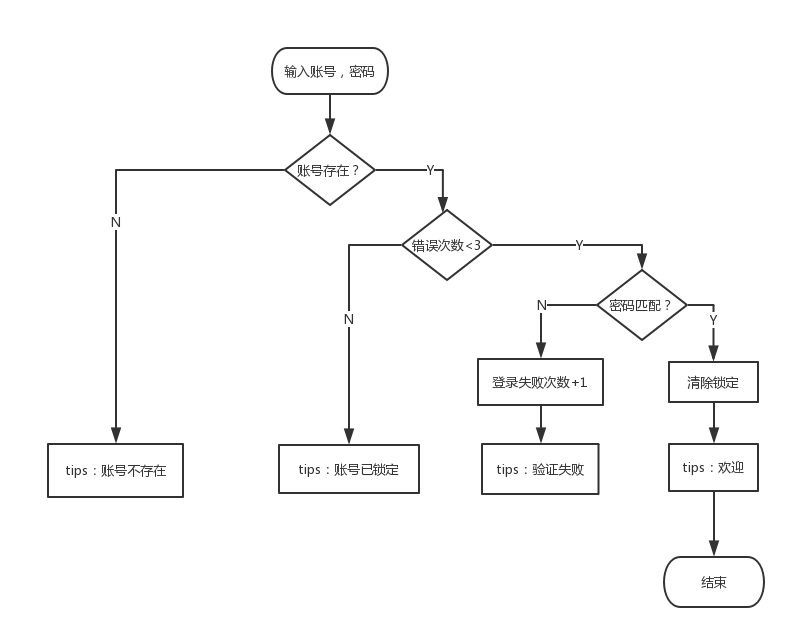
需求一
"""
需求描述:
    1.输入正确账号,密码,退出程序
    2.登录失败,重新输入账号密码
    3.同一账号连续登录失败超过三次,则锁定该账号
    4.登录已锁定账号,提示账号已锁定
"""
流程图一
实例代码一
#!/usr/bin/python

#coding=utf-8

"""

需求描述:

    1.输入正确账号,密码,退出程序

    2.登录失败,重新输入账号密码

    3.同一账号连续登录失败超过三次,则锁定该账号

    4.登录已锁定账号,提示账号已锁定

user.txt:

    Milton Loveyp 0

    Cherish Loveypgfc 0

    yangp Loveypgfc 0

"""

def modify_user(name, mode="add"):

    """

    修改用户名单中的登录错误次数

    :param name: 用户名称

    :param mode:add,登录错误次数自增1;del,登录错误次数重置为0

    :return:

    """

    # 读取用户文件

    with open("user.txt", "r") as read_file:

        read_data = read_file.readlines()

    # 写入用户文件

    with open("user.txt", "w") as write_file:

        for line in read_data:

            new_line = line.split()

            if new_line[0] == name:

                if mode == "add":

                    new_line[2] = bytes(int(new_line[2]) + 1)

                else:

                    new_line[2] = ""

                new_line = " ".join(new_line) + "\n"

                write_file.write(new_line)

                write_file.flush()

            else:

                write_file.write(line)

def auth(name, passwd):

    """

    用户鉴权

    :param name: 登录用户名

    :param passwd: 登录密码

    :return:

    """

    with open("user.txt", "r") as read_file:

        for eachLine in read_file:

            user_name, password, errors = eachLine.split()

            if name == user_name:

                if int(errors) < 3:

                    if password == passwd:

                        print "Dear [%s],welcome~" % name

                        modify_user(name, "del")

                        return True

                    else:

                        print "auth fail,please check your account and password!"

                        modify_user(name, "add")

                        return False

                else:

                    print "your accout is locked!"

                    return False

        else:

            print "your account is not exist!"

            return False

def login():

    """

    登录

    :return:

    """

    while True:

        name = raw_input("Name:")

        passwd = raw_input("PASS:")

        if auth(name, passwd):

            break

if __name__ == '__main__':

    login()
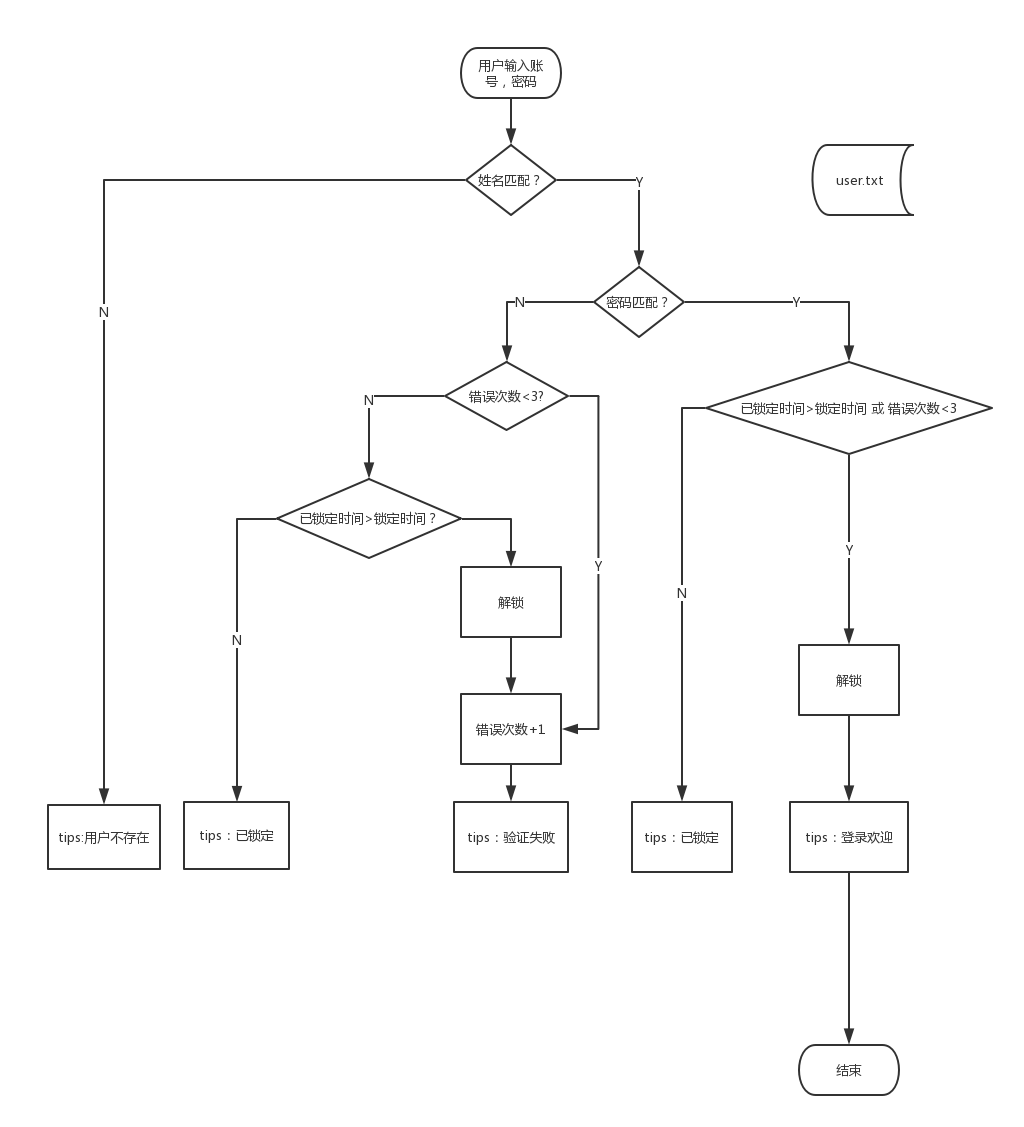
需求二,在一的基础上添加锁定时间控制。
"""
需求点:
    1.用户输入账号与密码
    2.如果输入正确,则提示欢迎信息
    3.如果输入账号不存在,则提示账号不存在
    4.如果输入账号与密码不匹配,提示验证失败
    5.同一账号,如果连续输入三次错误密码,则锁定该账号2min,2min后重新输入,如果账号密码匹配,则登录成功
    6.如果三次登录内成功登录,则清空登录错误次数
    7.登录时,如果账号已被锁定,提示账号已锁定信息
"""
流程图二
实例代码二
#!/usr/bin/env python

# -*- coding: utf-8 -*-

"""

需求点:

    1.用户输入账号与密码

    2.如果输入正确,则提示欢迎信息

    3.如果输入账号不存在,则提示账号不存在

    4.如果输入账号与密码不匹配,提示验证失败

    5.同一账号,如果连续输入三次错误密码,则锁定该账号2min,2min后重新输入,如果账号密码匹配,则登录成功

    6.如果三次登录内成功登录,则清空登录错误次数

    7.登录时,如果账号已被锁定,提示账号已锁定信息

user.txt:

    Milton Loveyp 0

    Cherish Loveypgfc 0

    yangp Loveypgfc 0

"""

import time

def modify_user(name, mode="add"):

    """

    修改用户名单中的登录错误次数

    :param name: 用户名称

    :param mode:add,登录错误次数自增1;del,登录错误次数重置为0

    :return:

    """

    # 读取用户文件

    with open("user.txt", "r") as read_file:

        read_data = read_file.readlines()

    # 写入用户文件

    with open("user.txt", "w") as write_file:

        for line in read_data:

            new_line = line.split()

            if new_line[0] == name:

                if mode == "add":

                    new_line[2] = bytes(int(new_line[2]) + 1)

                    if len(new_line) < 4:

                        new_line.append(str(time.time()))

                    else:

                        new_line[3] = str(time.time())

                else:

                    new_line[2] = ""

                    new_line = new_line[0:3]

                new_line = " ".join(new_line) + "\n"

                write_file.write(new_line)

                write_file.flush()

            else:

                write_file.write(line)

def auth(name, passwd, lock_time):

    """

    用户鉴权

    :param name: 登录用户名

    :param passwd: 登录密码

    :return:

    """

    with open("user.txt", "r") as read_file:

        for eachLine in read_file:

            user_list = eachLine.split()

            if len(user_list) < 4:

                user_list.append(str(time.time() - 100000))

            user_name, password, errors, last_time = user_list

            if name == user_name:

                if password == passwd:

                    if time.time() - float(last_time) > lock_time or int(errors) < 3:

                        print "Dear [%s],welcome~" % name

                        modify_user(name, "del")

                        return True

                    else:

                        print "your accout is locked,please try after [%f]s !" % (

                            lock_time - (time.time() - float(last_time)))

                        return False

                else:

                    if int(errors) < 3:

                        print "auth fail,please check your account and password!"

                        modify_user(name, "add")

                        return False

                    elif time.time() - float(last_time) > lock_time:

                        print "auth fail,please check your account and password!"

                        modify_user(name, "del")

                        modify_user(name, "add")

                        return False

                    else:

                        print "your accout is locked,please try after [%f]s !" % (

                            lock_time - (time.time() - float(last_time)))

                        return False

        else:

            print "your account is not exist!"

            return False

def login():

    """

    登录

    :return:

    """

    while True:

        user_name = raw_input("Name:")

        pwd = raw_input("PASS:")

        if auth(user_name, pwd, 120):

            break

if __name__ == '__main__':

    login()
Python 文件读写,条件循环(三次登录锁定账号实例)的更多相关文章
- python文件读写小结
读文件 打开一个文件用open()方法(open()返回一个文件对象,它是可迭代的): >>> f = open('test.txt', 'r') r表示是文本文件,rb是二进制文件 ...
- python文件读写及形式转化和CGI的简单应用
一丶python文件读写学习笔记 open() 将会返回一个 file 对象,基本语法格式如下: open(filename, mode) filename:包含了你要访问的文件名称的字符串值. mo ...
- python 文件读写操作(24)
以前的代码都是直接将数据输出到控制台,实际上我们也可以通过读/写文件的方式读取/输出到磁盘文件中,文件读写简称I/O操作.文件I/O操作一共分为四部分:打开(open)/读取(read)/写入(wri ...
- python 文件读写方式
一.普通文件读写方式 1.读取文件信息: with open('/path/to/file', 'r') as f: content = f.read() 2.写入文件中: with open('/U ...
- Python文件读写及网站显示
一.关于文件读写的笔记 (一) 文件概述 文件是一个存储在辅助存储器上的数据序列,可以包含任何数据内容 文件都是按照2进制进行存储的,但在表现形式上有2种:文本文件和二进制文件. 1. 文本文件 文本 ...
- python文件操作和集合(三)
对文件的操作分三步: 1.打开文件获取文件的句柄,句柄就理解为这个文件 2.通过文件句柄操作文件 3.关闭文件. 文件基本操作: f = open('file.txt','r') #以 ...
- Python 简明教程 --- 24,Python 文件读写
微信公众号:码农充电站pro 个人主页:https://codeshellme.github.io 过去的代码都是未经测试的代码. 目录 无论是哪种编程语言,IO 操作都是非常重要的部分.I 即Inp ...
- 【学习】python文件读写,用with open as的好处,非常好【转载】
原文链接:http://www.cnblogs.com/ymjyqsx/p/6554817.html 备注:博主还有很多值得学习的笔记,遇到问题可以拜读,非常感谢博主的总结 读写文件是最常见的IO操作 ...
- python文件读写,以后就用with open语句
读写文件是最常见的IO操作.Python内置了读写文件的函数,用法和C是兼容的. 读写文件前,我们先必须了解一下,在磁盘上读写文件的功能都是由操作系统提供的,现代操作系统不允许普通的程序直接操作磁盘, ...
随机推荐
- swift中的结构体和枚举
Swift 里的结构体非常特殊. 类是面向对象编程语言中传统的结构单元.和结构体相比,Swift 的类支持实现继承,(受限的)反射,析构函数和多所有者. 既然类比结构体强大这么多,为什么还要使用结构体 ...
- poj1984 带权并查集(向量处理)
Navigation Nightmare Time Limit: 2000MS Memory Limit: 30000K Total Submissions: 5939 Accepted: 2 ...
- epon e8-c HG220GS超级密码破解
网上找了很多管理电信e8-c的破解资料,大多都是明文密码,而hg220gs则为加密的密码,找来找去最后终于找到加密方式了base64,真心不容易 下面从其他博文中转载过来留着记录 低端hack.主要是 ...
- Mysql-linux下密码修改,忘记密码修改,超级管理用户修改
未忘记密码 方法一:在mysql系统外,使用mysqladmin # mysqladmin -u root -p password "test123"Enter password: ...
- Cocoa pod的使用注意点
一.CocoaPods是什么? CocoaPods是一个负责管理iOS项目中第三方开源库的工具.CocoaPods的项目源码在Github上管理.该项目开始于2011年8月12日,在这两年多的时间里, ...
- python-generator生成杨辉三角
根据廖雪峰老师的评论区摘录. 1: def triangles(): L = [1] while True: yield L L1 = [0] + L[:] L = [L[i]+L1[i] for i ...
- 《ODAY安全:软件漏洞分析技术》学习心得-----shellcode的一点小小的思考
I will Make Impossible To I'm possible -----------LittleHann 看了2个多星期.终于把0DAY这本书给看完了,自己动手将书上的实验一个一个实现 ...
- Spring BeanUtils的用法
package test; import java.util.Date; import org.springframework.beans.BeanUtils; import test.basic.B ...
- oracle报错:ORA-28000: the account is locked
连接数据库的时候报: ORA-28000: the account is locked 解决方法: cmd-进入命令行 C:\Users\0>sqlplus /nolog SQL*Plus: R ...
- hibernate基础增删查改简单实例
hibernate 基础理论知识网上很多,可以百度和google.这里不做多的介绍,以一个User表来开展例子 建一个web-project 我这里用了junit单元测试环境来进行增删查改的测试,别的 ...