
SilverLight.3-Validation:二、银光验证。TheLabel、TheDescriptionViewer和TheValidationSummary
| ylbtech-SilverLight.3-DataControls_BetterDataFroms:二、银光验证。TheLabel、TheDescriptionViewer和TheValidationSummary |
- 1.A, 数据源
- 1.B, TheLabel
- 1.C, TheDescriptionViewer
- 1.D, TheValidationSummary
| 1.A, 数据源返回顶部 |
using System;

using System.ComponentModel.DataAnnotations;

namespace SL3ValidationYlbtechApp.Access

{

    /// <summary>

    /// 人类

    /// </summary>

    public class Person

    {

        int _personId;

        /// <summary>

        /// 编号【PK】

        /// </summary>

        public int PersonId

        {

            get { return _personId; }

            set { _personId = value; }

        }

        string _username; //长度

        /// <summary>

        /// 姓名

        /// </summary>

        [Display(Name = "姓名", Description = "不许为空")]

        public string Username

        {

            get { return _username; }

            set

            {

                if (value == "") throw new ArgumentException("不许为空");

                _username = value;

            }

        }

        string _sex;    //用户自定义

        /// <summary>

        /// 性别【CK】男|女|未知

        /// </summary>

        public string Sex

        {

            get { return _sex; }

            set { _sex = value; }

        }

        int _age;   //范围

        /// <summary>

        /// 年龄

        /// </summary>

        [Display(Name="年龄",Description="必须大于0")]

        public int Age

        {

            get { return _age; }

            set

            {

                if (value < ) throw new ArgumentException("不能小于0");

                _age = value;

            }

        }

        string _email;  //正则

        /// <summary>

        /// 电子邮箱

        /// </summary>

        public string Email

        {

            get { return _email; }

            set { _email = value; }

        }

        DateTime _addedDate;

        /// <summary>

        /// 添加日期

        /// </summary>

        public DateTime AddedDate

        {

            get { return _addedDate; }

            set { _addedDate = value; }

        }

        string _description;

        /// <summary>

        /// 描述

        /// </summary>

        public string Description

        {

            get { return _description; }

            set { _description = value; }

        }

        /// <summary>

        /// 空参构造

        /// </summary>

        public Person() { }

        /// <summary>

        /// 全参构造

        /// </summary>

        /// <param name="personId"></param>

        /// <param name="username"></param>

        /// <param name="sex"></param>

        /// <param name="age"></param>

        /// <param name="email"></param>

        /// <param name="addedDate"></param>

        /// <param name="description"></param>

        public Person(int personId, string username, string sex, int age, string email

            , DateTime addedDate, string description)

        {

            _personId = personId;

            _username = username;

            _sex = sex;

            _age = age;

            _email = email;

            _addedDate = addedDate;

            _description = description;

        }

        /// <summary>

        /// GetModel

        /// </summary>

        /// <returns></returns>

        public static Person GetModel()

        {

            Person dal = new Person(, "rain", "男", , "ylbtech@qq.com"

                , new DateTime(, , ), "静以修身,俭以养德");

            return dal;

        }

    }

}
4,
| 1.B, TheLabel返回顶部 |
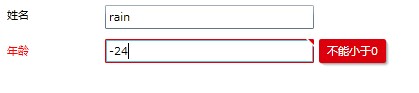
xmlns:my="clr-namespace:System.Windows.Controls;assembly=System.Windows.Controls.Data.Input"
2.2/3,
<Grid x:Name="gridDetailPerson" Background="White">

    <Grid.RowDefinitions>

        <RowDefinition Height="Auto"></RowDefinition>

        <RowDefinition Height="Auto"></RowDefinition>

    </Grid.RowDefinitions>

    <Grid.ColumnDefinitions>

        <ColumnDefinition Width="100"></ColumnDefinition>

        <ColumnDefinition Width="*"></ColumnDefinition>

        <ColumnDefinition Width="100"></ColumnDefinition>

    </Grid.ColumnDefinitions>

    <TextBlock Grid.Row="0" Grid.Column="0" Margin="7" Text="姓名"></TextBlock>

    <TextBox Grid.Row="0" Grid.Column="1" Margin="5" Text="{Binding Username}"></TextBox>

    <my:Label Grid.Row="1" Grid.Column="0" Margin="7" Content="年龄" Target="{Binding ElementName=txtAge}" />

    <TextBox Grid.Row="1" Grid.Column="1" Margin="5" x:Name="txtAge"

                Text="{Binding Age,Mode=TwoWay, ValidatesOnExceptions=True,NotifyOnValidationError=True}"></TextBox>

</Grid>
2.3/3,
using System.Windows.Controls;

using SL3ValidationYlbtechApp.Access;

namespace SL3ValidationYlbtechApp.DataControls.BetterDataForms

{

    public partial class TheLabel : UserControl

    {

        public TheLabel()

        {

            InitializeComponent();

            gridDetailPerson.DataContext = Person.GetModel();

        }

    }

}
3,
Target="{Binding ElementName=txtAge}"
| 1.C, TheDescriptionViewer返回顶部 |

<Grid x:Name="gridDetailPerson" Background="White">

    <Grid.RowDefinitions>

        <RowDefinition Height="Auto"></RowDefinition>

        <RowDefinition Height="Auto"></RowDefinition>

        <RowDefinition Height="Auto"></RowDefinition>

    </Grid.RowDefinitions>

    <Grid.ColumnDefinitions>

        <ColumnDefinition Width="100"></ColumnDefinition>

        <ColumnDefinition Width="*"></ColumnDefinition>

        <ColumnDefinition Width="100"></ColumnDefinition>

    </Grid.ColumnDefinitions>

    <my:Label Grid.Row="0" Grid.Column="0" Margin="7" Content="姓名" Target="{Binding ElementName=txtUsername}" />

    <TextBox Grid.Row="0" Grid.Column="1" Margin="5" x:Name="txtUsername"

             Text="{Binding Username,Mode=TwoWay, ValidatesOnExceptions=True,NotifyOnValidationError=True}"></TextBox>

    <my:DescriptionViewer Grid.Row="0" Grid.Column="2" Target="{Binding ElementName=txtUsername}"></my:DescriptionViewer>

    <my:Label Grid.Row="1" Grid.Column="0" Margin="7" Content="年龄" Target="{Binding ElementName=txtAge}" />

    <TextBox Grid.Row="1" Grid.Column="1" Margin="5" x:Name="txtAge"

             Text="{Binding Age,Mode=TwoWay, ValidatesOnExceptions=True,NotifyOnValidationError=True}"></TextBox>

        <my:DescriptionViewer Grid.Row="1" Grid.Column="2" Target="{Binding ElementName=txtAge}">

        <my:DescriptionViewer.GlyphTemplate>

            <ControlTemplate>

                <Image Source="reg1.jpg" Stretch="None"></Image>

            </ControlTemplate>

        </my:DescriptionViewer.GlyphTemplate>

    </my:DescriptionViewer>

</Grid>
2.1/3, 代码同上文1.B.2.3/3
<my:DescriptionViewer Grid.Row="1" Grid.Column="2" Target="{Binding ElementName=txtAge}">

<my:DescriptionViewer.GlyphTemplate>

    <ControlTemplate>

        <Image Source="reg1.jpg" Stretch="None"></Image>

    </ControlTemplate>

</my:DescriptionViewer.GlyphTemplate>

</my:DescriptionViewer>
4,
| 1.D, TheValidationSummary返回顶部 |
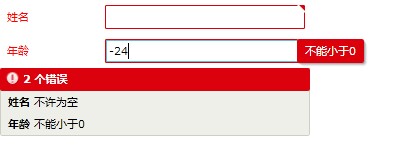
<Grid x:Name="gridDetailPerson" Background="White">

    <Grid.RowDefinitions>

        <RowDefinition Height="Auto"></RowDefinition>

        <RowDefinition Height="Auto"></RowDefinition>

        <RowDefinition Height="Auto"></RowDefinition>

    </Grid.RowDefinitions>

    <Grid.ColumnDefinitions>

        <ColumnDefinition Width="100"></ColumnDefinition>

        <ColumnDefinition Width="*"></ColumnDefinition>

        <ColumnDefinition Width="100"></ColumnDefinition>

    </Grid.ColumnDefinitions>

    <my:Label Grid.Row="0" Grid.Column="0" Margin="7" Content="姓名" Target="{Binding ElementName=txtUsername}" />

    <TextBox Grid.Row="0" Grid.Column="1" Margin="5" x:Name="txtUsername"

                Text="{Binding Username,Mode=TwoWay, ValidatesOnExceptions=True,NotifyOnValidationError=True}"></TextBox>

    <my:Label Grid.Row="1" Grid.Column="0" Margin="7" Content="年龄" Target="{Binding ElementName=txtAge}" />

    <TextBox Grid.Row="1" Grid.Column="1" Margin="5" x:Name="txtAge"

                Text="{Binding Age,Mode=TwoWay, ValidatesOnExceptions=True,NotifyOnValidationError=True}"></TextBox>

    <my:ValidationSummary Grid.Row="2" Grid.Column="0" Grid.ColumnSpan="2"  ></my:ValidationSummary>

</Grid>
2.1/3, 代码同上文1.B.2.3/3
<TextBox Margin="5" x:Name="txtPrice" Width="100" HorizontalAlignment="Left"

my:ValidationSummary.ShowErrorsInSummary="False"

Text="{Binding UnitCost, Mode=TwoWay, ValidatesOnExceptions=true,

NotifyOnValidationError=true}"></TextBox>
4,
| 1.E,返回顶部 |
 |
作者:ylbtech 出处:http://ylbtech.cnblogs.com/ 本文版权归作者和博客园共有,欢迎转载,但未经作者同意必须保留此段声明,且在文章页面明显位置给出原文连接,否则保留追究法律责任的权利。 |
SilverLight.3-Validation:二、银光验证。TheLabel、TheDescriptionViewer和TheValidationSummary的更多相关文章
- SilverLight.3-Validation:一、银光验证。ValidatesOnExpression和NotifyOnValidationError
ylbtech-SilverLight-DataBindings_BindingADataObjects_Validation:一.银光验证.ValidatesOnExpression和NotifyO ...
- jQuery学习之:Validation表单验证插件
http://polaris.blog.51cto.com/1146394/258781/ 最近由于公司决定使用AJAX + Struts2来重构项目,让我仔细研究一下这两个,然后集中给同事讲讲,让每 ...
- java实现谷歌二步验证 (Google Authenticator)
准备: 一个谷歌二步验证APP, 我用的是ios 身份宝 资料: 1.Google Authenticator 原理及Java实现 //主要参考 https://blog.csdn.net/li ...
- Force.com微信企业号开发系列(一) - 启用二次验证
微信于9月份推出企业号后引起了业界不小的反响,许多企业都在思索企业号将如何影响企业的运营,从本文开始,我将详细阐述微信企业号开发的相关知识,而本文将着重介绍如何实现更高安全机制的二次验证. 申请企业体 ...
- destoon 深度整合discuz x2 UC 之免邮箱二次验证
destoon中member/my.php,信息发布入口处判断是否已在dx中做了验证,如果已经验证,则不再提示验证,否则其中dt的验证页面. 在home.php.php. group.php. for ...
- 基于RSA securID的Radius二次验证java实现(PAP验证方式)
基于rsa SecurID的二次验证.RSA server自身可以作为Radius服务器,RSA也可以和其他的软件集合,使用其他的server作为Radius服务器. radius的验证的一般流程如下 ...
- GitHub中开启二次验证Two-factor authentication,如何在命令行下更新和上传代码
最近在使用GitHub管理代码,在git命令行管理代码时候遇到一些问题.如果开起了二次验证(Two-factor authentication两个要素认证),命令行会一直提示输入用户名和密码.查找了一 ...
- emqtt 试用(二)验证 emq 和 mosquito 的共享订阅
本地订阅(Local Subscription) 本地订阅(Local Subscription)只在本节点创建订阅与路由表,不会在集群节点间广播全局路由,非常适合物联网数据采集应用. 使用方式: 订 ...
- In-App Purchase iap 内付费 二次验证代码 (java 服务器端)
参考网址:https://blog.csdn.net/a351945755/article/details/22919533 package com.yichangmao.buyVerify.Comm ...
随机推荐
- java自动化测试开发环境搭建(更新至2018年10月8日 11:42:15)
1.安装JDK的1.8版本 官网下载地址:https://www.oracle.com/technetwork/java/javase/downloads/jdk8-downloads-2133151 ...
- Shell脚本直接执行sql语句和不显示列名
在shell脚本编程的时候,可以通过在mysql连接命令添加-N和-e参数实现查询结果不显示列名和直接执行sql语句操作 demo $(mysql -h ${HOST} -u ${USER} -p${ ...
- 04 JVM是如何执行方法调用的(上)
重载和重写 重载:同一个类中定义名字相同的方法,但是参数类型或者参数个数必须不同. 重载的方法在编译过程中就可完成识别.具体到每一个方法的调用,Java 编译器会根据所传入参数的生命类型来选取重载方法 ...
- android studio首个项目碰到的一些问题
一开始,我用的是android studio3.1,碰到Get “.gradle”的问题.解决方法是https://www.zhihu.com/question/37810416.在project中的 ...
- mvc-自定义Route
public class CustomerRoute : RouteBase { //从路径中解析出controller.action以及其他参数,创建RouteData(其中包括HttpHandle ...
- Ognl对象图导航语言 源码
// -------------------------------------------------------------------------- // Copyright (c) 1998- ...
- s debug
value stack contents ognl 值栈 stack context action上下文 action上下文是一个map对象,通过#key获得对象内容,在#re ...
- 查看apache和nginx的负载和连接数情况
1.查看apache当前并发访问数:netstat -an | grep ESTABLISHED | wc -l对比httpd.conf中MaxClients的数字差距多少. 2.查看有多少个进程数: ...
- Spring整合Hibernate与Struts
整合S2SH 一.导入jar包 Spring jar包 Hibernate jar包 Struts2 jar包 以上就是整合需要的所有jar包,当然其中有重复的包,(对比之后去掉版本低的就可以了,还有 ...
- HDU6438 Buy and Resell 解题报告(一个有趣的贪心问题的严格证明)
写在前面 此题是一个很容易想到的贪心题目,但是正确性的证明是非常复杂的.然而,目前网上所有题解并未给出本题贪心算法的任何正确性证明,全部仅停留在描述出一个贪心算法.本着对算法与计算机科学的热爱(逃), ...