
SpringMVC之Controller简单使用
//环境 spring-4.3.18/JDK1.8/开发工具/IntelliJ IDEA 2018.2.5 x64
//工程结构图
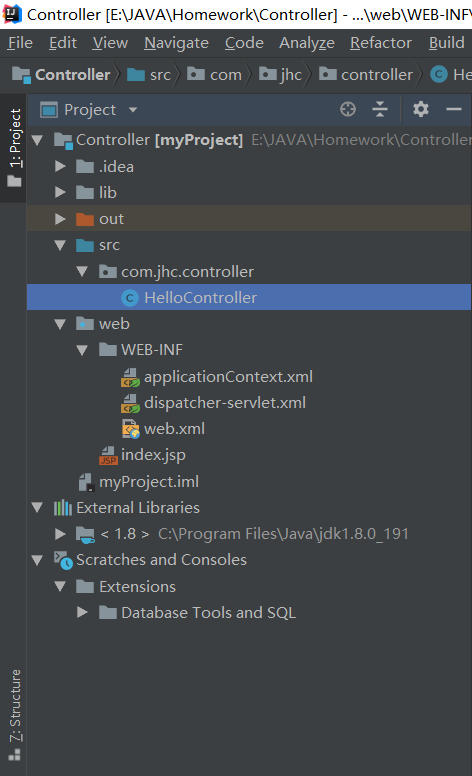
//web.xml
 <?xml version="1.0" encoding="UTF-8"?>

 <web-app xmlns="http://xmlns.jcp.org/xml/ns/javaee"

          xmlns:xsi="http://www.w3.org/2001/XMLSchema-instance"

          xsi:schemaLocation="http://xmlns.jcp.org/xml/ns/javaee http://xmlns.jcp.org/xml/ns/javaee/web-app_4_0.xsd"

          version="4.0">

     <!--配置Spring IoC配置文件路径-->

     <context-param>

         <param-name>contextConfigLocation</param-name>

         <param-value>/WEB-INF/applicationContext.xml,/WEB-INF/dispatcher-servlet.xml</param-value>

     </context-param>

     <!--初始化Spring IoC容器-->

     <listener>

         <listener-class>org.springframework.web.context.ContextLoaderListener</listener-class>

     </listener>

     <!--Spring MVC会根据servlet-name配置,找到/WEB-INF/dispatcher-servlet.xml作为配置文件载入web工程-->

     <servlet>

         <servlet-name>dispatcher</servlet-name>

         <servlet-class>org.springframework.web.servlet.DispatcherServlet</servlet-class>

         <!--配置Spring IoC配置文件路径-->

         <!--<init-param>

             <param-name>contextConfigLocation</param-name>

             <param-value>/WEB-INF/applicationContext.xml,/WEB-INF/dispatcher-servlet.xml</param-value>

         </init-param>-->

         <load-on-startup>1</load-on-startup>

     </servlet>

     <!--Controller-Servlet拦截配置-->

     <servlet-mapping>

         <servlet-name>dispatcher</servlet-name>

         <url-pattern>/</url-pattern>

     </servlet-mapping>

 </web-app>
//applicationContext.xml 该文件可省略,同时将
<!--配置Spring IoC配置文件路径-->

 7     <context-param>

 8         <param-name>contextConfigLocation</param-name>

 9         <param-value>/WEB-INF/applicationContext.xml,/WEB-INF/dispatcher-servlet.xml</param-value>

10     </context-param>

改成
<!--配置Spring IoC配置文件路径-->

 7     <context-param>

 8         <param-name>contextConfigLocation</param-name>

 9         <param-value>/WEB-INF/dispatcher-servlet.xml</param-value>

10     </context-param>
 <?xml version="1.0" encoding="UTF-8"?>

 <beans xmlns="http://www.springframework.org/schema/beans"

        xmlns:xsi="http://www.w3.org/2001/XMLSchema-instance"

        xmlns:mvc="http://www.springframework.org/schema/mvc"

        xmlns:context="http://www.springframework.org/schema/context"

        xmlns:aop="http://www.springframework.org/schema/aop"

        xmlns:tx="http://www.springframework.org/schema/tx"

        xsi:schemaLocation="http://www.springframework.org/schema/beans

         http://www.springframework.org/schema/beans/spring-beans-4.2.xsd

         http://www.springframework.org/schema/mvc

         http://www.springframework.org/schema/mvc/spring-mvc-4.2.xsd

         http://www.springframework.org/schema/context

         http://www.springframework.org/schema/context/spring-context.xsd

         http://www.springframework.org/schema/aop

         http://www.springframework.org/schema/aop/spring-aop-4.2.xsd

         http://www.springframework.org/schema/tx

         http://www.springframework.org/schema/tx/spring-tx.xsd">

 </beans>
//dispatcher-servlet.xml 下面部分声明可省略
 <?xml version="1.0" encoding="UTF-8"?>

 <beans xmlns="http://www.springframework.org/schema/beans"

        xmlns:xsi="http://www.w3.org/2001/XMLSchema-instance"

        xmlns:mvc="http://www.springframework.org/schema/mvc"

        xmlns:context="http://www.springframework.org/schema/context"

        xmlns:aop="http://www.springframework.org/schema/aop"

        xmlns:tx="http://www.springframework.org/schema/tx"

        xsi:schemaLocation="http://www.springframework.org/schema/beans

         http://www.springframework.org/schema/beans/spring-beans-4.2.xsd

         http://www.springframework.org/schema/mvc

         http://www.springframework.org/schema/mvc/spring-mvc-4.2.xsd

         http://www.springframework.org/schema/context

         http://www.springframework.org/schema/context/spring-context.xsd

         http://www.springframework.org/schema/aop

         http://www.springframework.org/schema/aop/spring-aop-4.2.xsd

         http://www.springframework.org/schema/tx

         http://www.springframework.org/schema/tx/spring-tx.xsd">

     <!--使用注解驱动-->

     <mvc:annotation-driven></mvc:annotation-driven>

     <!--<bean class="org.springframework.web.servlet.mvc.method.annotation.RequestMappingHandlerMapping"></bean>

     <bean class="org.springframework.web.servlet.mvc.method.annotation.RequestMappingHandlerAdapter"></bean>-->

     <!--扫描装载的包-->

     <context:component-scan base-package="com.jhc.controller"></context:component-scan>

     <!--定义视图解析器-->

     <bean class="org.springframework.web.servlet.view.InternalResourceViewResolver"></bean>

 </beans>
//index.jsp
 <%--

   Created by IntelliJ IDEA.

   User: JHC

   Date: 2018/11/30

   Time: 17:31

   To change this template use File | Settings | File Templates.

 --%>

 <%@ page contentType="text/html;charset=UTF-8" language="java" %>

 <html>

   <head>

     <title>Hello Word</title>

   </head>

   <body>

   Say:${hello}<br>

   </body>

 </html>
//HelloController.java
 package com.jhc.controller;

 import org.springframework.stereotype.Controller;

 import org.springframework.web.bind.annotation.RequestMapping;

 import org.springframework.web.servlet.ModelAndView;

 @Controller

 public class HelloController {

     @RequestMapping(value = "/hello")

     public ModelAndView sayHello(){

         System.out.println("Hello Word");

         ModelAndView modelAndView=new ModelAndView();

         modelAndView.addObject("hello","Hello Word");

         modelAndView.setViewName("/index.jsp");

         return modelAndView;

     }

 }
SpringMVC之Controller简单使用的更多相关文章
- SpringMVC从Controller跳转到另一个Controller(转)
http://blog.csdn.net/jackpk/article/details/44117603 [PK亲测] 能正常跳转的写法如下: return "forward:aaaa/bb ...
- 详解SpringMVC中Controller的方法中参数的工作原理[附带源码分析]
目录 前言 现象 源码分析 HandlerMethodArgumentResolver与HandlerMethodReturnValueHandler接口介绍 HandlerMethodArgumen ...
- SpringMVC 的 Controller 返回各种视图的处理方式
SpringMVC 的 Controller 可以返回各种各样的视图.比如 JSP, JSON, Velocity, FreeMarker, XML, PDF, Excel, 还有Html字符流 等等 ...
- Spring之SpringMVC的Controller(源码)分析
说明: 例子就不举了,还是直接进入主题,本文主要是以SpringMVC的Controller接口为入点,来分析SpringMVC中C的具体实现和处理过程. 1.Controller接口 public ...
- SpringMVC中Controller
详解SpringMVC中Controller的方法中参数的工作原理[附带源码分析] 目录 前言 现象 源码分析 HandlerMethodArgumentResolver与HandlerMethodR ...
- SpringMVC之Controller和参数绑定
在上一篇Spring+SpringMVC+Mybatis整合中说到了SSM的整合,并且在其中添加了一个简单的查询功能,目的只是将整个整合的流程进行一个梳理,下面在上一篇中工程的基础上再说一些关于Spr ...
- 详解SpringMVC中Controller的方法中参数的工作原理——基于maven
转自:http://www.tuicool.com/articles/F7byQn 前言 SpringMVC是目前主流的Web MVC框架之一. 如果有同学对它不熟悉,那么请参考它的入门blog:ht ...
- SpringMVC中controller返回图片(转)
本文转自:http://blog.csdn.net/u011637069/article/details/51112187 SpringMVC中controller通过返回ModelAndView然后 ...
- 【MVC - 参数原理】详解SpringMVC中Controller的方法中参数的工作原理[附带源码分析]
前言 SpringMVC是目前主流的Web MVC框架之一. 如果有同学对它不熟悉,那么请参考它的入门blog:http://www.cnblogs.com/fangjian0423/p/spring ...
随机推荐
- HDU 5883 F - The Best Path 欧拉通路 & 欧拉回路
给定一个图,要求选一个点作为起点,然后经过每条边一次,然后把访问过的点异或起来(访问一次就异或一次),然后求最大值. 首先为什么会有最大值这样的分类?就是因为你开始点选择不同,欧拉回路的结果不同,因为 ...
- winform 程序隐藏窗口运行
DWPublishForm frm = new DWPublishForm(); frm.IsAutoUpdate = true; frm.ShowInTaskbar = false; frm.For ...
- Selenium~自动化测试来了
这段时候研究了一下Selenium,它是一个自动化测试工具,在asp.net平台可以通过nuget去安装,同时支持多种开发语言,之前支持java,而现在也支持C#了,所以我们通过nuget就可以安装了 ...
- NHibernate中创建User类报错问题
前两天刚开始学习NHibernate架构,照着前辈的例子打了一遍运行之后没问题,然后自己创建了一个User的Model发现一运行就报User附近有错误,然后就检查,类写的没错用了virtual,Use ...
- IDEA Spring Boot 项目创建
1.创建新项目 2.选择 Spring Initializr 3.选择默认项或者修改其名称也可,直接下一步 4.选择 web选项以及spring boot版本(我用的是2.0.2) 5.为项目创建名称 ...
- android配置android studio not found target android-*.的问题
列:not found target android-25, 打开下载android SDK的工具栏,找到android-25版本下载到你本地的sdk路径下就OK了.
- python中的uuid4
Help on function uuid4 in module uuid: uuid4() Generate a random UUID.
- 快速搭建基于Azure Paas的高可用WordPress网站
产品详情 产品介绍 WordPress是一种使用非常广泛的CMS系统.本应用是根据Azure Resource Manager模板创建的.通过该ARM模板可以快速建立web应用和MySQL数据库,部署 ...
- 使用poi或jxl,通过java读写xls、xlsx文档
package nicetime.com.baseutil; import jxl.Sheet;import jxl.Workbook;import jxl.read.biff.BiffExcepti ...
- Python+selenium之窗口截图
自动化用例是由程序去执行,因此有时候打印的错误信息并不明确,如果在脚本执行错误的时候能对当前窗口截图保存,那么通过图片就可以非常直观的看出出错的原因.webdriver提供了截图函数get_scree ...