
SpringMVC之Controller简单使用
//环境 spring-4.3.18/JDK1.8/开发工具/IntelliJ IDEA 2018.2.5 x64
//工程结构图
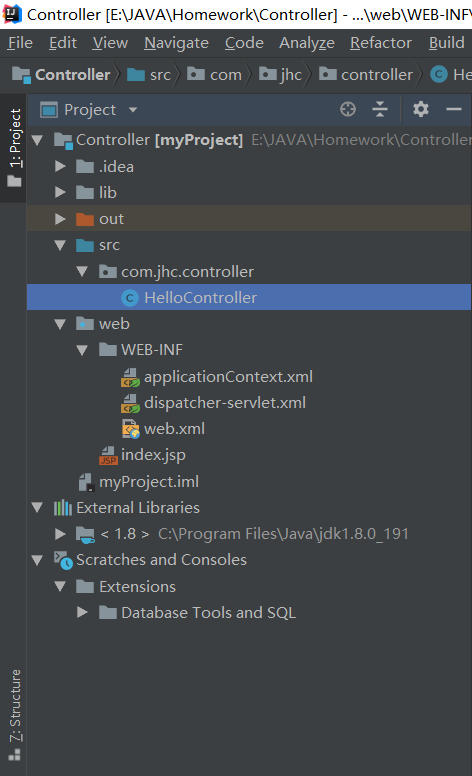
//web.xml
 <?xml version="1.0" encoding="UTF-8"?>

 <web-app xmlns="http://xmlns.jcp.org/xml/ns/javaee"

          xmlns:xsi="http://www.w3.org/2001/XMLSchema-instance"

          xsi:schemaLocation="http://xmlns.jcp.org/xml/ns/javaee http://xmlns.jcp.org/xml/ns/javaee/web-app_4_0.xsd"

          version="4.0">

     <!--配置Spring IoC配置文件路径-->

     <context-param>

         <param-name>contextConfigLocation</param-name>

         <param-value>/WEB-INF/applicationContext.xml,/WEB-INF/dispatcher-servlet.xml</param-value>

     </context-param>

     <!--初始化Spring IoC容器-->

     <listener>

         <listener-class>org.springframework.web.context.ContextLoaderListener</listener-class>

     </listener>

     <!--Spring MVC会根据servlet-name配置,找到/WEB-INF/dispatcher-servlet.xml作为配置文件载入web工程-->

     <servlet>

         <servlet-name>dispatcher</servlet-name>

         <servlet-class>org.springframework.web.servlet.DispatcherServlet</servlet-class>

         <!--配置Spring IoC配置文件路径-->

         <!--<init-param>

             <param-name>contextConfigLocation</param-name>

             <param-value>/WEB-INF/applicationContext.xml,/WEB-INF/dispatcher-servlet.xml</param-value>

         </init-param>-->

         <load-on-startup>1</load-on-startup>

     </servlet>

     <!--Controller-Servlet拦截配置-->

     <servlet-mapping>

         <servlet-name>dispatcher</servlet-name>

         <url-pattern>/</url-pattern>

     </servlet-mapping>

 </web-app>
//applicationContext.xml 该文件可省略,同时将
<!--配置Spring IoC配置文件路径-->

 7     <context-param>

 8         <param-name>contextConfigLocation</param-name>

 9         <param-value>/WEB-INF/applicationContext.xml,/WEB-INF/dispatcher-servlet.xml</param-value>

10     </context-param>

改成
<!--配置Spring IoC配置文件路径-->

 7     <context-param>

 8         <param-name>contextConfigLocation</param-name>

 9         <param-value>/WEB-INF/dispatcher-servlet.xml</param-value>

10     </context-param>
 <?xml version="1.0" encoding="UTF-8"?>

 <beans xmlns="http://www.springframework.org/schema/beans"

        xmlns:xsi="http://www.w3.org/2001/XMLSchema-instance"

        xmlns:mvc="http://www.springframework.org/schema/mvc"

        xmlns:context="http://www.springframework.org/schema/context"

        xmlns:aop="http://www.springframework.org/schema/aop"

        xmlns:tx="http://www.springframework.org/schema/tx"

        xsi:schemaLocation="http://www.springframework.org/schema/beans

         http://www.springframework.org/schema/beans/spring-beans-4.2.xsd

         http://www.springframework.org/schema/mvc

         http://www.springframework.org/schema/mvc/spring-mvc-4.2.xsd

         http://www.springframework.org/schema/context

         http://www.springframework.org/schema/context/spring-context.xsd

         http://www.springframework.org/schema/aop

         http://www.springframework.org/schema/aop/spring-aop-4.2.xsd

         http://www.springframework.org/schema/tx

         http://www.springframework.org/schema/tx/spring-tx.xsd">

 </beans>
//dispatcher-servlet.xml 下面部分声明可省略
 <?xml version="1.0" encoding="UTF-8"?>

 <beans xmlns="http://www.springframework.org/schema/beans"

        xmlns:xsi="http://www.w3.org/2001/XMLSchema-instance"

        xmlns:mvc="http://www.springframework.org/schema/mvc"

        xmlns:context="http://www.springframework.org/schema/context"

        xmlns:aop="http://www.springframework.org/schema/aop"

        xmlns:tx="http://www.springframework.org/schema/tx"

        xsi:schemaLocation="http://www.springframework.org/schema/beans

         http://www.springframework.org/schema/beans/spring-beans-4.2.xsd

         http://www.springframework.org/schema/mvc

         http://www.springframework.org/schema/mvc/spring-mvc-4.2.xsd

         http://www.springframework.org/schema/context

         http://www.springframework.org/schema/context/spring-context.xsd

         http://www.springframework.org/schema/aop

         http://www.springframework.org/schema/aop/spring-aop-4.2.xsd

         http://www.springframework.org/schema/tx

         http://www.springframework.org/schema/tx/spring-tx.xsd">

     <!--使用注解驱动-->

     <mvc:annotation-driven></mvc:annotation-driven>

     <!--<bean class="org.springframework.web.servlet.mvc.method.annotation.RequestMappingHandlerMapping"></bean>

     <bean class="org.springframework.web.servlet.mvc.method.annotation.RequestMappingHandlerAdapter"></bean>-->

     <!--扫描装载的包-->

     <context:component-scan base-package="com.jhc.controller"></context:component-scan>

     <!--定义视图解析器-->

     <bean class="org.springframework.web.servlet.view.InternalResourceViewResolver"></bean>

 </beans>
//index.jsp
 <%--

   Created by IntelliJ IDEA.

   User: JHC

   Date: 2018/11/30

   Time: 17:31

   To change this template use File | Settings | File Templates.

 --%>

 <%@ page contentType="text/html;charset=UTF-8" language="java" %>

 <html>

   <head>

     <title>Hello Word</title>

   </head>

   <body>

   Say:${hello}<br>

   </body>

 </html>
//HelloController.java
 package com.jhc.controller;

 import org.springframework.stereotype.Controller;

 import org.springframework.web.bind.annotation.RequestMapping;

 import org.springframework.web.servlet.ModelAndView;

 @Controller

 public class HelloController {

     @RequestMapping(value = "/hello")

     public ModelAndView sayHello(){

         System.out.println("Hello Word");

         ModelAndView modelAndView=new ModelAndView();

         modelAndView.addObject("hello","Hello Word");

         modelAndView.setViewName("/index.jsp");

         return modelAndView;

     }

 }
SpringMVC之Controller简单使用的更多相关文章
- SpringMVC从Controller跳转到另一个Controller(转)
http://blog.csdn.net/jackpk/article/details/44117603 [PK亲测] 能正常跳转的写法如下: return "forward:aaaa/bb ...
- 详解SpringMVC中Controller的方法中参数的工作原理[附带源码分析]
目录 前言 现象 源码分析 HandlerMethodArgumentResolver与HandlerMethodReturnValueHandler接口介绍 HandlerMethodArgumen ...
- SpringMVC 的 Controller 返回各种视图的处理方式
SpringMVC 的 Controller 可以返回各种各样的视图.比如 JSP, JSON, Velocity, FreeMarker, XML, PDF, Excel, 还有Html字符流 等等 ...
- Spring之SpringMVC的Controller(源码)分析
说明: 例子就不举了,还是直接进入主题,本文主要是以SpringMVC的Controller接口为入点,来分析SpringMVC中C的具体实现和处理过程. 1.Controller接口 public ...
- SpringMVC中Controller
详解SpringMVC中Controller的方法中参数的工作原理[附带源码分析] 目录 前言 现象 源码分析 HandlerMethodArgumentResolver与HandlerMethodR ...
- SpringMVC之Controller和参数绑定
在上一篇Spring+SpringMVC+Mybatis整合中说到了SSM的整合,并且在其中添加了一个简单的查询功能,目的只是将整个整合的流程进行一个梳理,下面在上一篇中工程的基础上再说一些关于Spr ...
- 详解SpringMVC中Controller的方法中参数的工作原理——基于maven
转自:http://www.tuicool.com/articles/F7byQn 前言 SpringMVC是目前主流的Web MVC框架之一. 如果有同学对它不熟悉,那么请参考它的入门blog:ht ...
- SpringMVC中controller返回图片(转)
本文转自:http://blog.csdn.net/u011637069/article/details/51112187 SpringMVC中controller通过返回ModelAndView然后 ...
- 【MVC - 参数原理】详解SpringMVC中Controller的方法中参数的工作原理[附带源码分析]
前言 SpringMVC是目前主流的Web MVC框架之一. 如果有同学对它不熟悉,那么请参考它的入门blog:http://www.cnblogs.com/fangjian0423/p/spring ...
随机推荐
- .net C#实现 中文转Unicode、Unicode转中文 及与js对应关系
中文转Unicode:HttpUtility.UrlEncodeUnicode(string str); 转换后中文格式:"%uxxxx" 举例:"柳_abc123&q ...
- Redis特性之持久化机制
持久化机制 Redis是一个支持持久化的内存数据库,也就是说redis需要经常将内存中的数据同步到硬盘来保证持久化. Redis支持两种持久化方式: 1.snapshotting(快照)也是默认方式 ...
- java进程占用系统内存高,排查方法
查看所有内存占用情况 top 定位线程问题(通过命令查看16764 进程的线程情况) ps p -L -o pcpu,pmem,pid,tid,time,tname,cmd 计数 ps p -L -o ...
- AngularJS(二):ng-app指令、表达式
本文也同步发表在我的公众号“我的天空” ng-app指令 AngularJS指令是扩展的HTML属性,所有指令均带有前缀“ng-”,我们学习的第一个指令便是ng-app,其定义了AngularJS管理 ...
- Each soul is individual and has its own merits and faults.
Each soul is individual and has its own merits and faults. 每一个灵魂都是独特的,都有各自的美德和过错.<摆渡人>
- linux mount命令详解(iso文件挂载)
挂载命令: mount [-t vfstype] [-o options] device dir mount 是挂载命令 -t + 类型 -o + 属性 device iso的文件 dir 挂 ...
- 使用PM2搭建在线vue.js开发环境(以守护进程方式热启动)
项目以vue.js+layUI的作为前端开发技术栈,需要有一个在线的环境供项目成员实时查看效果,总不能每次都webpack打包发布后才能看到效果吧!刚开始就简单使用npm run dev命令热启动,但 ...
- SQLServer 2012 报表服务部署配置(2)
2.当系统打开"SQL Server安装中心",则说明我们可以开始正常的安装SQL Server 2012,可以通过"计划"."安装".&q ...
- [中文翻译] ASP.NET 5 简介(Introducing ASP.NET 5,原作ScottGu 2015/2/23)
本文出处 [中文翻译] ASP.NET 5 简介(Introducing ASP.NET 5,原作ScottGu 2015/2/23) 这是我的文章备份 http://www.dotblogs.co ...
- 2017-3-7-lint82single-number
2017-3-7-lint82single-number 在河之洲 算法 小书匠 problem 82single-number/ solution int singleNumber(vector&l ...