
Ubuntu新服务器安装lnmp
版本:
nginx(无要求,最新)
mysql(5.6.xx)
php(5.6.xx)
ubuntu(16.04,其他版本也并无过多差异)
准备:
#apt-get update
#apt-get install cmake gcc libxml2 libncurses5-dev bison zlib1g-dev libpcre3 openssl libxml2-dev libjpeg-dev libpng-dev lrzsz libssl-dev libfreetype6-dev libmcrypt-dev
#wget https://dev.mysql.com/get/Downloads/MySQL-5.6/mysql-5.6.36.tar.gz
###http://php.net/get/php-5.6.40.tar.gz/from/a/mirror

#mkdir /data/mysql5.6
#mkdir /data/php5.6
安装mysql:
#编译安装
#tar -zxf /data/mysql-5.6.36.tar.gz
#cd /data/mysql-5.6.36
#cmake -DCMAKE_INSTALL_PREFIX=/data/mysql5.6 -DSYSCONFDIR=/etc -DMYSQL_DATADIR=/data/mysql5.6/data -DDEFAULT_CHARSET=utf8 -DDEFAULT_COLLATION=utf8_general_ci -DWITH_EXTRA_CHARSETS=all
make
#make
#make install
#初始化
#rm /etc/my.cnf
#cp /data/mysql-5.6.36/support-files/my-default.cnf /etc/my.cnf
#groupadd mysql
#useradd -g mysql mysql -s /sbin/false
#/data/mysql5.6/scripts/mysql_install_db --user=mysql --basedir=/data/mysql5.6 --datadir=/data/mysql5.6/data/
#修改数据库root密码,不知道密码的情况下
#vi /etc/my.cnf
[mysqld]
skip-grant-tables
#/data/mysql5.6/support-files/mysql.server start
#/data/mysql5.6/bin/mysql
>use mysql;
>update user set password=password("newpasswd") where user="root";
>flush privileges;
#/data/mysql5.6/support-files/mysql.server stop
#/data/mysql5.6/bin/mysql -uroot -pnewpasswd
#验证成功后,需要把配置文件改回去
安装php:
#tar -zxf /data/php-5.6.40.tar.gz
#cd /data/php-5.6.40
#./configure --prefix=/data/php5.6 --with-config-file-path=/data/php5.6 --with-mysql=/data/mysql5.6 --enable-fpm --with-mysqli --with-freetype-dir --with-jpeg-dir=/usr/lib --with-png-dir --with-zlib --enable-mbstring --with-gd --with-mhash --enable-opcache --with-curl --with-iconv-dir --enable-xml --disable-rpath --enable-bcmath --enable-shmop --enable-sysvsem --enable-inline-optimization --enable-mbregex --enable-mbstring --with-mcrypt --enable-ftp --enable-gd-native-ttf --with-openssl --enable-pcntl --enable-sockets --with-xmlrpc --enable-zip --enable-soap --without-pear --with-gettext --disable-fileinfo --enable-maintainer-zts

#报以上错误的话,执行下面
#ln -s /data/mysql5.6/lib/libmysqlclient.so.18 /usr/lib/
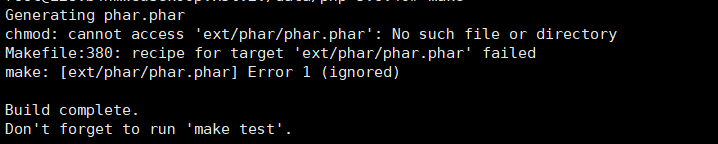
#报以上错误的话,执行下面
#cd ext/phar/
#cp phar.php phar.phar
#另外一些我遇到的其他错都是因为少安装了各种软件插件,已经把必要的安装在上面的准备里全写上了
#make
#make install
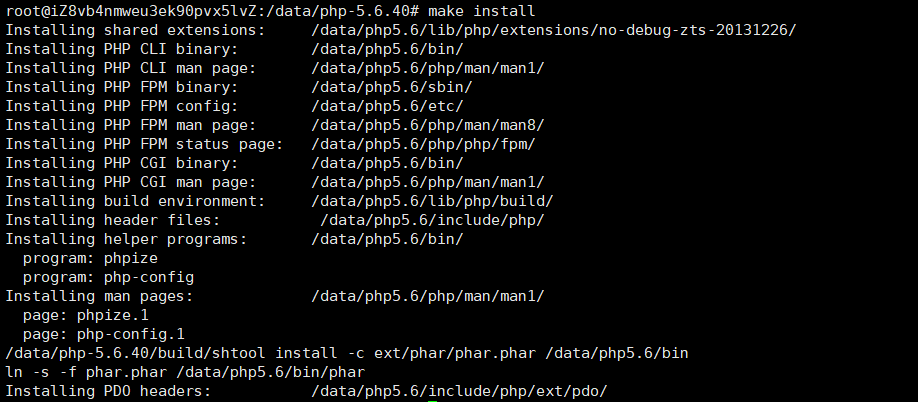
#安装成功显示如下
#优化配置
#/data/php5.6/bin/php --ini

#cp /data/php-5.6.40/php.ini-development /data/php5.6/php.ini
#vi /data/php5.6/php.ini
expose_php = Off
date.timezone = PRC
short_open_tag = On
#useradd -M -s /sbin/nologin php
#cd /data/php5.6/etc/
#cp php-fpm.conf.default php-fpm.conf
#vi php-fpm.conf
pid = run/php-fpm.pid
user = php
group = php
#启动
#/data/php5.6/sbin/php-fpm
安装nginx:
#至于nginx没有版本要求,就直接使用apt-get安装,不用源码安装了
#apt-get install nginx
#这里列一下主要的配置
 #server {

 #        listen ;

 #        server_name www.xxx.cn;

 #        location / {

 #                root /data/www/html;

 #                index index.html index.htm index.php;

 #        }

 #        location ~\.php$ {

 #                root /data/www/html;

 #                fastcgi_pass 127.0.0.1:9000;

 #                fastcgi_index index.php;

 #                fastcgi_param SCRIPT_FILENAME $document_root$fastcgi_script_name;

 #                include fastcgi_params;

 #        }

 #        error_page          /50x.html;

 #        location = /50x.html {

 #                root html;

 #        }

 #

 #}
Ubuntu新服务器安装lnmp的更多相关文章
- 服务器安装LNMP及构建个人站点
服务器安装LNMP(centos6.6+nginx1.7.12+mysql5.6.24+php5.6.7) 本次安装 centos6.6+nginx1.7.12+mysql5.6.24+php5.6 ...
- Ubuntu下安装LNMP之独立添加php扩展模块
使用php的过程中,发现某个扩展没有添加,又不想重新编译php,这个时候我们就需要单独添加需要的扩展模块. 下面以mysqli扩展模块为例,具体介绍安装步骤. 1.安装mysql 具体参考:Ubunt ...
- Ubuntu下安装LNMP之php7的安装并配置Nginx支持php及卸载php
据了解,php7是比之前的版本性能快很多的.http://php.net/get/php-7.2.2.tar.gz/from/a/mirror 安装前也可提前将相关依赖库安装好,或者在安装php时若安 ...
- Ubuntu系统下lnmp环境搭建和Nginx多站点配置
最近需要使用Ubuntu作为服务器搭建Lnmp环境,顺便将操作过程写下来,与大家分享.如有不足之处,欢迎大家提出不同意见.(本文默认读者已经熟悉相关linux命令的使用,比如创建文件和文件夹,编辑文件 ...
- ubuntu环境下lnmp环境搭建(3)之Php
1.lnmp详细 http://www.discuz.net/thread-3513107-1-1.html 2. 到php目录 http://blog.aboutc.net/linux/65/co ...
- Ubuntu下的LNMP环境
保证联网的情况下,直接参照http://lnmp.org/install.html进行安装,以下花括号内为原文引用: { 1.使用putty或类似的SSH工具登陆VPS或服务器: 登陆后运行:scre ...
- ubuntu apt-get 安装 lnmp
最近在 Ubuntu 14.04 LTS 安装 LNMP 一键安装包的时候出现了问题,PHP 5 服务没有启动,只好使用 Ubuntu 官方源进行安装: Nginx (读音 “engine x”)免费 ...
- 阿里云服务器Ubuntu系统搭建LNMP环境
目录 一.Nginx 安装 二.MySQL安装 三.PHP安装 四.配置Nginx 五.环境测试 六.服务器常用路径 一.Nginx 安装 更新软件源 sudo apt-get update 安装 N ...
- 阿里云Linux CentOS8.1 64位服务器安装LNMP(Linux+Nginx+MySQL+PHP) 并发调试之Nginx配置
搭建好LNMP环境之后,接着要考虑的就是整个系统的并发能力了. 一.Nginx的配置 Nginx有很好的并发能力.但是要想使它的并发能力能够施展出来,需要在初步安装好的Nginx上做一些配置.主要需要 ...
随机推荐
- Mysql处理字符串函数(转)
http://www.jb51.net/article/27458.htm 感觉上MySQL的字符串函数截取字符,比用程序截取(如PHP或JAVA)来得强大,所以在这里做一个记录,希望对大家有用. 函 ...
- 如何解压deb文件
有两种方法: Bash代码 1.dpkg -x xx.deb /tmp/oo 注意:/tmp/oo为自己解压文件路径,可以随意指定路径 2.ar -vx xx.deb 这会解压出3个文件debian- ...
- ACM学习历程—HDU 2112 HDU Today(map && spfa && 优先队列)
Description 经过锦囊相助,海东集团终于度过了危机,从此,HDU的发展就一直顺风顺水,到了2050年,集团已经相当规模了,据说进入了钱江肉丝经济开发区500强.这时候,XHD夫妇也退居了二线 ...
- ACM学习历程——HDU4814 Golden Radio Base(数学递推) (12年成都区域赛)
Description Golden ratio base (GRB) is a non-integer positional numeral system that uses the golden ...
- The Review Plan I-禁位排列和容斥原理
The Review Plan I Time Limit: 5000ms Case Time Limit: 5000ms Memory Limit: 65536KB 64-bit integer ...
- C#中如何应用索引器 ( How to use Indexers )
C#中索引器是个好东西, 可以允许类或者结构的实例像数组一样进行索引. 在foreach或者直接索引时很有用. 使用索引器可以简化客户端代码, 即调用者可以简化语法,直观理解类及其用途. 索引器只能根 ...
- 使用EA完成数据库设计
开始重构之后对于EA的了解也逐渐增多,今天就总结一下如何使用EA完成对数据库的设计.下边的图分别是截自机房收费系统和牛腩新闻开发的数据库,因为我第一遍写的时候是在机房合作的时候,而后建立牛腩新闻发布系 ...
- python3+selenium使用浏览器IE的时候,无法打开IE浏览器,老是报错: Unexpected error launching Internet Explorer. Protected Mode settings are not the same for all zones
python3+selenium使用浏览器IE的时候,老是报错: Unexpected error launching Internet Explorer. Protected Mode settin ...
- 在python 3.6下用pip 安装第三方库,比如pip install requests,老是报错 Fatal error in launcher: Unable to create process using '"'
解决办法:我把python.exe 修改为了python3.exe ,为了兼容python2, 后来把python2从环境变量里删除,把python3.exe修改为了python.exe 就解决了,再 ...
- PHP生成唯一的订单号
记:之前面试的时候被面试官问过简历项目中的订单号我是什么规则生成的,我牛逼吹过头了,乱说了一通,靠!今天在公司的项目中订单号生成,好奇,看了下,就是网上的这种而已. * * uniqid - 官方是这 ...