
Winform版本发布更新
版本发布:
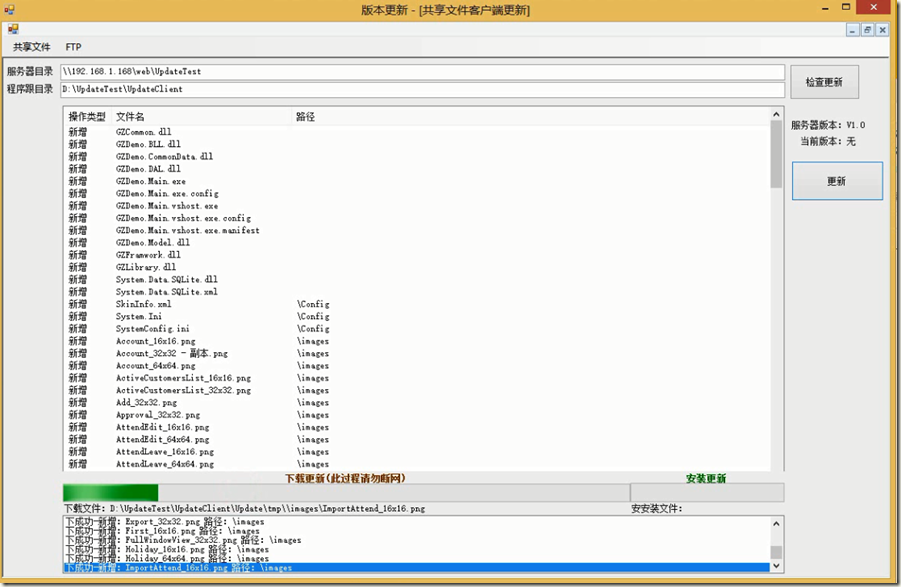
一、局域网共享文件方式
发布界面:

更新界面:
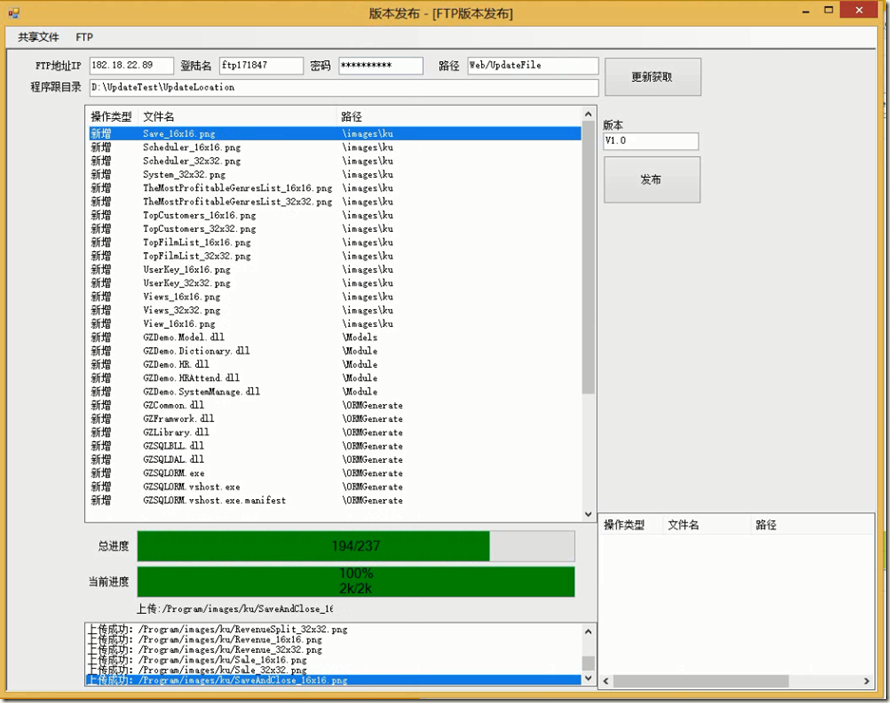
二、FTP方式
发布界面
更新界面:
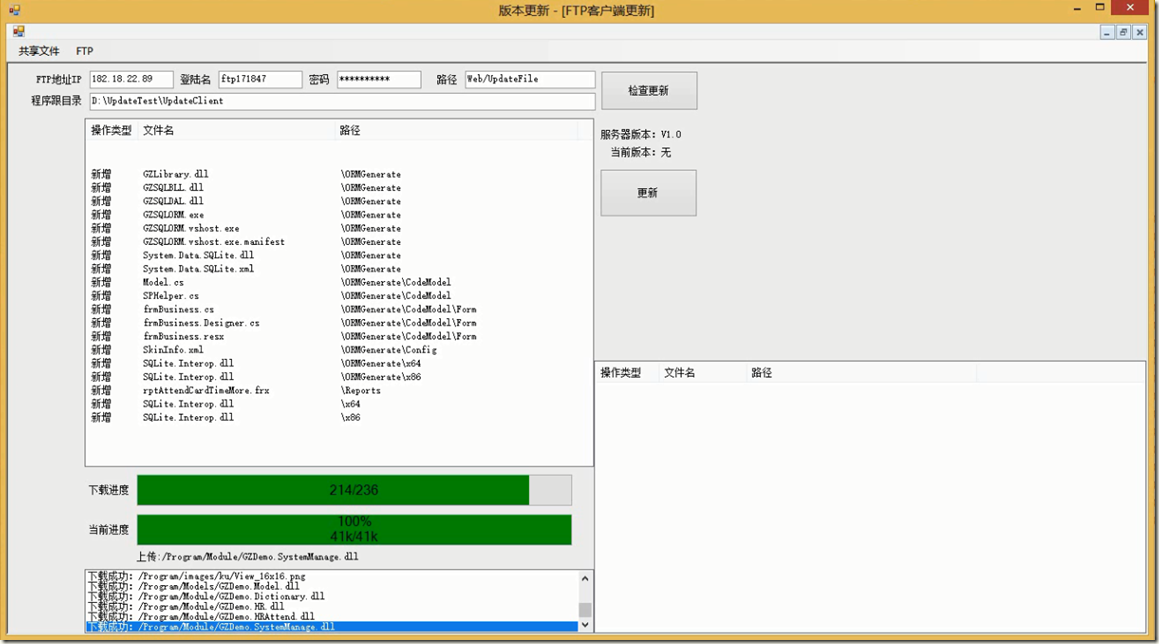
(只会更新有变动的文件)
同步新增,替换与删除
实现方式XML(文件名+文件最后修改时间)
状态判断:LINQ(通过对比本地XML和服务器XML的不同)
XML实质是一张DataSet
包含两张表
#region 获得数据集结构

        /// <summary>

        /// 获得数据集结构

        /// </summary>

        /// <returns></returns>

        protected DataSet GenerateDataSchema()

        {

            DataTable dtV = new DataTable(DataSchema.VersionSchema.TableName);

            dtV.Columns.Add(DataSchema.VersionSchema.Version);

            DataTable dtD = new DataTable(DataSchema.DetailSchema.TableName);

            dtD.Columns.Add(DataSchema.DetailSchema.Name, typeof(System.String));//名称

            dtD.Columns.Add(DataSchema.DetailSchema.EditDate, typeof(System.DateTime));//修改时间

            dtD.Columns.Add(DataSchema.DetailSchema.Size, typeof(System.String));//大小

            dtD.Columns.Add(DataSchema.DetailSchema.Path, typeof(System.String));//路径

            DataSet ds = new DataSet();

            ds.Tables.Add(dtV);

            ds.Tables.Add(dtD);

            return ds;

        }

        #endregion
LINQ服务器和本地对比代码:
版本发布:
//需要新增的

            //需要删除的

            //需要替换的

            var DataEdit = from dtLocation in LocalDetailFiles.AsEnumerable()

                           join dtServer in ServerDetailFiles.AsEnumerable()

                           on dtLocation.Field<string>(DataSchema.DetailSchema.Path) + dtLocation.Field<string>(DataSchema.DetailSchema.Name) equals

                              dtServer.Field<string>(DataSchema.DetailSchema.Path) + dtServer.Field<string>(DataSchema.DetailSchema.Name)

                           where dtLocation.Field<DateTime>(DataSchema.DetailSchema.EditDate) > dtServer.Field<DateTime>(DataSchema.DetailSchema.EditDate)

                           select new

                           {

                               Name = dtLocation.Field<string>(DataSchema.DetailSchema.Name),

                               Path = dtLocation.Field<string>(DataSchema.DetailSchema.Path)

                           };

            var DataAdd = from dtLocal in LocalDetailFiles.AsEnumerable()

                          where !ServerDetailFiles.AsEnumerable().Any(y => y.Field<string>(DataSchema.DetailSchema.Path) + y.Field<string>(DataSchema.DetailSchema.Name) == dtLocal.Field<string>(DataSchema.DetailSchema.Path) + dtLocal.Field<string>(DataSchema.DetailSchema.Name))

                          select new

                          {

                              Name = dtLocal.Field<string>(DataSchema.DetailSchema.Name),

                              Path = dtLocal.Field<string>(DataSchema.DetailSchema.Path)

                          };

            var DataDelete = from dtServer in ServerDetailFiles.AsEnumerable()

                             where !LocalDetailFiles.AsEnumerable().Any(y => y.Field<string>(DataSchema.DetailSchema.Path) + y.Field<string>(DataSchema.DetailSchema.Name) == dtServer.Field<string>(DataSchema.DetailSchema.Path) + dtServer.Field<string>(DataSchema.DetailSchema.Name))

                             select new

                             {

                                 Name = dtServer.Field<string>(DataSchema.DetailSchema.Name),

                                 Path = dtServer.Field<string>(DataSchema.DetailSchema.Path)

                             };

            dtUpdateFiles = new DataTable();

            dtUpdateFiles.Columns.Add("Name", typeof(System.String));

            dtUpdateFiles.Columns.Add("Path", typeof(System.String));

            dtUpdateFiles.Columns.Add("Type", typeof(System.String));

            foreach (var v in DataAdd)

            {

                DataRow dr = dtUpdateFiles.Rows.Add();

                dr["Type"] = "1";

                dr["Name"] = v.Name;

                dr["Path"] = v.Path;

                //ListViewItem item = new ListViewItem("新增");

                //item.SubItems.Add(v.Name);//文件名

                //item.SubItems.Add(v.Path);//路径

                //LVFile.Items.Add(item);

            }

            foreach (var v in DataEdit)

            {

                DataRow dr = dtUpdateFiles.Rows.Add();

                dr["Type"] = "2";

                dr["Name"] = v.Name;

                dr["Path"] = v.Path;

                //ListViewItem item = new ListViewItem("替换");

                //item.SubItems.Add(v.Name);//文件名

                //item.SubItems.Add(v.Path);//路径

                //LVFile.Items.Add(item);

            }

            foreach (var v in DataDelete)

            {

                DataRow dr = dtUpdateFiles.Rows.Add();

                dr["Type"] = "3";

                dr["Name"] = v.Name;

                dr["Path"] = v.Path;

                //ListViewItem item = new ListViewItem("删除");

                //item.SubItems.Add(v.Name);//文件名

                //item.SubItems.Add(v.Path);//路径

                //LVFile.Items.Add(item);

            }
版本更新:
//需要新增的

            //需要删除的

            //需要替换的

            var DataEdit = from dtServer in ServerDetailFiles.AsEnumerable()

                           join dtLocation in LocalDetailFiles.AsEnumerable()

                           on dtServer.Field<string>(DataSchema.DetailSchema.Path) + dtServer.Field<string>(DataSchema.DetailSchema.Name) equals

                                dtLocation.Field<string>(DataSchema.DetailSchema.Path) + dtLocation.Field<string>(DataSchema.DetailSchema.Name)

                           where dtServer.Field<DateTime>(DataSchema.DetailSchema.EditDate) > dtLocation.Field<DateTime>(DataSchema.DetailSchema.EditDate)

                           select new

                           {

                               Name = dtServer.Field<string>(DataSchema.DetailSchema.Name),

                               Path = dtServer.Field<string>(DataSchema.DetailSchema.Path)

                           };

            var DataAdd = from dtServer in ServerDetailFiles.AsEnumerable()

                          where !LocalDetailFiles.AsEnumerable().Any(y => y.Field<string>(DataSchema.DetailSchema.Path) + y.Field<string>(DataSchema.DetailSchema.Name) == dtServer.Field<string>(DataSchema.DetailSchema.Path) + dtServer.Field<string>(DataSchema.DetailSchema.Name))

                          select new

                          {

                              Name = dtServer.Field<string>(DataSchema.DetailSchema.Name),

                              Path = dtServer.Field<string>(DataSchema.DetailSchema.Path)

                          };

            var DataDelete = from dtLocation in LocalDetailFiles.AsEnumerable()

                             where !ServerDetailFiles.AsEnumerable().Any(y => y.Field<string>(DataSchema.DetailSchema.Path) + y.Field<string>(DataSchema.DetailSchema.Name) == dtLocation.Field<string>(DataSchema.DetailSchema.Path) + dtLocation.Field<string>(DataSchema.DetailSchema.Name))

                             select new

                             {

                                 Name = dtLocation.Field<string>(DataSchema.DetailSchema.Name),

                                 Path = dtLocation.Field<string>(DataSchema.DetailSchema.Path)

                             };
Winform版本发布更新的更多相关文章
- winform版本自动更新
我们在使用软件的时候经常会遇到升级版本,这也是Winform程序的一个功能,今天就大概说下我是怎么实现的吧(代码有点不完美有小BUG,后面再说) 先说下我的思路:首先在打开程序的时候去拿到我之前在网站 ...
- Taurus.MVC-Java 版本打包上传到Maven中央仓库(详细过程):5、Maven版本发布与后续版本更新(大结局)
文章目录: Taurus.MVC-Java 版本打包上传到Maven中央仓库(详细过程):1.JIRA账号注册 Taurus.MVC-Java 版本打包上传到Maven中央仓库(详细过程):2.PGP ...
- RDIFramework.NET平台代码生成器V3.0版本全新发布-更新于20160518(提供下载)
最新版本请转到:RDIFramework.NET平台代码生成器V3.1版本全新发布-更新于2016-10-08(提供下载) RDIFramework.NET代码生成器V3.0版本修改了针对3.0版本的 ...
- go-wingui 2018 全新 v2.0 版本发布,包含重大更新!
go-wingui 2018 全新 v2.0 版本发布,包含重大更新!使用新版CEF内核Chromium 63.0.3239.109,页面可以使用最新的css3,html5技术.使用delphi7重写 ...
- 自动化部署与统一安装升级 - 类ansible工具 udeploy0.3版本发布 (更新时间2014-12-24)
下载地址: unifyDeploy0.1版本 unifyDeploy0.2版本 unifyDeploy0.3版本 (更新时间2014-07-25) 自动化部署与统一安装升级,适用于多资 ...
- JeeWx全新版本发布!捷微二代微信活动平台1.0发布!活动插件持续开源更新!
JeeWx捷微二代微信活动平台 (专业微信营销活动平台,活动插件持续更新ing~) 终于等到你!还好我没放弃! 在团队持续多年的努力下,Jeewx微信管家和H5活动平台不断更新迭代,积累了许许多 ...
- RDIFramework.NET ━ .NET快速信息化系统开发框架 V2.8 版本发布
(新年巨献) RDIFramework.NET ━ .NET快速信息化系统开发框架 V2.8 版本发布 历时数月,RDIFramework.NET V2.8版本发布了,感谢大家的支持. RDIFram ...
- RDIFramework.NET ━ .NET快速信息化系统开发框架 V2.7 版本发布
历时数月,RDIFramework.NET V2.7 版本发布了,感谢大家的支持. RDIFramework.NET,基于.NET的快速信息化系统开发.整合框架,为企业或个人在.NET环境下快速开发系 ...
- EQueue 2.3.2版本发布(支持高可用)
前言 前段时间针对EQueue的完善终于告一段落了,实在值得庆祝,自己的付出和坚持总算有了成果.这次新版本主要为EQueue实现了集群功能,基本实现了Broker的高可用.另外还增加了很多实用的功能, ...
随机推荐
- 7. 星际争霸之php设计模式--中介者模式
题记==============================================================================本php设计模式专辑来源于博客(jymo ...
- 《zw版·Halcon-delphi系列原创教程》 邮票艺术品自动分类脚本
<zw版·Halcon-delphi系列原创教程> 邮票艺术品自动分类脚本 邮票艺术品自动分类脚本,是个综合应用,有不同尺寸图像的自动识别.区域分割 还有作品附近文字的自动分割 此类项目, ...
- OpenStack 密码注入
现状 实例可以创建,可以使用vnc,可以ssh,但是就是密码要使用默认tima123,要修改密码必须进入虚拟机.实际场景中如果用户将密码修改后忘记,需要重置密码则我们作为管理员也没有办法.这在实际需求 ...
- python实现指定目录下批量文件的单词计数:串行版本
直接上代码. 练习目标: 1. 使用 Python 面向对象的方法封装逻辑和表达 : 2. 使用异常处理和日志API : 3. 使用文件目录读写API : 4. 使用 list, map, t ...
- Index Condition Pushdown Optimization
Index Condition Pushdown (ICP) is an optimization for the case where MySQL retrieves rows from a tab ...
- 如何通过ps -ef|grep tomcat只获得你需要的查询进程,排除掉grep本身的进程信息
执行命令:ps -ef|grep tomcat|grep /opt/upay3/application/dispatcherTomcat/bin输出的进程信息会显示2个:包括grep本身的进程+你查询 ...
- 161021、spring异步调用,完美解决!
前言 项目中,用户抢单,下单需要向对方推送消息,但是加上推送就会造成抢单和下单性能降低,反应变慢,因为抢单下单动作跟推送部分是同步的,现在想改成异步推送. 在Java应用中,绝大多数情况下都是通过同步 ...
- loading等待载入正在加载的动画GIF图片圆形图标
http://www.wtoutiao.com/p/GdfbdM.html
- Java Properties工具类详解
1.Java Properties工具类位于java.util.Properties,该工具类的使用极其简单方便.首先该类是继承自 Hashtable<Object,Object> 这就奠 ...
- sort DEMO
测试用文件: [weblogic@etp-mall-dev7][/tmp]$ cat msn.txt aaa, fff, bbb, cc, ee, gg, hh, zz, mmm, DEMO1:按第一 ...