
bootstrap学习笔记<二>(标题,段落样式)
标题。样式:class="h1"~class="h6"
bootstrap中重新定义了h1~h6标签,具体差别如下:
在bootstrap中其他任何标签使用class="h1"~class="h6"都可以实现h1~h6的标题效果。
<!--Bootstrap中的标题-->

<h1>Bootstrap标题一</h1>

<h2>Bootstrap标题二</h2>

<h3>Bootstrap标题三</h3>

<h4>Bootstrap标题四</h4>

<h5>Bootstrap标题五</h5>

<h6>Bootstrap标题六</h6>

<!--Bootstrap中让非标题元素和标题使用相同的样式-->

<div class="h1">Bootstrap标题一</div>

<div class="h2">Bootstrap标题二</div>

<div class="h3">Bootstrap标题三</div>

<div class="h4">Bootstrap标题四</div>

<div class="h5">Bootstrap标题五</div>

<div class="h6">Bootstrap标题六</div>

<p class="h1">title</p>
副标题。标签:<small></small>
bootstrap还提供了副标题功能

副标题标签为<small></small>
<!--Bootstrap中使用了<small>标签来制作副标题-->

<h1>Bootstrap标题一<small>我是副标题</small></h1>

<h2>Bootstrap标题二<small>我是副标题</small></h2>

<h3>Bootstrap标题三<small>我是副标题</small></h3>

<h4>Bootstrap标题四<small>我是副标题</small></h4>

<h5>Bootstrap标题五<small>我是副标题</small></h5>

<h6>Bootstrap标题六<small>我是副标题</small></h6>
注意:small标签仅在h1~h6标签之内才生效副标题效果。
段落<p>标签
bootstrap对<p>标签也进行了优化,让段落更分明。
这里就不做演示。
强调效果。样式class="lead"
该样式会将文字字体相对同等标签放大。
<p>我是普通文本,我的样子长成这样我是普通文本</p>

<p class="lead">

我是特意要突出的文本,我的样子成这样。我是特意要突出的文本。

</p>
强调相关类
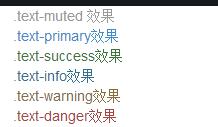
bootstrap为文字,按钮等元素提供多样的颜色警示和强调。
- .text-muted:提示,使用浅灰色(#999)
- .text-primary:主要,使用蓝色(#428bca)
- .text-success:成功,使用浅绿色(#3c763d)
- .text-info:通知信息,使用浅蓝色(#31708f)
- .text-warning:警告,使用黄色(#8a6d3b)
- .text-danger:危险,使用褐色(#a94442)
同样primary,success,info,warning,danger这些强调警示颜色也能用在其他元素,如:but
<div class="text-muted">.text-muted 效果</div>

<div class="text-primary">.text-primary效果</div>

<div class="text-success">.text-success效果</div>

<div class="text-info">.text-info效果</div>

<div class="text-warning">.text-warning效果</div>

<div class="text-danger">.text-danger效果</div>
bootstrap学习笔记<二>(标题,段落样式)的更多相关文章
- Bootstrap学习笔记(二) 表单
在Bootstrap学习笔记(一) 排版的基础上继续学习Bootstrap的表单,编辑器及head内代码不变. 3-1 基础表单 单中常见的元素主要包括:文本输入框.下拉选择框.单选按钮.复选按钮.文 ...
- bootstrap学习笔记细化(标题)
bootstrap中的排版: 标题(h1~h6/.h1~.h6) h1:36px;h2:30px;h3:24px;h4:18px;h5:14px;h6:12px; 副标题(small) 小练习(标题大 ...
- Html+css学习笔记二 标题
学习新标签,标题 <html> <head> <title>tags</title> </head> <body> <h1 ...
- bootstrap学习笔记之为导航条添加标题、二级菜单及状态 http://www.imooc.com/code/3120
为导航条添加标题.二级菜单及状态 加入导航条标题 在Web页面制作中,常常在菜单前面都会有一个标题(文字字号比其它文字稍大一些),其实在Bootstrap框架也为大家做了这方面考虑,其通过" ...
- amazeui学习笔记二(进阶开发3)--HTML/CSS规范Rules
amazeui学习笔记二(进阶开发3)--HTML/CSS规范Rules 一.总结 1.am:以 am 为命名空间 2.模块状态: {命名空间}-{模块名}-{状态描述} 3.子模块: {命名空间}- ...
- amazeui学习笔记--css(基本样式3)--文字排版Typography
amazeui学习笔记--css(基本样式3)--文字排版Typography 一.总结 1.字体:amaze默认非 衬线字体(sans-serif) 2.引用块blockquote和定义列表:引用块 ...
- Html学习笔记(二) 简单标签
标签的重点 标签的用途 标签在浏览器中的默认样式 <body>标签: 在网页上显示的内容 <p>标签: 添加段落 <hx>标签: 添加标题 标签一共有6个,h1.h ...
- amazeui学习笔记二(进阶开发5)--Web 组件开发规范Rules
amazeui学习笔记二(进阶开发5)--Web 组件开发规范Rules 一.总结 1.见名知意:见那些class名字知意,见函数名知意,见文件名知意 例如(HISTORY.md Web 组件更新历史 ...
- amazeui学习笔记--css(基本样式4)--打印样式Print
amazeui学习笔记--css(基本样式3)--打印样式Print 一.总结 1.打印显示url方法: 利用 CSS3 content 属性,将 <a> 和 <abbr> 的 ...
随机推荐
- 【PHP操作sphinx】
[index.php] [find.php] <?php header("Content-type:text/html;charset=utf-8"); $keyword = ...
- java 堆栈 静态
所以静态变量和非静态变量的区别就在于静态变量可以用来计数,而非静态变量则不行. 理解了内存,就理解了一切,就理解了各种各样的语言.所有的语言无非都是这样:局部变量分配内存永远在栈里面,new出来的东西 ...
- SQL Server 2005 日志文件过大处理
由于安装的时候没有计划好空间,默认装在系统盘,而且又没有做自动备份.截断事务日志等,很快LDF文件就达到十几G,或者几十G ,此时就不得不处理了. 备份和计划就不说了,现在就说下怎么把它先删除吧: 1 ...
- hdwiki 在IIS 下的伪静态
HDwiki有SEO设置的功能,此功能可以将HDwiki的页面进行URL静态化转换,从而使HDwiki内容更容易被搜索引擎挖掘,提高被收录的机率.注意事项 1.本功能对服务器环境有特殊要 ...
- git学习相关资料
入门还是廖大师的博客. 搭建git服务器: http://blog.csdn.net/code_style/article/details/38764203
- miniUI子窗口调父窗口方法
window.Owner.XXX 其中XXX是父窗口里的方法名
- 20151124002 treeView 数型菜单的操作
20151124002 treeView 数型菜单的操作 protected void FillTree() { SqlConnection1 = new Syst ...
- -WEBKIT-USER-SELECT:NONE导致输入框无法输入
原文:http://hicc.me/post/webkit-user-select-none-disabling-text-field.html 最近在webview中写页面的时候发现个别Androi ...
- Socket状态变迁图
在一些防火墙或端口管理工具中经常会看到连接状态为CLOSED CLOSE_WITE LAST_ACK等的进程, 虽然状态就那么很少的几个, 而且看字面意思也能猜个大概, 但没做过Socket编程的朋友 ...
- linux Centos 6.5 FTP服务原理及vsfptd的安装、配置(转)
本篇随笔将讲解FTP服务的原理以及vsfptd这个最常用的FTP服务程序的安装与配置... 一.FTP服务原理 FTP(File Transfer Protocol)是一个非常古老并且应用十分广泛的文 ...