
ASP.NET MVC 开源项目学习之ProDinner (一)
首先在github上面将ProDinner项目通过 Git Bash 克隆到本地,接下来我们开始分析这个项目吧~
系统采用.Net 4.5, Asp.net Mvc 5,VS2012,Sql server,系统的整体设计非常轻量级,却做到了整体架构分层明显,模块耦合度低的架构思想,很适合新手学习.
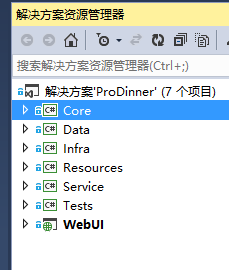
Core层实现了本地化Model和EF模型化需要的model数据,另外,Core层还为低耦合的业务逻辑和低耦合的数据访问做好了接口准备.
1.Model:
以下是表关系的大致内容:

我们在分析数据库表结构的时候,经常会发现表与表之间有很多共同的字段,例如Id,操作时间,操作人等等,所以可以为这些表构造公共基类,比如Entity就是所有表的基类.而事实上,对First Code而言,根本就不存在数据库的概念.
 public class Entity

    {

        public int Id { get; set; }

    }

 public class Feedback : Entity

    {

        public string Comments { get; set; }

    }

 public class Meal : DelEntity

    {

        public string Name { get; set; }

        public string Comments { get; set; }

        public virtual ICollection<Dinner> Dinners { get; set; }

        public string Picture { get; set; }

    }

 public class Role : Entity

    {

        public string Name { get; set; }

        public virtual ICollection<User> Users { get; set; }

    }

 public class User : DelEntity

    {

        public string Login { get; set; }

        public string Password { get; set; }

        public virtual ICollection<Role> Roles { get; set; }

    }

 public class Dinner : DelEntity

    {

        public string Name { get; set; }

        public int CountryId { get; set; }

        public virtual Country Country { get; set; }

        public int ChefId { get; set; }

        public virtual Chef Chef { get; set; }

        public string Address { get; set; }

        public DateTime Start { get; set; }

        public DateTime End { get; set; }

        public virtual ICollection<Meal> Meals { get; set; }

    }

 public class DelEntity : Entity, IDel

    {

        public bool IsDeleted { get; set; }

    }

 public class Country : DelEntity

    {

        public string Name { get; set; }

    }

 public class Chef : DelEntity

    {

        public string FirstName { get; set; }

        public string LastName { get; set; }

        public int CountryId { get; set; }

        public virtual Country Country { get; set; }

    }

 public interface IDel

    {

        bool IsDeleted { get; set; }

    }
从代码中可以看出,涉及到表关联的时候,统一使用了ICollection<T>的集合,类型都是Virtual,这表明这一Model层都是接口和基类,会被重写.
接下来就是创建应用程序所需的业务类.
2.Repository(仓库)
 public interface IDelRepo<T>

    {

        IQueryable<T> Where(Expression<Func<T, bool>> predicate, bool showDeleted = false);

        IQueryable<T> GetAll();

        void Restore(T o);

    }

   public interface IRepo<T>

    {

        T Get(int id);

        IQueryable<T> GetAll();

        IQueryable<T> Where(Expression<Func<T, bool>> predicate, bool showDeleted = false);

        T Insert(T o);

        void Save();

        void Delete(T o);

        void Restore(T o);

    }

  public interface IUniRepo

    {

        T Insert<T>(T o) where T : Entity, new();

        void Save();

        T Get<T>(int id) where T : Entity;

        IEnumerable<T> GetAll<T>() where T : Entity;

    }
从代码可以很明显看出,这是数据操作方式和数据业务逻辑的函数原型,其后service的所有具体实现的实体数据操作都会基于这些接口.
3.Security
引用了Asp.net的身份验证模块,故也进行了相应的接口限制
    public interface IFormsAuthentication

    {

        void SignIn(string userName, bool createPersistentCookie, IEnumerable<string> roles);

        void SignOut();

    }
4.Service
该层接口详细定义了四个类的操作接口:
ICrudService继承了上层接口的抽象接口
IMealService类继承了 ICrudService 同时,规定了图片保存的接口
IUserService继承了ICrudService,规定了用户验证的接口
5.ProDinnerException规定了系统自定义的抛错机制。
至此,Core层就介绍完了~
ASP.NET MVC 开源项目学习之ProDinner (一)的更多相关文章
- ASP.NET MVC 开源项目学习之ProDinner (二)
下面我们来看第二层:Data 这一层相对来说是对Core层的具体实现了. 从命名可以看出来,这和数据库相关. 1.Db.cs CodeFirst模式的本地数据库类,继承了DbContext. pr ...
- ASP.NET MVC 开源项目学习之ProDinner (三)
第四层:Resources 这一层里面主要是几个资源文件. 资源文件知识小杂烩: 几乎每一个生产性应用程序都需要使用资源.资源是在逻辑上由应用程序部署的任何非可执行数据.资源可以在应用程序中作为错 ...
- ASP.Net MVC开发基础学习笔记:一、走向MVC模式
一.ASP.Net的两种开发模式 1.1 ASP.Net WebForm的开发模式 (1)处理流程 在传统的WebForm模式下,我们请求一个例如http://www.aspnetmvc.com/bl ...
- ASP.Net MVC开发基础学习笔记(1):走向MVC模式
一.ASP.Net的两种开发模式 1.1 ASP.Net WebForm的开发模式 (1)处理流程 在传统的WebForm模式下,我们请求一个例如http://www.aspnetmvc.com/bl ...
- ASP.NET MVC Web API 学习笔记---第一个Web API程序
http://www.cnblogs.com/qingyuan/archive/2012/10/12/2720824.html GetListAll /api/Contact GetListBySex ...
- angular2+typescript在asp.net MVC Web项目上的实现
网上现在还没有关于angular2+typescript在asp.net mvc web项目上的实现的系统介绍,这里我也只是探索到了一个简单的方式,还有很多问题没能解决.但是能有个好的开头也值得记录一 ...
- 使用Visual Studio 2015 开发ASP.NET MVC 5 项目部署到Mono/Jexus
最新的Mono 4.4已经支持运行asp.net mvc5项目,有的同学听了这句话就兴高采烈的拿起Visual Studio 2015创建了一个mvc 5的项目,然后部署到Mono上,浏览下发现一堆错 ...
- ASP.NET MVC搭建项目后台UI框架—1、后台主框架
目录 ASP.NET MVC搭建项目后台UI框架—1.后台主框架 ASP.NET MVC搭建项目后台UI框架—2.菜单特效 ASP.NET MVC搭建项目后台UI框架—3.面板折叠和展开 ASP.NE ...
- ASP.NET MVC搭建项目后台UI框架—11、自动加载下拉框查询
ASP.NET MVC搭建项目后台UI框架—1.后台主框架 需求:在查询记录的时候,输入第一个字,就自动把以这个字开头的相关记录查找出来,输入2个字就过滤以这两个子开头的记录,依次类推. 突然要用到这 ...
随机推荐
- Sublime Text 3 自定义配置快捷键
Settings-User: { "font_face": "Courier New", "font_size": 14.0, " ...
- 黄聪:查看mysql数据库真正的data目录
终于找到了mysql数据库data目录在哪里! 用show variables like 'datadir',可查看真正的data目录 原文:http://blog.csdn.net/dmz1981/ ...
- 黄聪:Xmind修改默认字体风格设置
Xmind是一款非常好用的思维导图软件,但默认字体使用宋体不够好看,软件本身不支持设置默认字体,但通过修改配置文件达到配置默认字体的目的 默认控制风格的配置文件位置 XMind\plugins\org ...
- (C#) 调用执行批处理文件
Task: 在Windows的Service里面定时的调用执行一个批处理文件. private ApplicationOutput RunCommandOnPC(string executableP ...
- [JS]鼠标事件穿透的问题
今天制作登陆窗口的效果时碰到的一个问题,如下: 标签结构如下: <div id="loginFrame"> <form class="loginFram ...
- POJ 4046 Sightseeing 枚举+最短路 好题
有n个节点的m条无向边的图,节点编号为1~n 然后有点权和边权,给出q个询问,每一个询问给出2点u,v 输出u,v的最短距离 这里的最短距离规定为: u到v的路径的所有边权+u到v路径上最大的一个点权 ...
- python(6)时间戳和北京时间互转,输出当前的时间和推到七天前的日期
项目发展的需要:(包含时间函数)time datetime 时间戳和北京时间互转 import time import datetime s = '2015-04-17 11:25:30' d = d ...
- Hololens开发笔记之Gesture手势识别(基本介绍)
手势识别是HoloLens交互的重要输入方法之一.HoloLens提供了底层API和高层API,可以满足不同的手势定制需求.底层API能够获取手的位置和速度信息,高层API则借助手势识别器来识别预设的 ...
- purple-accessData
ylbtech-class:purple-accessData A, 返回顶部 1,送货时间 #region 送货时间 /// <summary> /// 送货时间 /// </su ...
- Java注解教程及自定义注解
Java注解提供了关于代码的一些信息,但并不直接作用于它所注解的代码内容.在这个教程当中,我们将学习Java的注解,如何定制注解,注解的使用以及如何通过反射解析注解. Java1.5引入了注解,当前许 ...