
ASP.NET MVC 开源项目学习之ProDinner (一)
首先在github上面将ProDinner项目通过 Git Bash 克隆到本地,接下来我们开始分析这个项目吧~
系统采用.Net 4.5, Asp.net Mvc 5,VS2012,Sql server,系统的整体设计非常轻量级,却做到了整体架构分层明显,模块耦合度低的架构思想,很适合新手学习.
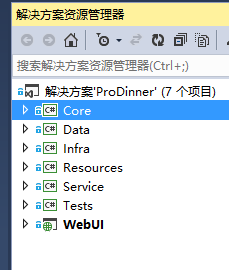
Core层实现了本地化Model和EF模型化需要的model数据,另外,Core层还为低耦合的业务逻辑和低耦合的数据访问做好了接口准备.
1.Model:
以下是表关系的大致内容:

我们在分析数据库表结构的时候,经常会发现表与表之间有很多共同的字段,例如Id,操作时间,操作人等等,所以可以为这些表构造公共基类,比如Entity就是所有表的基类.而事实上,对First Code而言,根本就不存在数据库的概念.
 public class Entity

    {

        public int Id { get; set; }

    }

 public class Feedback : Entity

    {

        public string Comments { get; set; }

    }

 public class Meal : DelEntity

    {

        public string Name { get; set; }

        public string Comments { get; set; }

        public virtual ICollection<Dinner> Dinners { get; set; }

        public string Picture { get; set; }

    }

 public class Role : Entity

    {

        public string Name { get; set; }

        public virtual ICollection<User> Users { get; set; }

    }

 public class User : DelEntity

    {

        public string Login { get; set; }

        public string Password { get; set; }

        public virtual ICollection<Role> Roles { get; set; }

    }

 public class Dinner : DelEntity

    {

        public string Name { get; set; }

        public int CountryId { get; set; }

        public virtual Country Country { get; set; }

        public int ChefId { get; set; }

        public virtual Chef Chef { get; set; }

        public string Address { get; set; }

        public DateTime Start { get; set; }

        public DateTime End { get; set; }

        public virtual ICollection<Meal> Meals { get; set; }

    }

 public class DelEntity : Entity, IDel

    {

        public bool IsDeleted { get; set; }

    }

 public class Country : DelEntity

    {

        public string Name { get; set; }

    }

 public class Chef : DelEntity

    {

        public string FirstName { get; set; }

        public string LastName { get; set; }

        public int CountryId { get; set; }

        public virtual Country Country { get; set; }

    }

 public interface IDel

    {

        bool IsDeleted { get; set; }

    }
从代码中可以看出,涉及到表关联的时候,统一使用了ICollection<T>的集合,类型都是Virtual,这表明这一Model层都是接口和基类,会被重写.
接下来就是创建应用程序所需的业务类.
2.Repository(仓库)
 public interface IDelRepo<T>

    {

        IQueryable<T> Where(Expression<Func<T, bool>> predicate, bool showDeleted = false);

        IQueryable<T> GetAll();

        void Restore(T o);

    }

   public interface IRepo<T>

    {

        T Get(int id);

        IQueryable<T> GetAll();

        IQueryable<T> Where(Expression<Func<T, bool>> predicate, bool showDeleted = false);

        T Insert(T o);

        void Save();

        void Delete(T o);

        void Restore(T o);

    }

  public interface IUniRepo

    {

        T Insert<T>(T o) where T : Entity, new();

        void Save();

        T Get<T>(int id) where T : Entity;

        IEnumerable<T> GetAll<T>() where T : Entity;

    }
从代码可以很明显看出,这是数据操作方式和数据业务逻辑的函数原型,其后service的所有具体实现的实体数据操作都会基于这些接口.
3.Security
引用了Asp.net的身份验证模块,故也进行了相应的接口限制
    public interface IFormsAuthentication

    {

        void SignIn(string userName, bool createPersistentCookie, IEnumerable<string> roles);

        void SignOut();

    }
4.Service
该层接口详细定义了四个类的操作接口:
ICrudService继承了上层接口的抽象接口
IMealService类继承了 ICrudService 同时,规定了图片保存的接口
IUserService继承了ICrudService,规定了用户验证的接口
5.ProDinnerException规定了系统自定义的抛错机制。
至此,Core层就介绍完了~
ASP.NET MVC 开源项目学习之ProDinner (一)的更多相关文章
- ASP.NET MVC 开源项目学习之ProDinner (二)
下面我们来看第二层:Data 这一层相对来说是对Core层的具体实现了. 从命名可以看出来,这和数据库相关. 1.Db.cs CodeFirst模式的本地数据库类,继承了DbContext. pr ...
- ASP.NET MVC 开源项目学习之ProDinner (三)
第四层:Resources 这一层里面主要是几个资源文件. 资源文件知识小杂烩: 几乎每一个生产性应用程序都需要使用资源.资源是在逻辑上由应用程序部署的任何非可执行数据.资源可以在应用程序中作为错 ...
- ASP.Net MVC开发基础学习笔记:一、走向MVC模式
一.ASP.Net的两种开发模式 1.1 ASP.Net WebForm的开发模式 (1)处理流程 在传统的WebForm模式下,我们请求一个例如http://www.aspnetmvc.com/bl ...
- ASP.Net MVC开发基础学习笔记(1):走向MVC模式
一.ASP.Net的两种开发模式 1.1 ASP.Net WebForm的开发模式 (1)处理流程 在传统的WebForm模式下,我们请求一个例如http://www.aspnetmvc.com/bl ...
- ASP.NET MVC Web API 学习笔记---第一个Web API程序
http://www.cnblogs.com/qingyuan/archive/2012/10/12/2720824.html GetListAll /api/Contact GetListBySex ...
- angular2+typescript在asp.net MVC Web项目上的实现
网上现在还没有关于angular2+typescript在asp.net mvc web项目上的实现的系统介绍,这里我也只是探索到了一个简单的方式,还有很多问题没能解决.但是能有个好的开头也值得记录一 ...
- 使用Visual Studio 2015 开发ASP.NET MVC 5 项目部署到Mono/Jexus
最新的Mono 4.4已经支持运行asp.net mvc5项目,有的同学听了这句话就兴高采烈的拿起Visual Studio 2015创建了一个mvc 5的项目,然后部署到Mono上,浏览下发现一堆错 ...
- ASP.NET MVC搭建项目后台UI框架—1、后台主框架
目录 ASP.NET MVC搭建项目后台UI框架—1.后台主框架 ASP.NET MVC搭建项目后台UI框架—2.菜单特效 ASP.NET MVC搭建项目后台UI框架—3.面板折叠和展开 ASP.NE ...
- ASP.NET MVC搭建项目后台UI框架—11、自动加载下拉框查询
ASP.NET MVC搭建项目后台UI框架—1.后台主框架 需求:在查询记录的时候,输入第一个字,就自动把以这个字开头的相关记录查找出来,输入2个字就过滤以这两个子开头的记录,依次类推. 突然要用到这 ...
随机推荐
- (一)java的由来
java的诞生:每一次设计语言的革新都是为了解决先前语言所遇到的不能解决的问题,B语言导致C语言的诞生,C语言演变成C++,java则继承了这两种语言的大部分特性.java最初的推动力是为了找到一种能 ...
- 黄聪:get_posts 函数 | wordpress
get_posts 函数,简单的来讲是 get_post 的复数新形势,但因为是文章多篇提取,所以使用方法上却略有不同,支持众多参数选择需要提取的文章,在 CMS 主题中经常被用到,当然如果你对 Wo ...
- C#继承的用法
using System; namespace 继承 { public class cat { private string _name = null; private int _age = 0; p ...
- [JavaWebService-axis]-环境搭建
一.准备 1.下载环境需要的zip包 JDK Eclipse axis(http://axis.apache.org/axis2/java/core/download.html)(axis2-1.7. ...
- [MySQL] 两个优化数据库表的简单方法--18.3
这里介绍两个简单的优化MySQL数据库表的方法 一.定期分析表和检查表 1.分析表语法如下: alalyze [local|no_write_to_binlog] table table_name1[ ...
- NoSQL与关系型数据库比较
虽然09年出现了比较激进的文章<关系数据库已死>,但是我们心里都清楚,关系数据库其实还活得好好的,你还不能不用关系数据库.但是也说明了一个事实,关系数据库在处理WEB2.0数据的时候,的确 ...
- 使用LKDBHelper 插入相同id时候应该是更新数据而不是插入新的数据
要实现使用LKDBHelp 插入相同id时候应该是更新数据而不是插入新的数据 例如#import "JSONModel.h" @interface InfoModel : JSON ...
- 使用python + tornado 做项目demo演示模板
很简单,可是却也折腾了不是时间,走了不少弯路.在此备注记录一下,以供后需. # web_server.py #!/usr/bin/env python # coding=utf-8 import os ...
- Good Sentences
Wine in, truth out One is never too old to learn What is done can not be undone Time tries all thing ...
- CentOS 安装 Chrome
cd /etc/yum.repos.d/ vi google.repo [gogle] name=Google-x86_64 baseurl=http://dl.google.com/linux/ ...