
C# app.config文件配置和修改
很多时候我们需要对系统的.config文件进度读写操作,例如:系统初始化的参数的更改、系统参数的改变都需要更新到配置文件。
首先我们有必要了解一下app.config、exe.config和vshost.exe.config作用和区别:
vshost.exe.config是程序运行时的配置文本,exe.config是程序运行后会复制到vshost.exe.config,app.config是在vshost.exe.config和exe.config没有情况起作用,从app.config复制到exe.config再复制到vshost.exe.config。vshost.exe.config和exe.config会自动创建内容跟app.config一样。了解过这些其实写配置文件都是写到exe.config文件中了,app.config不会变化。网上也有许多关于配置文件的读写操作,也是借鉴了多位前辈的经验自己总结的一些比较常用的读写操作。废话不多说,直接上主题:
- appSetting节点
           /// <summary>

          /// 修改AppSettings中配置

          /// </summary>

          /// <param name="key">key值</param>

          /// <param name="value">相应值</param>

          public static bool SetConfigValue(string key, string value)

          {

              try

              {

                  Configuration config = ConfigurationManager.OpenExeConfiguration(ConfigurationUserLevel.None);

                  if (config.AppSettings.Settings[key] != null)

                      config.AppSettings.Settings[key].Value = value;

                  else

                      config.AppSettings.Settings.Add(key, value);

                  config.Save(ConfigurationSaveMode.Modified);

                  ConfigurationManager.RefreshSection("appSettings");

                  return true;

              }

              catch

              {

                  return false;

              }

          }
修改或新增AppSetting节点
         /// <summary>

         /// 获取AppSettings中某一节点值

         /// </summary>

         /// <param name="key"></param>

         public static string GetConfigValue(string key)

         {

                 Configuration config = ConfigurationManager.OpenExeConfiguration(ConfigurationUserLevel.None);

                 if (config.AppSettings.Settings[key] != null)

                      return  config.AppSettings.Settings[key].Value;

                 else

                 return string.Empty;

         }
获取AppSetting节点值
ConnectionStrings节点
         /// <summary>

         /// 获取连接节点值

         /// </summary>

         /// <param name="key"></param>

         /// <returns></returns>

         public static string GetConnectionValue(string key)

         {

             if (ConfigurationManager.ConnectionStrings[key] != null)

                 return ConfigurationManager.ConnectionStrings[key].ConnectionString;

             return string.Empty;

         }
获取ConnectionStrings节点值
  public static void UpdateConnectionStringsConfig(string key, string conString)

         {

             bool isModified = false;    //记录该连接串是否已经存在

             if (ConfigurationManager.ConnectionStrings[key] != null)

             {

                 isModified = true;

             }

             //新建一个连接字符串实例

             ConnectionStringSettings mySettings = new ConnectionStringSettings(key, conString);

             // 打开可执行的配置文件*.exe.config

             Configuration config = ConfigurationManager.OpenExeConfiguration(ConfigurationUserLevel.None);

             // 如果连接串已存在,首先删除它

             if (isModified)

             {

                 config.ConnectionStrings.ConnectionStrings.Remove(key);

             }

             // 将新的连接串添加到配置文件中.

             config.ConnectionStrings.ConnectionStrings.Add(mySettings);

             // 保存对配置文件所作的更改

             config.Save(ConfigurationSaveMode.Modified);

             // 强制重新载入配置文件的ConnectionStrings配置节

             ConfigurationManager.RefreshSection("connectionStrings");

         }
修改或新增ConnectionStrings节点
System.ServiceModel节点
         /// <summary>

         /// 读取EndpointAddress

         /// </summary>

         /// <param name="endpointName"></param>

         /// <returns></returns>

         public static string GetEndpointClientAddress(string endpointName)

         {

             ClientSection clientSection = ConfigurationManager.GetSection("system.serviceModel/client") as ClientSection;

             foreach (ChannelEndpointElement item in clientSection.Endpoints)

             {

                 if (item.Name == endpointName)

                     return item.Address.ToString();

             }

             return string.Empty;

         }

         /// <summary>

         /// 设置EndpointAddress

         /// </summary>

         /// <param name="endpointName"></param>

         /// <param name="address"></param>

         public static bool SetEndpointClientAddress(string endpointName, string address)

         {

             try

             {

                 Configuration config = ConfigurationManager.OpenExeConfiguration(ConfigurationUserLevel.None);

                 ClientSection clientSection = config.GetSection("system.serviceModel/client") as ClientSection;

                 foreach (ChannelEndpointElement item in clientSection.Endpoints)

                 {

                     if (item.Name != endpointName)

                         continue;

                     item.Address = new Uri(address);

                     break;

                 }

                 config.Save(ConfigurationSaveMode.Modified);

                 ConfigurationManager.RefreshSection("system.serviceModel");

                 return true;

             }

             catch (Exception ex)

             {

                 return false;

             }

         }
客户端Client的Endpoint
服务端Service的Address
对与配置文件的修改有些可能会觉得直接操作config文件对安全性来说代价太高了,这种情况下就需要个人取决一下可以使用将appconfig段放到独立的config文件中,以XML的方式进行修改,并可以避免应用程序重启的问题。
简单的再说一下放到独立文件的操作
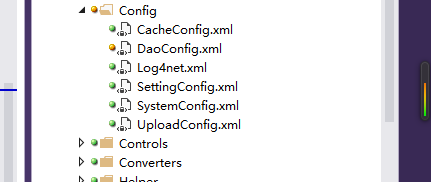
剩下的就是对xml的操作
              string ConnectConfigPath = AppData.StartupPath + "\\Config\\DaoConfig.xml";//获取配置文件路径

                 //向DaoConfig里添加节点

                 XmlDocument xmlDoc = new XmlDocument();

                 xmlDoc.Load(ConnectConfigPath);

                 XmlNode xmldocSelect = xmlDoc.SelectSingleNode("/DaoConfig[1]");

                 xmldocSelect.RemoveAll();//删除当前节点的所有子节点

                 //添加test节点

                 XmlElement Account = xmlDoc.CreateElement("test");

                 Account.InnerText = "对应的值";

                 xmldocSelect.AppendChild(Account);

                 xmlDoc.Save(ConnectConfigPath);
Dao.config文件新增节点的操作
C# app.config文件配置和修改的更多相关文章
- c#Winform程序调用app.config文件配置数据库连接字符串 SQL Server文章目录 浅谈SQL Server中统计对于查询的影响 有关索引的DMV SQL Server中的执行引擎入门 【译】表变量和临时表的比较 对于表列数据类型选择的一点思考 SQL Server复制入门(一)----复制简介 操作系统中的进程与线程
c#Winform程序调用app.config文件配置数据库连接字符串 你新建winform项目的时候,会有一个app.config的配置文件,写在里面的<connectionStrings n ...
- 配置文件——App.config文件读取和修改
作为普通的xml文件读取的话,首先就要知道怎么寻找文件的路径.我们知道一般配置文件就在跟可执行exe文件在同一目录下,且仅仅在名称后面添加了一个.config 因此,可以用Application.Ex ...
- Winform 数据库连接app.config文件配置 数据库连接字符串
1.添加配置文件 新建一个winform应用程序,类似webfrom下有个web.config,winform下也有个App.config;不过 App.config不是自动生成的需要手动添加,鼠标右 ...
- Winform数据库连接app.config文件配置
1.添加配置文件 新建一个winform应用程序,类似webfrom下有个web.config,winform下也有个App.config;不过 App.config不是自动生成的需要手动添加,鼠标右 ...
- c#Winform程序调用app.config文件配置数据库连接字符串
你新建winform项目的时候,会有一个app.config的配置文件,写在里面的<connectionStrings name=" " connectionString= ...
- C#中App.config文件配置获取
最新的framework使用如下方法: using System.Configuration; ConfigurationManager.AppSettings["key"]; A ...
- C# App.config文件配置数据的读写
添加程序集引用 System.configuration.dll 和命名空间 using System.Configuration; 读: ConfigurationManager.AppSetti ...
- 附带详细注释的log4net的app.config文件配置例子
<?xml version="1.0" encoding="utf-8" ?> <configuration> <configSe ...
- 修改和获取web.config或app.config文件appSettings配置节中的Add里的value属性 函数
1: /// <summary> 2: /// 修改web.config或app.config文件appSettings配置节中的Add里的value属性 3: /// </summ ...
随机推荐
- [Flex] as3xls读取excel,修改保存单表(二)
这个方法仅用了as3xls读取excel的功能,修改保存独立出来了. <?xml version="1.0" encoding="utf-8"?> ...
- [ActionScript] AS3代码实现曝光过度效果
package { import flash.display.Loader; import flash.display.SimpleButton; import flash.display.Sprit ...
- JAVA继承时this和super关键字
JAVA继承时this和super关键字 本文主要讨论在方法前使用this或super关键字时,编译器在什么地方查找对应的函数. 在子类中指定this关键字.首先在本类中查找,如果本类中找不到,再在父 ...
- jquery on off 方法
$("p").on("click",function(){alert("The paragraph was clicked.");}); $ ...
- [SQL]SQL删除数据的各种方式总结
SQL删除数据的各种方式总结 一.使用DELETE从表中删除目标行.记录每次删除操作.如: USE pubs DELETE FROM authors WHERE au_lname = 'McBadde ...
- 502 Bad Gateway什么意思
http://baike.baidu.com/link?url=U2ijg5T5PG_tTkY67mqfx07co7qGqvMB32rbLwq4S2ThBSRIWWvU76Y0Mb8Z3z6nbViN ...
- python3 pickle, json
pickle 有dump ,dumps ,load,loads等方法.区别在于dumps不会写入到文件. import pickle string = ['a', 2341, 'adsf'] p_st ...
- Redis多机功能之Sentinel
Sentinel的目的:监视主从服务器,并在主服务器下线时自动进行故障转移 启动Sentinel 通过执行Redis安装文件中的redis-sentinel程序,可以启动一个Sentinel实例: r ...
- POJ 1088 滑雪 记忆化DP
滑雪 Time Limit: 1000MS Memory Limit: 65536K Description Michael喜欢滑雪百这并不奇怪, 因为滑雪的确很刺激.可是为了获得速度 ...
- jmeter的分布式部署
在使用Jmeter进行性能测试时,如果并发数比较大(比如5000+并发),单台电脑的配置(CPU和内存)可能无法支持(公司配的联想e450家庭用笔记本一般到1000就会卡死),这时可以使用Jmeter ...