
C# app.config文件配置和修改
很多时候我们需要对系统的.config文件进度读写操作,例如:系统初始化的参数的更改、系统参数的改变都需要更新到配置文件。
首先我们有必要了解一下app.config、exe.config和vshost.exe.config作用和区别:
vshost.exe.config是程序运行时的配置文本,exe.config是程序运行后会复制到vshost.exe.config,app.config是在vshost.exe.config和exe.config没有情况起作用,从app.config复制到exe.config再复制到vshost.exe.config。vshost.exe.config和exe.config会自动创建内容跟app.config一样。了解过这些其实写配置文件都是写到exe.config文件中了,app.config不会变化。网上也有许多关于配置文件的读写操作,也是借鉴了多位前辈的经验自己总结的一些比较常用的读写操作。废话不多说,直接上主题:
- appSetting节点
           /// <summary>

          /// 修改AppSettings中配置

          /// </summary>

          /// <param name="key">key值</param>

          /// <param name="value">相应值</param>

          public static bool SetConfigValue(string key, string value)

          {

              try

              {

                  Configuration config = ConfigurationManager.OpenExeConfiguration(ConfigurationUserLevel.None);

                  if (config.AppSettings.Settings[key] != null)

                      config.AppSettings.Settings[key].Value = value;

                  else

                      config.AppSettings.Settings.Add(key, value);

                  config.Save(ConfigurationSaveMode.Modified);

                  ConfigurationManager.RefreshSection("appSettings");

                  return true;

              }

              catch

              {

                  return false;

              }

          }
修改或新增AppSetting节点
         /// <summary>

         /// 获取AppSettings中某一节点值

         /// </summary>

         /// <param name="key"></param>

         public static string GetConfigValue(string key)

         {

                 Configuration config = ConfigurationManager.OpenExeConfiguration(ConfigurationUserLevel.None);

                 if (config.AppSettings.Settings[key] != null)

                      return  config.AppSettings.Settings[key].Value;

                 else

                 return string.Empty;

         }
获取AppSetting节点值
ConnectionStrings节点
         /// <summary>

         /// 获取连接节点值

         /// </summary>

         /// <param name="key"></param>

         /// <returns></returns>

         public static string GetConnectionValue(string key)

         {

             if (ConfigurationManager.ConnectionStrings[key] != null)

                 return ConfigurationManager.ConnectionStrings[key].ConnectionString;

             return string.Empty;

         }
获取ConnectionStrings节点值
  public static void UpdateConnectionStringsConfig(string key, string conString)

         {

             bool isModified = false;    //记录该连接串是否已经存在

             if (ConfigurationManager.ConnectionStrings[key] != null)

             {

                 isModified = true;

             }

             //新建一个连接字符串实例

             ConnectionStringSettings mySettings = new ConnectionStringSettings(key, conString);

             // 打开可执行的配置文件*.exe.config

             Configuration config = ConfigurationManager.OpenExeConfiguration(ConfigurationUserLevel.None);

             // 如果连接串已存在,首先删除它

             if (isModified)

             {

                 config.ConnectionStrings.ConnectionStrings.Remove(key);

             }

             // 将新的连接串添加到配置文件中.

             config.ConnectionStrings.ConnectionStrings.Add(mySettings);

             // 保存对配置文件所作的更改

             config.Save(ConfigurationSaveMode.Modified);

             // 强制重新载入配置文件的ConnectionStrings配置节

             ConfigurationManager.RefreshSection("connectionStrings");

         }
修改或新增ConnectionStrings节点
System.ServiceModel节点
         /// <summary>

         /// 读取EndpointAddress

         /// </summary>

         /// <param name="endpointName"></param>

         /// <returns></returns>

         public static string GetEndpointClientAddress(string endpointName)

         {

             ClientSection clientSection = ConfigurationManager.GetSection("system.serviceModel/client") as ClientSection;

             foreach (ChannelEndpointElement item in clientSection.Endpoints)

             {

                 if (item.Name == endpointName)

                     return item.Address.ToString();

             }

             return string.Empty;

         }

         /// <summary>

         /// 设置EndpointAddress

         /// </summary>

         /// <param name="endpointName"></param>

         /// <param name="address"></param>

         public static bool SetEndpointClientAddress(string endpointName, string address)

         {

             try

             {

                 Configuration config = ConfigurationManager.OpenExeConfiguration(ConfigurationUserLevel.None);

                 ClientSection clientSection = config.GetSection("system.serviceModel/client") as ClientSection;

                 foreach (ChannelEndpointElement item in clientSection.Endpoints)

                 {

                     if (item.Name != endpointName)

                         continue;

                     item.Address = new Uri(address);

                     break;

                 }

                 config.Save(ConfigurationSaveMode.Modified);

                 ConfigurationManager.RefreshSection("system.serviceModel");

                 return true;

             }

             catch (Exception ex)

             {

                 return false;

             }

         }
客户端Client的Endpoint
服务端Service的Address
对与配置文件的修改有些可能会觉得直接操作config文件对安全性来说代价太高了,这种情况下就需要个人取决一下可以使用将appconfig段放到独立的config文件中,以XML的方式进行修改,并可以避免应用程序重启的问题。
简单的再说一下放到独立文件的操作
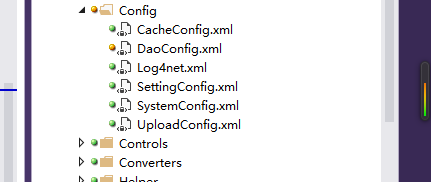
剩下的就是对xml的操作
              string ConnectConfigPath = AppData.StartupPath + "\\Config\\DaoConfig.xml";//获取配置文件路径

                 //向DaoConfig里添加节点

                 XmlDocument xmlDoc = new XmlDocument();

                 xmlDoc.Load(ConnectConfigPath);

                 XmlNode xmldocSelect = xmlDoc.SelectSingleNode("/DaoConfig[1]");

                 xmldocSelect.RemoveAll();//删除当前节点的所有子节点

                 //添加test节点

                 XmlElement Account = xmlDoc.CreateElement("test");

                 Account.InnerText = "对应的值";

                 xmldocSelect.AppendChild(Account);

                 xmlDoc.Save(ConnectConfigPath);
Dao.config文件新增节点的操作
C# app.config文件配置和修改的更多相关文章
- c#Winform程序调用app.config文件配置数据库连接字符串 SQL Server文章目录 浅谈SQL Server中统计对于查询的影响 有关索引的DMV SQL Server中的执行引擎入门 【译】表变量和临时表的比较 对于表列数据类型选择的一点思考 SQL Server复制入门(一)----复制简介 操作系统中的进程与线程
c#Winform程序调用app.config文件配置数据库连接字符串 你新建winform项目的时候,会有一个app.config的配置文件,写在里面的<connectionStrings n ...
- 配置文件——App.config文件读取和修改
作为普通的xml文件读取的话,首先就要知道怎么寻找文件的路径.我们知道一般配置文件就在跟可执行exe文件在同一目录下,且仅仅在名称后面添加了一个.config 因此,可以用Application.Ex ...
- Winform 数据库连接app.config文件配置 数据库连接字符串
1.添加配置文件 新建一个winform应用程序,类似webfrom下有个web.config,winform下也有个App.config;不过 App.config不是自动生成的需要手动添加,鼠标右 ...
- Winform数据库连接app.config文件配置
1.添加配置文件 新建一个winform应用程序,类似webfrom下有个web.config,winform下也有个App.config;不过 App.config不是自动生成的需要手动添加,鼠标右 ...
- c#Winform程序调用app.config文件配置数据库连接字符串
你新建winform项目的时候,会有一个app.config的配置文件,写在里面的<connectionStrings name=" " connectionString= ...
- C#中App.config文件配置获取
最新的framework使用如下方法: using System.Configuration; ConfigurationManager.AppSettings["key"]; A ...
- C# App.config文件配置数据的读写
添加程序集引用 System.configuration.dll 和命名空间 using System.Configuration; 读: ConfigurationManager.AppSetti ...
- 附带详细注释的log4net的app.config文件配置例子
<?xml version="1.0" encoding="utf-8" ?> <configuration> <configSe ...
- 修改和获取web.config或app.config文件appSettings配置节中的Add里的value属性 函数
1: /// <summary> 2: /// 修改web.config或app.config文件appSettings配置节中的Add里的value属性 3: /// </summ ...
随机推荐
- [Java] 日期的简单处理
package test.date; import java.text.ParseException; import java.text.SimpleDateFormat; import java.u ...
- 配置IISExpress允许外部访问
1.找到IISExpress的配置文件,位于 <文档>/IISExpress/config文件夹下,打开applicationhost.config,找到如下代码: <site na ...
- Mingyang.net:如何获取所有的请求参数?
第一种方法:用@RequestParam. @RequestMapping(params="m=update", method=RequestMethod.POST) public ...
- tarjan 边双连通分量 对点进行分组 每组点都在一个双连通分量里边
int dfn[N],low[N],id[N],s[N],p,num,t,son[N];//dfn记录dfs时间戳//low代表当前点到达的最小时间戳,id对点进行分组编号.num是时间戳//s临时存 ...
- DNS拦截的处理
在用webSocket来实现长连接时,我们的链接对象使用了域名.但是再某些省份的网络下,发生了DNS拦截.踹改.导致使用某个域名链接,发生连接不上的现象.[解决方案] 在多次尝试原有域名不能使用的情况 ...
- ARM开发板挂载U盘
ARM开发板运行Linux系统后,插入U盘,通过串口打印系统识别到U盘如下: 系统识别U盘盘符为sda4 那么需要挂载后才能操作U盘:挂载命令 mount -t vfat /dev/sda4 /mnt ...
- 在git上下载的Asp.Net MVC 4源码怎么编译?
以本人的下载位置为例:E:\aspnetwebstack 1.win+r 输入cmd 打开dos 界面 2.e: 回车,定位到e 盘 3.cd E:\aspnetwebstack 进入e 盘aspne ...
- OC基础(1)
Objective-C简介 OC和C对比 第一个OC程序 面向对象思想 *:first-child { margin-top: 0 !important; } body > *:last-chi ...
- http是什么?
http HyperText Transfer Protocol 超文本传输协议,是一个应用层通信协议. 可以用wireshark抓取.
- Perlin Noise 及其应用
Perlin Noise 可以用来表现自然界中无法用简单形状来表达的物体的形态,比如火焰.烟雾.表面纹路等.要生成 Perlin Noise 可以使用工具离线生成,也可以使用代码运行时生成.最简单常用 ...