
在Centos7.2(64位)下搭建Web服务器
一:通过Yum安装mysql
1 # wget http://dev.mysql.com/get/mysql-community-release-el7-5.noarch.rpm

2 # rpm -ivh mysql-community-release-el7-5.noarch.rpm

3 # yum install mysql-community-server
二:重启mysql,并设置密码
1 # service mysqld restart

2 # mysql -u root

3 # set password for 'root'@'localhost' =password('password');

4

5 systemctl status mysqld 查看mysql状态

6

7 systemctl start mysqld 启动mysql

8

9 systemctl stop mysqld 关闭mysql
三:mysql远程连接设置
1 mysql> grant all privileges on *.* to root@'%'identified by 'password';(把在所有数据库的所有表的所有权限赋值给位于所有IP地址的root用户。)

2

3 注:如果不是root用户,可先新建用户  mysql>create user 'username'@'%' identified by 'password';  (然后通过grant来进行给予权限)
四:安装设置ftp
安装
1 yum install vsftpd
修改/etc/vsftpd/vsftpd.config
1 # 禁止匿名登陆

2 anonymous_enable=NO

3 # 限制访问自身目录

4  chroot_list_enable=YES

5 # (default follows)

6 chroot_list_file=/etc/vsftpd/vsftpd/chroot_list
1 systemctl restart vsftpd
scp /path/filename username@servername:/path/
3、wget下载 (需要指定cookie,确认协议的)
1 wget --no-cookie --no-check-certificate --header "Cookie: oraclelicense=accept-securebackup-cookie" http://download.oracle.com/otn-pub/java/jdk/8u171-b11/512cd62ec5174c3487ac17c61aaa89e8/jdk-8u171-linux-x64.tar.gz
下载好,解压到 /root/java
然后配置环境,在/etc/profile文件的最下面添加

然后重新加载profile
1 source /etc/profile
六:安装tomcat
将tomcat解压好,将web程序放入webapps中,修改conf中的server.xml文件

将端口改为80端口
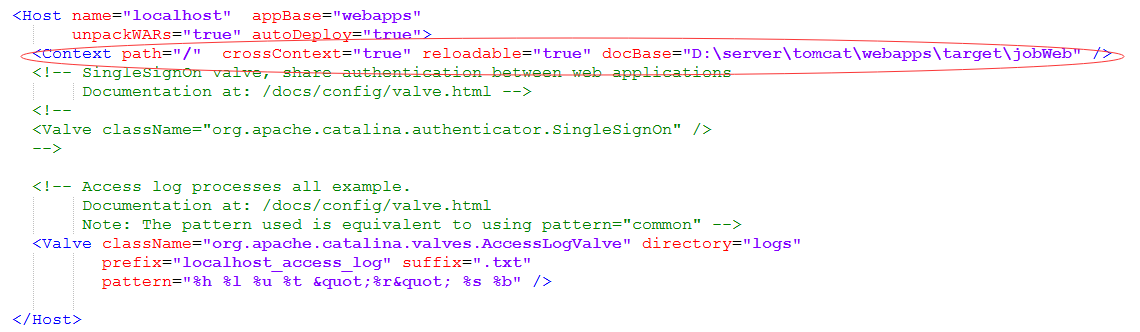
添加上面选中的语句,指定项目路径
七:除了tomcat,使用spring boot的
1 nohup java -jar message-1.0-SNAPSHOT.jar & > log.file 2>&1 &
八:设置防火墙
firewall-cmd --zone=public --add-port=80/tcp --permanent
firewall-cmd --zone=public --add-port=3306/tcp --permanent
firewall-cmd --zone=public --add-service=ftp --permanent
systemctl enable firewalld.service //开机启动
systemctl restart firewalld.service //重启防火墙
在Centos7.2(64位)下搭建Web服务器的更多相关文章
- CentOS7系统64位下搭建Python3.6环境及相关细节工具部署文章收集
(1)http://blog.csdn.net/chen798213337/article/details/70767902 问题描述: 安装Navicat管理数据库时,启动界面出现乱码情况. 解决办 ...
- CentOS 6.2下搭建Web服务器
1Centos 6.2下搭建web服务器 如今,Linux在Web应用越来越广,许多企业都采用Linux来搭建Web服务器,这样即节省了购买正版软件的费用,而且还能够提高服务器的安全性. 之前我们介绍 ...
- 在Win10下搭建web服务器,使用本机IP不能访问,但是使用localhos或127.0.0.1可以正常访问的解决办法
最近在在Win10下搭建web服务器,发现通过windows自带的浏览器win10 edge浏览器使用本机IP不能放问,但是使用localhos或127.0.0.1可以正常访问, 后来无意发现,使用w ...
- CentOS 6.3下搭建Web服务器
准备前的工作: 1.修改selinux配置文件(/etc/sysconfig/selinux) 关闭防火墙 (1)把SELINUX=enforcing注释掉 (2)并添加SELINUX=disable ...
- Windows2008R2安装iis和iis下搭建web服务器(9.18 第七天)
IIS internet information services 互联网信息服务微软开发的运行在windows中的互联网服务,提供了web.ftp.smtp服务 Windows server 200 ...
- ubuntu 12.04下搭建web服务器(MySQL+PHP+Apache) 教程
最近,经理让我搭建一个服务器,我从网上找了一篇比较好的教程,按教程一步步执行感觉挺顺利,所以准备整理一下这个教程.尊重原版注明出处:http://news.2ky.cn/Linux/ubuntu-12 ...
- win7下搭建web服务器
简介 微软为了操作系统的安全,默认把web.ftp等服务默认关闭了,重新打开也非常简单. step 1 打开控制面板: step 2: step 3: step 4: 单击确定之后等个几分钟,web服 ...
- Ubuntu 64位下搭建ADT的种种问题
我使用的adt版本为 adt-bundle-linux-x86_64-20140702.zip 1. Eclipse启动时提示 adb 无法加载动态链接库 libstdc++.so.6 以及 lib ...
- centos6.2下搭建Web服务器
1.安装Apache2 yum install httpd 2.启动 方法一:service httpd start 方法二:/etc/init.d/httpd start //浏览http://ip ...
随机推荐
- java代码之美(3)---guava 复写Object常用方法
guava 复写Object常用方法 Guava 是一个 Google 的基于java1.6的类库集合的扩展项目,这个库提供用于集合,缓存,支持原语,并发性,常见注解,字符串处理,I/O和验证的实用方 ...
- C++11 实现生产者消费者模式
代码都类似,看懂一个,基本都能理解了. 共有代码: #include <cstdlib>#include <condition_variable>#include <io ...
- MongoDB exception:connection failed
根据http://www.runoob.com/mongodb/mongodb-window-install.html的教程配置了MongoDB,Mongod.exe配置为 --port 指令表明mo ...
- Error: Cannot fit requested classes in a single dex file (# methods: 149346 > 65536)
引用第三方库的jar文件,都有可能会触发这个错误.解决方案如下: 参考<[Android]Cannot fit requested classes in a single dex file. T ...
- 《HelloGitHub月刊》第 08 期
<HelloGitHub>第 08 期 兴趣是最好的老师,<HelloGitHub>就是帮你找到兴趣! 简介 最开始我只是想把自己在浏览GitHub过程中,发现的有意思.高质量 ...
- centos7默认防火墙firewalld
1.开关 启动: systemctl start firewalld 查看状态: systemctl status firewalld 停止: systemctl disable firewalld ...
- Kali~2018安装后的配置
今天,物理机上成功的安装了Kali Linux系统,但是要想用的顺手还需要花费许多时间和精力,下面就是我对它的养成之路. 一.添加普通用户 useradd -m -G sudo,video,audio ...
- Oracle学习笔记三
一.创建表空间 表空间是ORACLE数据库的逻辑单元.数据库--表空间 一个表空间可以与多个数据文件(物理结构)关联一个数据库下可以建立多个表空间,一个表空间可以建立多个用户个用户下可以建立多个表. ...
- HttpServletResponse ServletResponse 返回响应 设置响应头设置响应正文体 重定向 常用方法 如何重定向 响应编码 响应乱码
HttpServletResponse 和 ServletResponse 都是接口 具体的类型对象是由Servlet容器传递过来 ServletResponse对象的功能分为以下四种: ...
- Android ios嵌套web页面
我们现在做一个活动页面,Android和ios的活动页面用web来做,方便更改,下面有几个小问题: 1.在Android和ios中,虽然web上面可以存localstorage,但是到了Android ...