
git中利用rebase来压缩多次提交 ----- 原文:https://blog.csdn.net/itfootball/article/details/44154121
之前我们用git merge –squash来将分支中多次提交合并到master后,只保留一次提交历史。但是有些提交到github远程仓库中的commit信息如何合并呢?
使用下面的命令,最后一个数字4代表压缩最后四次提交。
git rebase -i HEAD~4该命令执行后,会弹出vim的编辑窗口,4次提交的信息会倒序排列,最上面的是第四次提交,最下面的是最近一次提交。
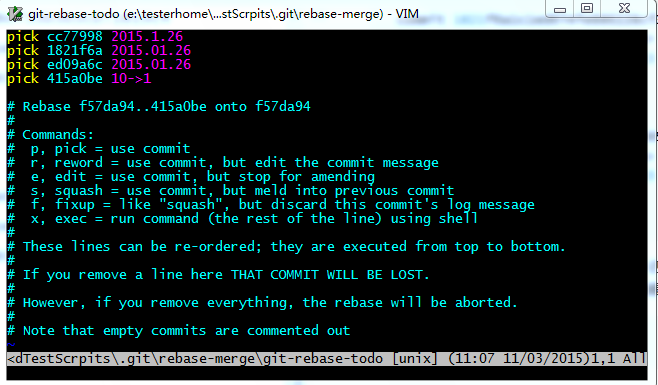
我们需要修改第2-4行的第一个单词pick为squash,这个意义为将最后三次的提交压缩到倒数第四次的提交,效果就是我们在pick所在的提交就已经做了4次动作,但是看起来就是一次而已:
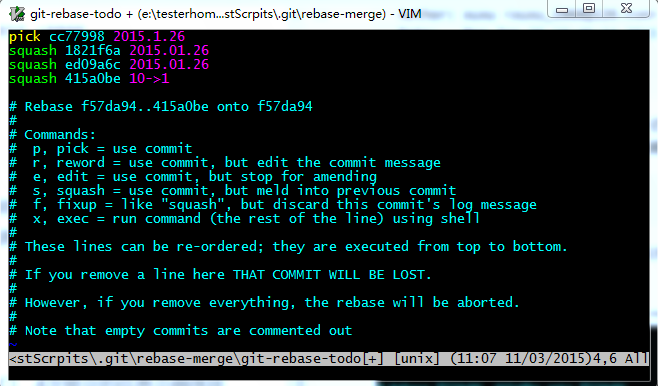
然后我们保存退出,git会一个一个压缩提交历史,如果有冲突,需要修改,修改的时候要注意,保留最新的历史,不然我们的修改就丢弃了。修改以后要记得敲下面的命令:
git add .

git rebase --continue
如果你想放弃这次压缩的话,执行以下命令:
git rebase --abort如果所有冲突都已经解决了,会出现如下的编辑窗口:
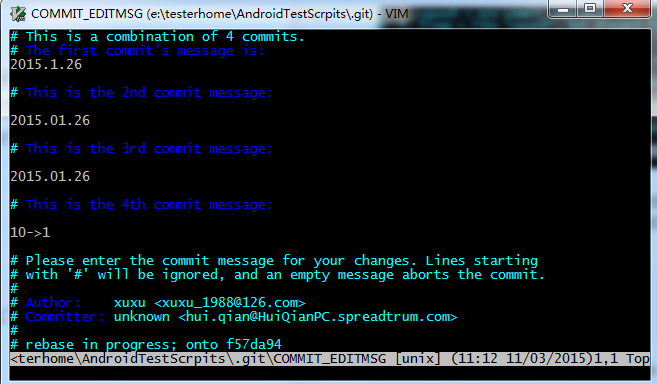
这个时候我们需要修改一下合并后的commit的描述信息,我们将其描述为helloworld吧:
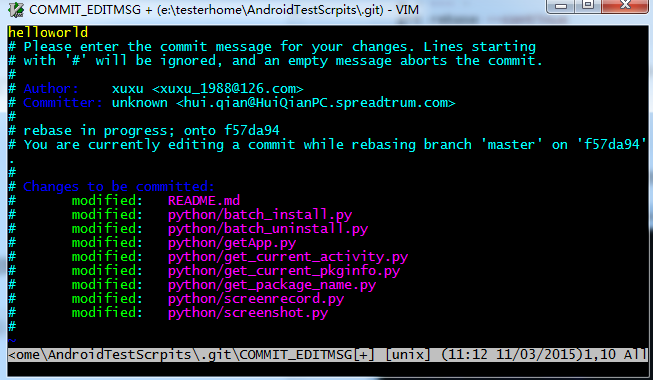
保存退出后会看到我们完整的信息:
$ git rebase -i HEAD~4

[detached HEAD 9097684] helloworld

 Author: xuxu <xuxu_1988@126.com>

 Committer: unknown <hui.qian@HuiQianPC.spreadtrum.com>

Your name and email address were configured automatically based

on your username and hostname. Please check that they are accurate.

You can suppress this message by setting them explicitly:

    git config --global user.name "Your Name"

    git config --global user.email you@example.com

After doing this, you may fix the identity used for this commit with:

    git commit --amend --reset-author

 9 files changed, 25 insertions(+), 11 deletions(-)

Successfully rebased and updated refs/heads/master.
同步到远程仓库
那么这个时候我们的github上的信息又是如何呢?

github上的提交历史还是之前的,如何更新我们压缩后的历史记录呢?
我们采用git push 试试:
To https://github.com/DoctorQ/AndroidTestScrpits.git

 ! [rejected]        master -> master (non-fast-forward)

error: failed to push some refs to 'https://github.com/DoctorQ/AndroidTestScrpit

s.git'

hint: Updates were rejected because the tip of your current branch is behind

hint: its remote counterpart. Integrate the remote changes (e.g.

hint: 'git pull ...') before pushing again.

hint: See the 'Note about fast-forwards' in 'git push --help' for details.
被拒绝了,因为我们合并的历史记录已经在远程仓库之前了,你无法覆盖它。那怎么办?如果你确定你的合并过程都是正确无误的,那么就可以强制push:
$ git push -f

warning: push.default is unset; its implicit value is changing in

Git 2.0 from 'matching' to 'simple'. To squelch this message

and maintain the current behavior after the default changes, use:

  git config --global push.default matching

To squelch this message and adopt the new behavior now, use:

  git config --global push.default simple

When push.default is set to 'matching', git will push local branches

to the remote branches that already exist with the same name.

In Git 2.0, Git will default to the more conservative 'simple'

behavior, which only pushes the current branch to the corresponding

remote branch that 'git pull' uses to update the current branch.

See 'git help config' and search for 'push.default' for further information.

(the 'simple' mode was introduced in Git 1.7.11. Use the similar mode

'current' instead of 'simple' if you sometimes use older versions of Git)

Counting objects: 1, done.

Writing objects: 100% (1/1), 232 bytes | 0 bytes/s, done.

Total 1 (delta 0), reused 0 (delta 0)

To https://github.com/DoctorQ/AndroidTestScrpits.git

 + 415a0be...9097684 master -> master (forced update)
git中利用rebase来压缩多次提交 ----- 原文:https://blog.csdn.net/itfootball/article/details/44154121的更多相关文章
- js中index()的四种经典用法(转https://blog.csdn.net/superit401/article/details/51726826)
<!doctype html><html lang="en"> <head> <meta charset="UTF-8" ...
- 数组中&a与&a[0]的区别 转载自http://blog.csdn.net/FX677588/article/details/74857473
在探讨这个问题之前,我们首先来看一道笔试题,如下: [摘自牛客网]下列代码的结果是:(正确答案是 C) main() { int a[5]={1,2,3,4,5}; int *ptr=(int *)( ...
- 虚拟机中的CentOS7如何上网?---https://blog.csdn.net/nothing2017/article/details/61420767
虚拟机中的CentOS7如何上网?https://blog.csdn.net/nothing2017/article/details/61420767
- 向txt文件中写入内容(覆盖重写与在末尾续写+FileOutputStream与FileWriter)(转发:https://blog.csdn.net/bestcxx/article/details/51381460)
!!!! 读取txt文件中的内容 import java.io.BufferedReader; import java.io.File; import java.io.FileReader; /** ...
- OpenGL学习脚印: uniform blocks在着色器中的使用 转自https://blog.csdn.net/wangdingqiaoit/article/details/52717963
写在前面 目前,我们在着色器中要传递多个uniform变量时,总是使用多个uniform,然后在主程序中设置这些变量的值:同时如果要在多个shader之间共享变量,例如投影矩阵projection和视 ...
- 比较C++中的4种类型转换方式(转自http://blog.csdn.net/hrbeuwhw/article/details/7884797)
C++的四种cast操作符的区别 Q:什么是C风格转换?什么是static_cast, dynamic_cast 以及 reinterpret_cast?区别是什么?为什么要注意? A:转换的含义是通 ...
- 如何简单地理解Python中的if __name__ == '__main__'(https://blog.csdn.net/yjk13703623757/article/details/77918633)
1. 摘要 通俗的理解__name__ == '__main__':假如你叫小明.py,在朋友眼中,你是小明(__name__ == '小明'):在你自己眼中,你是你自己(__name__ == '_ ...
- golang中defer的详解 转自https://blog.csdn.net/skh2015java/article/details/77081250
Go里的defer很有用,尤其在很多执行模块化操作时,初始化时给各个需要执行的模块传入参数,但是这些参数有些事在模块执行过程中才赋值的. 这时候有了defer就不会把代码写的很凌乱. Go的defer ...
- Android 利用cursor来进行排序(转至http://blog.csdn.net/yangzongquan/article/details/6547860)
主要思路是:override move系列的方法,让cursor以自己想要的顺序来移动,从而达到对cursor排序的目的.比如数组A0里有 4(0),3(1),1(2),2(3),括号内为位置,排序后 ...
随机推荐
- Linux运维期中架构(50台集群)
一.期中架构 二.期中架构-前端部分 三.第三阶段作业-期中架构
- mybatis中大于等于小于的写法
第一种写法(1): 原符号 < <= > >= & ' "替换符号 < <= > >= & ' " ...
- 酷炫的loading
今天分享一下,怎么通过用css写出一个酷炫的loading. meta: <meta name="viewport" content="width=device-w ...
- Python——collections模块(扩展数据类型)
1.namedtuple:利用坐标.空间坐标,扑克牌等指定空间位置 # namedtuple('名字',[list列表属性])from collections import namedtuple Po ...
- SSL 证书生成与转化
1.windows 的keytool工具 2.如何将jks文件转换为pfx格式并导入客户端 https://jingyan.baidu.com/article/a65957f4c69dfc24e67f ...
- GDOI2018游记&题解
day0 第一件事当然是去酒店入住+领一堆东西. 感觉酒店不错,而且离学校挺近的,走路10分钟不到,骑车5分钟就到了. 然后去学校吃饭.我们在教工饭堂吃饭,饭菜还不错,但是没有筷子差评. 吃完饭后找了 ...
- JS获取字符串实际长度(包含汉字)的简单方法
方法一: var jmz = {}; jmz.GetLength = function(str) { ///<summary>获得字符串实际长度,中文2,英文1</summary&g ...
- 一种使用 sprintf 导致死机的情况
@2019-02-26 [小记] char temp[10] float money; sprintf(temp, "0.2f", money); 以上使用方法可能导致死机,原因是 ...
- H5与APP混合开发相关知识点总结
整理一: 现在有这么个需求,如下图 app端点击右上角的 加 号 ,弹出模态框 这个项目是基于vue写的,客户端需要调用H5页面里定义的js方法,但是在vue里,所有的方法都是在组件内部声明的,也只能 ...
- 联想的笔记本有隐藏分区 导致无法安装win10 eufi启动 报错:windows无法更新计算机的启动配置。无法安装
联想的笔记本都带着类似一键还原等的系统恢复软件,这些软件往往是将出厂设置备份在单 独的一个分区,此分区默认为隐藏,在 Windows 的磁盘管理中可以看到.打开磁盘管理器 的方法是右击计算机——管理, ...