
EntityFramework之监听者判断SQL性能指标
前言
当我们利用EF这个ORM框架时,我们可能会利用LINQ或者原生的SQL语句来进行数据操作,此时我们无法确定我们的代码是否会给数据库带来一定的负载,当给数据库带来一定的压力时,由于项目中对数据进行相应的操作实在是太多,我们无法准确的去进行定位,又或者我们不是专业的DBA,无法准确的去分析SQL性能的优劣,此时该怎么办呢?我们完全不需要DBA,我们可以通过相应的操作来判断一段SQL代码的好坏,这就是我们本节需要讲的内容,利用EF中监听者来判断SQL性能,在之前系列中也有提到,可以参考之前系列。我们进入主题。
DbCommandInterceptor
不用讲从字面意思我们就能立马明白大概是【监听命令】,我们看下该类,如下:
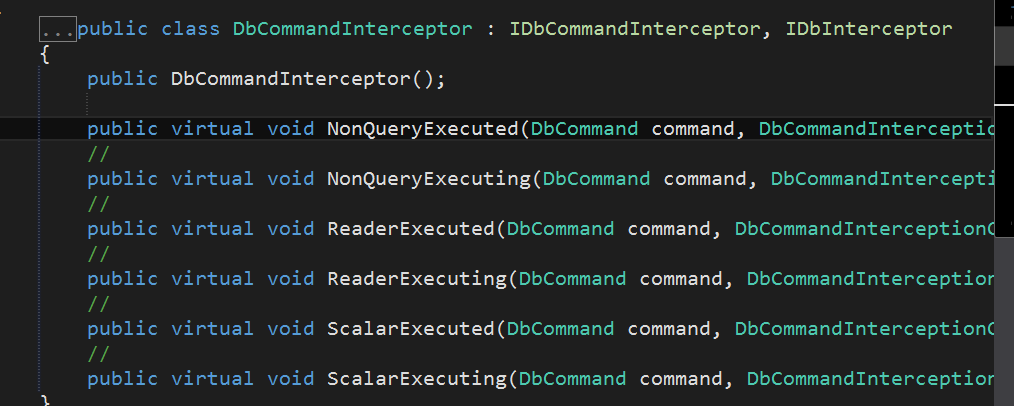
我们无需多加细看,看这几个虚方法我们马上就能明白和我们之前猜测的一致,就是进行数据库操作的SQL命令。在这个类中有一个重要的类那就是 DbCommandInterceptionContext ,我们姑且叫做监听SQL命令的上下文吧,我们再看这个类中包含什么。如下:
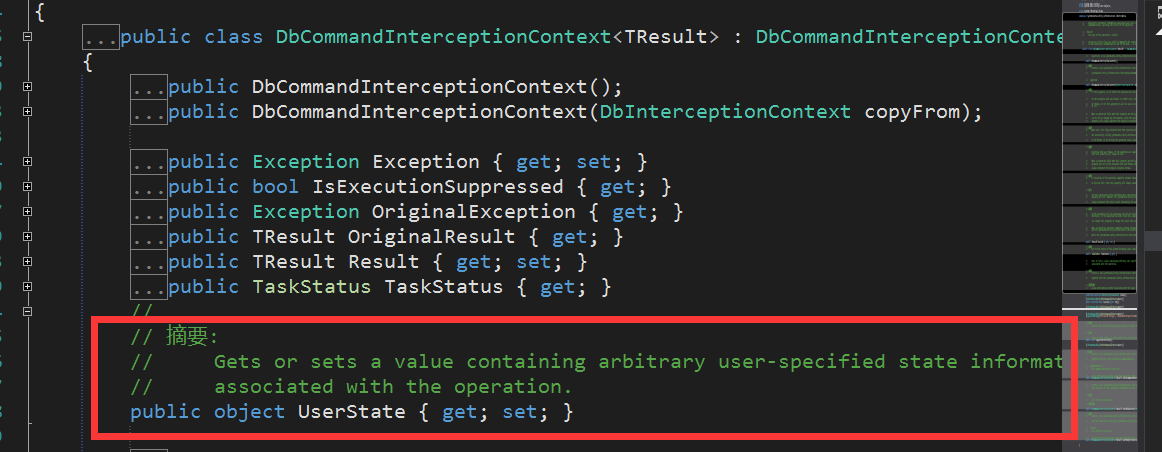
在这个类中有一个重要的属性 UserState ,哦,意思是用户状态,根据摘要信息得知,我们可以设置我们进行操作的相关信息,同时还是个object类型,看来是利于对象之间的转换而给。
接下来进入主题,我们如何去判断SQL性能指标呢?答案:我们检索出执行SQL时以及执行SQL完成后的消耗时间即可。
SQL性能判断指标
那么问题来了,我们该如何正确这个时间呢?此问题又可以细分为两个步骤。
(1)如何知道SQL命令是正在执行时以及执行完成呢?
(2)知道了之后我们又如何设置以及获取时间呢?
我们一一来划分,首先我建立一个类 SQLProfiler ,而此类肯定是继承于 DbCommandInterceptor ,所以代码就变成了这样。

    public class SQLProfiler : DbCommandInterceptor

    {

        public override void ReaderExecuting(DbCommand command, DbCommandInterceptionContext<DbDataReader> interceptionContext)

        {

            Executing(interceptionContext);

            base.ReaderExecuting(command, interceptionContext);

        }

        public override void ReaderExecuted(DbCommand command, DbCommandInterceptionContext<DbDataReader> interceptionContext)

        {

            Executed(command, interceptionContext);

            base.ReaderExecuted(command, interceptionContext);

        }

        public override void NonQueryExecuting(DbCommand command, DbCommandInterceptionContext<int> interceptionContext)

        {

            Executing(interceptionContext);

            base.NonQueryExecuting(command, interceptionContext);

        }

        public override void NonQueryExecuted(DbCommand command, DbCommandInterceptionContext<int> interceptionContext)

        {

            Executed(command, interceptionContext);

            base.NonQueryExecuted(command, interceptionContext);

        }

        public override void ScalarExecuting(DbCommand command, DbCommandInterceptionContext<object> interceptionContext)

        {

            Executing(interceptionContext);

            base.ScalarExecuting(command, interceptionContext);

        }

        public override void ScalarExecuted(DbCommand command, DbCommandInterceptionContext<object> interceptionContext)

        {

            Executed(command, interceptionContext);

            base.ScalarExecuted(command, interceptionContext);

        }

}
貌似发现了什么,好像方法参数都是什么DbCommand和DbCommandInterCeptionContext,既然这样,我们依样画葫芦诺,为了从执行SQL命令开始,我们此时从这里开始计时,将计时对象给UserState即可,于是就有了下面的代码。
        private void Executing<T>(DbCommandInterceptionContext<T> interceptionContext)

        {

            var timer = new Stopwatch();

            interceptionContext.UserState = timer;

            timer.Start();

        }
此时应该就明朗了,我们在执行完成后来获取该计时对象并利用是否出现异常和我们指定设置的时间来判断其最终所花费的时间。执行完成后代码如下:
        private void Executed<T>(DbCommand command, DbCommandInterceptionContext<T> interceptionContext)

        {

            var timer = (Stopwatch)interceptionContext.UserState;

            timer.Stop();

            if (interceptionContext.Exception != null)

            {

                File.AppendAllLines(

                    _logFile,

                    new string[]

                {

                "错误SQL语句",

                interceptionContext.Exception.Message,

                command.CommandText,

                Environment.StackTrace,

                string.Empty,

                string.Empty,

                });

            }

            else if (timer.ElapsedMilliseconds >= _executionTime)

            {

                File.AppendAllLines(

                    _logFile,

                    new string[]

                {

                string.Format("耗时SQL语句({0}ms)",timer.ElapsedMilliseconds),

                command.CommandText,

                Environment.StackTrace,

                string.Empty,

                string.Empty,

                });

            }

        }
上述 _executionTime 是我们在此类构造函数中所设置的时间,构造函数如下:
        private readonly string _logFile;

        private readonly int _executionTime;

        public SQLProfiler(string logFile, int executionTime)

        {

            _logFile = logFile;

            _executionTime = executionTime;

        }
而logFile则是我么所要输出的日志。此时别忘记最重要的一件事,那就是DbConfiguration配置类中进行注册(或者在配置文件中进行注册)。如下:
    public class MyDbConfiguration : DbConfiguration

    {

        public MyDbConfiguration()

        {

            this.AddInterceptor(new SQLProfiler(@"D:\log.txt", 1));

        }

    }
接下来我们来进行检验结果。
检验成果
           using (var ctx = new EntityDbContext())

            {

                SqlParameter[] parameter = { };

                ctx.Database.SqlQuery<Student>("select * from a", parameter).ToList();

                Console.ReadKey();

            }
上述表a实际上是不存在的,我们就是要看看是否能检测到该异常并获取其时间。来,瞧一瞧。
【效果一】
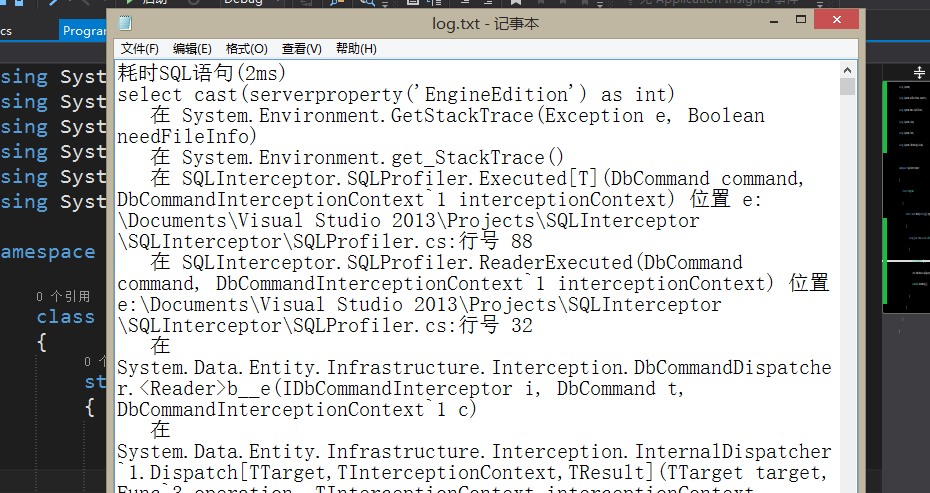
【效果二】

结语
当然,如上述当执行查询时此表不存在肯定是会报错,但是我们的侧重点不在此,这里验证了此表不存在,同时也验证了SQL在执行时和执行完之间的耗时,同时我们可以通过构造函数手动设置当耗时大于我们预期的多少才算需要改善SQL。
Reference from : http://www.cnblogs.com/CreateMyself/p/5277681.html
EntityFramework之监听者判断SQL性能指标的更多相关文章
- EntityFramework 如何查看执行的 SQL 代码?
在 VS 调试的时候,如果我们项目中使用的是 EntityFramework,查看 SQL 执行代码就不像 ADO.NET 那样直观了,我们需要设置下,可以参考下: How can I log the ...
- Android 手势水平监听判断
package com.zihao.ui; import com.zihao.R; import android.os.Bundle; import android.app.Activity; imp ...
- Javaweb上下文监听者ServletContextListener
一个监听类,不是一个servlet或JSP,它能监听ServletContext一生中的两个关键事件:初始化(创建)和撤销.这个类实现了javax.servlet.ServletContextList ...
- Web应用中监听者的通知顺序按照DD中的定义顺序
Web应用中监听者的通知顺序按照DD中的定义顺序: XML: <?xml version="1.0" encoding="UTF-8"?> < ...
- WPF - 监听判断键盘组合键的按下
对于键盘事件PreviewKeyDown.PreviewKeyUp.KeyDown.KeyUp,在其中检查当次事件是哪个按键触发的很简单,只需要判断KeyEventArgs类型的事件参数e的Key属性 ...
- Java Listener pattern 监听者模式
Java Listener pattern 监听者模式 2016-5-12 监听者模式(观察者模式)能降低对象之间耦合程度.为两个相互依赖调用的类进行解耦. 便于进行模块化开发工作.不同模块的开发者可 ...
- 在java.util中有EventListener接口:所有事件监听者都要实现这个接口。
在java.util中有EventListener接口:所有事件监听者都要实现这个接口. java.util中有EventObject类:所有的事件都为其子类. 事件范例在\CoreJava\Gi ...
- 在C++11中实现监听者模式
参考文章:https://coderwall.com/p/u4w9ra/implementing-signals-in-c-11 最近在完成C++大作业时,碰到了监听者模式的需求. 尽管C++下也可以 ...
- SQL利用Case When Then多条件判断SQL 语句
http://www.cnblogs.com/kevin2013/archive/2010/07/02/1769682.html SQL利用Case When Then多条件判断SQL ,用于sele ...
随机推荐
- "检索COM类工厂中 CLSID为 {00024500-0000-0000-C000-000000000046}的组件时失败,原因是出现以下错误: 80070005" 问题的解决
一.故障环境 Windows 2008 .net 3.0 二.故障描述 调用excel组件生成excel文档时页面报错.报错内容一大串,核心是"检索COM类工厂中 CLSID为 {000 ...
- C#开发微信门户及应用(24)-微信小店货架信息管理
在前面微信小店系列篇<C#开发微信门户及应用(22)-微信小店的开发和使用>里面介绍了一些微信小店的基础知识,以及<C#开发微信门户及应用(23)-微信小店商品管理接口的封装和测试& ...
- 手机端访问web调用数字键盘。
转自 http://www.webkfa.com/one4/w1937.html 最近在做手机页面时,遇到数字输入的键盘的问题,之前的做法只是一刀切的使用 type="tel", ...
- 利用私有的API获得手机上所安装的所有应用信息(包括版本,名称,bundleID,类型)
MobileCoreService这个系统的库,里面有个私有的类LSApplicationWorkspace ,利用运行时可以获得私有类里面的方法,- (id)allInstalledApplicat ...
- iOS通知的整理笔记
iOS通知用于高耦合界面的传值确实方便快捷. 需要实现模态弹出的视图控制器上,有一个视图控制器可以导航.这必定要将这个视图控制器的导航视图控制器naVC.view添加到模态弹出的视图控制器presen ...
- iOS - 捕获应用程序崩溃日志
作为一名iOS移动应用开发者,为了确保你的应用程序正确无误,在将应用程序提交到应用商店之前,你必定会进行大量的测试工作:而且在你测试的过程中应用程序运行的很好,但是在应用商店上线之后,还是有用户抱怨应 ...
- 让代码更简单——自定义toBean实现
经过历时三天的鏖战,终于将阶段性项目——新闻发布系统做完了.在编码过程中,发现了很多冗余代码,统一流程,却需要不断重复编码——将用户输入实例化为对象的过程. 例: Person.set("i ...
- Hibernate 系列 06 - 对象在JVM中的生命周期
引导目录: Hibernate 系列教程 目录 Java对象通过new命令进行创建,Java虚拟机(Java Virtual Machine,JVM)会为新的Java对象在内存中开辟一个新空间以存放次 ...
- 如何利用mount命令将另外一个linux服务器上的目录挂在到本机?
你先要在192.168.1.100上开启NFS服务并编辑/etc/exports文件: chkconfig --level 35 nfs on service nfs start vi /etc/ex ...
- Java类加载基本过程
基本过程: 根据类的全限定名称加载定义类的二进制字节流. 将字节流代表的静态存储结构转化为方法区的运行时数据结构 内存中生成一个代表这个类的java.lang.Class对象,作为方法去这个类的各 ...