
Android 普通通知栏新方法,现在需要创建通知渠道才可以
先看看效果看看是不是你想要的

点击后
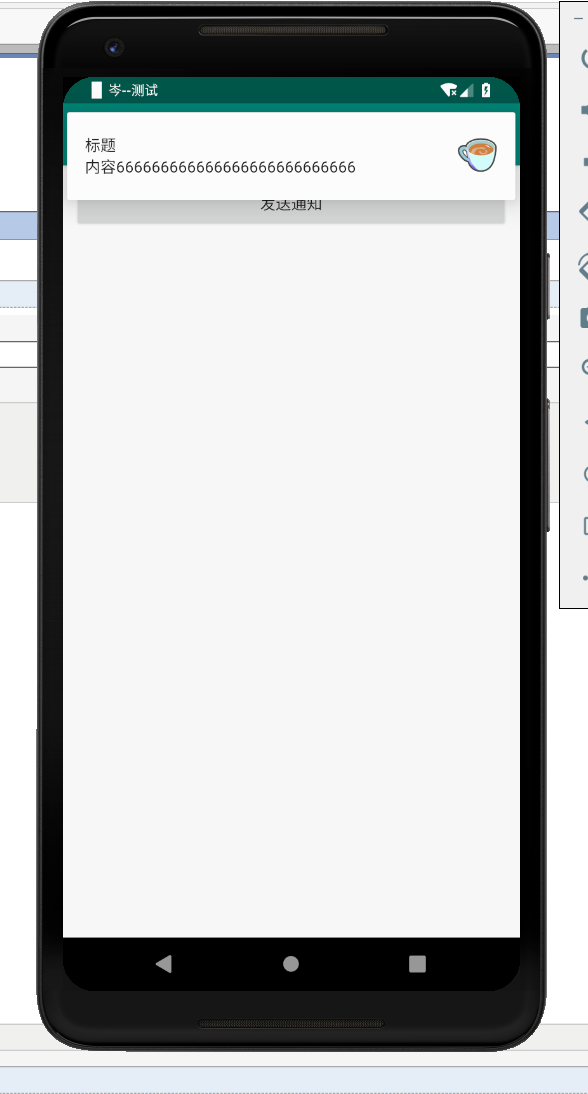

话不多所,贴代码
xml文件:
<?xml version="1.0" encoding="utf-8"?>
<LinearLayout xmlns:android="http://schemas.android.com/apk/res/android"
    xmlns:app="http://schemas.android.com/apk/res-auto"
    xmlns:tools="http://schemas.android.com/tools"
    android:layout_width="match_parent"
    android:layout_height="match_parent"
    android:orientation="vertical"
    android:padding="10dp"
    tools:context=".MainSendMessage">
    <Button
        android:id="@+id/b1"
        android:layout_width="match_parent"
        android:layout_height="wrap_content"
        android:text="发送通知"
        />

</LinearLayout>

activity代码:
package com.example.love5;

import android.app.Notification;
import android.app.NotificationChannel;
import android.app.NotificationManager;
import android.graphics.BitmapFactory;
import android.graphics.Color;
import android.os.Build;
import android.support.annotation.RequiresApi;
import android.support.v4.app.NotificationCompat;
import android.support.v7.app.AppCompatActivity;
import android.os.Bundle;
import android.view.View;
import android.widget.Button;

public class MainSendMessage extends AppCompatActivity {
    private Button b1;

    @Override
    protected void onCreate(Bundle savedInstanceState) {
        super.onCreate(savedInstanceState);
        setContentView(R.layout.activity_main_send_message);

        b1 = findViewById(R.id.b1);
        b1.setOnClickListener(new View.OnClickListener() {
            @RequiresApi(api = Build.VERSION_CODES.O)
            @Override
            public void onClick(View v) {
                NotificationManager manager = (NotificationManager) getSystemService(NOTIFICATION_SERVICE);
                //创建通知渠道实例
                //并为它设置属性
                //通知渠道的ID,随便写
                String id = "channel_01";
                //用户可以看到的通知渠道的名字,R.string.app_name就是strings.xml文件的参数,自定义一个就好了
                CharSequence name = getString(R.string.app_name);
                //用户可看到的通知描述
                String description = getString(R.string.app_name);
                //构建NotificationChannel实例
                NotificationChannel notificationChannel =
                        new NotificationChannel(id, name, NotificationManager.IMPORTANCE_HIGH);
                //配置通知渠道的属性
                notificationChannel.setDescription(description);
                //设置通知出现时的闪光灯
                notificationChannel.enableLights(true);
                notificationChannel.setLightColor(Color.RED);
                //设置通知出现时的震动
                notificationChannel.enableVibration(true);
                notificationChannel.setVibrationPattern(new long[]{100, 200, 300, 400, 500, 400, 300, 200, 100});
                //在notificationManager中创建通知渠道
                manager.createNotificationChannel(notificationChannel);

          //蓝色字是个新方法,旧的被api放弃了
                Notification notification = new NotificationCompat.Builder(MainSendMessage.this, id)
                        .setContentTitle("标题")
                        .setContentText("内容666666666666666666666666666")
                        .setWhen(System.currentTimeMillis())
                        .setSmallIcon(R.drawable.tubiao)
                        .setLargeIcon(BitmapFactory.decodeResource(getResources(), R.drawable.coffee))
                        .build();
                manager.notify(1, notification);

            }
        });

    }
}
Android 普通通知栏新方法,现在需要创建通知渠道才可以的更多相关文章
- 【Android】一种提高Android应用进程存活率新方法
[Android]一种提高Android应用进程存活率新方法 SkySeraph Jun. 19st 2016 Email:skyseraph00@163.com 更多精彩请直接访问SkySeraph ...
- 一种提高Android应用进程存活率新方法
一.基础知识 1.Android 进程优先级 1.1 进程优先级等级一般分法:- Activte process- Visible Process- Service process- Backgrou ...
- 腾讯云安全:开发者必看|Android 8.0 新特性及开发指南
欢迎大家关注腾讯云技术社区-博客园官方主页,我们将持续在博客园为大家推荐技术精品文章哦~ 背景介绍 谷歌2017 I/O开发者大会今年将于5月17-19日在美国加州举办.大会将跟往年一样发布最新的 A ...
- 开发者必看|Android 8.0 新特性及开发指南
背景介绍 谷歌2017 I/O开发者大会今年将于5月17-19日在美国加州举办.大会将跟往年一样发布最新的 Android 系统,今年为 Android 8.0.谷歌在今年3 月21日发布 Andro ...
- 第6篇-Java方法新栈帧的创建
在 第2篇-JVM虚拟机这样来调用Java主类的main()方法 介绍JavaCalls::call_helper()函数的实现时提到过如下一句代码: address entry_point = me ...
- 《Android群英传》读书笔记 (5) 第十一章 搭建云端服务器 + 第十二章 Android 5.X新特性详解 + 第十三章 Android实例提高
第十一章 搭建云端服务器 该章主要介绍了移动后端服务的概念以及Bmob的使用,比较简单,所以略过不总结. 第十三章 Android实例提高 该章主要介绍了拼图游戏和2048的小项目实例,主要是代码,所 ...
- [Android]使用Dagger 2依赖注入 - 图表创建的性能(翻译)
以下内容为原创,欢迎转载,转载请注明 来自天天博客:http://www.cnblogs.com/tiantianbyconan/p/5098943.html 使用Dagger 2依赖注入 - 图表创 ...
- Android 5.X新特性之为RecyclerView添加下拉刷新和上拉加载及SwipeRefreshLayout实现原理
RecyclerView已经写过两篇文章了,分别是Android 5.X新特性之RecyclerView基本解析及无限复用 和 Android 5.X新特性之为RecyclerView添加Header ...
- Android经典完美退出方法
Android经典完美退出方法,使用单例模式创建一个Activity管理对象,该对象中有一个Activity容器(具体实现自己处理,使用LinkedList等)专门负责存储新开启的每一个Activit ...
随机推荐
- SourceInSight自定义命令说明与应用
1.自定义命名设置界面(Tool -> Custom Commands...) Command 显示当前选中命令的名字. 下拉列表中包含了所有的自定义命令. Run 命令行,当调用自定义命令时, ...
- IIS+Tomcat功能iis端口2
之前写过IIS桥接Tomcat是通过isapi_redirect.dll,组件方式实现共用端口的,但是在Windows2012服务器 iis8.0版本中,配置完成后没有效果,比较抓狂,分析发现如下信息 ...
- MVC简单的增删改查
最近的学习了一下mvc,现在做一个mvc的CRUD例子. 1.创建实体模型 2.创建一个UserInfo的控制器 3.查询数据 code public IList<UserInfo> us ...
- WinForm 中 comboBox控件之数据绑定
一.IList 现在我们直接创建一个List集合,然后绑定 1 IList<string> list = new List<string>(); 2 list.Add(&quo ...
- PostgreSQL>窗口函数的用法
PostgreSQL之窗口函数的用法 转载请注明出处:https://www.cnblogs.com/funnyzpc/p/9311281.html PostgreSQL的高级特性本准备三篇的(递归. ...
- DEDECMS织梦文章摘要批量更改方法
我们建站有时候需要直接把数据库导入,只要修改一下基本的名称信息就可以直接用,但是遇用到一些问题.比如文章摘要不会随着文章内容的更新而更新.织梦(dede)在添加文章的时候会自动生成文章摘要,如果重新修 ...
- redis的过期策略都有哪些?
1.面试题 redis的过期策略都有哪些?内存淘汰机制都有哪些?手写一下LRU代码实现? 2.面试官心里分析 1)老师啊,我往redis里写的数据怎么没了? 之前有同学问过我,说我们生产环境的redi ...
- 修改 Docker 的 daemon.json后启动失败
创建Harbor要把register 换成Harbor地址 vim /etc/docker/daemon.json添加{ "insecure-registries":[" ...
- vue.js数据可以在页面上渲染成功却总是警告提示某个字段“undefined”未定义
最近在开发公司的一个后端管理系统,用的是比较流行的vue框架.在开发过程中,总是出现各种各样的报错问题,有警告的,有接口不通的,有自己马虎造成的低级错误的等等,这些错误在一些老司机面前分分钟解决,但今 ...
- webpack2入门概念
webpack是一种JavaScript应用模块化打包工具,它配置起来简单易上手,因此很多企业工程化代码都使用它来打包.在具体介绍如何使用webpack之前,先来介绍下webpack的四个核心概念. ...