
Android 普通通知栏新方法,现在需要创建通知渠道才可以
先看看效果看看是不是你想要的

点击后
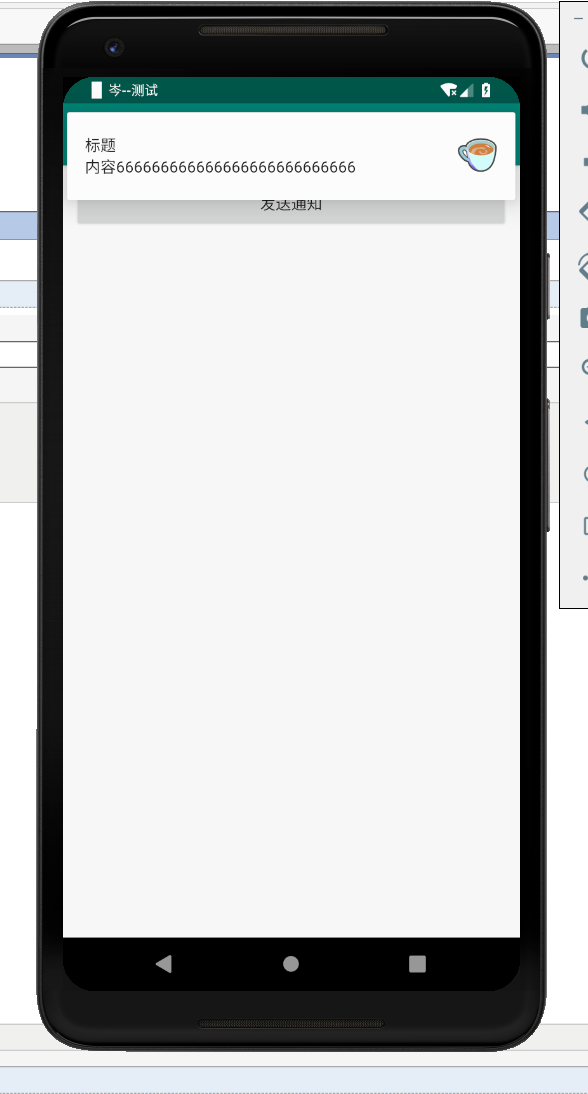

话不多所,贴代码
xml文件:
<?xml version="1.0" encoding="utf-8"?>
<LinearLayout xmlns:android="http://schemas.android.com/apk/res/android"
    xmlns:app="http://schemas.android.com/apk/res-auto"
    xmlns:tools="http://schemas.android.com/tools"
    android:layout_width="match_parent"
    android:layout_height="match_parent"
    android:orientation="vertical"
    android:padding="10dp"
    tools:context=".MainSendMessage">
    <Button
        android:id="@+id/b1"
        android:layout_width="match_parent"
        android:layout_height="wrap_content"
        android:text="发送通知"
        />

</LinearLayout>

activity代码:
package com.example.love5;

import android.app.Notification;
import android.app.NotificationChannel;
import android.app.NotificationManager;
import android.graphics.BitmapFactory;
import android.graphics.Color;
import android.os.Build;
import android.support.annotation.RequiresApi;
import android.support.v4.app.NotificationCompat;
import android.support.v7.app.AppCompatActivity;
import android.os.Bundle;
import android.view.View;
import android.widget.Button;

public class MainSendMessage extends AppCompatActivity {
    private Button b1;

    @Override
    protected void onCreate(Bundle savedInstanceState) {
        super.onCreate(savedInstanceState);
        setContentView(R.layout.activity_main_send_message);

        b1 = findViewById(R.id.b1);
        b1.setOnClickListener(new View.OnClickListener() {
            @RequiresApi(api = Build.VERSION_CODES.O)
            @Override
            public void onClick(View v) {
                NotificationManager manager = (NotificationManager) getSystemService(NOTIFICATION_SERVICE);
                //创建通知渠道实例
                //并为它设置属性
                //通知渠道的ID,随便写
                String id = "channel_01";
                //用户可以看到的通知渠道的名字,R.string.app_name就是strings.xml文件的参数,自定义一个就好了
                CharSequence name = getString(R.string.app_name);
                //用户可看到的通知描述
                String description = getString(R.string.app_name);
                //构建NotificationChannel实例
                NotificationChannel notificationChannel =
                        new NotificationChannel(id, name, NotificationManager.IMPORTANCE_HIGH);
                //配置通知渠道的属性
                notificationChannel.setDescription(description);
                //设置通知出现时的闪光灯
                notificationChannel.enableLights(true);
                notificationChannel.setLightColor(Color.RED);
                //设置通知出现时的震动
                notificationChannel.enableVibration(true);
                notificationChannel.setVibrationPattern(new long[]{100, 200, 300, 400, 500, 400, 300, 200, 100});
                //在notificationManager中创建通知渠道
                manager.createNotificationChannel(notificationChannel);

          //蓝色字是个新方法,旧的被api放弃了
                Notification notification = new NotificationCompat.Builder(MainSendMessage.this, id)
                        .setContentTitle("标题")
                        .setContentText("内容666666666666666666666666666")
                        .setWhen(System.currentTimeMillis())
                        .setSmallIcon(R.drawable.tubiao)
                        .setLargeIcon(BitmapFactory.decodeResource(getResources(), R.drawable.coffee))
                        .build();
                manager.notify(1, notification);

            }
        });

    }
}
Android 普通通知栏新方法,现在需要创建通知渠道才可以的更多相关文章
- 【Android】一种提高Android应用进程存活率新方法
[Android]一种提高Android应用进程存活率新方法 SkySeraph Jun. 19st 2016 Email:skyseraph00@163.com 更多精彩请直接访问SkySeraph ...
- 一种提高Android应用进程存活率新方法
一.基础知识 1.Android 进程优先级 1.1 进程优先级等级一般分法:- Activte process- Visible Process- Service process- Backgrou ...
- 腾讯云安全:开发者必看|Android 8.0 新特性及开发指南
欢迎大家关注腾讯云技术社区-博客园官方主页,我们将持续在博客园为大家推荐技术精品文章哦~ 背景介绍 谷歌2017 I/O开发者大会今年将于5月17-19日在美国加州举办.大会将跟往年一样发布最新的 A ...
- 开发者必看|Android 8.0 新特性及开发指南
背景介绍 谷歌2017 I/O开发者大会今年将于5月17-19日在美国加州举办.大会将跟往年一样发布最新的 Android 系统,今年为 Android 8.0.谷歌在今年3 月21日发布 Andro ...
- 第6篇-Java方法新栈帧的创建
在 第2篇-JVM虚拟机这样来调用Java主类的main()方法 介绍JavaCalls::call_helper()函数的实现时提到过如下一句代码: address entry_point = me ...
- 《Android群英传》读书笔记 (5) 第十一章 搭建云端服务器 + 第十二章 Android 5.X新特性详解 + 第十三章 Android实例提高
第十一章 搭建云端服务器 该章主要介绍了移动后端服务的概念以及Bmob的使用,比较简单,所以略过不总结. 第十三章 Android实例提高 该章主要介绍了拼图游戏和2048的小项目实例,主要是代码,所 ...
- [Android]使用Dagger 2依赖注入 - 图表创建的性能(翻译)
以下内容为原创,欢迎转载,转载请注明 来自天天博客:http://www.cnblogs.com/tiantianbyconan/p/5098943.html 使用Dagger 2依赖注入 - 图表创 ...
- Android 5.X新特性之为RecyclerView添加下拉刷新和上拉加载及SwipeRefreshLayout实现原理
RecyclerView已经写过两篇文章了,分别是Android 5.X新特性之RecyclerView基本解析及无限复用 和 Android 5.X新特性之为RecyclerView添加Header ...
- Android经典完美退出方法
Android经典完美退出方法,使用单例模式创建一个Activity管理对象,该对象中有一个Activity容器(具体实现自己处理,使用LinkedList等)专门负责存储新开启的每一个Activit ...
随机推荐
- Java新手问题集锦
Java是目前最流行的编程语言之一——它可以用来编写Windows程序或者是Web应用,移动应用,网络程序,消费电子产品,机顶盒设备,它无处不在. 有超过30亿的设备是运行在Java之上的.根据Ora ...
- Python 实现auto linlink 连连看
先上知乎上大神所写: 你看过/写过哪些有意思的代码? 然后别急着看blog,玩一把游戏再说! 看知乎评论,有人说他用了一个下午时间就写出来了. wo kao!!! 我断断续续写了一周的下午才搞定,然后 ...
- JVM调优入门之初探
JVM:程序计数器,jvm栈,本地方法栈,堆,方法区 JVM:虚拟机内存又分有:年轻代(eden,servivor s0,servivor s1),年老代(tenured),永久代() 问题1:如何查 ...
- java位移运算符2 转
https://blog.csdn.net/xxx134617/article/details/7454774 java中int类型占4个字节,二进制用补码表示: 3的二进制表示: 00000000 ...
- java简单框架设计
设计框架包可以作为一个工具给大家用,需要有完全不同设计思路给出来,不同于我们去做一个web服务.网站. 或者一个业务微服务,需要从原来使用视角转换成一个构建者视角. 框架或者工具,更多是框架来管理或者 ...
- PBRT笔记(6)——采样和重构
前言 本文仅作为个人笔记分享,又因为本章涉及多个专业领域而本人皆未接触过,所以难免出错,请各位读者注意. 对于数字图像需要区分image pixels(特定采样处的函数值)和display pixel ...
- 微信小程序开发---各代码文件简介
根据上一文,已建立QuickStart 项目,该项目系本人毕设部分内容,所以记录以便以后查阅 开发小程序就必须了解小程序项目目录结构和文件作用,接下来就根据我现在自学得到的知识把这些记录下来. 一.目 ...
- 2.10linux学习(2)
2019-2-10 19:34:27 跟着超哥学Linux 发现蛮好玩的!适合开发,Windows适合娱乐! 可以跟着超哥学Linux 参考:https://www.cnblogs.com/pyyu/ ...
- 873D. Merge Sort
Merge sort is a well-known sorting algorithm. The main function that sorts the elements of array a w ...
- 查看 FormData 中已存在的值
var formData = new FormData(); formData.append('name','bob'); formData.append('sex','male'); formDat ...