
msf登陆Windows 1
前言
刚做完这个测试,于是,写下自己的测试过程以及测试中遇到的问题解决办法
环境&操作
1. Windows版本适合类型(Win 7 // XP...............)
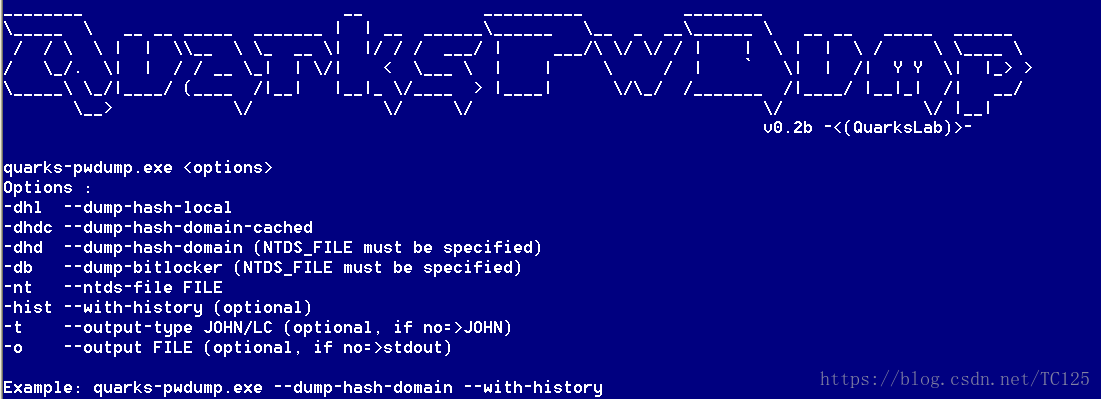
2. 以XP为靶机,借助工具gethash
其使用方法:在cmd中输入命令gethash.exe -dhl可以直接获得用户hash

输入命令gethash.exe $local可以查看该参数
3. 使用msf
先加载模块

连接靶机

设置smbuser smbpass

最后直接输入exploit进行攻击即可
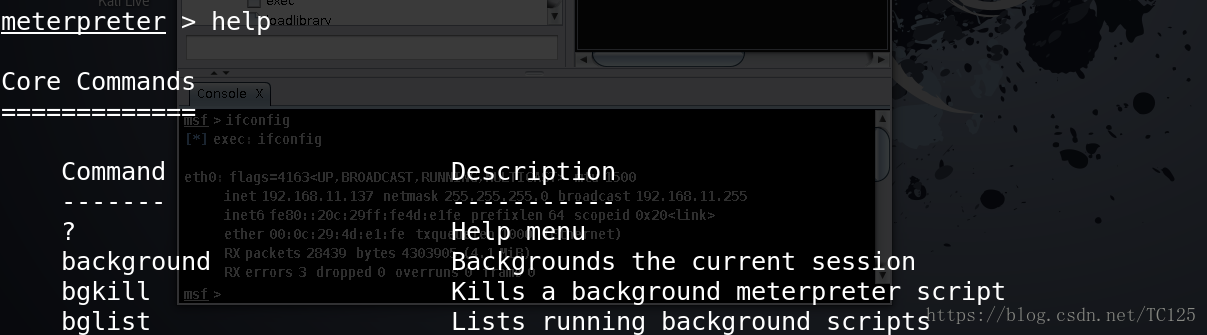
可以这样的话就算OK了,你就相当于登陆这个系统,可查看任何东西
4. 报错
靶机: Windows XP
1)连接拒绝
[-] 192.168.48.151: - Exploit failed [unreachable]: Rex::ConnectionRefused The connection was refused by the remote host (192.168.48.151:).
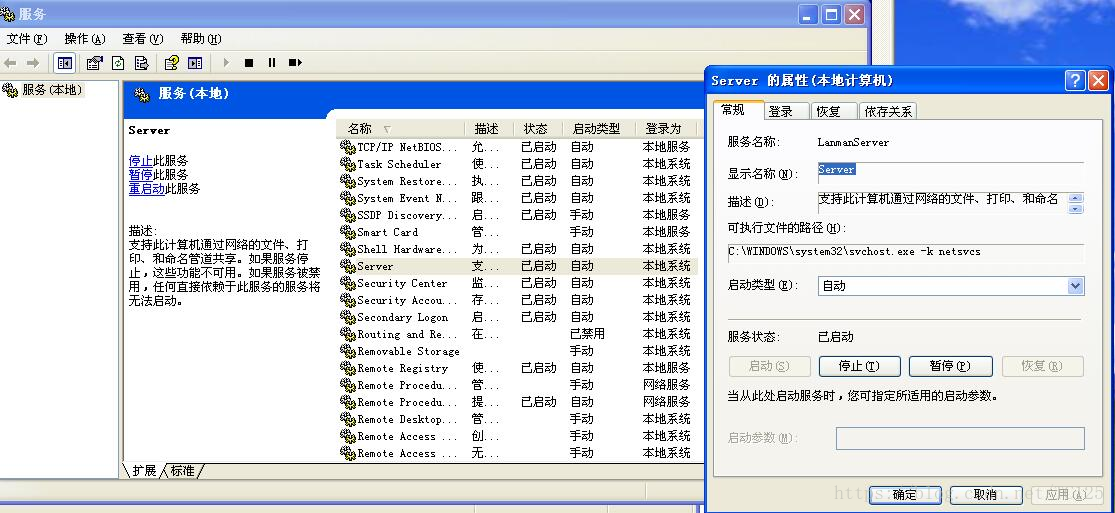
开启Windows XP 的445端口和Server服务
2)登陆失败
[-] 192.168.48.151: - Exploit failed [no-access]: Rex::Proto::SMB::Exceptions::LoginError Login Failed: The server responded with error: STATUS_LOGON_FAILURE (Command= WordCount=)
首先检测SMBPass的值是否正确Win + R打开gpedit.msc
依次打开本地计算机策略 - >计算机配置 - > Windows设置 - >安全设置 - >本地策略 - >安全选项
修改网络访问:本地帐户的共享和安全模式为经典 - 本地用户身份验证
靶机: Windows 7
1)共享服务不允许远程访问
较新的Windows系统默认情况下是不允许的
[-] 192.168.48.144: - Exploit failed [no-access]: Rex::Proto::SMB::Exceptions::ErrorCode The server responded with error: STATUS_ACCESS_DENIED (Command= WordCount=)
将注册表中LocalAccountTokenFilterPolicy的值更改为
HKEY_LOCAL_MACHINE\SOFTWARE\Microsoft\Windows\CurrentVersion\Policies\System
如果下面没有该文件,直接新建一个(DWORD32位)
msf登陆Windows 1的更多相关文章
- msf登陆Windows 2
使用ms17_010(永恒之蓝)进行攻击登陆(XP) 1)加载模块 2)连接靶机 3)设置payload 4)设置lhost(攻击主机IP) 5)exploit进行攻击登陆
- Azure China (6) SAP 应用在华登陆 Windows Azure 公有云
<Windows Azure Platform 系列文章目录> 2014年07月11日 由世纪互联运营的 Windows Azure 为 SAP 应用提供公有云平台 2014 年 ...
- metasploit(MSF)对windows的ms17-010漏洞利用
picture 配置exploit msf > use exploit/windows/smb/ms17_010_eternalblue msf exploit(windows/smb/ms17 ...
- 利用Py-Socket模块做的一个不登陆windows服务器自动实现替换或者调用自动拨号功能
xu言: 最近,有个朋友让我帮忙“搞点事情”,然后正好在学习socket模块,这个模块666啊,基本上可以实现远程服务器cmd shell的大部分功能.好,话不多说,直接上码~ 由于很多电信运营商都会 ...
- python+msf 制作 windows远控
最近分析的一个远控,后发现是meterpreter rever http shell,文件是个打包的python(打包成exe),感谢wstone的指导~ 创建dll ./msfpayload win ...
- 通过Javascript模拟登陆Windows认证的网站
<html xmlns="http://www.w3.org/1999/xhtml"> <head> <title>模拟登陆</title ...
- ubuntu远程登陆windows
首先安装rdesktop : apt-get install rdesktop.p 程序安装完后,在终端命令行中输入:$ rdesktop -g 1024x768 -d 24 ip,就进入了windo ...
- 模拟登陆WINDOWS认证的sharepoint页面
<!DOCTYPE html PUBLIC "-//W3C//DTD XHTML 1.0 Transitional//EN" "http://www.w3.org/ ...
- Kali linux 2016.2(Rolling)的利用MSF攻击windows小案例(exploits + payloads + taegets)(博主推荐)
不多说,直接上干货! 本博文举的例,是利用远程溢出windows服务器. Exploit/windows/smb/ms08_067_netapi. Payload : windows/shell ...
随机推荐
- 如何使用yql实现跨域访问
应用场景 调用百度的某个API, 例如:https://openapi.baidu.com/api 返回结果是:{"id":123,"name":"t ...
- [AtCoder3856]Ice Rink Game - 模拟
Problem Statement An adult game master and N children are playing a game on an ice rink. The game co ...
- apicloud实现各种自定义弹层组件
- Vue 项目: npm run dev 报错 webpack-dev-server
从码云上下载vue项目,运行npm run dev 时报错: > webpack-dev-server --inline --progress --config build/webpack.de ...
- 实战深度学习OpenCV(三):视频实时canny边缘检测
#include <stdio.h> #include"opencv2/opencv.hpp" using namespace cv; int main() { Vid ...
- [Swift]LeetCode143. 重排链表 | Reorder List
Given a singly linked list L: L0→L1→…→Ln-1→Ln,reorder it to: L0→Ln→L1→Ln-1→L2→Ln-2→… You may not mod ...
- [Swift]LeetCode256.粉刷房子 $ Paint House
There are a row of n houses, each house can be painted with one of the three colors: red, blue or gr ...
- [Swift]LeetCode478. 在圆内随机生成点 | Generate Random Point in a Circle
Given the radius and x-y positions of the center of a circle, write a function randPoint which gener ...
- CoCos2dx开发:更换导出的app名称和图标
要处理的文件路径如下: 1.更换图标: drawable-hdpi.drawable-ldpi.drawable-mdpi三个文件夹分别代表大.小.中三个不同宽高的图片,为了应对手机的不同分辨率,来采 ...
- Kubernetes 笔记 06 豌豆荚之旅(一)
本文首发于我的公众号 Linux云计算网络(id: cloud_dev),专注于干货分享,号内有 10T 书籍和视频资源,后台回复「1024」即可领取,欢迎大家关注,二维码文末可以扫. Hi,大家好, ...