
Java Spring Boot VS .NetCore (七) 配置文件
Java Spring Boot VS .NetCore (一)来一个简单的 Hello World
Java Spring Boot VS .NetCore (二)实现一个过滤器Filter
Java Spring Boot VS .NetCore (三)Ioc容器处理
Java Spring Boot VS .NetCore (四)数据库操作 Spring Data JPA vs EFCore
Java Spring Boot VS .NetCore (五)MyBatis vs EFCore
Java Spring Boot VS .NetCore (六) UI thymeleaf vs cshtml
Java Spring Boot VS .NetCore (七) 配置文件
Java Spring Boot VS .NetCore (八) Java 注解 vs .NetCore Attribute
Java Spring Boot VS .NetCore (九) Spring Security vs .NetCore Security
Java Spring Boot VS .NetCore (十) Java Interceptor vs .NetCore Interceptor
Java Spring Boot VS .NetCore (十一)自定义标签 Java Tag Freemarker VS .NetCore Tag TagHelper
Spring Boot 配置文件
主要说下 properties & yml
下面来看下
application.properties的文件格式
Spring.datasource.url=jdbc:mysql://192.168.0.233:3306/test1?useSSL=false

Spring.datasource.username=uoso

Spring.datasource.password=uosotech_123

Spring.datasource.driver-class-name=com.mysql.jdbc.Driver
yml配置格式
spring1:

 url1: dbc:mysql://192.168.0.102:3306/test1?useSSL=false
那么在代码中我们怎么来使用这些配置文件呢?
这里要介绍的就是注解 @Component 、 @Value 的使用了
默认只要编写名称为application.*.yml 都是能够被直接使用的,只需要把 配置文件映射到类的属性里面,代码如下
@Component

public class PropertiesConfig {

    @Value("${Spring.datasource.url}")

    private String database;

    public String getDatabase() {

        return database;

    }

    public void setDatabase(String database) {

        this.database = database;

    }

}
如果世界使用的application.yml 能够自动被填充的配置资源里面,写法给上面样就能拿到配置
我这里自定义一个yml 如:test.yml
这里需要添加依赖
<dependency>

            <groupId>org.springframework.boot</groupId>

            <artifactId>spring-boot-configuration-processor</artifactId>

            <optional>true</optional>

        </dependency>
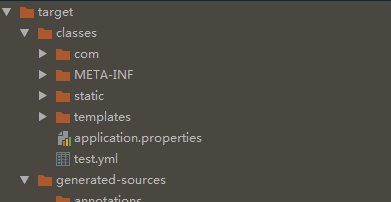
重新构建后,我新建一个class ,这里需要说明的就是 @ProtertySource 指定yml的路径 需要注意是的 classpath 这个指向的地址,是打包后的目录,调试的时候肯定找不到对应路径目录的文件需要自己配置下,否则就放在下图的目录结构
@Component

@PropertySource(value = "classpath:/test.yml")

@ConfigurationProperties(prefix = "spring1")

public class YMLConfig {

    public String getUrl1() {

        return url1;

    }

    public void setUrl1(String url1) {

        this.url1 = url1;

    }

    @Value("${url1}")

    private  String url1;
使用通过注解 @Autowired \ @Resource 都可以
//测试yml配置

    @Autowired

    private YMLConfig ymlConfig;

    @Test

    public  void testYmlConfig()

    {

        System.out.print(ymlConfig.getUrl1());

    }


得到了我们想要的结果,下面在来说下.NetCore中的配置使用情况
.NetCore 配置文件
.NetCore提供了json 、xml 的方式来实现配置,这里我以json 来举个例子看下使用方式
默认也有一个appsettings.json 的文件,在不使用自定义配置的情况下,系统会加载这个配置文件 ,那么如果要把配置文件映射到class里面需要怎么处理呢?
下来创建一个配置类
 public class AuthorityConfig

    {

        public string Authority { get; set; }

        public bool RequireHttpsMetadata { get; set; }

    }
在appsetting里面我们根据目录结构添加即可
  "AuthorityConfig": {

    "Authority": "http://localhost:20001",

    "RequireHttpsMetadata": false

  }
那么怎么把这两个Bind起来呢? 前面可以看到Java是通过@Value注解
.NetCore则是通过 在Startup 启动类中添加服务 里面有 IConfiguration 接口,根据这个接口来操作即可
services.AddOptions();

services.Configure<AuthorityConfig>(Configuration.GetSection("AuthorityConfig"));
根据节点位置配置关联的类,需要使用的时候通过构造函数注入即可
如果需要添加自定义的配置,我们使用启动类的构建来创建相关路径下的相关文件绑定到配置中Configuration 最后通过 Configuration 来绑定 Class之间的关系
public Startup(IConfiguration configuration, IHostingEnvironment env)

        {

            var configurationbuilder = new ConfigurationBuilder()

               .SetBasePath(env.ContentRootPath)

               .AddJsonFile($"appsettings.json", optional: true, reloadOnChange: true)

               .AddXmlFile($"appsettings.xml", optional: true, reloadOnChange: true)

               .AddEnvironmentVariables();

            Configuration = configurationbuilder.Build();

           // Configuration = configuration;

        }
总结
其实 Spring Boot中也有其他的方式加载自定义的文件 ,这里的 ConfugurationBuilder 跟 Spring Boot中的 PropertySourcesPlaceholderConfigurer 类似,Java还提供了2中创建方式
1、YamlPropertiesFactoryBean yaml = new YamlPropertiesFactoryBean();
2、YamlPropertySourceLoader loader = new YamlPropertySourceLoader();
MutablePropertySources sources = new MutablePropertySources();
可以看到第二种里面多了MutablePropertySources,英文上就是加载多个资源文件的,事实就是这个意思,加载多个资源文件,而第一种没抛出异常
下面来解析下第一种:看源码
public class YamlPropertiesFactoryBean extends YamlProcessor implements FactoryBean<Properties>, InitializingBean {

    private boolean singleton = true;

    @Nullable

    private Properties properties;

    public YamlPropertiesFactoryBean() {

    }

    public void setSingleton(boolean singleton) {

        this.singleton = singleton;

    }

    public boolean isSingleton() {

        return this.singleton;

    }

    public void afterPropertiesSet() {

        if (this.isSingleton()) {

            this.properties = this.createProperties();

        }

    }
没有异常,而且是单例
看下第二种的源码,抛出了IO异常,在找不到文件目录文件的情况下会抛出异常
public class YamlPropertySourceLoader implements PropertySourceLoader {

    public YamlPropertySourceLoader() {

    }

    public String[] getFileExtensions() {

        return new String[]{"yml", "yaml"};

    }

    public List<PropertySource<?>> load(String name, Resource resource) throws IOException {

        if (!ClassUtils.isPresent("org.yaml.snakeyaml.Yaml", (ClassLoader)null)) {

            throw new IllegalStateException("Attempted to load " + name + " but snakeyaml was not found on the classpath");

        } else {

            List<Map<String, Object>> loaded = (new OriginTrackedYamlLoader(resource)).load();

            if (loaded.isEmpty()) {

                return Collections.emptyList();

            } else {

                List<PropertySource<?>> propertySources = new ArrayList(loaded.size());

                for(int i = 0; i < loaded.size(); ++i) {

                    String documentNumber = loaded.size() != 1 ? " (document #" + i + ")" : "";

                    propertySources.add(new OriginTrackedMapPropertySource(name + documentNumber, (Map)loaded.get(i)));

                }

                return propertySources;

            }

        }

    }

}
配置这一块就说道这里~~~
下一章来介绍下自定的注解,同时也会结合.NetCore自定义属性标签来比较来时比较说明。
Java Spring Boot VS .NetCore (七) 配置文件的更多相关文章
- Java Spring Boot VS .NetCore (一)来一个简单的 Hello World
系列文章 Java Spring Boot VS .NetCore (一)来一个简单的 Hello World Java Spring Boot VS .NetCore (二)实现一个过滤器Filte ...
- Java Spring Boot VS .NetCore (二)实现一个过滤器Filter
Java Spring Boot VS .NetCore (一)来一个简单的 Hello World Java Spring Boot VS .NetCore (二)实现一个过滤器Filter Jav ...
- Java Spring Boot VS .NetCore (三)Ioc容器处理
Java Spring Boot VS .NetCore (一)来一个简单的 Hello World Java Spring Boot VS .NetCore (二)实现一个过滤器Filter Jav ...
- Java Spring Boot VS .NetCore (四)数据库操作 Spring Data JPA vs EFCore
Java Spring Boot VS .NetCore (一)来一个简单的 Hello World Java Spring Boot VS .NetCore (二)实现一个过滤器Filter Jav ...
- Java Spring Boot VS .NetCore (五)MyBatis vs EFCore
Java Spring Boot VS .NetCore (一)来一个简单的 Hello World Java Spring Boot VS .NetCore (二)实现一个过滤器Filter Jav ...
- Java Spring Boot VS .NetCore (六) UI thymeleaf vs cshtml
Java Spring Boot VS .NetCore (一)来一个简单的 Hello World Java Spring Boot VS .NetCore (二)实现一个过滤器Filter Jav ...
- Java Spring Boot VS .NetCore (八) Java 注解 vs .NetCore Attribute
Java Spring Boot VS .NetCore (一)来一个简单的 Hello World Java Spring Boot VS .NetCore (二)实现一个过滤器Filter Jav ...
- Java Spring Boot VS .NetCore (九) Spring Security vs .NetCore Security
Java Spring Boot VS .NetCore (一)来一个简单的 Hello World Java Spring Boot VS .NetCore (二)实现一个过滤器Filter Jav ...
- Java Spring Boot VS .NetCore (十) Java Interceptor vs .NetCore Interceptor
Java Spring Boot VS .NetCore (一)来一个简单的 Hello World Java Spring Boot VS .NetCore (二)实现一个过滤器Filter Jav ...
随机推荐
- SSH 协议的 ssh StrictHostKeyChecking
项目的SFTP用到了这个参数: @Override public PooledObject<ChannelSftp> makeObject() throws Exception { JSc ...
- Python——日志模块(logging)
一.日志说明 日志是跟踪软件运行时所发生的事件的一种方法.软件开发者在代码中调用日志函数,表明发生了特定的事件.事件由描述性消息描述,该描述性消息可以可选地包含可变数据(即,对于事件的每次出现都潜在地 ...
- DRF之频率限制、分页、解析器和渲染器
一.频率限制 1.频率限制是做什么的 开放平台的API接口调用需要限制其频率,以节约服务器资源和避免恶意的频繁调用. 2.频率组件原理 DRF中的频率控制基本原理是基于访问次数和时间的,当然我们可以通 ...
- C#操作session的类实例(转)
using System.Web; namespace DotNet.Utilities { public static class SessionHelper2 { /// <summary& ...
- python学习日记(OOP——静态方法和类方法)
classmethod 类方法在Python中使用比较少,类方法传入的第一个参数为cls,是类本身.并且,类方法可以通过类直接调用,或通过实例直接调用.但无论哪种调用方式,最左侧传入的参数一定是类本身 ...
- codeforces 1077F2. Pictures with Kittens (hard version)单调队列+dp
被队友催着上(xun)分(lian),div3挑战一场蓝,大号给基佬紫了,结果从D开始他开始疯狂教我做人??表演如何AKdiv3???? 比赛场上:A 2 分钟,B题蜜汁乱计数,结果想得绕进去了20多 ...
- Ubuntu和Windows双系统的安装
本菜鸡的ACM生涯大概是结束了 最有希望的EC和焦作也顺利的铁了,一路走来还是怪自己不努力,整日整日的划水,算了,铁牌退役,也是自己应有的惩罚,静下心来吧 下面介绍如何装windows10和Ubunt ...
- 来了解质量管理工具——质量屋(HOQ)
质量屋(The House Of Quality),又名HOQ,它是质量功能配置(QFD)的核心.一般QFD的学习会涉及到.同时HOQ也是项目管理十大知识领域领域中质量管理工具中的一种,今天我们就来了 ...
- Entity Framework入门教程(4)---EF中的实体关系
这一节将总结EF是怎么管理实体之间的关系.EF与数据库一样支持三种关系类型:①一对一 ,②一对多,③多对多. 下边是一个SchoolDB数据库的实体数据模型,图中包含所有的实体和各个实体间的关系.通过 ...
- 高并发秒杀系统--Service事务管理与继承测试
[Spring IoC的类型及应用场景] [Spring事务使用方式] [Spring事务的特性] [Spring事务回滚的理解] [Service声明式事务的配置] 1.配置事务管理器 2.配置基 ...