
【c#】队列(Queue)和MSMQ(消息队列)的基础使用
首先我们知道队列是先进先出的机制,所以在处理并发是个不错的选择。然后就写两个队列的简单应用。
Queue
命名空间
命名空间:System.Collections,不在这里做过多的理论解释,这个东西非常的好理解。
可以看下官方文档:https://docs.microsoft.com/zh-cn/dotnet/api/system.collections.queue?view=netframework-4.7.2
示例代码
我这里就是为了方便记忆做了一个基本的例子,首先创建了QueueTest类:
包含了获取队列的数量,入队和出队的实现
  public class QueueTest

     {

         public static Queue<string> q = new Queue<string>();

         #region 获取队列数量

         public int GetCount()

         {

             return q.Count;

         }

         #endregion

         #region 队列添加数据

         public void IntoData(string qStr)

         {

             string threadId = System.Threading.Thread.CurrentThread.ManagedThreadId.ToString();

             q.Enqueue(qStr);

             Console.WriteLine($"队列添加数据: {qStr};当前线程id:{threadId}");

         }

         #endregion

         #region 队列输出数据

         public string OutData()

         {

             string threadId = System.Threading.Thread.CurrentThread.ManagedThreadId.ToString();

             string str = q.Dequeue();

             Console.WriteLine($"队列输出数据: {str};当前线程id:{threadId}");

             return str;

         }

         #endregion

     }
为了模拟并发情况下也不会出现重复读取和插入混乱的问题所以写了TaskTest类里面开辟了两个异步线程进行插入和读取:
这里只是证明了多线程插入不会造成丢失。无忧证明并发的先进先出
     class TaskTest

     {

         #region 队列的操作模拟

         public static void QueueMian()

         {

             QueueA();

             QueueB();

         }

         private static async void QueueA()

         {

             QueueTest queue = new QueueTest();

             var task = Task.Run(() =>

             {

                 for (int i = ; i < ; i++)

                 {

                     queue.IntoData("QueueA" + i);

                 }

             });

             await task;

             Console.WriteLine("QueueAA插入完成,进行输出:");

             while (queue.GetCount() > )

             {

                 queue.OutData();

             }

         }

         private static async void QueueB()

         {

             QueueTest queue = new QueueTest();

             var task = Task.Run(() =>

             {

                 for (int i = ; i < ; i++)

                 {

                     queue.IntoData("QueueB" + i);

                 }

             });

             await task;

             Console.WriteLine("QueueB插入完成,进行输出:");

             while (queue.GetCount() > )

             {

                 queue.OutData();

             }

         }

         #endregion

     }
效果展示
然后在main函数直接调用即可:
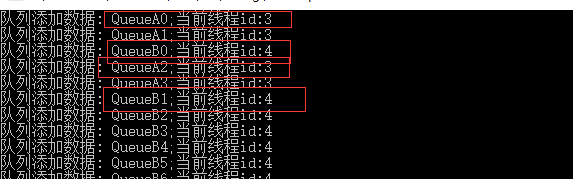
通过上面的截图可以看出插入线程是无先后的。
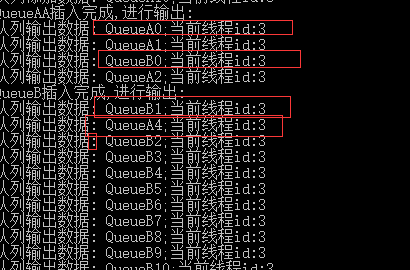
这张图也是线程无先后。
补充:通过园友的提问,我发现我一开始测试的不太仔细,只注意多线程下的插入,没有注意到输出其实不是跟插入的顺序一致,对不起,这说明queue不是线程安全的,所以这个就当是入队,出队的基础例子并不能说明并发。后面有一个补充的ConcurrentQueue队列是说明了并发线程的先进先出。
MSMQ
msmq是微软提供的消息队列,本来在windows系统中就存在,但是默认没有开启。需要开启。
开启安装
打开控制面板=>程序和功能=> 启动或关闭windows功能 => Microsoft Message Queue(MSMQ)服务器=>Microsoft Message Queue(MSMQ)服务器核心
一般选择:MSMQ Active Directory域服务继承和MSMQ HTTP支持即可。

点击确定等待安装成功。
命名空间
需要引用System.Messaging.DLL
命名空间:System.Messaging
官方资料文档:https://docs.microsoft.com/zh-cn/dotnet/api/system.messaging.messagequeue?view=netframework-4.7.2
示例代码
与上面queue同样的示例方式,创建一个MSMQ类,实现创建消息队列,查询数据,入列,出列功能:
  /// <summary>

     /// MSMQ消息队列

     /// </summary>

     class MSMQ

     {

         static string path = ".\\Private$\\myQueue";

         static MessageQueue queue;

         public static void Createqueue(string queuePath)

         {

             try

             {

                 if (MessageQueue.Exists(queuePath))

                 {

                     Console.WriteLine("消息队列已经存在");

                     //获取这个消息队列

                     queue = new MessageQueue(queuePath);

                 }

                 else

                 {

                     //不存在,就创建一个新的,并获取这个消息队列对象

                     queue = MessageQueue.Create(queuePath);

                     path = queuePath;

                 }

             }

             catch (Exception e)

             {

                 Console.WriteLine(e.Message);

             }

         }

         #region 获取消息队列的数量

         public static int GetMessageCount()

         {

             try

             {

                 if (queue != null)

                 {

                     int count = queue.GetAllMessages().Length;

                     Console.WriteLine($"消息队列数量:{count}");

                     return count;

                 }

                 else

                 {

                     return ;

                 }

             }

             catch (MessageQueueException e)

             {

                 Console.WriteLine(e.Message);

                 return ;

             }

         }

         #endregion

         #region 发送消息到队列

         public static void SendMessage(string qStr)

         {

             try

             {

                 //连接到本地队列

                 MessageQueue myQueue = new MessageQueue(path);

                 //MessageQueue myQueue = new MessageQueue("FormatName:Direct=TCP:192.168.12.79//Private$//myQueue1");

                 //MessageQueue rmQ = new MessageQueue("FormatName:Direct=TCP:121.0.0.1//private$//queue");--远程格式

                 Message myMessage = new Message();

                 myMessage.Body = qStr;

                 myMessage.Formatter = new XmlMessageFormatter(new Type[] { typeof(string) });

                 //发生消息到队列中

                 myQueue.Send(myMessage);

                 string threadId = System.Threading.Thread.CurrentThread.ManagedThreadId.ToString();

                 Console.WriteLine($"消息发送成功: {qStr};当前线程id:{threadId}");

             }

             catch (MessageQueueException e)

             {

                 Console.WriteLine(e.Message);

             }

         }

         #endregion

         #region 连接消息队列读取消息

         public static void ReceiveMessage()

         {

             MessageQueue myQueue = new MessageQueue(path);

             myQueue.Formatter = new XmlMessageFormatter(new Type[] { typeof(string) });

             try

             {

                 //从队列中接收消息

                 Message myMessage = myQueue.Receive(new TimeSpan());// myQueue.Peek();--接收后不消息从队列中移除

                 myQueue.Close();

                 string context = myMessage.Body.ToString();

                 string threadId = System.Threading.Thread.CurrentThread.ManagedThreadId.ToString();

                 Console.WriteLine($"--------------------------消息内容: {context};当前线程id:{threadId}");

             }

             catch (System.Messaging.MessageQueueException e)

             {

                 Console.WriteLine(e.Message);

             }

             catch (InvalidCastException e)

             {

                 Console.WriteLine(e.Message);

             }

         }

         #endregion

     }
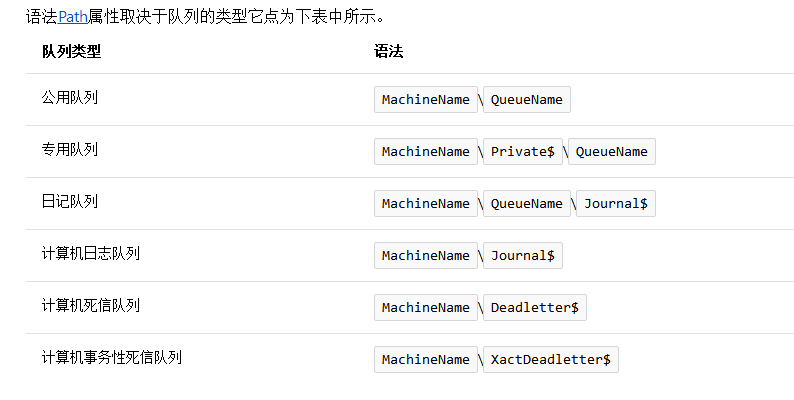
这里说明一下path这个字段,这是消息队列的文件位置和队列名称,我这里写的“.”(点)就是代表的位置MachineName字段,,代表本机的意思
然后TaskTest类修改成这个样子:
 class TaskTest

     {

         #region 消息队列的操作模拟

         public static void MSMQMian()

         {

             MSMQ.Createqueue(".\\Private$\\myQueue");

             MSMQA();

             MSMQB();

             Console.WriteLine("MSMQ结束");

         }

         private static async void MSMQA()

         {

             var task = Task.Run(() =>

             {

                 for (int i = ; i < ; i++)

                 {

                     MSMQ.SendMessage("MSMQA" + i);

                 }

             });

             await task;

             Console.WriteLine("MSMQA发送完成,进行读取:");

             while (MSMQ.GetMessageCount() > )

             {

                 MSMQ.ReceiveMessage();

             }

         }

         private static async void MSMQB()

         {

             var task = Task.Run(() =>

             {

                 for (int i = ; i < ; i++)

                 {

                     MSMQ.SendMessage("MSMQB" + i);

                 }

             });

             await task;

             Console.WriteLine("MSMQB发送完成,进行读取:");

             while (MSMQ.GetMessageCount() > )

             {

                 MSMQ.ReceiveMessage();

             }

         }

         #endregion
效果展示
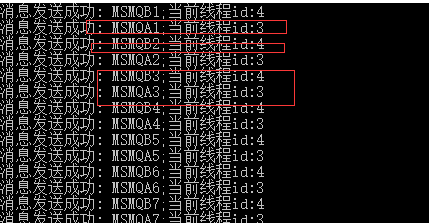
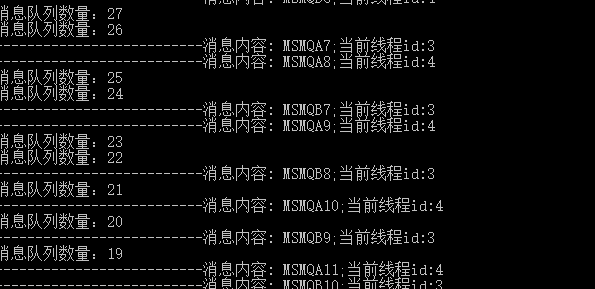
本机查看消息队列
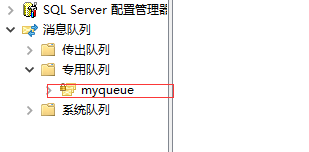
创建成功的消息队列我们可以在电脑上查看:我的电脑=>管理 =>计算机管理 =>服务与应用程序 =>消息队列 =>专用队列就看到我刚才创建的消息队列
补充感谢
感谢 virtual1988 提出的queue不是线程安全这个问题,是我没搞清楚。线程安全要使用ConcurrentQueue队列。
谢谢提出的宝贵意见。
ConcurrentQueue
所以我有修改了一下写了个ConcurrentQueue队列的:
修改代码如下:
 //public static Queue<string> q = new Queue<string>();

        public static ConcurrentQueue<string> q = new ConcurrentQueue<string>();

        //public static Queue q =Queue.Synchronized(new Queue());

        #region 获取队列数量

        public static int GetCount()

        {

            return q.Count;

        }

        #endregion

        #region 队列添加数据

        public static void IntoData(string qStr)

        {

            string threadId = System.Threading.Thread.CurrentThread.ManagedThreadId.ToString();

            q.Enqueue(qStr);

            System.Threading.Thread.Sleep();

            Console.WriteLine($"队列添加数据: {qStr};当前线程id:{threadId}");

        }

        #endregion

        #region 队列输出数据

        public static string OutData2()

        {

            string threadId = System.Threading.Thread.CurrentThread.ManagedThreadId.ToString();

            foreach (var item in q)

            {

                Console.WriteLine($"------队列输出数据: {item};当前线程id:{threadId}");

                string d="";

                q.TryDequeue( out d);

            }

            return "";

        }

        #endregion
task类:
 #region 队列的操作模拟

        public static async void QueueMian()

        {

            QueueA();

            QueueB();

        }

        private static async void QueueA()

        {

            var task = Task.Run(() =>

            {

                for (int i = ; i < ; i++)

                {

                    QueueTest.IntoData("QueueA" + i);

                }

            });

            await task;

            Console.WriteLine("QueueA插入完成,进行输出:");

        }

        private static async void QueueB()

        {

            var task = Task.Run(() =>

            {

                for (int i = ; i < ; i++)

                {

                    QueueTest.IntoData("QueueB" + i);

                }

            });

            await task;

            Console.WriteLine("QueueB插入完成,进行输出:");

        }

        public static void QueueC()

        {

            Console.WriteLine("Queue插入完成,进行输出:");

            while (QueueTest.GetCount() > )

            {

                QueueTest.OutData2();

            }

        }

        #endregion
Main函数调用:
 static void Main(string[] args)

        {

            try

            {

                Stopwatch stopWatch = new Stopwatch();

                TaskTest.QueueMian();

                Console.ReadLine();

                TaskTest.QueueC();

                Console.ReadLine();

            }

            catch (Exception e)

            {

                throw;

            }

        }
插入效果:
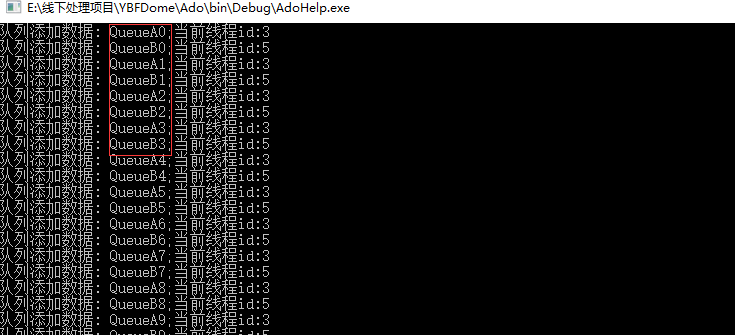
输出效果:

【c#】队列(Queue)和MSMQ(消息队列)的基础使用的更多相关文章
- WCF分布式开发必备知识(1):MSMQ消息队列
本章我们来了解下MSMQ的基本概念和开发过程.MSMQ全称MicroSoft Message Queue,微软消息队列,是在多个不同应用之间实现相互通信的一种异步传输模式,相互通信的应用可以分布于同一 ...
- 跟我一起学WCF(1)——MSMQ消息队列
一.引言 Windows Communication Foundation(WCF)是Microsoft为构建面向服务的应用程序而提供的统一编程模型,该服务模型提供了支持松散耦合和版本管理的序列化功能 ...
- 【转】MSMQ消息队列安装
一.Windows 7安装.管理消息队列1.安装消息队列 执行用户必须要有本地 Administrators 组中的成员身份,或等效身份. 具体步骤: 开始—>控制面板—>程 ...
- MSMQ消息队列安装
一.Windows 7安装.管理消息队列1.安装消息队列 执行用户必须要有本地 Administrators 组中的成员身份,或等效身份. 具体步骤: 开始—>控制面板—>程 ...
- MSMQ消息队列
MSMQ全称MicroSoft Message Queue,微软消息队列,是在多个不同的应用之间实现相互通信的一种异步传输模式,相互通信的应用可以分布于同一台机器上,也可以分布于相连的网络空间中的任一 ...
- 【6】.net msmq消息队列实例
1.msmq消息队列windows环境安装 控制面板---->程序和功能---->启用或关闭Windows程序---->Microsoft Message Queue(MSMQ)服务 ...
- WCF之MSMQ消息队列
一.MSMQ简介 MSMQ(微软消息队列)是Windows操作系统中消息应用程序的基础,是用于创建分布式.松散连接的消息通讯应用程序的开发工具. MSMQ与XML Web Services和.Net ...
- 微软MSMQ消息队列的使用
首先在windows系统中安装MSMQ 一.MSMQ交互 开发基于消息的应用程序从队列开始.MSMQ包含四种队列类型: 外发队列:消息发送到目的地之前,用它来临时存储消息. 公共队列:在主动目录中公布 ...
- C#实战Microsoft Messaging Queue(MSMQ)消息队列(干货)
前言 在使用MSMQ之前,我们需要自行安装消息队列组件!(具体安装方法大家自己搜一下吧) 采用MSMQ带来的好处是:由于是异步通信,无论是发送方还是接收方都不用等待对方返回成功消息,就可以执行余下的代 ...
- C#实战Microsoft Messaging Queue(MSMQ)消息队列
前言 在使用MSMQ之前,我们需要自行安装消息队列组件!(具体安装方法大家自己搜一下吧) 采用MSMQ带来的好处是:由于是异步通信,无论是发送方还是接收方都不用等待对方返回成功消息,就可以执行余下的代 ...
随机推荐
- 818C.soft thief
Yet another round on DecoForces is coming! Grandpa Maks wanted to participate in it but someone has ...
- History of program (language).
1 编程语言的发展历程及未来趋势 1.1 编程语言的发展 · 1946 Plankalkul Konrad Zuse,一位德国工程师,他躲藏在巴伐利亚附近的阿尔卑斯山上时,独立开发了Plank ...
- APP研发录笔记
一.消灭全局变量 在内存不足时,系统会回收一部分闲置的资源,由于App被切换到后台,所以之前存放的全局变量很容易被回收,这时再切换到前台继续使用,会报空指针崩溃.想彻底解决这个问题,就要使用序列化. ...
- XML如何添加注释?
注释以 <!-- 开始并以 --> 结束, 例如 <!--注释内容-->. 注释可以出现在文档序言中,包括文档类型定义 (DTD):文档之后:或文本内容中. 注释不能出现在属性 ...
- vue项目实践-前后端分离关于权限的思路
前后端分离后权限的思路 最近看到许多关于权限的思路,但好像都是使用动态加载路由的方式,现在也分享下我在项目中使用的解决方案. 前后端分离关于权限的处理每个人都不一样,根据项目选择制定合适的方案就好 我 ...
- Http 1.x弊端与Http 2.0比较
HTTP2.0作为新版协议,改动细节必然很多,不过对应用开发者和服务提供商来说,影响较大的就几点. 新的二进制格式(Binary Format) http1.x诞生的时候是明文协议,其格式由三部分组成 ...
- 【DFS】n皇后问题
回溯: 递归调用代表开启一个分支,如果希望这个分支返回后某些数据恢复到分支开启前的状态以便重新开始,就要使用到回溯技巧,全排列的交换法,数独,部分和,用到了回溯.下一个状态在开始之前需要利用到之前的状 ...
- Node.js(day4)
一.一些小问题 1.文件操作路径和模块读取路径的问题 我们使用fs核心模块系统进行文件操作时一般这样书写路径 fs.readFile('./views/index.html');//读取views目录 ...
- awk小例子_1_逆序排列
seq 3 | awk '{ lifo[NR]=$0 } END{ for(lno=NR;lno>-1;lno--){ print lifo[lno]; } }' 结果:3 2 1 空行(lno ...
- CentOS随笔——Service与防火墙关闭
Service后台服务管理 基本语法 service 服务名 start 开启服务 service 服务名 stop 关闭服务 service 服务名 restart 重启服务 service 服务名 ...