
C#中得到程序当前工作目录和执行目录的五种方法
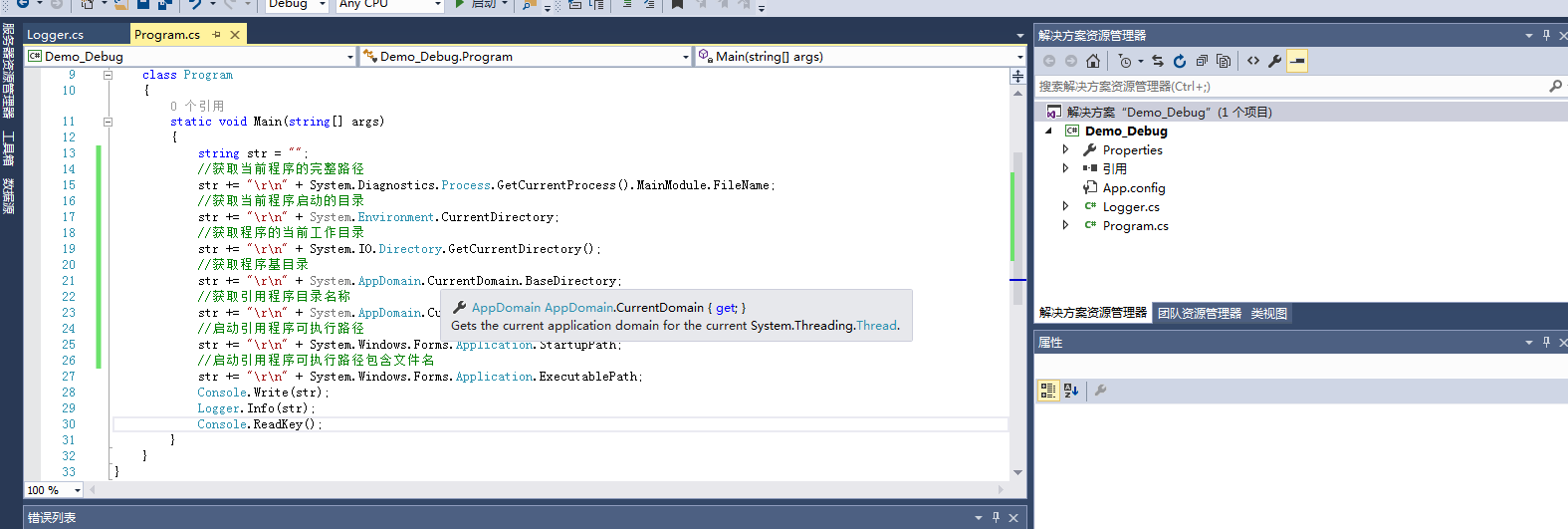
string str="";
str += "\r\n" + System.Diagnostics.Process.GetCurrentProcess().MainModule.FileName;
str += "\r\n" + System.Environment.CurrentDirectory;
str += "\r\n" + System.IO.Directory.GetCurrentDirectory();
str += "\r\n" + System.AppDomain.CurrentDomain.BaseDirectory;
str += "\r\n" + System.AppDomain.CurrentDomain.SetupInformation.ApplicationBase;
str += "\r\n" + System.Windows.Forms.Application.StartupPath;
str += "\r\n" + System.Windows.Forms.Application.ExecutablePath;
Console.Write(str);
Console.ReadKey();
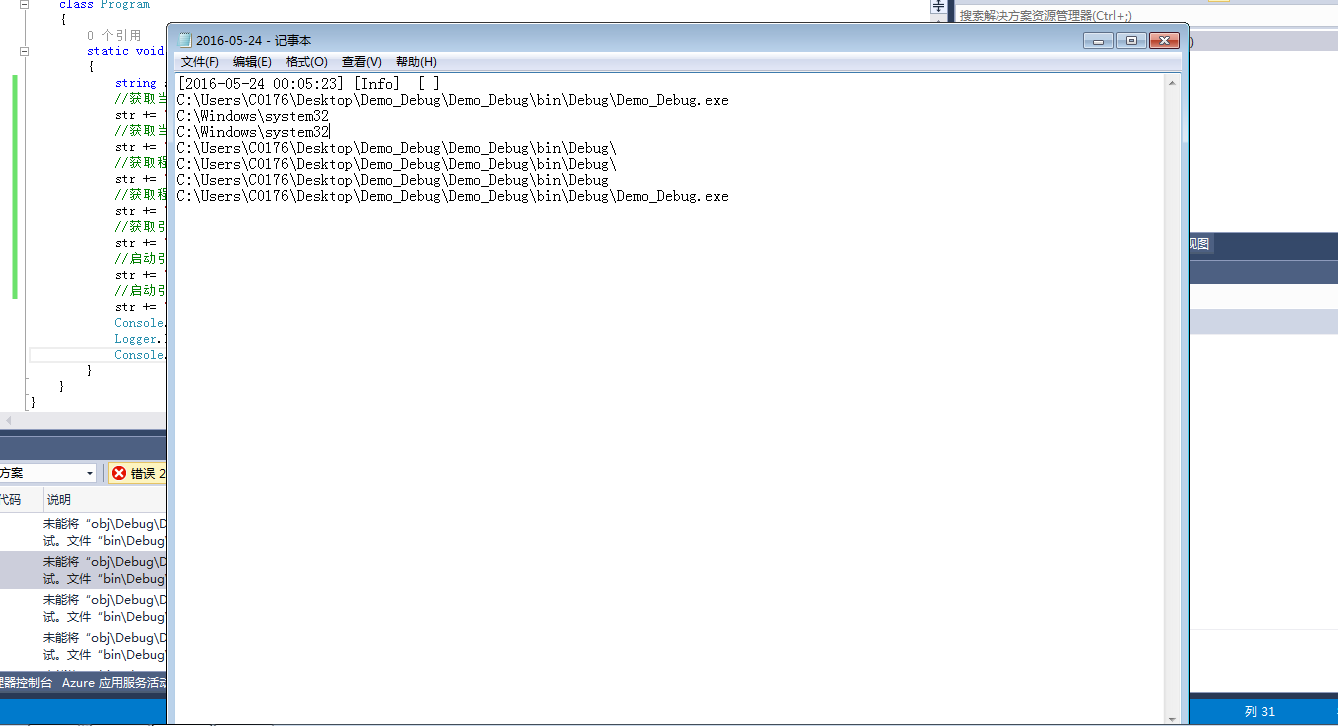
得到结果:
D:\路径测试\bin\Debug\路径测试.vshost.exe
D:\路径测试\bin\Debug
D:\路径测试\bin\Debug
D:\路径测试\bin\Debug\
D:\路径测试\bin\Debug\
D:\路径测试\bin\Debug
D:\路径测试\bin\Debug\路径测试.EXE
1. System.Diagnostics.Process.GetCurrentProcess().MainModule.FileName
获取模块的完整路径。
2. System.Environment.CurrentDirectory
获取和设置当前目录(该进程从中启动的目录)的完全限定目录。
3. System.IO.Directory.GetCurrentDirectory()
获取应用程序的当前工作目录。这个不一定是程序从中启动的目录啊,有可能程序放在C:\www里,这个函数有可能返回C:\Documents and Settings\ZYB\,或者C:\Program Files\Adobe\,有时不一定返回什么东东,我也搞不懂了。
4. System.AppDomain.CurrentDomain.BaseDirectory
获取程序的基目录。确认这种方法在 windows服务中是可以用的
5. System.AppDomain.CurrentDomain.SetupInformation.ApplicationBase
获取和设置包括该应用程序的目录的名称。
6. System.Windows.Forms.Application.StartupPath
获取启动了应用程序的可执行文件的路径。效果和2、5一样。只是5返回的字符串后面多了一个"\"而已
7. System.Windows.Forms.Application.ExecutablePath
获取启动了应用程序的可执行文件的路径及文件名,效果有时和1一样。
C#中得到程序当前工作目录和执行目录的五种方法
string str="";
str += "\r\n" + System.Diagnostics.Process.GetCurrentProcess().MainModule.FileName;
str += "\r\n" + System.Environment.CurrentDirectory;
str += "\r\n" + System.IO.Directory.GetCurrentDirectory();
str += "\r\n" + System.AppDomain.CurrentDomain.BaseDirectory;
str += "\r\n" + System.AppDomain.CurrentDomain.SetupInformation.ApplicationBase;
str += "\r\n" + System.Windows.Forms.Application.StartupPath;
str += "\r\n" + System.Windows.Forms.Application.ExecutablePath;
Console.Write(str);
Console.ReadKey();
得到结果:
D:\路径测试\bin\Debug\路径测试.vshost.exe
D:\路径测试\bin\Debug
D:\路径测试\bin\Debug
D:\路径测试\bin\Debug\
D:\路径测试\bin\Debug\
D:\路径测试\bin\Debug
D:\路径测试\bin\Debug\路径测试.EXE
1. System.Diagnostics.Process.GetCurrentProcess().MainModule.FileName
获取模块的完整路径。
2. System.Environment.CurrentDirectory
获取和设置当前目录(该进程从中启动的目录)的完全限定目录。
3. System.IO.Directory.GetCurrentDirectory()
获取应用程序的当前工作目录。这个不一定是程序从中启动的目录啊,有可能程序放在C:\www里,这个函数有可能返回C:\Documents and Settings\ZYB\,或者C:\Program Files\Adobe\,有时不一定返回什么东东,我也搞不懂了。
4. System.AppDomain.CurrentDomain.BaseDirectory
获取程序的基目录。确认这种方法在 windows服务中是可以用的
5. System.AppDomain.CurrentDomain.SetupInformation.ApplicationBase
获取和设置包括该应用程序的目录的名称。
6. System.Windows.Forms.Application.StartupPath
获取启动了应用程序的可执行文件的路径。效果和2、5一样。只是5返回的字符串后面多了一个"\"而已
7. System.Windows.Forms.Application.ExecutablePath
获取启动了应用程序的可执行文件的路径及文件名,效果有时和1一样。

C#中得到程序当前工作目录和执行目录的五种方法的更多相关文章
- VC++ 获取系统时间、程序运行时间(精确到秒,毫秒)的五种方法
1.使用CTime类(获取系统当前时间,精确到秒) CString str; //获取系统时间 CTime tm; tm=CTime::GetCurrentTime();//获取系统日期 str=tm ...
- 【VS开发】VC++ 获取系统时间、程序运行时间(精确到秒,毫秒)的五种方法
1.使用CTime类(获取系统当前时间,精确到秒) CString str; //获取系统时间 CTime tm; tm=CTime::GetCurrentTime();//获取系统日期 str=tm ...
- JS中判断某个字符串是否包含另一个字符串的五种方法
String对象的方法 方法一: indexOf() (推荐) ? 1 2 var str = "123" console.log(str.indexOf("2&qu ...
- python中执行shell的两种方法总结
这篇文章主要介绍了python中执行shell的两种方法,有两种方法可以在Python中执行SHELL程序,方法一是使用Python的commands包,方法二则是使用subprocess包,这两个包 ...
- C#统计给定的文本中字符出现的次数,使用循环和递归两种方法
前几天看了一个.net程序员面试题目,题目是”统计给定的文本中字符出现的次数,使用循环和递归两种方法“. 下面是我对这个题目的解法: 1.使用循环: /// <summary> /// 使 ...
- Oracle中获取执行计划的几种方法分析
以下是对Oracle中获取执行计划的几种方法进行了详细的分析介绍,需要的朋友可以参考下 1. 预估执行计划 - Explain PlanExplain plan以SQL语句作为输入,得到这条S ...
- 在Activity中响应ListView内部按钮的点击事件的两种方法!!!
在Activity中响应ListView内部按钮的点击事件的两种方法 转载:http://www.cnblogs.com/ivan-xu/p/4124967.html 最近交流群里面有人问到一个问题: ...
- (网页)angular中实现li或者某个元素点击变色的两种方法(转)
转自脚本之家: 本篇文章主要介绍了angular中实现li或者某个元素点击变色的两种方法,非常具有实用价值,需要的朋友可以参考下 本文介绍了angular中实现li或者某个元素点击变色的两种方法,分享 ...
- SQL Server中灾难时备份结尾日志(Tail of log)的两种方法
转自:http://www.cnblogs.com/CareySon/archive/2012/02/23/2365006.html SQL Server中灾难时备份结尾日志(Tail of log) ...
随机推荐
- canal mysql slave
[mysqld] log-bin=mysql-bin #添加这一行就ok binlog-format=ROW #选择row模式 server_id=1 #配置mysql replaction需要定义, ...
- Excle中的使用小技巧
关于从数据库中拷贝来的数字,拷贝到excle中,那些数字都变成了科学计算法. 步骤1,鼠标右键选中的列,选择“设置单元格格式(F)” 2.从这里面选中这些是否有小数,如果没有小数就把这个改成0
- windows----------windows10如何固定局域网ip
1. 2. 3. 4. 5.
- 转:select2 使用教程(简)
用了这么久的Select2插件,也该写篇文章总结总结.当初感觉Select2不是特别好用,但又找不到比它更好的下拉框插件. 在我的印象里Select2有2个版本,最新版本有一些新的特性,并且更新了一下 ...
- [Chrome] chrome 自动跳转到https
关键字眼: - static_upgrade_mode: FORCE_HTTPS - You cannot visit www.xxx.dev right now because the websit ...
- 漫谈GUI开发—各种平台UI开发概况
前言: 在看这边文章前,可以建议看下:图形界面操作系统发展史——计算机界面发展历史回顾 从CS到BS,现在的前端开发,其实也是GUI开发范畴.现今 各平台的UI开发概况 HTML&CSS,Wi ...
- SQL 一列数据整合为一条数据
SQL 一列数据整合为一条数据: SELECT STUFF(( SELECT distinct ',' + 列名 FROM 表名 where [条件] FOR XML PATH('') ), 1 ...
- ASP.NET MVC案例教程(七)
前言 写这篇文章的目的,是想总结一些东西,以帮助朋友们更好的使用这个框架.但是,我又不像把官方列举的哪些优势.功能翻译过来列举在这里.所以,我想干脆我就纯从个人观点上对这个框架评论一下吧.说的不好 ...
- 移动App专项测试
移动App测试实战—专项测试 转自:http://www.51testing.com/html/58/n-3713758.html 我们在进行了手工的功能测试之后,也开发了一些自动化测试用例,并且做了 ...
- Tableau 学习资料
官方文档: https://www.tableau.com/zh-cn/support/help 其他教程: tablaue破解版_tableau10 破解_tableau server 破解:htt ...