
iOS原生 和 react native视图混编
在iOS原生功能中加入RN,请看之前 写的 RN与iOS交互系列文章.本篇只讲下视图混编.
关键点只有二:
1.通过 RCTRootView 加载RN视图.
2.RN中,只需要AppRegistry.registerComponent()导出即可.
关键代码:
OC里面:
//

//  RootViewController.m

//  iOSRN

//

//  Created by Shaoting Zhou on 2017/12/8.

//  Copyright © 2017年 Shaoting Zhou. All rights reserved.

//

#import "RootViewController.h"

#import <React/RCTRootView.h>

#define Main_Screen_Height      [[UIScreen mainScreen] bounds].size.height

#define Main_Screen_Width      [[UIScreen mainScreen] bounds].size.width

@interface RootViewController ()

@end

@implementation RootViewController

- (void)viewDidLoad {

    [self loadIOSView];

    [self loadRNView];

}

#pragma mark - 添加IOS视图

-(void)loadIOSView{

    self.view.backgroundColor = [UIColor redColor];

    NSString * strUrl = @"http://localhost:8081/App.bundle?platform=ios&dev=true";

    NSURL * jsCodeLocation = [NSURL URLWithString:strUrl];

    RCTRootView * rootView = [[RCTRootView alloc] initWithBundleURL:jsCodeLocation moduleName:@"iosrn"

                                                  initialProperties:nil

                                                      launchOptions:nil];

    rootView.frame = CGRectMake(, , , );

    [self.view addSubview:rootView];

}

#pragma mark - 添加rn视图

-(void)loadRNView{

    [super viewDidLoad];

    NSString * strUrl = @"http://localhost:8081/index.bundle?platform=ios&dev=true";

    NSURL * jsCodeLocation = [NSURL URLWithString:strUrl];

    RCTRootView * rootView = [[RCTRootView alloc] initWithBundleURL:jsCodeLocation moduleName:@"iosrn"

                                                  initialProperties:nil

                                                      launchOptions:nil];

    rootView.frame = CGRectMake(, Main_Screen_Height/, Main_Screen_Width, Main_Screen_Height/);

    UILabel * la = [[UILabel alloc]initWithFrame:CGRectMake(, , , )];

    la.backgroundColor = [UIColor blueColor];

    la.text = @"我是原生";

    [rootView addSubview:la];

    [self.view addSubview:rootView];

}

- (void)didReceiveMemoryWarning {

    [super didReceiveMemoryWarning];

    // Dispose of any resources that can be recreated.

}

/*

#pragma mark - Navigation

// In a storyboard-based application, you will often want to do a little preparation before navigation

- (void)prepareForSegue:(UIStoryboardSegue *)segue sender:(id)sender {

    // Get the new view controller using [segue destinationViewController].

    // Pass the selected object to the new view controller.

}

*/

@end
RN里面:
import React, { Component } from 'react';

import {

  AppRegistry,

  Platform,

  StyleSheet,

  Text,

  View

} from 'react-native';

const instructions = Platform.select({

  ios: 'Press Cmd+R to reload,\n' +

    'Cmd+D or shake for dev menu',

  android: 'Double tap R on your keyboard to reload,\n' +

    'Shake or press menu button for dev menu',

});

export default class App extends Component<{}> {

  render() {

    return (

      <View style={styles.container}>

       <Text>

          我是RN

       </Text>

      </View>

    );

  }

}

const styles = StyleSheet.create({

  container: {

    flex: ,

    backgroundColor: '#F5FCFF',

  },

  welcome: {

    fontSize: ,

    textAlign: 'center',

    margin: ,

  },

  instructions: {

    textAlign: 'center',

    color: '#333333',

    marginBottom: ,

  },

});

AppRegistry.registerComponent('iosrn', () => App);
效果如图:
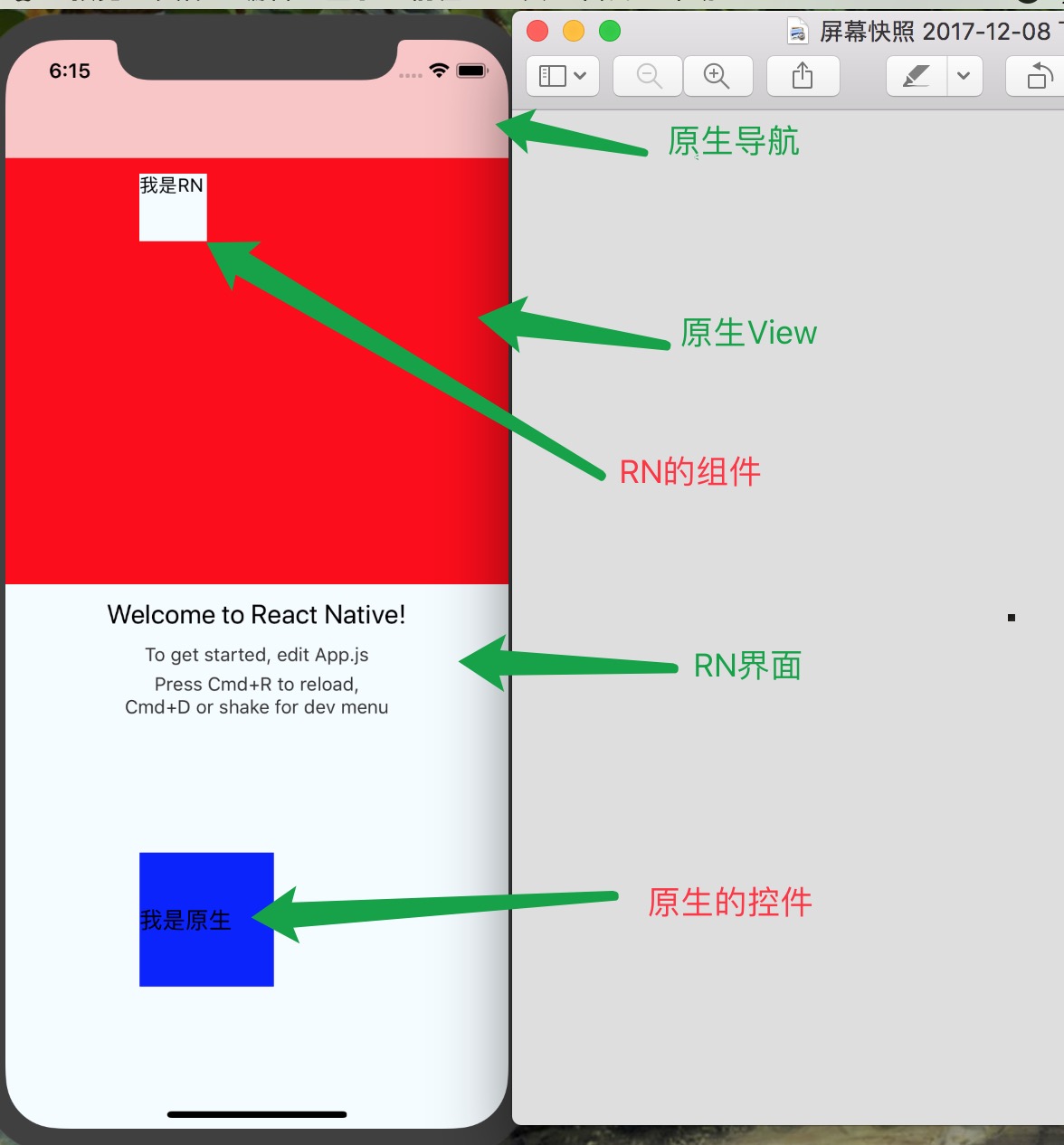
github: https://github.com/pheromone/IOS-native-and-React-native-interaction 中的 iOSRN
iOS原生 和 react native视图混编的更多相关文章
- 一个资深iOS开发者对于React Native的看法
一个资深iOS开发者对于React Native的看法 当我第一次尝试ReactNative的时候,我觉得这只是网页开发者涉足原生移动应用领域的歪门邪道. 我认为一个js开发者可以使用javasc ...
- iOS 写给iOS开发者的React Native学习路线(转)
我是一名iOS开发者,断断续续一年前开始接触React Native,最近由于工作需要,专职学习React Native也有一个多月了.网络上知识资源非常的多,但能让人豁然开朗.迅速学习的还是少数,我 ...
- 写给iOS开发者的React Native学习路线(转)
我是一名iOS开发者,断断续续一年前开始接触React Native,最近由于工作需要,专职学习React Native也有一个多月了.网络上知识资源非常的多,但能让人豁然开朗.迅速学习的还是少数,我 ...
- 现有iOS项目集成React Native过程记录
在<Mac系统下React Native环境搭建>配置了RN的开发环境,然后,本文记录在现有iOS项目集成React Native的过程,官方推荐使用Cocoapods,项目一开始也是使用 ...
- 原生工程接入Flutter实现混编
前言 上半年我定的OKR目标是帮助团队将App切入Flutter,实现统一技术栈,变革成多端融合开发模式.Flutter目前是跨平台方案中最有潜力实现我们这个目标的,不管是Hybird还是React ...
- [转] 一个资深iOS开发者对于React Native的看法
当我第一次尝试ReactNative的时候,我觉得这只是网页开发者涉足原生移动应用领域的歪门邪道. 我认为一个js开发者可以使用javascript来构建iPhone应用确实是一件很酷的事情,但是我很 ...
- Android原生嵌入React Native
1.首先集成的项目目录 我使用的是直接按照react-native init Project 的格式来导入的,也就是说,我的Android项目目录是跟node_modules是在一个目录下的. 我们i ...
- 《React Native 精解与实战》书籍连载「iOS 平台与 React Native 混合开发」
此文是我的出版书籍<React Native 精解与实战>连载分享,此书由机械工业出版社出版,书中详解了 React Native 框架底层原理.React Native 组件布局.组件与 ...
- 【React Native】在原生和React Native间通信(RN调用原生)
一.从React Native中调用原生方法(原生模块) 原生模块是JS中也可以使用的Objective-C类.一般来说这样的每一个模块的实例都是在每一次通过JS bridge通信时创建的.他们可以导 ...
随机推荐
- 移动端遇到的问题小结--video
本篇主要是针对Android系统,所遇到的问题. 1. video的全屏处理: 这里说的全屏是指针对浏览器的全屏,而不是整个手机的全屏.要想全屏效果只需对video标签加 webkit-plays ...
- 跟踪mqttv3源码(二)
对于spring-mqtt.xml中的标签: <int-mqtt:message-driven-channel-adapter> <int-mqtt:outbound-channel ...
- SQL server 数据库的版本为661,无法打开,此服务器只支持655版及更低版本。不支持降级路径
亲测有效. 解决方案:造成这个错误是因为把本地的SQL Server (MSSQLSERVER)服务给禁止了,而把 SQL Server (SQLEXPRESS)服务给启动了,因为这样子,本来应该在数 ...
- 某mac最简单调节亮度
说明 mac用户其实都可以使用 背景 很多人都说需要打补丁啊,或者修改什么的,我试过不管用.不如通过软件调节.. 正文 从appstore下载 Brightness Slider 即可,虽然不能达到系 ...
- .net core 获取本地ip及request请求端口
1.获取ip和端口 string str = (Request.HttpContext.Connection.LocalIpAddress.MapToIPv4().ToString() + " ...
- 从码农到技术总监分享Leader经验
从一个毕业的IT小伙或者一个码农成长为一个管理者,有很多需要转变的思想,那么当你遇到了瓶颈,或许我的经验能帮到你,感谢. 系统的掌握了.NET,JAVA技术,能够熟练的使用springcloud + ...
- javascript 十进制转换为二进制
1.十进制转换为二进制 var toBin = (n) => { if(n == 0) return '0'; var res = ''; while(n != 0) { res = n % 2 ...
- linux常用命令 echo输出命令
echo输出命令 'echo [选项] [输出内容]' 选项 '-e' 支持反斜线控制的字符转换 控制字符 \a 输出警告音 \b 退格键,也就是向左删除键 \n 换行符 \r 回车键 \t 制表符 ...
- MongoDB的数据库导出和导入以及备份
数据库的导出 mongoexport -d 数据库名 -c 集合名 -o 导出文件的保存地址及保存文件名.json --type json 数据库的导入 mongoimport -d 数据库名 -c ...
- Python爬虫入门之正则表达式
在前面我们已经搞定了怎样获取页面的内容,不过还差一步,这么多杂乱的代码夹杂文字我们怎样把它提取出来整理呢?下面就开始介绍一个十分强大的工具,正则表达式! 1.了解正则表达式 正则表达式是对字符串操作的 ...