
ubantu16.04安装ns2.34 错误
把ns2.34解压缩之后,sudo ./install
出现的错误:
错误一:安装NS2.34过程中出现如下的错误:
tools/ranvar.cc: In member function ‘virtual double GammaRandomVariable::value()’:
tools/ranvar.cc:219:70: error: cannot call constructor ‘GammaRandomVariable::GammaRandomVariable’ directly
tools/ranvar.cc:219:70: error: for a function-style cast, remove the redundant ‘::GammaRandomVariable’
make: *** [tools/ranvar.o]错误1
Ns make failed!
See http://www.isi.edu/nsnam/ns/ns-problems.html for problems
这是由于gcc版本提高后对类内部函数调用的简化造成的不兼容,解决方法如下:
在ns-allinone-2.34/ ns-2.34/tools文件夹下,找到报错提示中的ranvar.cc文件,打开找到对应的219行删除::GaammaRandomVariable,保存,
即:将219行的
return GammaRandomVariable::GammaRandomVariable(1.0 + alpha_, beta_).value() * pow (u, 1.0 / alpha_);
改为:
return GammaRandomVariable(1.0 + alpha_, beta_).value() * pow (u, 1.0 / alpha_);
然后保存退出,重新安装ns2.
======================================================================================
错误二:
In file included from mac/mac-802_11Ext.cc:66:0:
mac/mac-802_11Ext.h: In member function ‘u_int32_t PHY_MIBExt::getHdrLen11()’:
mac/mac-802_11Ext.h:175:19: error: expected primary-expression before ‘struct’
mac/mac-802_11Ext.h:175:41: error: ‘dh_body’ was not declared in this scope
mac/mac-802_11Ext.h:175:51: error: ‘offsetof’ was not declared in this scope
mac/mac-802_11Ext.h:177:3: warning: control reaches end of non-void function [-Wreturn-type]
make: *** [mac/mac-802_11Ext.o] Error 1
Ns make failed!
下面是网上找得关于本问题的解决方案:
If you get error like:
mac/mac-802_11Ext.h: In member function ‘u_int32_t PHY_MIBExt::getHdrLen11()’:
mac/mac-802_11Ext.h:176:19: error: expected primary-expression before ‘struct’
mac/mac-802_11Ext.h:176:41: error: ‘dh_body’ was not declared in this scope
mac/mac-802_11Ext.h:176:51: error: ‘offsetof’ was not declared in this scope
open that file and add
#include <cstddef>
to the header files.
在ns-allinone-2.34\ns-2.34\mac\mac-802_11Ext.h 文件添加#include <cstddef>
然后重新安装,就OK了。
=============================================================================
错误三:
mobile/nakagami.cc: In member function ‘virtual double Nakagami::Pr(PacketStamp*, PacketStamp*, WirelessPhy*)’:
mobile/nakagami.cc:183:73: error: cannot call constructor ‘ErlangRandomVariable::ErlangRandomVariable’ directly
mobile/nakagami.cc:183:73: error: for a function-style cast, remove the redundant ‘::ErlangRandomVariable’
mobile/nakagami.cc:185:67: error: cannot call constructor ‘GammaRandomVariable::GammaRandomVariable’ directly
mobile/nakagami.cc:185:67: error: for a function-style cast, remove the redundant ‘::GammaRandomVariable’
make: *** [mobile/nakagami.o]错误1
Ns make failed!
See http://www.isi.edu/nsnam/ns/ns-problems.html for problems
解决方法:
在ns-allinone-2.34/ ns-2.34/ mobile文件夹下,找到报错提示中的nakagami.cc文件,打开找到对应的183行删除::ErlangRandomVariable,保存,
即:将183行的
resultPower = ErlangRandomVariable::ErlangRandomVariable(Pr/m, int_m).value();
改为:
resultPower = ErlangRandomVariable(Pr/m, int_m).value();
在ns-allinone-2.34/ ns-2.34/ mobile文件夹下,找到报错提示中的nakagami.cc文件,打开找到对应的185行删除::GammaRandomVariable,保存,
即:将185行的
resultPower = GammaRandomVariable::GammaRandomVariable(m, Pr/m).value();
改为:
resultPower = GammaRandomVariable(m, Pr/m).value();
=============================================================================
错误四:
In file included from linkstate/ls.cc:67:0:

linkstate/ls.h: In instantiation of ‘void LsMap<Key, T>::eraseAll() [with Key = int; T = LsIdSeq]’:

linkstate/ls.cc:396:28:   required from here

linkstate/ls.h:137:58: 错误:‘erase’ was not declared in this scope, and no declarations were found by argument-dependent lookup at the point of instantiation [-fpermissive]

  void eraseAll() { erase(baseMap::begin(), baseMap::end()); }

                                                          ^

linkstate/ls.h:137:58: 附注:declarations in dependent base ‘std::map<int, LsIdSeq, std::less<int>, std::allocator<std::pair<const int, LsIdSeq> > >’ are not found by unqualified lookup

linkstate/ls.h:137:58: 附注:use ‘this->erase’ instead

Makefile:93: recipe for target 'linkstate/ls.o' failed

make: *** [linkstate/ls.o] Error 1
解决方法:
Go to ns-allinone-2.35/ns-2.35/linkstate/

b.Now edit ls.h

In line number 137, in place of void eraseAll() { erase(baseMap::begin(), baseMap::end()); }

make it void eraseAll() { this->erase(baseMap::begin(), baseMap::end()); }
=============================================================================
重新在ns目录下键入$ ./install安装,再次出现问题时,仿照解决方法,找到对应的文件和行数,修改即可。至此安装成功。
配置环境:修改home/wang目录下的 .bashrc文件
打开终端:sudo gedit .bashrc
在文件最后输入:
export PATH=$PATH:/home/wang/ns/ns-allinone-2.34/bin:/home/wang/ns/ns-allinone-2.34/tcl8.4.18/unix:/home/wang/ns/ns-allinone-2.34/tk8.4.18/unix
export LD_LIBRARY_PATH=$LD_LIBRARY_PATH:/home/wang/ns/ns-allinone-2.34/otcl-1.13:/home/wang/ns/ns-allinone-2.34/lib
export TCL_LIBRARY=$TCL_LIBRARY:/home/wang/ns/ns-alllinone-2.34/tcl8.4.18/library
=======================================================================================================================
终端输入ns之后出现%之后,说明暂时成功了。
运行./validate(貌似在ns-2.34目录下??)
会出现问题:
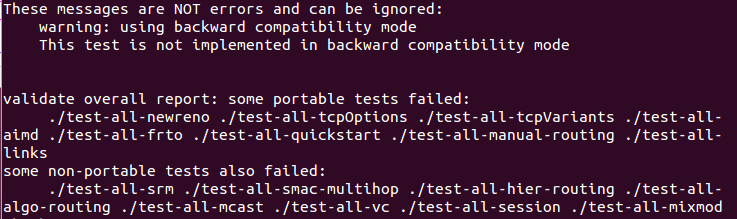
解决方法:
1. 网上说是gcc版本过高的问题,我们把gcc版本降为4.4。教程:http://blog.sina.com.cn/s/blog_6cee149d010129bl.html
2. 可能有些包没有安装:(这个存疑,可以安装试试)
sudo apt-get install libx11-dev xorg-dev libxmu-dev libperl4-corelibs-perl

貌似还是没能解决!!!!
ubantu16.04安装ns2.34 错误的更多相关文章
- ubantu10.04安装ns-2.34
LQ大神说是这个搭配才能完美移植leach 安装如下: 1. 安装必须的软件,因为版本较久远, sudo gedit /etc/apt/sources.list(大概是个意思) 把里面的内容换成: d ...
- 安装ns2.34,802.11p的各种包的时候遇到问题
安装教程:http://blog.sina.com.cn/s/blog_6735526a0102w1zs.html 802.11p补丁包:https://download.csdn.net/downl ...
- ubantu16.04安装sougou输入法
安装搜狗拼音输入法下载安装包:http://pinyin.sogou.com/linux/?r=pinyin如果直接安装不了,则按如下方法进行安装:sudo dpkg -i sogoupinyin_ ...
- ubantu16.04安装配置samba服务(原创)
1.安装samba服务 $ sudo apt-get install samba samba-common$ sudo apt-get install smbclient 如果你开启了防火墙,关闭: ...
- Ubuntu 16——安装——ns2.35和nam
Ubuntu 16.04 安装ns2.35+nam 总结出以下安装步骤 1: 更新源 sudo apt-get update #更新源列表 sudo apt-get upgrade #更新已经安装的包 ...
- Ubuntu12.04中安装ns-allinone-2.34
1.首先安装ns2所需的组件.库之类: $sudo apt-get update $sudo apt-get install build-essential $ tcl8.-dev tk8. tk8. ...
- Ubuntu12.04安装64位系统出现编译错误error while loading shared libraries: libz.so.1: cannot open shared object file: No such file or dir
问题: Ubuntu12.04安装64位系统出现编译错误error while loading shared libraries: libz.so.1: cannot open shared obje ...
- Ubuntu12.04 LTS 32位 安装ns-2.35
ubuntu12.04lts 32-bit默认采用gcc 4.6和g++4.6,而ns的最新版本ns 2.3.5也采用了相同到版本,所以这方面不会有版本不同到问题 收回上面这句话..../valida ...
- ubantu16.04+mxnet +opencv+cuda8.0 环境搭建
ubantu16.04+mxnet +opencv+cuda8.0 环境搭建 建议:环境搭建完成之后,不要更新系统(内核) 转载请注明出处: 微微苏荷 一 我的安装环境 系统:ubuntu16.04 ...
随机推荐
- 来了解质量管理工具——质量屋(HOQ)
质量屋(The House Of Quality),又名HOQ,它是质量功能配置(QFD)的核心.一般QFD的学习会涉及到.同时HOQ也是项目管理十大知识领域领域中质量管理工具中的一种,今天我们就来了 ...
- LVM备份(2)-创建LVM逻辑卷
懵逼了几天,对LVM快照备份总算有了个比较清晰的认识 总的来说,就是这样: 1.普通分区备份比较困难,需要转化成LVM逻辑卷进行管理 2.在新创建的LVM逻辑卷上进行业务操作,比如建数据库 3.某个时 ...
- ArrayList的实现及原理
ArrayList ArrayList是最常见以及每个Java开发者最熟悉的集合类了,顾名思义,ArrayList就是一个以数组形式实现的集合,以一张表格来看一下ArrayList里面有哪些基本的元素 ...
- HashMap底层结构、原理、扩容机制
https://www.jianshu.com/p/c1b616ff1130 http://youzhixueyuan.com/the-underlying-structure-and-princip ...
- 【原创】支持同时生成多个main函数 makefile 模板
背景: 去年做项目的时候,由于有需要编译出多个可执行文件的需求,修改了Makefile使其支持生成多个结果(编译多个含有main函数的文件),但总觉得自己的实现不够完美. 今年又遇到这样需求的时候,可 ...
- MySQL5.6.39修改密码
5.6.39 苹果->系统偏好设置->最下边点mysql 在弹出页面中 关闭mysql服务(点击stop mysql server) step2: 进入终端输入:cd /usr/local ...
- vue学习之组件
组件从注册方式分为全局组件和局部组件. 从功能类型又可以分为偏视图表现的(presentational)和偏逻辑的(动态生成dom),推荐在前者中使用模板,在后者中使用 JSX 或渲染函数动态生成组件 ...
- 转:spring boot log4j2配置(使用log4j2.yml文件)---YAML 语言教程
转:spring boot log4j2配置(使用log4j2.yml文件) - CSDN博客http://blog.csdn.net/ClementAD/article/details/514988 ...
- Django之分页
需要知道:每页多少条数据.一共多少条数据.一共需要多少页.每页从哪开始到哪结束 注意问题:1.用户输入页码为非数字. 2.用户输入页码超出页码范围 def books(request): try: ...
- IDEA 在同一目录创建多个项目
以往的Eclipse.NetBeans等开发工具不同,IDEA的Project相当与Eclipse的Workspace,而Module相当于Project. 下边就给出Eclipse与IDEA的概念的 ...