
iOS开发小技巧 -- tableView-section圆角边框解决方案
【iOS开发】tableView-section圆角边框解决方案
tableView圆角边框解决方案
iOS 7之前,图下圆角边框很容易设置
iOS 7之后,tableviewcell的风格不再是圆角了
设置tableView中section圆角边框,需求如下:
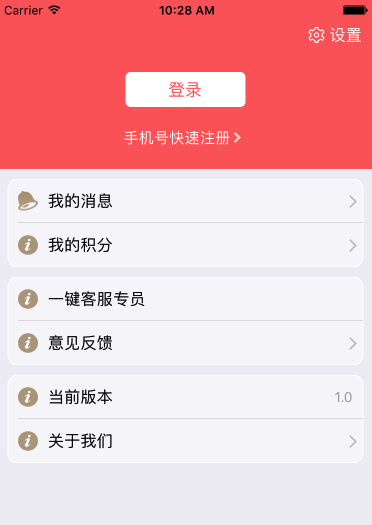
找了很多办法都没办法解决。
设置过tableView的边框,但是发现,滑动tableView的时候,其实是里面的content在移动,也就是,向上向下滑,边框并不会动=。=。
可以试着打印tableView的frame,发现frame的x.y并不会移动。
最后解决了,找了两种方案
【方案一】- 自定义cell
圆角边框为UIImage,充当自定义cell的背景图.
1.方法比较简单,就不粘代码了,弄上边圆角,下边圆角,没有圆角,上下边都有圆角四张图片。
2.判断加载的是section中的indexpath.row是几,对应加载哪种圆角图片,就可以了。
【方法二】- cell重绘
给section,绘制边框。
1.在UITableViewDelegate有个展示cell的代理方法,在展示cell的时候,然后为section中的cell绘制边框
2.index path.row0和index path.row最后一个 的时候,加圆角。
3.此方法,可以直接复制粘贴使用,另外,如果此需求用到的地方比较多,可以构建基类或者写在category里面,方便使用代码如下:
#pragma mark - Table view data source

// 重新绘制cell边框

- (void)tableView:(UITableView *)tableView willDisplayCell:(UITableViewCell *)cell forRowAtIndexPath:(NSIndexPath *)indexPath{

 if ([cell respondsToSelector:@selector(tintColor)]) {

 // if (tableView == self.tableView) {

 CGFloat cornerRadius = 10.f;

 cell.backgroundColor = UIColor.clearColor;

 CAShapeLayer *layer = [[CAShapeLayer alloc] init];

 CGMutablePathRef pathRef = CGPathCreateMutable();

 CGRect bounds = CGRectInset(cell.bounds, 10, 0);

 BOOL addLine = NO;

 if (indexPath.row == 0 && indexPath.row == [tableView numberOfRowsInSection:indexPath.section]-1) {

 CGPathAddRoundedRect(pathRef, nil, bounds, cornerRadius, cornerRadius);

 } else if (indexPath.row == 0) {

 CGPathMoveToPoint(pathRef, nil, CGRectGetMinX(bounds), CGRectGetMaxY(bounds));

 CGPathAddArcToPoint(pathRef, nil, CGRectGetMinX(bounds), CGRectGetMinY(bounds), CGRectGetMidX(bounds), CGRectGetMinY(bounds), cornerRadius);

 CGPathAddArcToPoint(pathRef, nil, CGRectGetMaxX(bounds), CGRectGetMinY(bounds), CGRectGetMaxX(bounds), CGRectGetMidY(bounds), cornerRadius);

 CGPathAddLineToPoint(pathRef, nil, CGRectGetMaxX(bounds), CGRectGetMaxY(bounds));

 addLine = YES;

 } else if (indexPath.row == [tableView numberOfRowsInSection:indexPath.section]-1) {

 CGPathMoveToPoint(pathRef, nil, CGRectGetMinX(bounds), CGRectGetMinY(bounds));

 CGPathAddArcToPoint(pathRef, nil, CGRectGetMinX(bounds), CGRectGetMaxY(bounds), CGRectGetMidX(bounds), CGRectGetMaxY(bounds), cornerRadius);

 CGPathAddArcToPoint(pathRef, nil, CGRectGetMaxX(bounds), CGRectGetMaxY(bounds), CGRectGetMaxX(bounds), CGRectGetMidY(bounds), cornerRadius);

 CGPathAddLineToPoint(pathRef, nil, CGRectGetMaxX(bounds), CGRectGetMinY(bounds));

 } else {

 CGPathAddRect(pathRef, nil, bounds);

 addLine = YES;

 }

 layer.path = pathRef;

 CFRelease(pathRef);

 //颜色修改

 layer.fillColor = [UIColor colorWithWhite:1.f alpha:0.5f].CGColor;

 layer.strokeColor=[UIColor whiteColor].CGColor;

 if (addLine == YES) {

 CALayer *lineLayer = [[CALayer alloc] init];

 CGFloat lineHeight = (1.f / [UIScreen mainScreen].scale);

 lineLayer.frame = CGRectMake(CGRectGetMinX(bounds)+10, bounds.size.height-lineHeight, bounds.size.width-10, lineHeight);

 lineLayer.backgroundColor = tableView.separatorColor.CGColor;

 [layer addSublayer:lineLayer];

 }

 UIView *testView = [[UIView alloc] initWithFrame:bounds];

 [testView.layer insertSublayer:layer atIndex:0];

 testView.backgroundColor = UIColor.clearColor;

 cell.backgroundView = testView;

 }

 // }

}
来源http://www.jianshu.com/p/da1adec5a601
iOS开发小技巧 -- tableView-section圆角边框解决方案的更多相关文章
- iOS开发小技巧--TableView Group样式中控制每个section之间的距离
一.TableView的Group样式中,默认的每个section都有sectionHeader和sectionFooter,只要调整这两个的大小就可以实现section之前的间距扩大或缩小 二.项目 ...
- iOS开发小技巧--图片的圆角处理
图片圆角处理方案一: 缺点是图片多了感觉卡 设置图层的CornerRadius属性 -- 设置了圆角后,运行程序没有反应,多半是没有设置下面这句:让内容遵循设置的边缘 masksToBounds = ...
- iOS开发小技巧--TableView中headerView的循环利用,以及自定义的headerView
一.首先要搞清楚,tableView中有两种headerView,一个是tableHeaderView,另一个是headerView.前者就一个;后者根据session决定个数 headerView的 ...
- iOS开发小技巧--设置按钮圆角
方法一:代码设置 方法二:通过图形化界面
- iOS开发小技巧--tableView中实现无数据无分割线,有数据才有分割线
通过通讯录练习GET的技能
- iOS开发小技巧 - UILabel添加中划线
iOS开发小技巧 遇到的问题: 给Label添加中划线,然后并没有效果 NSString *str = [NSString stringWithFormat:@"合计金额 ¥%.2f&quo ...
- iOS开发小技巧 - runtime适配字体
iOS开发小技巧 - runtime适配字体 版权声明:本文为博主原创文章,未经博主允许不得转载,有问题可联系博主Email: liuyongjiesail@icloud.com 一个iOS开发项目无 ...
- iOS开发小技巧--即时通讯项目:消息发送框(UITextView)高度的变化; 以及UITextView光标复位的小技巧
1.即时通讯项目中输入框(UITextView)跟随输入文字的增多,高度变化的实现 最主要的方法就是监听UITextView的文字变化的方法- (void)textViewDidChange:(UIT ...
- ios开发小技巧之提示音播放与震动
在ios开发中,有时候我们需要频繁播放某种提示声音,比如微博刷新提示音.QQ消息提示音等,对于这些短小且需要频繁播放的音频,最好将其加入到系统声音(system sound)里. 注意: 需要播放的音 ...
随机推荐
- iPhone开发学习
Xcode6中怎么添加空工程模板 NSBundle 使用(程序的资源) 本地存储数据的简单方式:NSUserDefaults UIApplication隐藏statusBarStyle ...
- java集合你了解多少?
用了java集合这么久,还没有系统的研究过java的集合结构,今天亲自画了下类图,总算有所收获. 一.所有集合都实现了Iterable接口. Iterable接口中包含一个抽象方法:Iterator& ...
- Oracle Blob数据保存为文件
好久不写文,最近得空写一点.Oracle数据库国内用户量主要在企业上,其中有一种byte的存储称为Blob,并不能直接看. 有时候为了调试需要,可以通过: ,)) ; 这种sql去转为字符串查看,但是 ...
- 物联网框架ServerSuperIO(SSIO)更新、以及增加宿主程序和配置工具,详细介绍
一.更新内容 1.修改*Server类,以及承继关系.2.增加IRunDevice的IServerProvider接口继承.3.修复增加COM设备驱动可能造成的异常.4.修复网络发送数据可能引发的异常 ...
- java反射复制属性值
/** 将sourceObj的属性拷贝到targetObj * @param sourceObj * @param targetObj * @param clazz 从哪一个类开始(比如sourceO ...
- 建造者模式组装mybatis参数Example()
参考:github, https://github.com/liuxiaochen0625/MyBatis-Spring-Boot-master.git 从controller组装tk.mybat ...
- 你知道JavaScript中的结果值是什么吗?
你知道JavaScript中的每条语句.甚至表达式都有一个结果值吗? 当你在浏览器中测试代码时,经常会在控制台的输出结果的最后面多出一条,大部分为undefined,这个undefined就是一个结果 ...
- Microsoft Dynamics CRM 2013 Js Odata 查询
实现功能: 在新建记录时,(大区,省区,城市)的值默认为当前用户的值.tips:字段均为lookup类型; function Default_region(){ var fromtype=Xrm. ...
- HTML学习(一)基础篇
这篇文章有人比我总结的好,适用于新手,我就适当的铺垫一下,结尾处会给你们网站,我就不班门弄斧了. 一)HTML结构 1.<head>标签 <title> <base/&g ...
- Cell右滑 多个编辑选项栏
简单粗暴,一看就能明白 关于右滑cell,能滑出来两个以上的选项栏,可以如下这么做,但是要注意下面的注意事项,就是关于iOS8前后的问题,注释写的很清楚了.可以直接复制到自己的代码里看的会更明白. / ...