
iOS开发小技巧 -- tableView-section圆角边框解决方案
【iOS开发】tableView-section圆角边框解决方案
tableView圆角边框解决方案
iOS 7之前,图下圆角边框很容易设置
iOS 7之后,tableviewcell的风格不再是圆角了
设置tableView中section圆角边框,需求如下:
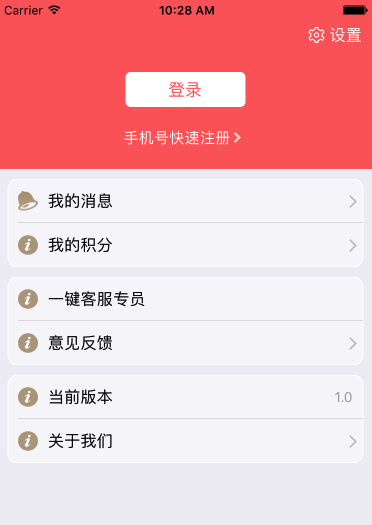
找了很多办法都没办法解决。
设置过tableView的边框,但是发现,滑动tableView的时候,其实是里面的content在移动,也就是,向上向下滑,边框并不会动=。=。
可以试着打印tableView的frame,发现frame的x.y并不会移动。
最后解决了,找了两种方案
【方案一】- 自定义cell
圆角边框为UIImage,充当自定义cell的背景图.
1.方法比较简单,就不粘代码了,弄上边圆角,下边圆角,没有圆角,上下边都有圆角四张图片。
2.判断加载的是section中的indexpath.row是几,对应加载哪种圆角图片,就可以了。
【方法二】- cell重绘
给section,绘制边框。
1.在UITableViewDelegate有个展示cell的代理方法,在展示cell的时候,然后为section中的cell绘制边框
2.index path.row0和index path.row最后一个 的时候,加圆角。
3.此方法,可以直接复制粘贴使用,另外,如果此需求用到的地方比较多,可以构建基类或者写在category里面,方便使用代码如下:
#pragma mark - Table view data source

// 重新绘制cell边框

- (void)tableView:(UITableView *)tableView willDisplayCell:(UITableViewCell *)cell forRowAtIndexPath:(NSIndexPath *)indexPath{

 if ([cell respondsToSelector:@selector(tintColor)]) {

 // if (tableView == self.tableView) {

 CGFloat cornerRadius = 10.f;

 cell.backgroundColor = UIColor.clearColor;

 CAShapeLayer *layer = [[CAShapeLayer alloc] init];

 CGMutablePathRef pathRef = CGPathCreateMutable();

 CGRect bounds = CGRectInset(cell.bounds, 10, 0);

 BOOL addLine = NO;

 if (indexPath.row == 0 && indexPath.row == [tableView numberOfRowsInSection:indexPath.section]-1) {

 CGPathAddRoundedRect(pathRef, nil, bounds, cornerRadius, cornerRadius);

 } else if (indexPath.row == 0) {

 CGPathMoveToPoint(pathRef, nil, CGRectGetMinX(bounds), CGRectGetMaxY(bounds));

 CGPathAddArcToPoint(pathRef, nil, CGRectGetMinX(bounds), CGRectGetMinY(bounds), CGRectGetMidX(bounds), CGRectGetMinY(bounds), cornerRadius);

 CGPathAddArcToPoint(pathRef, nil, CGRectGetMaxX(bounds), CGRectGetMinY(bounds), CGRectGetMaxX(bounds), CGRectGetMidY(bounds), cornerRadius);

 CGPathAddLineToPoint(pathRef, nil, CGRectGetMaxX(bounds), CGRectGetMaxY(bounds));

 addLine = YES;

 } else if (indexPath.row == [tableView numberOfRowsInSection:indexPath.section]-1) {

 CGPathMoveToPoint(pathRef, nil, CGRectGetMinX(bounds), CGRectGetMinY(bounds));

 CGPathAddArcToPoint(pathRef, nil, CGRectGetMinX(bounds), CGRectGetMaxY(bounds), CGRectGetMidX(bounds), CGRectGetMaxY(bounds), cornerRadius);

 CGPathAddArcToPoint(pathRef, nil, CGRectGetMaxX(bounds), CGRectGetMaxY(bounds), CGRectGetMaxX(bounds), CGRectGetMidY(bounds), cornerRadius);

 CGPathAddLineToPoint(pathRef, nil, CGRectGetMaxX(bounds), CGRectGetMinY(bounds));

 } else {

 CGPathAddRect(pathRef, nil, bounds);

 addLine = YES;

 }

 layer.path = pathRef;

 CFRelease(pathRef);

 //颜色修改

 layer.fillColor = [UIColor colorWithWhite:1.f alpha:0.5f].CGColor;

 layer.strokeColor=[UIColor whiteColor].CGColor;

 if (addLine == YES) {

 CALayer *lineLayer = [[CALayer alloc] init];

 CGFloat lineHeight = (1.f / [UIScreen mainScreen].scale);

 lineLayer.frame = CGRectMake(CGRectGetMinX(bounds)+10, bounds.size.height-lineHeight, bounds.size.width-10, lineHeight);

 lineLayer.backgroundColor = tableView.separatorColor.CGColor;

 [layer addSublayer:lineLayer];

 }

 UIView *testView = [[UIView alloc] initWithFrame:bounds];

 [testView.layer insertSublayer:layer atIndex:0];

 testView.backgroundColor = UIColor.clearColor;

 cell.backgroundView = testView;

 }

 // }

}
来源http://www.jianshu.com/p/da1adec5a601
iOS开发小技巧 -- tableView-section圆角边框解决方案的更多相关文章
- iOS开发小技巧--TableView Group样式中控制每个section之间的距离
一.TableView的Group样式中,默认的每个section都有sectionHeader和sectionFooter,只要调整这两个的大小就可以实现section之前的间距扩大或缩小 二.项目 ...
- iOS开发小技巧--图片的圆角处理
图片圆角处理方案一: 缺点是图片多了感觉卡 设置图层的CornerRadius属性 -- 设置了圆角后,运行程序没有反应,多半是没有设置下面这句:让内容遵循设置的边缘 masksToBounds = ...
- iOS开发小技巧--TableView中headerView的循环利用,以及自定义的headerView
一.首先要搞清楚,tableView中有两种headerView,一个是tableHeaderView,另一个是headerView.前者就一个;后者根据session决定个数 headerView的 ...
- iOS开发小技巧--设置按钮圆角
方法一:代码设置 方法二:通过图形化界面
- iOS开发小技巧--tableView中实现无数据无分割线,有数据才有分割线
通过通讯录练习GET的技能
- iOS开发小技巧 - UILabel添加中划线
iOS开发小技巧 遇到的问题: 给Label添加中划线,然后并没有效果 NSString *str = [NSString stringWithFormat:@"合计金额 ¥%.2f&quo ...
- iOS开发小技巧 - runtime适配字体
iOS开发小技巧 - runtime适配字体 版权声明:本文为博主原创文章,未经博主允许不得转载,有问题可联系博主Email: liuyongjiesail@icloud.com 一个iOS开发项目无 ...
- iOS开发小技巧--即时通讯项目:消息发送框(UITextView)高度的变化; 以及UITextView光标复位的小技巧
1.即时通讯项目中输入框(UITextView)跟随输入文字的增多,高度变化的实现 最主要的方法就是监听UITextView的文字变化的方法- (void)textViewDidChange:(UIT ...
- ios开发小技巧之提示音播放与震动
在ios开发中,有时候我们需要频繁播放某种提示声音,比如微博刷新提示音.QQ消息提示音等,对于这些短小且需要频繁播放的音频,最好将其加入到系统声音(system sound)里. 注意: 需要播放的音 ...
随机推荐
- ViEmu 3.6.0 过期 解除30天限制的方法
下载:链接: http://pan.baidu.com/s/1c2HUuWw 密码: sak8 删除下面2个地方 HKEY_CLASSES_ROOT\Wow6432Node\CLSID\{B9CDA4 ...
- Delphi_09_Delphi_Object_Pascal_面向对象编程
今天这里讨论一下Delphi中的面向对象编程,这里不做过多过细的讨论,主要做提纲挈领的描述,帮助自己抓做重点. 本随笔分为两部分: 一.面向对象编程 二.面向对象编程详细描述 ------------ ...
- MongoDB集群卡死问题
一年前搭了个MongoDB集群,跑得还算不错,但是有几次遇到过服务卡死的问题.处理起来已经得心应手了,拿来跟大家分享一下: 故障现象: 业务查询缓慢,而且会有连接异常: { "serverU ...
- GJM :Unity使用EasyAR实现脱卡功能
首先说下大致思路当卡片离开摄像头时间,ImageTarget-Image的SetActive (false),所以其子物体(model)也就不显示了,因此解决的办法就是在Target (false)时 ...
- jq制作圣诞主题页面
今天制作的是有飘雪效果的圣诞主题页面,个人灰常喜欢. 首先还是放张效果图: 当看到这这页面的时候我们要注意四点: 1.图片的轮播 2.文字的滚动效果 3.音乐播放 4.飘雪效果 那我们就一点一点来完成 ...
- Javascript高性能编程-提高javascript加载速度
1.将所有<script>标签放在尽可能接近<body>标签底部的位置,以保证页面在脚本运行之前完成解析尽量减少对整个页面下载的影响 2.限制页面的<sc ...
- 深入理解js的变量提升和函数提升
一.变量提升 在ES6之前,JavaScript没有块级作用域(一对花括号{}即为一个块级作用域),只有全局作用域和函数作用域.变量提升即将变量声明提升到它所在作用域的最开始的部分.上个简历的例子如: ...
- Java基础知识【上】(转载)
http://blog.csdn.net/silentbalanceyh/article/details/4608272 (最终还是决定重新写一份Java基础相关的内容,原来因为在写这一个章节的时候没 ...
- java 中抽象类和接口的五点区别?
1.一个类可以实现多个接口 ,但却只能继承最多一个抽象类. 2.抽象类可以包含具体的方法 , 接口的所有方法都是抽象的. 3.抽象类可以声明和使用字段 ,接口则不能,但接口可以创建静态的final常量 ...
- 用gcc进行程序的编译
在Linux系统上,一个档案能不能被执行看的是有没有可执行的那个权限(x),不过,Linux系统上真正认识的可执行文件其实是二进制文件(binary program),例如/usr/bin/passw ...