
RCNN算法的tensorflow实现
RCNN算法的tensorflow实现
转载自:https://blog.csdn.net/MyJournal/article/details/77841348?locationNum=9&fps=1
这个算法的思路大致如下:
1、训练人脸分类模型 输入:图像;输出:这张图像的特征
1-1、在Caltech256数据集上pre-trained,训练出一个较大的图片识别库;
1-2、利用之前人脸与非人脸的数据集对预训练模型进行fine tune,得到一个人脸分类模型。
2、训练SVM模型(重新定义正负样本)输入:图像的特征 输出:图像类别
3、将图片分为多个矩形选框,用SVM模型对这些选框区域进行分类,即判定该区域中是否包含人脸
4、使用回归器精细修正候选框位置
下面将进行具体的解释。
1、训练人脸分类模型
以初学者的思维(在基本掌握了MNIST手写数字识别后),我们通常是设置一个神经网络(通常是借鉴在图片分类中较好的模型的网络层次结构,例如Alexnet、VGG16等,但据说VGG16的计算量较大,这个我也没有试过)直接开始训练即可。但这时需要考虑到一个问题:我们为模型选择的数据集的规模如何?
如果我的神经网络结构是七层,前四层是卷积池化层,后三层是连接层,对于这样较复杂的网络使用多少的数据量合适呢?几千张?几万张?可能都有些少了。当图片较少时,模型很容易欠拟合,因此需要借用别人用大数据量作为数据集已经训练好的模型。但需要注意的是,一旦借用别人的模型,之后fine-tuning定义的模型结构需要与之相同,除了最终的图片分类数目不同以外。
以下是我定义的神经网络:
def inference(input_tensor, train, regularizer,num):

    with tf.name_scope('layer1-conv1'):

        conv1_weights = tf.get_variable("weight1",[5,5,3,32],initializer=tf.truncated_normal_initializer(stddev=0.1))

        conv1_biases = tf.get_variable("bias1", [32], initializer=tf.constant_initializer(0.0))

        conv1 = tf.nn.conv2d(input_tensor, conv1_weights, strides=[1, 1, 1, 1], padding='SAME')

        relu1 = tf.nn.relu(tf.nn.bias_add(conv1, conv1_biases))

    with tf.name_scope("layer2-pool1"):

        pool1 = tf.nn.max_pool(relu1, ksize = [1,2,2,1],strides=[1,2,2,1],padding="VALID")

    with tf.variable_scope("layer3-conv2"):

        conv2_weights = tf.get_variable("weight2",[5,5,32,64],initializer=tf.truncated_normal_initializer(stddev=0.1))

        conv2_biases = tf.get_variable("bias2", [64], initializer=tf.constant_initializer(0.0))

        conv2 = tf.nn.conv2d(pool1, conv2_weights, strides=[1, 1, 1, 1], padding='SAME')

        relu2 = tf.nn.relu(tf.nn.bias_add(conv2, conv2_biases))

    with tf.name_scope("layer4-pool2"):

        pool2 = tf.nn.max_pool(relu2, ksize=[1, 2, 2, 1], strides=[1, 2, 2, 1], padding='VALID')

    with tf.variable_scope("layer5-conv3"):

        conv3_weights = tf.get_variable("weight3",[3,3,64,128],initializer=tf.truncated_normal_initializer(stddev=0.1))

        conv3_biases = tf.get_variable("bias3", [128], initializer=tf.constant_initializer(0.0))

        conv3 = tf.nn.conv2d(pool2, conv3_weights, strides=[1, 1, 1, 1], padding='SAME')

        relu3 = tf.nn.relu(tf.nn.bias_add(conv3, conv3_biases))

    with tf.name_scope("layer6-pool3"):

        pool3 = tf.nn.max_pool(relu3, ksize=[1, 2, 2, 1], strides=[1, 2, 2, 1], padding='VALID')

    with tf.variable_scope("layer7-conv4"):

        conv4_weights = tf.get_variable("weight4",[3,3,128,128],initializer=tf.truncated_normal_initializer(stddev=0.1))

        conv4_biases = tf.get_variable("bias4", [128], initializer=tf.constant_initializer(0.0))

        conv4 = tf.nn.conv2d(pool3, conv4_weights, strides=[1, 1, 1, 1], padding='SAME')

        relu4 = tf.nn.relu(tf.nn.bias_add(conv4, conv4_biases))

    with tf.name_scope("layer8-pool4"):

        pool4 = tf.nn.max_pool(relu4, ksize=[1, 2, 2, 1], strides=[1, 2, 2, 1], padding='VALID')

        nodes = 6*6*128

        reshaped = tf.reshape(pool4,[-1,nodes])

    with tf.variable_scope('layer9-fc1'):

        fc1_weights = tf.get_variable("weight5", [nodes, 1024],initializer=tf.truncated_normal_initializer(stddev=0.1))

        if regularizer != None:

            tf.add_to_collection('losses1', regularizer(fc1_weights))

        fc1_biases = tf.get_variable("bias5", [1024], initializer=tf.constant_initializer(0.1))

        fc1 = tf.nn.relu(tf.matmul(reshaped, fc1_weights) + fc1_biases)

        if train:

            fc1 = tf.nn.dropout(fc1, 0.5)

    with tf.variable_scope('layer10-fc2'):

        fc2_weights = tf.get_variable("weight6", [1024, 512],initializer=tf.truncated_normal_initializer(stddev=0.1))

        if regularizer != None:

            tf.add_to_collection('losses2', regularizer(fc2_weights))

        fc2_biases = tf.get_variable("bias6", [512], initializer=tf.constant_initializer(0.1))

        fc2 = tf.nn.relu(tf.matmul(fc1, fc2_weights) + fc2_biases)

        if train:

            fc2 = tf.nn.dropout(fc2, 0.5)

    with tf.variable_scope('layer11-fc3'):

        fc3_weights = tf.get_variable("weight7", [512, num],initializer=tf.truncated_normal_initializer(stddev=0.1))

        if regularizer != None:

            tf.add_to_collection('losses3', regularizer(fc3_weights))

        fc3_biases = tf.get_variable("bias7", [num], initializer=tf.constant_initializer(0.1))

        logit = tf.matmul(fc2, fc3_weights) + fc3_biases

    return logit  #fc3
1-1、pre-trained——Caltech256数据集(有256类的图片,包括静物、动物、人物等)
最终分的类别是256类,将上述网络中num设置为256即可。
将训练好的模型保存到model.ckpt中,之后fine-tuning需要将预训练模型重新加载。
checkpoint_file = os.path.join(log_dir, 'model.ckpt')

saver.save(sess,checkpoint_file)
1-2、fine tuning
在这里我先介绍论文中的做法。(由于我的电脑运行速度太慢了,我就没有这么做,只是找了人脸及非人脸的数据集拉进去fine tuning,但是效果不是很好…)
如果做的目标定位系统是定位男人、女人、猫、狗这四类目标,那我们将fine tuning的神经网络中的最后一层num设置为5(4+1),加的这一类代表背景。那么背景如何获得呢? 首先,需要我们提前对图片数据提前标定目标位置,对于每张图可能获得一个或更多的标定矩形框(x,y,w,h分别表示横坐标的最小值,纵坐标的最小值、矩形框宽度、矩形框长度)。其次,我们通过Python selectivesearch库中的selectivesearch指令获得多个目标框(Proposals)(selectivesearch指令根据图片的颜色变化、纹理等将多个像素合并为多个选框)。接着,我们通过定义并计算出的IoU(目标框与标定框的重合程度,即IoU=重合面积/两个矩形所占的面积(其中一个矩形是标定框,另一个矩形是目标框))与阈值比较,若大于这个阈值则表示该目标框标出的是男人、女人、猫或狗四类中的一类,若小于这个阈值则表示该标定框标出的是背景。论文中选取的阈值threshold=0.5。最后,加载pre-trained模型后,训练这些图片,在预训练模型的基础上对各个参数进行微调。
IOU的定义如下:
def if_intersection(xmin_a, xmax_a, ymin_a, ymax_a, xmin_b, xmax_b, ymin_b, ymax

_b):

    if_intersect = False

    # 通过四条if来查看两个方框是否有交集。如果四种状况都不存在,我们视为无交集

    if xmin_a < xmax_b <= xmax_a and (ymin_a < ymax_b <= ymax_a or ymin_a <= ymin_b < ymax_a):

        if_intersect = True

    elif xmin_a <= xmin_b < xmax_a and (ymin_a < ymax_b <= ymax_a or ymin_a <= ymin_b < ymax_a):

        if_intersect = True

    elif xmin_b < xmax_a <= xmax_b and (ymin_b < ymax_a <= ymax_b or ymin_b <= ymin_a < ymax_b):

        if_intersect = True

    elif xmin_b <= xmin_a < xmax_b and (ymin_b < ymax_a <= ymax_b or ymin_b <= ymin_a < ymax_b):

        if_intersect = True

    else:

        return False

    # 在有交集的情况下,我们通过大小关系整理两个方框各自的四个顶点, 通过它们得到交集面积

    if if_intersect == True:

        x_sorted_list = sorted([xmin_a, xmax_a, xmin_b, xmax_b])#from small to big number

        y_sorted_list = sorted([ymin_a, ymax_a, ymin_b, ymax_b])

        x_intersect_w = x_sorted_list[2] - x_sorted_list[1]

        y_intersect_h = y_sorted_list[2] - y_sorted_list[1]

        area_inter = x_intersect_w * y_intersect_h

        return area_inter

def IOU(ver1, ver2):

    vertice1 = [ver1[0], ver1[1], ver1[0]+ver1[2], ver1[1]+ver1[3]]

    vertice2 = [ver2[0], ver2[1], ver2[0]+ver2[2], ver2[1]+ver2[3]]

    area_inter = if_intersection(vertice1[0], vertice1[2], vertice1[1], vertice1[3], vertice2[0], vertice2[2], vertice2[1], vertice2[3])

    # 如果有交集,计算IOU

    if area_inter:

        area_1 = ver1[2] * ver1[3]

        area_2 = ver2[2] * ver2[3]

        iou = float(area_inter) / (area_1 + area_2 - area_inter)

        return iou

    iou = 0

    return iou
加载pre-trained模型并进行fine-tune训练:
def load_with_skip(data_path, session, skip_layer):

    reader = pywrap_tensorflow.NewCheckpointReader(ckpt.model_checkpoint_path)

    data_dict = reader.get_variable_to_shape_map()

    for key in data_dict:

        print("tensor_name: ", key)

        if key not in skip_layer:

            print ( data_dict[key])

            print (reader.get_tensor(key))

            session.run([key])

saver = tf.train.Saver()

with tf.Session() as sess:

 restore = False

 sess.run(tf.global_variables_initializer())

 ckpt1 = tf.train.get_checkpoint_state(aim_dir)

 if ckpt1 and ckpt1.model_checkpoint_path:

    restore = True

    saver.restore(sess,ckpt1.model_checkpoint_path)

    print ('fine-tuning model has already exist!')

    print("Continue training")

 else:

     ckpt = tf.train.get_checkpoint_state(log_dir)

     if ckpt and ckpt.model_checkpoint_path:

         restore = True

         print ('original model has already exist!')

         print("Continue training")

         load_with_skip(ckpt.model_checkpoint_path, sess, ['layer11-fc3','layer11-fc2','layer11-fc1'])
2、训练SVM模型,论文中是这么说的:
(1)SVM分类与CNN分类的数据集区别:
‘for finetuning we map each object proposal to the ground-truth instance with which it has maximum IoU overlap (if any) and label it as a positive for the matched ground-truth class if the IoU is at least 0.5. All other proposals are labeled “background” (i.e., negative examples for all classes). For training SVMs, in contrast, we take only the ground-truth boxes as positive examples for their respective classes and label proposals with less than 0.3 IoU overlap with all instances of a class as a negative for that class. Proposals that fall into the grey zone (more than 0.3 IoU overlap, but are not ground truth) are ignored.’
Fine tuning 阶段我们将IoU大于0.5的目标框圈定的图片作为正样本,小于0.5的目标框圈定的图片作为负样本。而在对每一类目标分类的SVM训练阶段,我们将标定框圈定的图片作为正样本,IoU小于0.3的目标框圈定的图片作为负样本,其余目标框舍弃。
(2)对每一类目标选择SVM模型
‘Once features are extracted and training labels are applied, we optimize one linear SVM per class.’
对SVM(支持向量机)简单的理解就是:寻找一个(超)平面将一个事物与其对立面尽可能划分开来。(二分类问题) 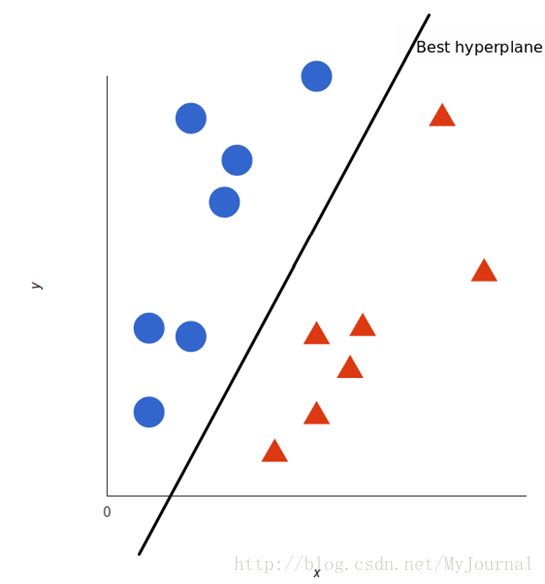
我们将正样本作为输入送入fine-tune模型中,输出是某一连接层得到的特征值,将这个输出与其标签(上面标定过的正负样本)作为SVM的样本进行训练,得到SVM模型。
(3)为什么选择SVM?
‘In Appendix B we discuss why the positive and negative examples are defined differently in fine-tuning versus SVM training. We also discuss the trade-offs involved in training detection SVMs rather than simply using the outputs from the final softmax layer of the fine-tuned CNN.’
论文的附录中提到了为什么不直接选择CNN模型及softmax对目标分类,而是选择SVM来分类。
def load_from_pkl(dataset_file):

    X, Y = pickle.load(open(dataset_file, 'rb'))

    return X,Y

def load_train_proposals(datafile, num_clss, threshold = 0.5, svm = False, save=False, save_path='dataset.pkl'):

    train_list = open(datafile,'r')

    labels = []

    images = []

    n = 0

    for line in train_list:

        n = n+1

        print ('n: '+str(n))

        tmp = line.strip().split(' ')

        # tmp0 = image address

        # tmp1 = label

        # tmp2 = rectangle vertices

        img = skimage.io.imread(tmp[0])

        ref_rect = tmp[2].split(',')

        ref_rect_int = [int(i) for i in ref_rect]

        print (ref_rect)

        # im_orig:输入图片   scale:表示felzenszwalb分割时,值越大,表示保留的下来的集合就越大

        # sigma:表示felzenszwalb分割时,用的高斯核宽度  min_size:表示分割后最小组尺寸

        img_lbl, regions = selectivesearch.selective_search(img, scale=200, sigma=0.3, min_size=25)

        candidates = set()

        for r in regions:

        # excluding same rectangle (with different segments)

            if r['rect'] in candidates:# 剔除重复的方框

                continue

            if r['size'] < 220:# 剔除太小的方框

                continue

            if r['size'] > 4000:

                continue

            proposal_img, proposal_vertice = clip_pic(img, r['rect'])

            if len(proposal_img) == 0:# Delete Empty array

                continue

            x, y, w, h = r['rect']

            if w == 0 or h == 0: # 长或宽为0的方框,剔除

                continue

            if h/w <= 0.7 or h/w>=1.3:

                continue

            # Check if any 0-dimension exist    image array的dim里有0的,剔除

            [a, b, c] = np.shape(proposal_img)

            if a == 0 or b == 0 or c == 0:

                continue

            im = Image.fromarray(proposal_img)

            resized_proposal_img = resize_image(im, 100, 100,resize_mode=3) # 重整方框的大小

            candidates.add(r['rect'])

            img_float = pil_to_nparray(resized_proposal_img)

            images.append(img_float)

            # 计算IOU

            iou_val = IOU(ref_rect_int, proposal_vertice)

            # labels, let 0 represent default class, which is background

            index = int(tmp[1])

            if svm == False:

                label = np.zeros(num_clss+1)

                if iou_val < threshold:

                    labels.append(0)

                else:

                    labels.append(index)

                labels.append(label)

            else:

                if iou_val < threshold:

                    labels.append(0)

                else:

                    labels.append(index)

                    print (r['rect'])

                    print ('iou_val: '+str(iou_val))

                    print ('labels append!')

    if save:

        pickle.dump((images, labels), open(save_path, 'wb'))

    return images, labels

def generate_single_svm_train(one_class_train_file):#获取SVM训练样本

    trainfile = one_class_train_file

    savepath = one_class_train_file.replace('txt', 'pkl')

    print (savepath)

    images = []

    Y = []

    if os.path.isfile(savepath):

      print("restoring svm dataset " + savepath)

      images, Y = load_from_pkl(savepath)

    else:

    print("loading svm dataset " + savepath)

        images, Y = load_train_proposals(trainfile, 3, threshold=0.3, svm=True, save=True, save_path=savepath)

    return images, Y

def train_svms(train_file_folder, model):

    listings = os.listdir(train_file_folder)

    print (listings)

    svms = []

    for train_file in listings:

        if "pkl" in train_file:

        continue

        X, Y = generate_single_svm_train(train_file_folder+train_file)

        print (np.shape(X))

        print ('success!')

        train_features = []

        for i in range(0,len(Y)):

            imgsvm = X[i]

            labelsvm = Y[i]

            print ('svm LABEL:'+str(labelsvm))

            feats,prelabel = Restore_show(imgsvm)

            train_features.append(feats[0])

        print("feature dimension")

        clf = svm.LinearSVC()

        print("fit svm")

        clf.fit(train_features,Y)

        print (clf)

        print(clf.score(train_features, Y))  # 打印拟合优度

        joblib.dump(clf,os.getcwd()+'/svm/filename.pkl')#保存SVM模型

        svms.append(clf)

    print (svms)

    return svms
3、将图片用selectivesearch指令分为多个矩形选框,用SVM模型对这些选框区域进行分类,即判定该区域中是否包含人脸,并将标签为1(即包含人脸的图片)记录下来:
imgs, verts = image_proposal(img_path)#image_proposal函数类似于之前的load_train_proposals函数,用于将选框筛选出来

  with tf.Session() as sess:

    features = []

    box_images = []

    print("predict image:")

    results = []

    results_label = []

    results_ratio = []

    count = 0

    number = 0

    temp = []

    for f in imgs:

            feats ,prelabel ,ratio= Restore_show(f)#Restore_show函数是将图片送入CNN分类模型预测,输出分别是特征、预测标签、是人脸的概率

            clf=joblib.load(os.getcwd()+'/svm/filename.pkl')#载入SVM模型

            pred = clf.predict(feats[0])#用模型进行预测,feats[0]是图片的特征

            print(pred)

            if pred[0] != 0:

                results.append(verts[count])

                results_label.append(pred[0])

                results_ratio.append(ratio)

                temp.append ((ratio,verts[count][0],verts[count][1],verts[count][2],verts[count][3]))

                number += 1

            count += 1
4、使用回归器精细修正候选框位置 (box regression)
至于这一部分论文中及许多博客上都仔细讲过,主要计算公式我就不再赘述。大致的原理就是标定框与目标框之间存在一定误差,我们需要寻找一种关系重新对目标框设置中心点及大小。为了保持这个关系为线性关系,我们在使用ridge regression时选择的目标框应是与标定框之间的IoU在0.6以上的值(论文中选择的值,我选取的是0.7,感觉效果也可以。)
4-1、ridge regression训练的输入是:图片标定框的特征值,标定框的中心点坐标、长、宽(x,y,w,h),目标框的中心点坐标、长、宽(x,y,w,h)
4-2、预测:
 feature, classnum = Output_show(img_path,0,0,size[0],size[1])

    #Output_show函数类似于Restore_show函数,将图片送入CNN分类模型预测,输出分别是特征、预测标签

    clf=joblib.load(os.getcwd()+'/boxregression/filenamex.pkl')#载入ridge regression模型

    predx = clf.predict(feature)

    clf=joblib.load(os.getcwd()+'/boxregression/filenamey.pkl')

    predy = clf.predict(feature)

    clf=joblib.load(os.getcwd()+'/boxregression/filenamew.pkl')

    predw = clf.predict(feature)

    clf=joblib.load(os.getcwd()+'/boxregression/filenameh.pkl')

    predh = clf.predict(feature)

    for i in range(number-1,-1,-1):

        if i not in flag_not:

            print (temp[i][1],temp[i][2],temp[i][3],temp[i][4])

            x = float(temp[i][1])

            y = float(temp[i][2])

            w = float(temp[i][3])

            h = float(temp[i][4])

            x1 = max(w*predx+x,0)

            y1 = max(h*predy+y,0)

            w1 = w*math.exp(predw)

            h1 = h*math.exp(predh)

            print (str(x1)+' '+str(y1)+' '+str(w1)+' '+str(h1))

            rect = mpatches.Rectangle(

                           (x1, y1), w1, h1, fill=False, edgecolor='red', linewidth=2)

            ax.add_patch(rect)#画出边框回归后的矩形

            rect1 = mpatches.Rectangle(

                           (x, y), w, h, fill=False, edgecolor='white', linewidth=2)

            ax.add_patch(rect1)#画出为边框回归的矩形

            out_ratio = str(temp[i][1])

            plt.text(x1+15, y1+15, str(temp[i][0]),color='red') #在矩形框上写出预测概率
1、http://blog.csdn.net/bixiwen_liu/article/details/53840913
2、http://blog.csdn.net/ture_dream/article/details/52896452
3、http://blog.csdn.net/daunxx/article/details/51578787
4、https://github.com/rbgirshick/rcnn
5、http://www.cnblogs.com/edwardbi/p/5647522.html
RCNN算法的tensorflow实现的更多相关文章
- 目标检测算法(1)目标检测中的问题描述和R-CNN算法
目标检测(object detection)是计算机视觉中非常具有挑战性的一项工作,一方面它是其他很多后续视觉任务的基础,另一方面目标检测不仅需要预测区域,还要进行分类,因此问题更加复杂.最近的5年使 ...
- 第三十一节,目标检测算法之 Faster R-CNN算法详解
Ren, Shaoqing, et al. “Faster R-CNN: Towards real-time object detection with region proposal network ...
- 第三十节,目标检测算法之Fast R-CNN算法详解
Girshick, Ross. “Fast r-cnn.” Proceedings of the IEEE International Conference on Computer Vision. 2 ...
- 第二十九节,目标检测算法之R-CNN算法详解
Girshick, Ross, et al. “Rich feature hierarchies for accurate object detection and semantic segmenta ...
- 【目标检测】Faster RCNN算法详解
Ren, Shaoqing, et al. “Faster R-CNN: Towards real-time object detection with region proposal network ...
- 【目标检测】RCNN算法详解
网址: 1. https://blog.csdn.net/zijin0802034/article/details/77685438 (box regression 边框回归) 2. https:// ...
- R-CNN算法概要
参考论文:Rich feature hierarchies for accurate object detection and semantic segmentation 下载地址:https://a ...
- 目标检测算法之Faster R-CNN算法详解
Fast R-CNN存在的问题:选择性搜索,非常耗时. 解决:加入一个提取边缘的神经网络,将候选框的选取交给神经网络. 在Fast R-CNN中引入Region Proposal Network(RP ...
- 目标检测算法之R-CNN算法详解
R-CNN全称为Region-CNN,它可以说是第一个成功地将深度学习应用到目标检测上的算法.后面提到的Fast R-CNN.Faster R-CNN全部都是建立在R-CNN的基础上的. 传统目标检测 ...
随机推荐
- javaweb中上传图片并显示图片,用我要上传课程信息(里面包括照片)这个例子说明
原理: 从客户端上传到服务器 照片——文件夹——数据库 例如:桌面一张照片,在tomacat里创建upload文件夹,把桌面照片上传到upload文件夹里,并且把照片的 ...
- react 阻止事件冒泡
前言 在学习react阻止事件冒泡,需要先了解 合成事件 和 原生事件 合成事件:在jsx中直接绑定的事件,就是合成事件: 原生事件: 通过js原生代码绑定的事件,就是原生事件: react事件:re ...
- 程序员50题(JS版本)(三)
程序11:判断101~200之间有多少个素数,并输出所有素数 for(var i=101,num=0;i<=200;i++){ for(var j=2;j<=i;j++){ if(i%j= ...
- ARM与FPGA通过spi通信设计1.spi基础知识
SPI(Serial Peripheral Interface--串行外设接口)总线系统是一种同步串行外设接口,它可以使MCU与各种外围设备以串行方式进行通信以交换信息.SPI总线可直接与各个厂家生产 ...
- 开启bin-log日志mysql报错:This function has none of DETERMINISTIC, NO SQL解决办法
开启bin-log日志mysql报错:This function has none of DETERMINISTIC, NO SQL解决办法: 创建存储过程时 出错信息: ERROR 1418 (HY ...
- Redis压缩列表
此篇文章是主要介绍Redis在数据存储方面的其中一种方式,压缩列表.本文会介绍1. 压缩列表(ziplist)的使用场景 2.如何达到节约内存的效果?3.压缩列表的存储格式 4. 连锁更新的问题 5 ...
- C# 批量插入数据方法
批量插入数据方法 void InsertTwo(List<CourseArrangeInfo> dtF) { Stopwatch watch = new Stopwatch(); watc ...
- MySQL 执行计划中Extra(Using where,Using index,Using index condition,Using index,Using where)的浅析
关于如何理解MySQL执行计划中Extra列的Using where.Using Index.Using index condition,Using index,Using where这四者的区别 ...
- 【原】Java学习笔记007 - 流程控制
package cn.temptation; public class Sample01 { public static void main(String[] args) { // for循环 // ...
- phpstorm设置编码格式
phpstorm设置编码格式 默认: utf-8格式 设置方法: file -> settings -> Editor -> file encodng -> project e ...