
springboot整合ueditor 前后端分离
1.下载ueditor,百度搜索ueditor,下载

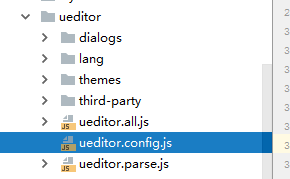
前端用的是Jsp版,导入文件如下
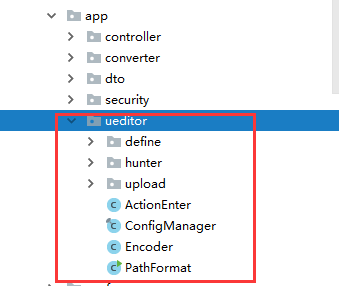
由于要修改部分源码,所以后端用的源码版,导入文件如下
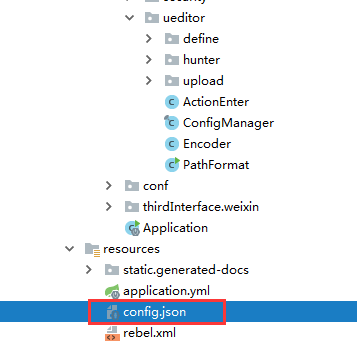
2.配置路径,用来找到json文件
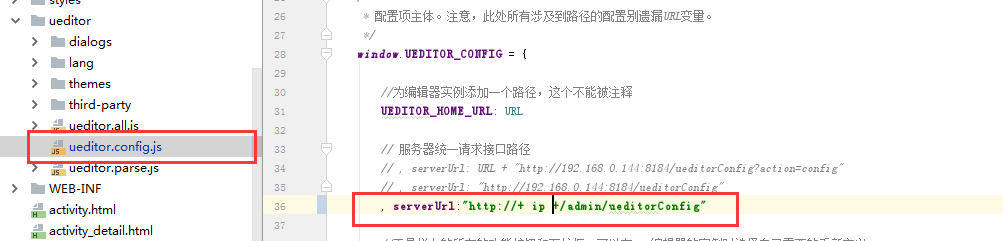
配置前端ueditor.config.js,用来找到Controller
新建 UeditorController,指定路径rootPath 用来找到config.json文件
@RestController

public class UeditorController {

    @RequestMapping("/ueditorConfig")

    public void getUEditorConfig(HttpServletResponse response,HttpServletRequest request){

        String rootPath = "此处配置项目中config.json文件路径";

        try {

            String exec = new ActionEnter(request, rootPath).exec();

            PrintWriter writer = response.getWriter();

            writer.write(exec);

            writer.flush();

            writer.close();

        } catch (IOException | JSONException e) {

            e.printStackTrace();

        }

    }

}
3.配置上传路径

4.修改BinaryUploader源码(https://blog.csdn.net/qq_33745799/article/details/70031641)
package com.baidu.ueditor.upload;

import com.baidu.ueditor.PathFormat;

import com.baidu.ueditor.define.AppInfo;

import com.baidu.ueditor.define.BaseState;

import com.baidu.ueditor.define.FileType;

import com.baidu.ueditor.define.State;

import org.apache.commons.fileupload.servlet.ServletFileUpload;

import org.springframework.web.multipart.MultipartFile;

import org.springframework.web.multipart.MultipartHttpServletRequest;

import javax.servlet.http.HttpServletRequest;

import java.io.IOException;

import java.io.InputStream;

import java.util.Arrays;

import java.util.List;

import java.util.Map;

public class BinaryUploader {

	public static final State save(HttpServletRequest request,

			Map<String, Object> conf) {

		// FileItemStream fileStream = null;

		// boolean isAjaxUpload = request.getHeader( "X_Requested_With" ) != null;

		if (!ServletFileUpload.isMultipartContent(request)) {

			return new BaseState(false, AppInfo.NOT_MULTIPART_CONTENT);

		}

        // ServletFileUpload upload = new ServletFileUpload(

			// 	new DiskFileItemFactory());

        //

        // if ( isAjaxUpload ) {

        //     upload.setHeaderEncoding( "UTF-8" );

        // }

		try {

			// FileItemIterator iterator = upload.getItemIterator(request);

            //

			// while (iterator.hasNext()) {

			// 	fileStream = iterator.next();

            //

			// 	if (!fileStream.isFormField())

			// 		break;

			// 	fileStream = null;

			// }

            //

			// if (fileStream == null) {

			// 	return new BaseState(false, AppInfo.NOTFOUND_UPLOAD_DATA);

			// }

			MultipartHttpServletRequest multipartRequest = (MultipartHttpServletRequest) request;

			MultipartFile multipartFile = multipartRequest.getFile(conf.get("fieldName").toString());

			if(multipartFile==null){

				return new BaseState(false, AppInfo.NOTFOUND_UPLOAD_DATA);

			}

			String savePath = (String) conf.get("savePath");

			//String originFileName = fileStream.getName();

			String originFileName = multipartFile.getOriginalFilename();

			String suffix = FileType.getSuffixByFilename(originFileName);

			originFileName = originFileName.substring(0,

					originFileName.length() - suffix.length());

			savePath = savePath + suffix;

			long maxSize = ((Long) conf.get("maxSize")).longValue();

			if (!validType(suffix, (String[]) conf.get("allowFiles"))) {

				return new BaseState(false, AppInfo.NOT_ALLOW_FILE_TYPE);

			}

			savePath = PathFormat.parse(savePath, originFileName);

			String physicalPath = (String) conf.get("rootPath") + savePath;

			//InputStream is = fileStream.openStream();

			InputStream is = multipartFile.getInputStream();

			State storageState = StorageManager.saveFileByInputStream(is,

					physicalPath, maxSize);

			is.close();

			if (storageState.isSuccess()) {

				storageState.putInfo("url", PathFormat.format(savePath));

				storageState.putInfo("type", suffix);

				storageState.putInfo("original", originFileName + suffix);

			}

			return storageState;

		// } catch (FileUploadException e) {

		// 	return new BaseState(false, AppInfo.PARSE_REQUEST_ERROR);

		} catch (IOException e) {

		}

		return new BaseState(false, AppInfo.IO_ERROR);

	}

	private static boolean validType(String type, String[] allowTypes) {

		List<String> list = Arrays.asList(allowTypes);

		return list.contains(type);

	}

}
springboot整合ueditor 前后端分离的更多相关文章
- Ueditor 前后端分离实现文件上传到独立服务器
关于Ueditor 前后端分离实现文件上传到独立服务器,在网上搜索确实遇到大坑,不过还好遇到了 虚若影 最终实现了,在此感谢!虚若影的原文博客网址:http://www.cnblogs.com/hpn ...
- springboot2.0整合springsecurity前后端分离进行自定义权限控制
在阅读本文之前可以先看看springsecurity的基本执行流程,下面我展示一些核心配置文件,后面给出完整的整合代码到git上面,有兴趣的小伙伴可以下载进行研究 使用maven工程构建项目,首先需要 ...
- springboot+vue的前后端分离与合并方案
pringboot和vue结合的方案网络上的主要有以下两种: 1. [不推荐]在html中直接使用script标签引入vue和一些常用的组件,这种方式和以前传统的开发是一样的,只是可以很爽的使用vue ...
- shiro,基于springboot,基于前后端分离,从登录认证到鉴权,从入门到放弃
这个demo是基于springboot项目的. 名词介绍: ShiroShiro 主要分为 安全认证 和 接口授权 两个部分,其中的核心组件为 Subject. SecurityManager. Re ...
- SpringBoot 和Vue前后端分离入门教程(附源码)
作者:梁小生0101 juejin.im/post/5c622fb5e51d457f9f2c2381 推荐阅读(点击即可跳转阅读) 1. SpringBoot内容聚合 2. 面试题内容聚合 3. 设计 ...
- springboot集成shiro 前后端分离
前后端分离情况下 首先考虑是否跨域,如果没有跨域是可以使用shiro原生的session+cookie,无需特别处理. 如果涉及到跨域则需要考虑cookie问题(本质上也是重写shiro获取JESSI ...
- springboot集成shiro 前后端分离 统一处理shiro异常
在前后端分离的情况下,shiro一些权限异常处理会返回401之类的结果,这种结果不好统一管理.我们希望的结果是统一管理,所有情况都受我们控制 就算权限验证失败,我们也希望返回200,并且返回我们定义的 ...
- 一套基于SpringBoot+Vue+Shiro 前后端分离 开发的代码生成器
一.前言 最近花了一个月时间完成了一套基于Spring Boot+Vue+Shiro前后端分离的代码生成器,目前项目代码已基本完成 止步传统CRUD,进阶代码优化: 该项目可根据数据库字段动态生成 c ...
- Spring Boot Security JWT 整合实现前后端分离认证示例
前面两章节我们介绍了 Spring Boot Security 快速入门 和 Spring Boot JWT 快速入门,本章节使用 JWT 和 Spring Boot Security 构件一个前后端 ...
随机推荐
- Vue-admin工作整理(五):守卫导航
一.作用: 它可以帮我们在路由发生跳转,到导航结束的时间内,做一些相应的逻辑处理,分为:全局守卫,和专项守卫 1.全局收尾: (a).前置守卫:router.beforeEach(to,from,ne ...
- windows主用python3 个别程序使用python2的方法
原始需求: 平时执行命令都默认用python3,遇到个别程序需要python2的时候也能用python2. 实现: 1.先装python3,添加环境变量,这时在cmd里输入python可以显示出是版本 ...
- 在Python中使用SMTP发送电子邮件
Python中有内置的smtplib模块,完成一封邮件的发送,需要做很多准备工作.第三方的py_smtp这个包也是基于smtplib的,在Python中使用py_smtp发送电子邮件非常方便,只要填写 ...
- 在tensorflow中使用batch normalization
问题 训练神经网络是一个很复杂的过程,在前面提到了深度学习中常用的激活函数,例如ELU或者Relu的变体能够在开始训练的时候很大程度上减少梯度消失或者爆炸问题,但是却不能保证在训练过程中不出现该问题, ...
- pyqt多线程进度条
ui.py # -*- coding: utf-8 -*- # Form implementation generated from reading ui file 'ui.ui' # # Creat ...
- Java集合框架相关知识整理
1.常见的集合有哪些? Collection接口和Map接口是所有集合框架的父接口 Collection接口的子接口包括:Set接口和List接口 Map接口的实现类主要有:HashMap ...
- Wincc报表+Listview使用
listview在Wincc中可以作为显示的控件,对于列表表头的定义如下所示: list的命名,点击属性,在对象名称中对其定义: 有了listview的定义,就可以使用VBS对其表头的定义.具体代码如 ...
- 关于noip2017的感想
关于noip2017的感想 晚自习没有事做,也不知道该干什么. 第一次参加noip提高组. 前2年参加普及还算不错,没有犯任何错误. 去年就做了几套历年真题,感觉500+很好拿呀. 但去年的时候看20 ...
- Java实现post和get请求
GET请求:GET请求会向服务器发索取数据的请求,从而来获取信息,该请求就像数据库的select操作一样,只是用来查询一下数据,不会修改.增加数据,不会影响资源的内容,即该请求不会产生副作用.无论进行 ...
- JAVA如何request没有参数的post提交
过去做网页的时候 post过来的值都是带参的 我就request.getParameter("")来获取 现在过来的不带参 就一串字符串 我应该怎么获取? //用获取数据流的方式, ...