
OpenStack入门篇(二十)之实现阿里云ESC多FLAT网络
1.给两台虚拟机增加网卡,使用仅主机模式,网段为:192.168.57.0/24
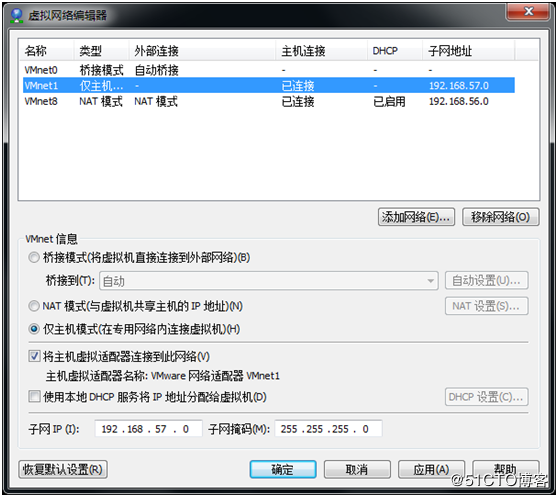
2.修改两台主机网卡配置
[root@linux-node1 ~]# cp /etc/sysconfig/network-scripts/ifcfg-eth0 /etc/sysconfig/network-scripts/ifcfg-eth1

[root@linux-node1 ~]# vim /etc/sysconfig/network-scripts/ifcfg-eth1

TYPE=Ethernet

BOOTPROTO=static

NAME=eth1

DEVICE=eth1

ONBOOT=yes

IPADDR=192.168.57.11

NETMASK=255.255.255.0

[root@linux-node1 ~]# systemctl restart network

[root@linux-node2 ~]# cp /etc/sysconfig/network-scripts/ifcfg-eth0 /etc/sysconfig/network-scripts/ifcfg-eth1

[root@linux-node2 ~]# vim /etc/sysconfig/network-scripts/ifcfg-eth1

TYPE=Ethernet

BOOTPROTO=static

NAME=eth1

DEVICE=eth1

ONBOOT=yes

IPADDR=192.168.57.12

NETMASK=255.255.255.0

[root@linux-node2 ~]# systemctl restart network
3.修改桥接网络配置
[root@linux-node1 ~]# vim /etc/neutron/plugins/ml2/linuxbridge_agent.ini

physical_interface_mappings = public:eth0,internal:eth1

public:公网   internal:私网

[root@linux-node1 ~]# source admin-openstack

[root@linux-node1 ~]# openstack endpoint list
4.修改ml2的配置
[root@linux-node1 ~]# vim /etc/neutron/plugins/ml2/ml2_conf.ini

flat_network:单一扁平网络

flat_network = public,internal

[root@linux-node1 ~]# systemctl restart neutron-server

[root@linux-node1 ~]# systemctl restart neutron-linuxbridge-agent
5.计算节点:linux-node2一样配置/etc/neutron/plugins/ml2/linuxbridge_agent.ini
physical_interface_mappings = public:eth0,internal:eth1

[root@linux-node2 ~]# systemctl restart neutron-linuxbridge-agent
6.创建网络
[root@linux-node1 ~]# source admin-openstack

[root@linux-node1 ~]# openstack network create --share \

    --provider-physical-network internal \

    --provider-network-type flat internal  <--网络名称

[root@linux-node1 ~]# openstack subnet create --network internal \

    --allocation-pool start=192.168.57.100,end=192.168.57.200

    --dns-nameserver 192.168.56.2 --gateway 192.168.57.2 \

    --subnet-range 192.168.57.0/ internal-subnet
7.dashboard查看并创建云主机
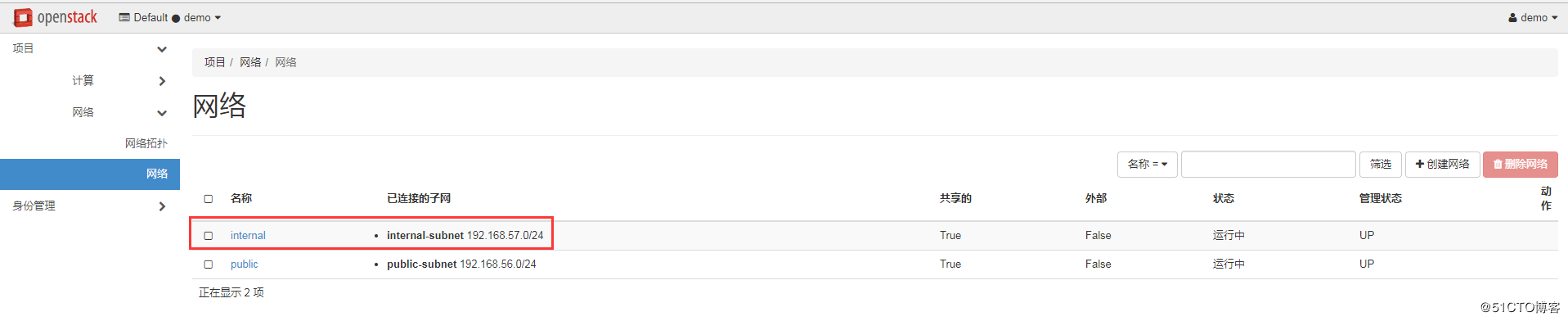
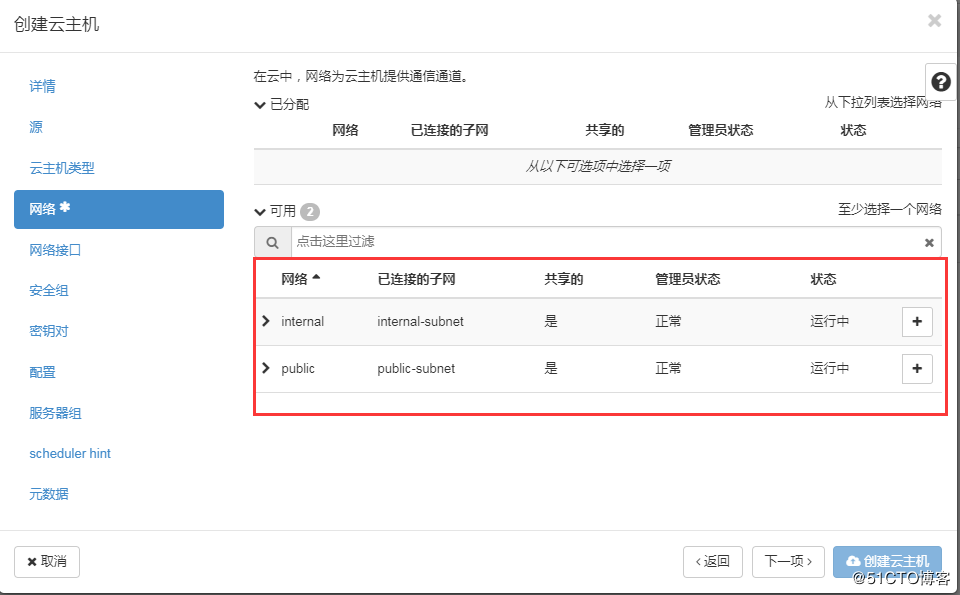
在创建云主机时即可选择网络,如图:
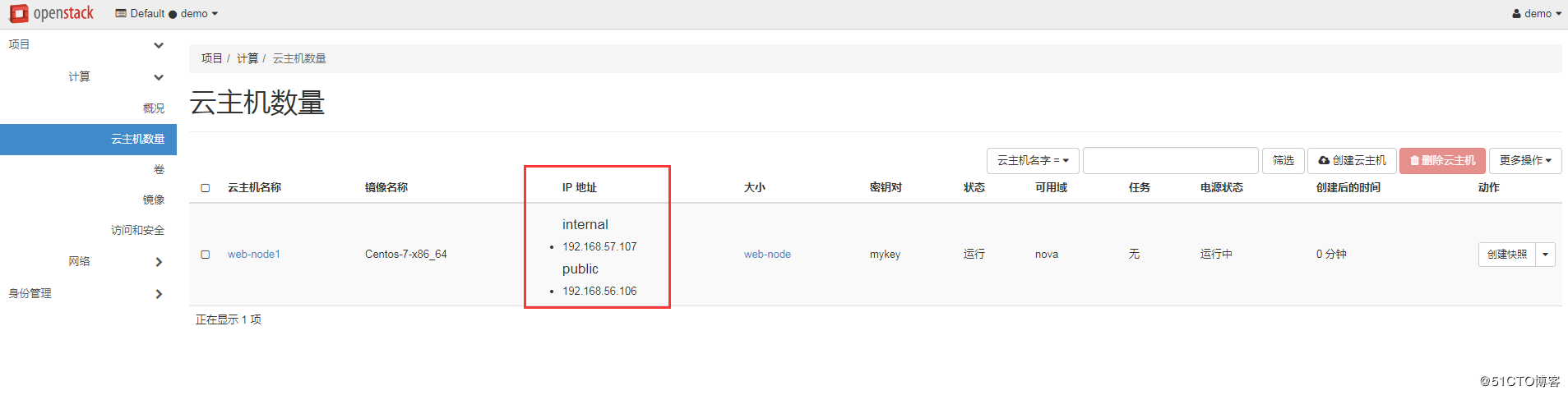
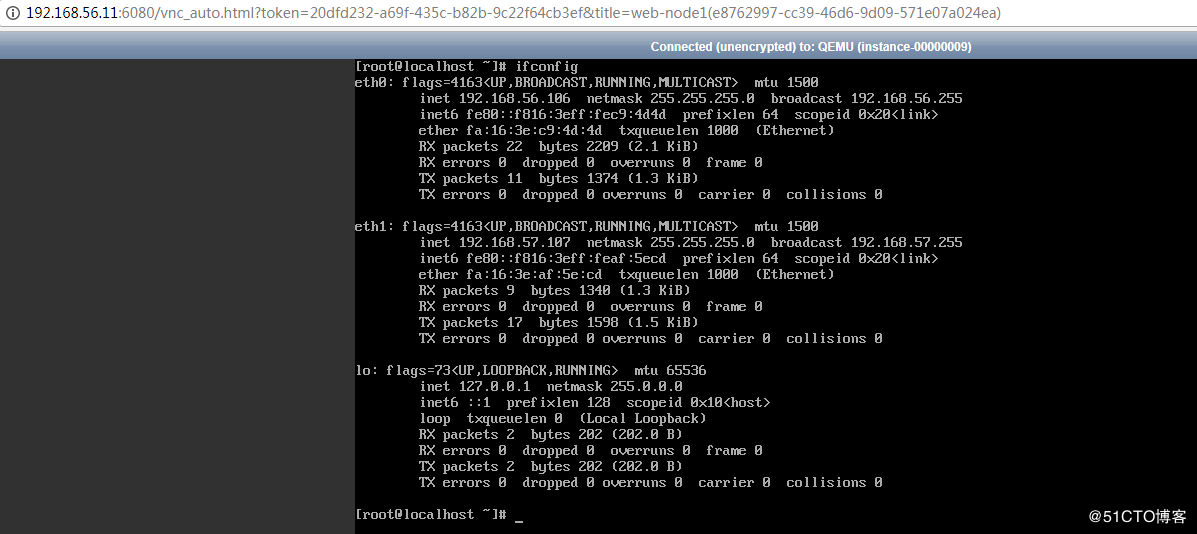
实现阿里云的FLAT网络(经典网络)一个公网ip,一个私网ip,如图:
VNC查看:
OpenStack入门篇(二十)之实现阿里云ESC多FLAT网络的更多相关文章
- 028-实现阿里云ESC多FLAT网络
实现类似于阿里云ECS的网络结构,其效果为云主机拥有两块和两个不同的网络,一个网络是用于用于和外网连接,一个用于内网通信,但宿主机上至少有两个网卡,整体配置如下:1.在wmare里给宿主机添加一块网卡 ...
- OpenStack入门篇(二十二)之实现阿里云VPC的SDN网络
1.修改/etc/neutron/neutron.conf配置 [root@linux-node1 ~]# vim /etc/neutron/neutron.conf [defalut] ... co ...
- Openstack入门篇(十二)之neutron服务(计算节点)的部署与测试
1.Neutron组件安装 [root@linux-node2 ~]# yum install -y openstack-neutron-linuxbridge ebtables ipset 2.配置 ...
- Openstack入门篇(十八)之Cinder服务-->使用NFS作为后端存储
1.安装cinder-volume组件以及nfs [root@linux-node2 ~]# yum install -y openstack-cinder python-keystone [root ...
- Openstack入门篇(十六)之Cinder服务的部署与测试
1.理解块存储服务 操作系统获得存储空间的方式一般有两种: 通过某种协议(SAS,SCSI,SAN,iSCSI 等)挂接裸硬盘,然后分区.格式化.创建文件系统:或者直接使用裸硬盘存储数据(数据库) 通 ...
- Openstack入门篇(十五)之如何创建生产使用的openstack镜像
在linux-node1节点上: [root@linux-node1 ~]# yum install -y openstack-nova-compute [root@linux-node1 ~]# y ...
- Openstack入门篇(十四)之horizon服务的部署与测试
1.Horizon介绍 •提供一个web界面操作openstack的系统 •使用Django框架基于openstack API开发 •支持将session存储在DB.memcached •支持集群 t ...
- Openstack入门篇(十)之nova服务(计算节点)的部署与测试
1.安装服务软件包 [root@linux-node2 ~]# yum install -y centos-release-openstack-newton [root@linux-node2 ~]# ...
- OpenStack入门篇(十九)之网络虚拟化基础
1.Linux Bridge的基本概念 假设宿主机有 1 块与外网连接的物理网卡 eth0,上面跑了 1 个虚机 VM1,现在有个问题是: 如何让 VM1 能够访问外网?① 给 VM1 分配一个虚拟网 ...
随机推荐
- docker 的简单使用
运行一个ubuntu容器 咱们要在cenots7操作系统下,以docker下载一个ubuntu image文件,然后以image启动容器 docker pull ubuntu 或者指定版本:docke ...
- [翻译] FBNetworkReachability
FBNetworkReachability You can use FBNetworkReachabilty class to get network reachability on iOS devi ...
- Exchange & Office 365最小混合部署
前言 这篇文章的主题是混合部署~ 混合使得本地组织和云环境像一个单一的.协作紧密的组织一样运作.当组织决定进行混合部署,达到本地Exchange Server和Office 365共存的状态时,就会面 ...
- Ogre学习教程:Ogre1.8.1+VS2010环境配置(转)
http://blog.csdn.net/yangtrees/article/details/8724120 http://blog.csdn.net/cll611/article/details/8 ...
- D:\hunting2014\小题目\字符串倒序
#include<stdio.h>#include<string.h> char *revert(char *str){ char temp; char *p = str; c ...
- Python简单实现多级菜单
# -*- coding: utf-8 -*- # @Time : 2018-06-01 13:40 # @Author : 超人 # @Email : huxiaojiu111@gmail.com ...
- 2016-3-19日小结:scrollTop
<div id="div1" style="padding: 0; position:absolute;width: 200px;height: 200px;< ...
- 【转】合格PHP工程师的知识结构
PHP的运行环境 连环境都搞不起来,就是你有多么喜欢PHP,那也是白搭,开始我们大多会使用集成环境软件例如xampp,wamp.随着知识的增加慢慢要学会自己搭建运行环境,例如 Linux(Ubuntu ...
- mysql报错:/usr/sbin/mysqld:unknown variable 'default-character-set=utf8'
修改mysql的字符集时,为了将默认字符集设置为utf-8,便将/etc/my.cnf下[mysqld]加了一行 default-character-set=utf8, 但是在下次启动系统的时候,my ...
- python基础整理2——Linux
Linux 目录 /:根目录,一般根目录下只存放目录 /bin./usr/bin: 可执行二进制文件的目录,如常用的命令ls.tar.mv.cat等 /boot:放置linux系统启动时用到的一些文件 ...