
vue2.0实现购物车功能
购物车功能是一件比较繁琐的事情,逻辑功能太多,今天就用vue2.0实现一个简单的购物车功能,数据都本地自己写的假数据
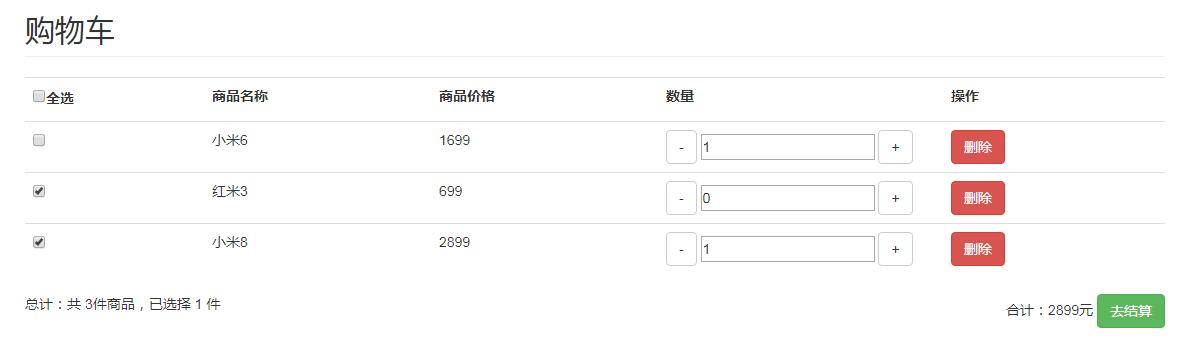
功能列表:
1、全选和单选结算
2、减少和增加数量
3、商品的删除
界面搭建以及布局,这里,我直接用bootstrap快速搭建的一个简单的布局
<div class="container" id="app">

            <h2 class="page-header">购物车</h2>

            <table class="table">

                <tr>

                    <th><label><input type="checkbox" @click="check_all" :checked="check_goods.length == cart_list.length"/>全选</label></th>

                    <th>商品名称</th>

                    <th>商品价格</th>

                    <th>数量</th>

                    <th>操作</th>

                </tr>

                <tr v-for="(cart,index) in cart_list" :key="index">

                    <td><input type="checkbox" :value="cart" v-model="check_goods" /></td>

                    <td>{{cart.goods_name}}</td>

                    <td>{{cart.goods_price}}</td>

                    <td class="col-xs-3">

                        <span class="btn btn-default" v-on:click="reduce(cart)">-</span>

                        <input class="btn-group" type="number" v-model="cart.num" />

                        <span class="btn btn-default" v-on:click="add_num(cart)">+</span>

                    </td>

                    <td>

                        <button class="btn btn-danger" v-on:click="delete_num">删除</button>

                    </td>

                </tr>

            </table>

            <div>

                总计:共 {{cart_list.length    }}件商品,已选择 {{total_num}} 件

                <div class="pull-right">

                    合计:{{total_price}}元

                    <a href="" class="btn btn-success" :disabled="check_goods.length <= 0">去结算</a>

                </div>

            </div>

        </div>
所有的数据都是自己本地写的
data() {

	return {

		cart_list: [{

		  goods_name: '小米6',

		  goods_price: '1699',

		  num: '2',

		},{

		   goods_name: '红米3',

		   goods_price: '699',

		   num: '1',

		},{

		   goods_name: '小米8',

		   goods_price: '2899',

		   num: '1',

		}],

		   check_goods: [] //已选择的商品

	      }

	},
计算属性:
计算出商品中,总价和数量
              computed: {

//				总价

				total_price() {

					let price = 0


					this.check_goods.forEach(item => {

//						总价 = 价格 * 数量

						price += Number(item.goods_price) * Number(item.num)

					})

					return price

				},

//				数量

				total_num() {

					let t_num = 0;

					this.check_goods.forEach(item => {

						t_num += Number(item.num);

					})

					return t_num

				}

			},
实现商品增加减少,删除功能
              methods:{

//				商品类减减

				reduce(cart) {

					if(cart.num <=0) {

						cart.num = 0

					} else {

						cart.num --

					}

				},

//				商品累加

				add_num(cart) {

					cart.num++

				},

//				删除商品

				delete_num(cart){

					this.check_goods.splice(this.check_goods.indexOf(cart),1)

					this.cart_list.splice(this.cart_list.indexOf(cart),1)

				},

//				全选

				check_all() {

					if (this.check_goods.length >0) {

						this.check_goods = []

					} else {

						this.cart_list.forEach(item => {

							this.check_goods.push(item)

						})

					}

				}

			}
至此我们的购物车基本功能就完成了,
vue2.0实现购物车功能的更多相关文章
- 关于慕课网《使用vue2.0实现购物车和地址选配功能》的总结
视频学习网址:http://www.imooc.com/learn/796 源码打包:https://codeload.github.com/fachaoshao/Vue-ShoppingCart/z ...
- VUE2.0实现购物车和地址选配功能学习第五节
第五节 单件商品金额计算和单选全选功能 1.vue精髓在于操作data模型来改变dom,渲染页面,而不是直接去改变dom 2.加减改变总金额功能: html:<div class="c ...
- VUE2.0实现购物车和地址选配功能学习第四节
第四节 v-on实现金额动态计算 用¥金额 进行格式处理,可以使用原生js进行转换,但是在vuei,使用filter过滤器更加方便 注: 1.es6语法=>和import等 好处在于res参数后 ...
- VUE2.0实现购物车和地址选配功能学习第三节
第三节 使用v-for渲染商品列表 1.使用vue-resource插件引入json数据 (注:在谷歌中调试打断点-- ,console还可以输出vm,res等属性列表,或者productList等一 ...
- VUE2.0实现购物车和地址选配功能学习第七节
第七节 卡片选中,设置默认 1.卡片选中html:<li v-for="(item,index) in filterAddress" v-bind:class="{ ...
- VUE2.0实现购物车和地址选配功能学习第六节
第六节 地址列表过滤和展开所有的地址 html:<li v-for="(item,index) in filterAddress">js: new Vue({ el:' ...
- VUE2.0实现购物车和地址选配功能学习第二节
第二节 创建VUE实例 购物车项目计划: 1.创建一个vue实例 2.通过v-for指令渲染产品数据 3.使用filter对金额和图片进行格式化 4.使用v-on实现产品金额动态计算 5.综合演示 ① ...
- VUE2.0实现购物车和地址选配功能学习第一节(来源--慕课网河畔一角)
第一节 vue知识 vue-resource:和后台交互的一个插件,实现get.post和jsonp等功能.(替代jQuery) vue特点: 1.易用:通过创建vue实例,{{}}绑定数据十分方便 ...
- vue2.0的常用功能简介
路由跳转 当我们想要实现点击链接跳转时,可以使用$router来进行跳转 语法如下: '}}) 这里path是要跳转的路径,query里面是路径跳转时要携带的参数,以对象的形式存在 2 获取路由参数 ...
随机推荐
- springmvc 开涛 数据验证
两种方式:编程和声明. 编程需要:验证器,控制器,servlet.xml,错误码设置 声明需要:加jar包,控制器,跟孔浩讲得类似 错误消息设置的两种方式:硬编码:从资源文件中读取(默认,自定义).
- Create Your Content and Structure
The original page source Content is the most important aspect of any site. So let's design for the c ...
- Oracle 监听服务启动不了
解决方法: 重新生成listener.ora文件 实施步骤 1,打开Net Configuration Assistant 2, 3, 4, 5, 6, 7,
- linux系统编程之管道(三):命令管道(FIFO)
一,匿名管道PIPE局限性 管道的主要局限性正体现在它的特点上: 只支持单向数据流: 只能用于具有亲缘关系的进程之间: 没有名字: 管道的缓冲区是有限的(管道制存在于内存中,在管道创建时,为缓冲区分配 ...
- C#开发微信小程序
个人见解,欢迎交流,不喜勿喷. 微信小程序相比于微信公众号的开发,区别在于微信小程序只请求第三方的数据,整个界面的交互(view)还是在微信小程序上实现,前后端完全分离,说白了,微信小程序开发与具 ...
- 记录JavaScript中使用keyup事件做输入验证(附event.keyCode表)
input的blur事件 $("#input-name").blur(function () { var value = $(this).val(); if (value === ...
- 第七章 ReentrantLock总结
常用方式: int a = 12; //注意:通常情况下,这个会设置成一个类变量,比如说Segement中的段锁与copyOnWriteArrayList中的全局锁 final ReentrantLo ...
- 工信部公示网络安全示范项目 网易云易盾“自适应DDoS攻击深度检测和防御系统”入选
本文由 网易云发布. 工信部官网 2017年年底,经专家评审和遴选,中华人民共和国工业和信息化部(以下简称“工信部”)公示了2017年电信和互联网行业网络安全试点示范项目,网易云易盾的“自适应DDo ...
- springboot-登录拦截器
小伙伴们大家好,今天给大家分享一个简单的springboot版登录拦截器 首先我们需要在springboot的启动类中让它实现WebMvcConfigurer 这个接口 比如: public clas ...
- 【BZOJ3238】[AHOI2013]差异
[BZOJ3238][AHOI2013]差异 题面 给定字符串\(S\),令\(T_i\)表示以它从第\(i\)个字符开始的后缀.求 \[ \sum_{1\leq i<j\leq n}len(T ...