
CentOS7 之基础设置及常见操作命令
1、Host SMbus controller not enabled
解决方法: 在 /etc/modprobe.d/blacklist.conf 文件里添加
blacklist i2c_piix4
2、intel_rapl: no valid rapl domains found in package 0
解决方法: 在 /etc/modprobe.d/blacklist.conf 文件里添加
blacklist intel_rapl
3、修改开机等待时间
在 /boot/grub2/grub.cfg 找到并修改下面的代码
terminal_output console
if [ x$feature_timeout_style = xy ] ; then
set timeout_style=menu
set timeout= (建议修改成1,不要修改成0,修改完成后,重启即可看到效果)
# Fallback normal timeout code in case the timeout_style feature is
# unavailable.
else
set timeout=5
fi
### END /etc/grub.d/00_header ###
4、选定默认启动内核,及删除无用内核
#使用cat /boot/grub2/grub.cfg |grep menuentry 查看系统可用内核
[root@bigapp-slave27 ~]# cat /boot/grub2/grub.cfg |grep menuentry
if [ x"${feature_menuentry_id}" = xy ]; then
menuentry_id_option="--id"
menuentry_id_option=""
export menuentry_id_option
menuentry 'CentOS Linux (3.10.0-514.16.1.el7.x86_64) 7 (Core)' --class centos --class gnu-linux --class gnu --class os --unrestricted $menuentry_id_option 'gnulinux-3.10.0-327.el7.x86_64-advanced-6f5840d0-55ac-4d3b-899b-61c0297c5347' {
menuentry 'CentOS Linux (3.10.0-327.el7.x86_64) 7 (Core)' --class centos --class gnu-linux --class gnu --class os --unrestricted $menuentry_id_option 'gnulinux-3.10.0-327.el7.x86_64-advanced-6f5840d0-55ac-4d3b-899b-61c0297c5347' {
menuentry 'CentOS Linux (0-rescue-d57307c454c0437d91c309347178cdf5) 7 (Core)' --class centos --class gnu-linux --class gnu --class os --unrestricted $menuentry_id_option 'gnulinux-0-rescue-d57307c454c0437d91c309347178cdf5-advanced-6f5840d0-55ac-4d3b-899b-61c0297c5347' {
#查看当前内核
[root@bigapp-slave27 ~]# uname -r
3.10.0-514.16.1.el7.x86_64
#修改开机时默认使用的内核
grub2-set-default 'CentOS Linux (3.10.0-327.el7.x86_64) 7 (Core)'
#查看内核修改结果
[root@bigapp-slave27 ~]# grub2-editenv list
saved_entry=CentOS Linux (3.10.0-327.el7.x86_64) 7 (Core)
#查看系统安装了哪些内核包
[root@bigapp-slave27 ~]# rpm -qa |grep kernel
kernel-3.10.0-327.el7.x86_64
kernel-headers-3.10.0-514.6.1.el7.x86_64
kernel-tools-libs-3.10.0-327.el7.x86_64
kernel-3.10.0-514.16.1.el7.x86_64
kernel-tools-3.10.0-327.el7.x86_64
#使用yum remove 或rpm -e 删除无用内核
yum remove kernel-3.10.0-327.el7.x86_64
5、中断ping命令
ctrl+c是可以的。不然也可以ctrl+z,然后kill %1
最好的方法还是 ping -c 3 192.168.1.1 ,-c 3表示ping 3次
6、关闭防火墙
CentOS 7.0默认使用的是firewall作为防火墙
systemctl stop firewalld.service #停止firewall
systemctl disable firewalld.service #禁止firewall开机启动
7、修改虚拟机配置文件,设置固定IP
cd /etc/sysconfig/network-scripts
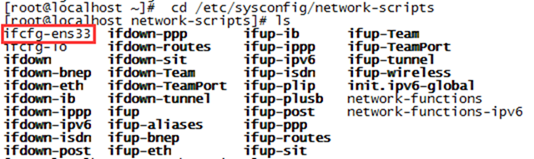
vi ifcfg-ens33
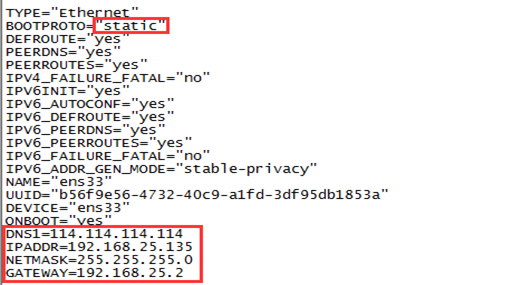
注意:ONBOOT="yes"
修改:BOOTPROTO="static"
添加:
DNS1=114.114.114.114 #这个是国内的DNS,是固定的,当然还有个8.8.8.8,是国外谷歌的IPADDR=192.168.25.135 # 设置一个和原来动态分配的ip在同一子网的IP
NETMASK=255.255.255.0 #子网掩码
GATEWAY=192.168.25.2 #网关,vmvare的nat模式网关为x.x.x.2
重启网络服务
service network restart
参考链接:http://www.cnblogs.com/wycc/p/6066342.html
CentOS7 之基础设置及常见操作命令的更多相关文章
- linux网络基础设置 以及 软件安装
ifconfig #查看所有已激活的网卡信息 临时配置 #yum install net-tools -y 默认ifconfig是没有安装的,可能需要安装 ifconfig eth0 #查看单独一块网 ...
- linux基础-第十四单元 Linux网络原理及基础设置
第十四单元 Linux网络原理及基础设置 三种网卡模式图 使用ifconfig命令来维护网络 ifconfig命令的功能 ifconfig命令的用法举例 使用ifup和ifdown命令启动和停止网卡 ...
- Linux网络服务01——Linux网络基础设置
Linux网络服务01--Linux网络基础设置 一.查看及测试网络 1.使用ifconfig命令查看网络接口 (1)查看活动的网络接口 ifconfig命令 [root@crushlinux ~]# ...
- Redis入门很简单之二【常见操作命令】
Redis入门很简单之二[常见操作命令] 博客分类: NoSQL/Redis/MongoDB redisnosql缓存 Redis提供了丰富的命令,允许我们连接客户端对其进行直接操作.这里简单介绍一 ...
- gRPC学习之一:在CentOS7部署和设置GO
欢迎访问我的GitHub https://github.com/zq2599/blog_demos 内容:所有原创文章分类汇总及配套源码,涉及Java.Docker.Kubernetes.DevOPS ...
- centos7 ip地址设置
centos7 ip地址设置 http://simonhu.blog.51cto.com/196416/1588971 CentOS系统 修改DNS 修改对应网卡的DNS的配置文件 # vi /etc ...
- hibernate----hibernate的基础设置
本次学习的内容是hibernate的基础设置 具体内容为: 一.准备工作 1.新建java工程 2.自动引入相关库(自动生成SessionFactory) 3.将数据库驱动拿进来 4.添加hibern ...
- postfix 邮箱设置及常见错误
postfix 邮箱设置及常见错误 1.如果装了sendmail的话,先卸载了. yum remove sendmail 2.安装 Postfix yum install postfix 3.更改默认 ...
- Ubuntu安装VirtualBox以及CentOS7.5联网设置
一.virtualBox的安装 官方Liunx版本下载地址: https://www.virtualbox.org/wiki/Linux_Downloads 这里选择下载ubuntu 16.04 ...
随机推荐
- Linux初学之vmware Workstation 网络连接三种模式
简介: VM(VMware Workstation简称VM,后面都将用VM代替阐述)是一款功能强大的虚拟化软件.VM支持在 单一的桌面上同时运行多款不同的操作系统,能够模拟完整的网络环境,支持pxe功 ...
- Java RMI 简单实现
提供远端访问的时候,我们首先需要定义远端能够访问哪些东西,在Java中,定义这类接口需要实现Remote接口 public interface Business extends Remote{ pub ...
- JavaScript中函数和构造函数的区别
构造函数也是函数 构造函数和其它函数的唯一区别: 构造函数是通过new操作符来调用的. 也就是说如果构造函数不用new操作符来调用,那它就是普通函数,反过来说任何函数通过new操作符来调用就可以当做构 ...
- java项目中Excel文件预览
package com.linkonworks.df.busi.utils; import java.io.File; import java.io.FileInputStream; import j ...
- WebService环境变量
将axis2部署到tomcat的webapps文件夹下: 因为该路径用于自动部署Web应用,将Web应用复制在该路径下,tomcat会将应用自动部署在容器中. AXIS_LIB:F:\tomcat\w ...
- ETL 自动化测试框架
分享个自己最近在做的自动化测试框架架构图. 数据的测试,入口一般定时任务.可添加参数选择执行任务的范围,也可以选择默认的执行范围.验证测试的为etl测试.数据库中的字段校验(通过对应关系.接口或者SQ ...
- 20155325 2016-2017-2 《Java程序设计》第5周学习总结
教材学习内容总结 Java中把正常流程放try块中,错误(异常)处理放catch块中. Error及其子类写程序不用处理,最多留个日志.因为这种错误Java应用程序本身是无力回复的. 在使用throw ...
- 创造101:如果软件测试工程师组团出道,怎样才能站C位?!
作者 C位出道的华华 虽然华华是一个软件测试技术宅,可以连续七七四十九天加班不重样,心里除了上班工作学习写代码就没有别的爱好了,但是各种潮流资讯啊狗血剧啊娱乐综艺啊,从来没有错过. 比如说现在大火的& ...
- golang的json序列化
json就是简单的数据交换格式,语法类似javascript的对象和列表,是最常见的后端和运行在网页上的js之间的通信格式. encoding: 编码json数据需要使用到Marshal()函数. f ...
- ubuntu git 简单入门【转】
转自:http://blog.chinaunix.net/uid-20718384-id-3334859.html 1. 安装 sudo apt-get install git-core 2. 初始 ...