
MVC登陆认证简单设置
首先,弄个基类
 /// <summary>

    /// 所有控制器基类,里面重写了OnActionExecuted方法

    /// </summary>

    public class BaseController : Controller

    {

        /// <summary>

        /// 是否需要校验

        /// </summary>

        public bool IsCheckLogin { get; set; } = true;

        /// <summary>

        /// 已登陆的用户信息

        /// </summary>

        public UserInfo LoginUser { get; set; }

        /// <summary>

        /// 在方法执行之前调用

        /// </summary>

        /// <param name="filterContext"></param>

        protected override void OnActionExecuting(ActionExecutingContext filterContext)

        {

            base.OnActionExecuting(filterContext);

            //如果页面需要校验

            if (IsCheckLogin)

            {

                #region Session方式

                ////校验用户是否登陆

                //if (filterContext.HttpContext.Session["LoginUser"] == null)

                //{

                //    //为空,则跳转到登陆

                //    filterContext.HttpContext.Response.Redirect("/UserLogin/Index");

                //}

                //else

                //{

                //    //不为空,则将用户登陆信息存储

                //    LoginUser = filterContext.HttpContext.Session["LoginUser"] as UserInfo;

                //    //将信息存入viewBag中

                //    ViewBag.UserInfo = LoginUser;

                //}

                #endregion

                #region 缓存方式

                //校验用户是否登陆

                //获取cookie中的信息

                if (Request.Cookies["userLoginGuid"] == null)

                {

                    //为空,则跳转到登陆

                    filterContext.HttpContext.Response.Redirect("/UserLogin/Index");

                    return;

                }

                string guidUser = Request.Cookies["userLoginGuid"].Value;

                UserInfo userInfo = CacheHelper.getCache<UserInfo>(guidUser);

                if (userInfo == null)

                {

                    //用户长时间不操作,超时

                    filterContext.HttpContext.Response.Redirect("/UserLogin/Index");

                    return;

                }

                //不为空,则将用户登陆信息存储

                LoginUser = userInfo;

                //将信息存入viewBag中

                if (LoginUser == null)

                {

                    ViewBag.UserInfo = "";

                }

                else

                {

                    ViewBag.UserInfo = LoginUser;

                }

                //滑动窗口机制

                CacheHelper.SetCache(guidUser, userInfo, DateTime.Now.AddMinutes());

                #endregion

            }

        }

    }
,这个基类中有两个属性,
一个是IsCheckLogin,默认为true,该属性主要在子类的构造函数中进行初始化,确定子类是否需要进行登陆认证,一般登陆控制器应设为false
一个是LoginUser,主要记录当前登陆成功用户的实体类
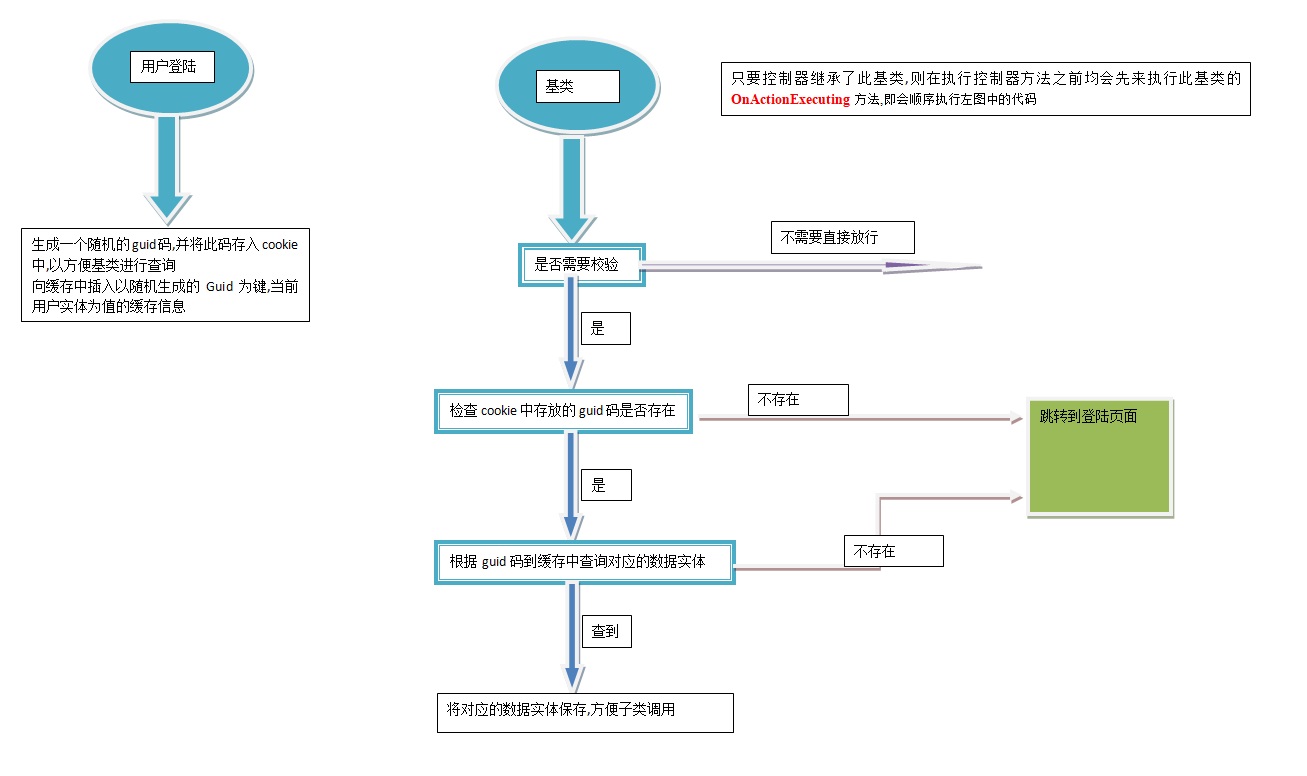
在重写OnActionExecuting的方法中,首先校验IsCheckLogin是否为true,如是,则说明需要登陆校验
此时从cookie中找到登陆时随机生成的guid码,如果没有找到,则直接返回到登陆界面
如果找到,则依据此guid码从缓存中寻找对应的用户实体,如果没有找到一样返回登陆界面,
如果找到则将用户实体放入LoginUser中,以便子类需要.
最后设置缓存的过期时间
其中还用到缓存,缓存类的代码如下
 public interface ICacheWrite

    {

        bool AddCache(string key, object value);

        bool AddCache(string key, object value, DateTime exprity);

        object GetCache(string key);

        T getCache<T>(string key);

        void SetCache(string key, object value, DateTime exprity);

        void SetCache(string key, object value);

    }
缓存的接口类
public class HttpRuntimeCacheWriter : ICacheWrite

    {

        public bool AddCache(string key, object value)

        {

            HttpRuntime.Cache.Insert(key, value);

            return true;

        }

        public bool AddCache(string key, object value, DateTime exprity)

        {

            HttpRuntime.Cache.Insert(key, value, null, exprity, TimeSpan.Zero);

            return true;

        }

        public object GetCache(string key)

        {

            return HttpRuntime.Cache.Get(key);

        }

        public T getCache<T>(string key)

        {

            return (T)HttpRuntime.Cache[key];

        }

        public void SetCache(string key, object value)

        {

            HttpRuntime.Cache.Remove(key);

            AddCache(key, value);

        }

        public void SetCache(string key, object value, DateTime exprity)

        {

            throw new NotImplementedException();

        }

    }
运用HttpRuntime缓存
public class CacheHelper

    {

        //这里应该用注入,因为可能更改为其它实现了ICacheWrite的对象

        public static ICacheWrite write { get; set; } = new HttpRuntimeCacheWriter(); //new MemcacheWriter();

        public static bool AddCache(string key, object value)

        {

            return write.AddCache(key, value);

        }

        public static bool AddCache(string key, object value, DateTime exprity)

        {

            return write.AddCache(key, value, exprity);

        }

        public static object GetCache(string key)

        {

            return write.GetCache(key);

        }

        public static T getCache<T>(string key)

        {

            return write.getCache<T>(key);

        }

        public static void SetCache(string key, object value)

        {

            write.SetCache(key, value);

        }

        public static void SetCache(string key, object value, DateTime exprity)

        {

            write.SetCache(key, value, exprity);

        }

    }
缓存帮助类
然后前台调用示例
public class LoginController : BaseController

    {

        //得到用户服务层对象

        IUserInfoSerivce userSerivce = new UserInfoSerivce();

        public LoginController()

        {

            this.IsCheckLogin = false;

        }

        // GET: Login

        public ActionResult Login()

        {

            return View();

        }

        /// <summary>

        /// 进行简单登陆检验

        /// </summary>

        /// <param name="uid"></param>

        /// <param name="pwd"></param>

        /// <returns></returns>

        public ActionResult Check(string uid,string pwd)

        {

            if (!Checked(uid,pwd))

            {

                var user = userSerivce.GetEntities(u => u.Uid == uid && u.pwd == pwd).FirstOrDefault();

                if (user!=null)

                {

                    //立即分配一个标志,Guid,把标志作为key(并写入cookie中),把用户放到value中

                    string userLoginGuid = Guid.NewGuid().ToString();

                    Response.Cookies["userLoginGuid"].Value = userLoginGuid;

                    //将用户登陆信息存到缓存中

                    CacheHelper.AddCache(userLoginGuid, user, DateTime.Now.AddMinutes());

                    return Content("ok");

                }

            }

            return Content("ok");

        }

        /// <summary>

        /// 检查用户名密码是否正确

        /// </summary>

        /// <param name="uid"></param>

        /// <param name="pwd"></param>

        /// <returns></returns>

        private bool Checked(string uid,string pwd)

        {

            bool reslut = string.IsNullOrEmpty(uid) || string.IsNullOrEmpty(pwd);

            return reslut;

        }

    }
其它控制器只用继承基类即可
 public class DefaultController : BaseController

    {

        IBLL.IFriendInfoSerivce friendSerivce = new BLL.FriendInfoSerivce();

        // GET: Default

        public ActionResult Index()

        {

            ViewData.Model = friendSerivce.GetEntities(f => !f.DelFlag);

            return View();

        }

    }
粗略画个图表示下

MVC登陆认证简单设置的更多相关文章
- 【配置】检测到在集成的托管管道模式下不适用的ASP.NET设置的解决方法(非简单设置为【经典】模式)。
× 检测到在集成的托管管道模式下不适用的ASP.NET设置的解决方法(非简单设置为[经典]模式). 我们将ASP.NET程序从IIS6移植到IIS7,可能运行提示以下错误: HTTP 错误 5 ...
- Spring Boot确保Web应用安全(登陆认证)
Spring Boot官方提供了一个登陆认证的清晰易懂的 例子 , 我们在次以此例展开演示Spring Boot是如何实现登陆认证的. 首先我们去 https://start.spring.io/ 下 ...
- 批量实现SSH无密码登陆认证脚本
批量实现SSH无密码登陆认证脚本 问题背景 使用为了让linux之间使用ssh不需要密码,可以采用了数字签名RSA或者DSA来完成.主要使用ssh-key-gen实现. 1.通过 ssh-key-ge ...
- 批量SSH key-gen无密码登陆认证脚本 附件脚本
# 批量实现SSH无密码登陆认证脚本 ## 问题背景 使用为了让linux之间使用ssh不需要密码,可以采用了数字签名RSA或者DSA来完成.主要使用ssh-key-gen实现. 1.通过 ssh-k ...
- ASP.NET MVC 3 入门级常用设置、技巧和报错
1.ASP.NET MVC 3 如何去除默认验证 这个默认验证是在web.config配置文件中设置的 <add key="ClientValidationEnabled&quo ...
- spring-security 登陆认证之初次探究
首先,希望还对 spring-security框架完全不懂的新手 下载下Git源码. 引入到项目中.这个短文就是边看源码边聊的.也会启动下项目验证自己的推想. 一.登陆认证的登陆配置项 <for ...
- 使用TT模板+mvc+wcf实现简单查询
今天是除夕,小编的这篇博客是掐着点儿发的,在此,祝各位小伙伴新年快乐,身体健康,万事如意:喜从天降,欣喜若狂:喜气盈门,好事成双:好人好运,金玉满堂:神采飞扬,如愿以偿,财源滚滚来,福如东海长:伴随着 ...
- Spring集成shiro做登陆认证
一.背景 其实很早的时候,就在项目中有使用到shiro做登陆认证,直到今天才又想起来这茬,自己抽空搭了一个spring+springmvc+mybatis和shiro进行集成的种子项目,当然里面还有很 ...
- {Django基础九之中间件} 一 前戏 二 中间件介绍 三 自定义中间件 四 中间件的执行流程 五 中间件版登陆认证
Django基础九之中间件 本节目录 一 前戏 二 中间件介绍 三 自定义中间件 四 中间件的执行流程 五 中间件版登陆认证 六 xxx 七 xxx 八 xxx 一 前戏 我们在前面的课程中已经学会了 ...
随机推荐
- [Xamarin]我的Xamarin填坑之旅(二)
上一篇交代了我Xamarin填坑的背景,大概聊了聊第一步环境配置,第二步创建项目和开发框架选择.如果有一个可用的梯子,这部分基本不会出错. 接下来就具体聊一聊写代码的过程中遇到的一些事儿. 第三步是码 ...
- 【新题】OCP 062题库出现很多新题-6
6.Which four statements are true about database instance behavior? A) Redo log files can be renamed ...
- spring json的支持
在spring中可以通过配置来实现对json的支持: 以下连接是看到的一篇对这方面内容讲解比较好的文章 http://www.cnblogs.com/fangjian0423/p/springMVC- ...
- puppet更新失败
# puppet-updatepuppet: no process foundWarning: Unable to fetch my node definition, but the agent ru ...
- Andrew Ng机器学习第五章——多变量线性回归
一.多变量线性回归的技巧之一——特征缩放 1.为什么要使用特征缩放? 特征缩放用来确保特征值在相似的范围之内. 设想这样一种情况(房价预测),两个特征值分别是房子的大小和卧室的数量.每个特征值所处的范 ...
- 【LOJ 2542】【PKUWC2018】 随机游走(最值反演 + 树上期望dp)
哇我太菜啦555555 不妨钦定我们需要访问的点集为$S$,在$S$已知的情况下,我们令$f(x) $表示从$x$走到点集$S$中任意一点的期望步数. 若$x∈S$,则显然$f(x)=0$,否则$f[ ...
- 【hdu6058】 Kanade's sum 模拟
题目传送门:http://acm.hdu.edu.cn/showproblem.php?pid=6058 题目大意:给你一个$1$到$n$的排列,请求出该序列所有区间中第$k$大之和,若该区间内少于$ ...
- 散列表碰撞处理、开链法、HashTable散列
散列表碰撞处理.开链法.HashTable散列 /** * 散列表碰撞处理.开链法.HashTable散列. * 将数组里的元素位置,也设置为数组,当两个数据的散列在同一个位置时, * 就可以放在这个 ...
- LINUX 下 NMAP 内网扫描
#1.扫描内网存活主机 nmap -sP 10.2.24.* |grep for > tmp #2.扫描主机端口 nmap -A -T4 192.168.1.2 #3.扫描主机的所有端口 nma ...
- 【jQuery源码】DOM Ready
一直以来,各种JS最佳实践都会告诉我们,将JS放在HTML的最后,即</body>之前,理由就是:JS会阻塞下载,而且,在JS中很有可能有对DOM的操作,放在HTML的最后,可以尽可能的保 ...