
Spring boot --- Spring Oauth(三)
本节将学习 spring security oauth 实现单点登录
概述
首先我们来了解什么是单点登录。看下面两张图就明白了。
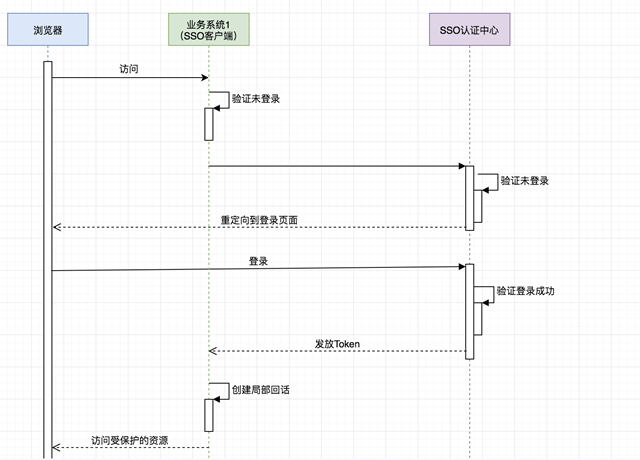
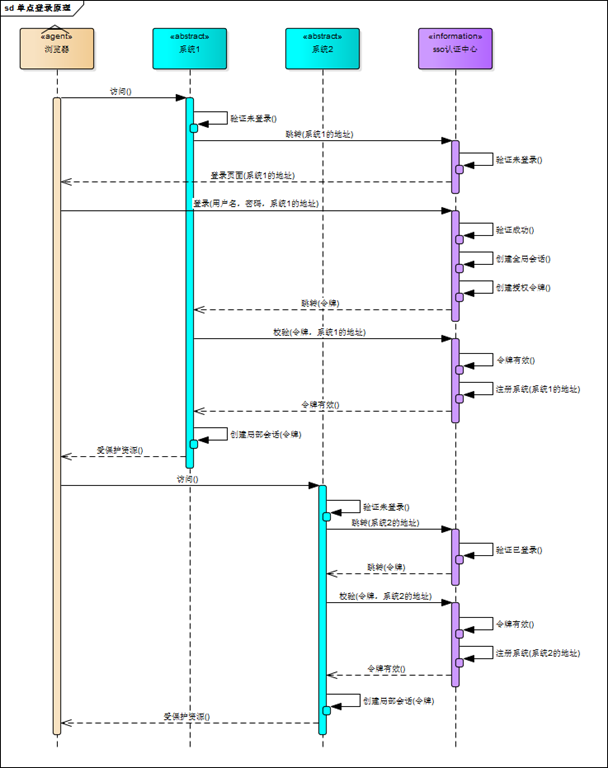
很明显,单点登录最重要解决的就是登录和注销的功能,今天的例子,可以用来这样的界面来验证我们实现的单点登录是否成功。
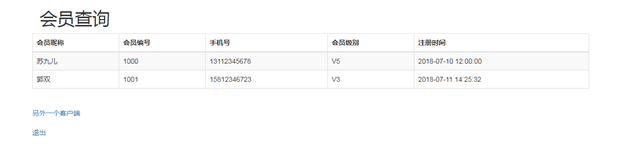
一个是是否登录后可以跳到子服务器,另一个是退出登录,是否需要重新登录才可以再次访问页面。
代码实现
以下并不是完整的demo 代码,而是编写过程中需要注意注意的地方
单点登录的客户端需要添加@EnableOauthSso的注解 :
@EnableOAuth2Sso

@Configuration

@EnableGlobalMethodSecurity(prePostEnabled = true)

public class UiSecurityConfig extends WebSecurityConfigurerAdapter {

    @Override

    public void configure(HttpSecurity http) throws Exception {

        http.antMatcher("/**")

                .authorizeRequests()

                .antMatchers("/", "/login**","/logout","/static**").permitAll()

                .anyRequest()

                .authenticated().and()

                .logout().logoutUrl("/logout").logoutSuccessUrl("http://localhost:8080/logout")

                .and().csrf().disable().cors();

    }

}
从上面的配置,我们也看到了指定了登录和注销的 url ,我们看到注销的地址是跨域的,所以要注销地址的服务器需要设置 CORS
认证服务器端
@Configuration

@EnableWebSecurity

public class SecurityConfig extends WebSecurityConfigurerAdapter {

    ....

    @Bean

    CorsConfigurationSource corsConfigurationSource() {

        CorsConfiguration configuration = new CorsConfiguration();

        configuration.setAllowedOrigins(Arrays.asList("http://localhost:8081"));

        configuration.setAllowedMethods(Arrays.asList("GET","POST"));

        configuration.setAllowedHeaders(Arrays.asList("x-requested-with"));

        UrlBasedCorsConfigurationSource source = new UrlBasedCorsConfigurationSource();

        source.registerCorsConfiguration("/**", configuration);

        return source;

    }

    @Override

    protected void configure(HttpSecurity http) throws Exception {

        http.authorizeRequests()

                .antMatchers("/oauth/**","/login/**", "/client/exit","/actuator**").permitAll()

                .anyRequest().authenticated()   // 其他地址的访问均需验证权限

                .and()

                .logout().deleteCookies("remove").invalidateHttpSession(false)

                .and()

                .formLogin()

                .loginPage("/login").and().csrf().disable().cors();

    }

}
完整代码详见 :代码
总结
逻辑实现过程中注意看项目输出的log日志,方便理解整个流程,再一个需要看文档
参考资料
- https://www.cnblogs.com/cjsblog/p/10548022.html
- https://www.cnblogs.com/Benjious/p/10588466.html
- https://docs.spring.io/spring-security/site/docs/5.2.0.BUILD-SNAPSHOT/reference/htmlsingle/#cors
Spring boot --- Spring Oauth(三)的更多相关文章
- spring boot 笔记--第三章
spring boot 笔记 第三章,使用Spring boot 构建系统: 强烈建议支持依赖管理的构建系统,Maven或Gradle 依赖管理: Spring Boot的每版本都会提供它支持的依赖列 ...
- Spring Boot 项目学习 (三) Spring Boot + Redis 搭建
0 引言 本文主要介绍 Spring Boot 中 Redis 的配置和基本使用. 1 配置 Redis 1. 修改pom.xml,添加Redis依赖 <!-- Spring Boot Redi ...
- Spring Boot 2.X(三):使用 Spring MVC + MyBatis + Thymeleaf 开发 web 应用
前言 Spring MVC 是构建在 Servlet API 上的原生框架,并从一开始就包含在 Spring 框架中.本文主要通过简述 Spring MVC 的架构及分析,并用 Spring Boot ...
- 使用Spring Boot和OAuth构建安全的SPA
最近一段时间都在闭关学习,过程还是有点艰辛的,幸运的是还有优锐课老师带着,少走了很多弯路.很久也没有更新文章了,这篇想和大家分享的是,了解如何在使用Spring Boot入门程序的同时使用Spring ...
- spring Boot+spring Cloud实现微服务详细教程第二篇
上一篇文章已经说明了一下,关于spring boot创建maven项目的简单步骤,相信很多熟悉Maven+Eclipse作为开发常用工具的朋友们都一目了然,这篇文章主要讲解一下,构建spring bo ...
- spring Boot+spring Cloud实现微服务详细教程第一篇
前些天项目组的大佬跟我聊,说项目组想从之前的架构上剥离出来公用的模块做微服务的开发,恰好去年的5/6月份在上家公司学习了国内开源的dubbo+zookeeper实现的微服务的架构.自己平时对微服务的设 ...
- [权限管理系统(四)]-spring boot +spring security短信认证+redis整合
[权限管理系统]spring boot +spring security短信认证+redis整合 现在主流的登录方式主要有 3 种:账号密码登录.短信验证码登录和第三方授权登录,前面一节Sprin ...
- 基于Spring Boot+Spring Security+JWT+Vue前后端分离的开源项目
一.前言 最近整合Spring Boot+Spring Security+JWT+Vue 完成了一套前后端分离的基础项目,这里把它开源出来分享给有需要的小伙伴们 功能很简单,单点登录,前后端动态权限配 ...
- 新书上线:《Spring Boot+Spring Cloud+Vue+Element项目实战:手把手教你开发权限管理系统》,欢迎大家买回去垫椅子垫桌脚
新书上线 大家好,笔者的新书<Spring Boot+Spring Cloud+Vue+Element项目实战:手把手教你开发权限管理系统>已上线,此书内容充实.材质优良,乃家中必备垫桌脚 ...
- Java面试题(Spring Boot/Spring Cloud篇)
Spring Boot/Spring Cloud 104.什么是 spring boot? SpringBoot是一个框架,一种全新的编程规范,他的产生简化了框架的使用,所谓简化是指简化了Spring ...
随机推荐
- wpf expender 展开动画
非原创,网上下载的,觉得还可以,记录一下以便以后查看学习 <ResourceDictionary xmlns="http://schemas.microsoft.com/winfx/2 ...
- 一文看尽 Raft 一致性协议的关键点
本文由 网易云 发布. 作者:孙建良 Raft 协议的发布,对分布式行业是一大福音,虽然在核心协议上基本都是师继 Paxos 祖师爷(Lamport) 的精髓,基于多数派的协议.但是 Raft 一致 ...
- 敏捷项目-依赖项拖动change
1. 2.类方法插入数据.
- python操作mongodb实例
安装pymongo扩展 import pymongo; client = pymongo.MongoClient(host='10.48.176.170',port=27017); db = clie ...
- 变不可能为可能 - .NET Windows Form 改变窗体类名(Class Name)有多难?续篇
发布<.NET Windows Form 改变窗体类名(Class Name)有多难?>转眼大半年过去了,要不是在前几天有园友对这篇文章进行评论,基本上已经很少关注它了,毕竟那只是一个解惑 ...
- Swift 里字符串(二)创建
 最终都要走到__StringStorage 的 create(realCodeUnitCapacity,countAndFlags) 方法里去. 默认实现是 UTF8 internal stati ...
- (转)python字符串函数
原文:https://www.cnblogs.com/emanlee/p/3616755.html https://blog.csdn.net/luoyhang003/article/details/ ...
- (转)mysql explain详解
原文:http://www.cnblogs.com/xuanzhi201111/p/4175635.html http://yutonger.com/18.html http://www.jiansh ...
- Aop学习笔记系列一
一.Aop解决了什么问题? 1.在说解决了什么问题之前,先介绍一些关键的知识点 a.功能需求:功能需求指项目中的增值需求,比如业务逻辑,UI,持久化(数据库). b.非功能需求:项目中次要的,但却不可 ...
- Spring Security构建Rest服务-0800-Spring Security图片验证码
验证码逻辑 以前在项目中也做过验证码,生成验证码的代码网上有很多,也有一些第三方的jar包也可以生成漂亮的验证码.验证码逻辑很简单,就是在登录页放一个image标签,src指向一个controller ...