
招新系统(jsp+servlet,实现简略前端网页注册登录+后台增删改查,分学生和管理员,Java语言,mysql数据库连接,tomcat服务器)
生活不只是眼前的苟且,还有诗和远方。
架构说明:
要求是采用MVC模式,所以分了下面的几个包,但是由于是第一次写,可能分的也不是很清楚:
这个是后台部分的架构:
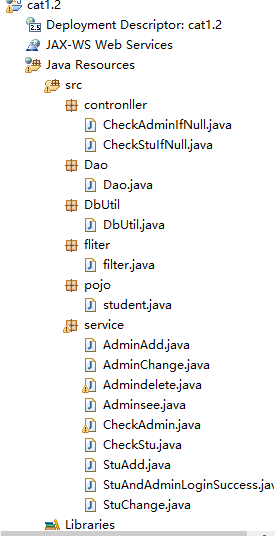
这个是前端的的展示:

(那个StuLoginSuccess.html与StuLoginSuccess.jsp是重复的了,我在写后台时调用的是jsp那个,那个html是没用的。)
说明:
由于系统的架构必须先写后台,再从后台需要展示的时候写点前端,这里就按照我当时的步骤写就好了,不分啥前端篇后台篇的了哈哈哈。。。
步骤:
1)
首先写的当然就是学生类啦!
src下右键,新建一个pakage,名为pojo,旗下新建一个class文件,取名为student,敲:
package pojo;

public class student {
    private String id;
    private String name;
    private String sex;
    private String grade;
    private String phone;//防止电话号码过长
    private String decision;
    private String selfintroduction;
    private String password;

    public student(){

    }
    public student(String name,String sex,String id,String grade,String phone,String decision,String selfintroduction,String password){
        super();
        this.name=name;
        this.sex=sex;
        this.id=id;
        this.grade=grade;
        this.phone=phone;//防止电话号码过长
        this.decision=decision;
        this.selfintroduction=selfintroduction;
        this.password=password;

    }

    /*
     * 得到器
     */
    public String getId(){
        return id;
    }
    public String getName(){
        return name;
    }
    public String getSex(){
        return sex;
    }
    public String getGrade(){
        return grade;
    }
    public String getPhone(){
        return phone;
    }
    public String getDecision(){
        return decision;
    }
    public String getSelfintroduction(){
        return selfintroduction;
    }
    public String getPassword() {
        // TODO Auto-generated method stub
        return password;
    }

    /*
     * 更改器
     */
    public void setId(String id){
        this.id=id;
    }
    public void setName(String name){
        this.name=name;
    }
    public void  setSex(String sex){
        this.sex=sex;
    }
    public void  setGrade(String grade){
        this.grade=grade;
    }
    public void setPhone(String phone){
         this.phone=phone;
    }
    public void setDecision(String decision){
        this.decision=decision;
    }
    public void setSelfintroduction(String i){
        this.selfintroduction=i;
    }
    public void setPassword(String password){
        this.password=password;
    }

    @Override
    public String toString(){
        return "学生名字:"+name+"    性别:"+sex+"    学号(id):"+id+"    年级班级:"+grade+"电话:"+phone+"        方向(前端/后台):"+decision+"自我介绍:"+selfintroduction;
    }

}
(toString方法可以不要,就是打印到后台而已,在开发初期还没写html、jsp的时候有点用)
2)
然后连接数据库:
写这段代码前,你需要先下个mysql数据库(或者别的数据库),请自行网上查找学习。
src下右键,新建一个pakage,名为DbUtil,旗下新建一个class文件,取名为DbUtil,敲:
package DbUtil;

import java.sql.Connection;
import java.sql.DriverManager;
import java.sql.PreparedStatement;
import java.sql.Statement;

public class DbUtil {
    private static String dburl="jdbc:mysql://localhost:3306/my?useUnicode=true&characterEncoding=UTF-8";
    //用户名
    public static String userName="root";
    //密码
    public static String password="root";
    //数据驱动
    public static String jdbcName="com.mysql.jdbc.Driver";

    Connection con=null;
    /**
     * 获取数据库的连接
     * @return
     * @throws Exception
     */
    public Connection getcon() throws Exception {
        Class.forName(jdbcName);    //加载数据驱动
        con=DriverManager.getConnection(dburl, userName, password);//连接数据库
        System.out.println("数据库连接成功!");
        return con;
    }
    /**
     * 关闭连接
     * @param con
     * @throws Exception
     */
    public void close(Statement stmt,Connection con) throws Exception{
        if(stmt!=null){
            stmt.close();
            if (con!=null)
                con.close();
        }
    }
    public void close(PreparedStatement pstmt,Connection con) throws Exception{
        if(pstmt!=null){
            pstmt.close();
            if (con!=null)
                con.close();
        }
    }
}
3)
写dao层:
src下右键,新建一个pakage,名为Dao,旗下新建一个class文件,取名为Dao,敲:
package Dao;

import java.sql.Connection;
import java.sql.PreparedStatement;
import java.sql.ResultSet;
import java.util.ArrayList;

import DbUtil.DbUtil;
import pojo.student;
public class Dao {
    /**
     * 管理员 调用此方法  ,管理员增加用户信息将是null的密码
     * @param stu
     * @return
     * @throws Exception
     */
    public static int  AddStudent(student stu) throws Exception {
        DbUtil dbutil=new DbUtil();
        Connection con=dbutil.getcon();
        //注意要加个'',否则会无法插入除数字以外的字符,除非修改数据库字符编码为gbk或者utf-8
        String sql="insert into everyone (id,name,grade,sex,decision,phone,selfintroduction) values (?,?,?,?,?,?,?)";
        PreparedStatement pstmt=con.prepareStatement(sql);
        pstmt.setString(1, stu.getId());
        pstmt.setString(2, stu.getName());
        pstmt.setString(3, stu.getGrade());
        pstmt.setString(4, stu.getSex());
        pstmt.setString(5, stu.getDecision());
        pstmt.setString(6, stu.getPhone());
        pstmt.setString(7, stu.getSelfintroduction());
//        pstmt.setString(8, stu.getPassword());
        int result=pstmt.executeUpdate();
        dbutil.close(pstmt, con);
        return result;
    }

    /**
     * 学生调用此方法,在注册的基础之上,增加原有的信息
     * @param stu
     * @return
     * @throws Exception
     */
    public static int  AddStudentStu2(student stu) throws Exception {
        DbUtil dbutil=new DbUtil();
        Connection con=dbutil.getcon();
        //注意要加个'',否则会无法插入除数字以外的字符,除非修改数据库字符编码为gbk或者utf-8
        String sql="insert into everyone (id,name,grade,sex,decision,phone,selfintroduction) values (?,?,?,?,?,?,?)";
        PreparedStatement pstmt=con.prepareStatement(sql);
        pstmt.setString(1, stu.getId());
        pstmt.setString(2, stu.getName());
        pstmt.setString(3, stu.getGrade());
        pstmt.setString(4, stu.getSex());
        pstmt.setString(5, stu.getDecision());
        pstmt.setString(6, stu.getPhone());
        pstmt.setString(7, stu.getSelfintroduction());
//        pstmt.setString(8, stu.getPassword());
        int result=pstmt.executeUpdate();
        dbutil.close(pstmt, con);
        return result;
    }
    /**
     * 用户 调用此方法  注册用户信息
     * @param stu
     * @return
     * @throws Exception
     */
    public static int  AddStudentStu(student stu) throws Exception {
        DbUtil dbutil=new DbUtil();
        Connection con=dbutil.getcon();
        //注意要加个'',否则会无法插入除数字以外的字符
        String sql="insert into everyone (phone,password,id) values (?,?,?)";
        PreparedStatement pstmt=con.prepareStatement(sql);
        pstmt.setString(1, stu.getPhone());
        pstmt.setString(2, stu.getPassword());
        pstmt.setString(3, stu.getId());
        int result=pstmt.executeUpdate();
        dbutil.close(pstmt, con);
        return result;
    }

    /**
     * 管理员删除用户信息,
     * 直接删除指定名字和学号的学生信息,
     * 如果有多条同名的学生信息,将删除全部同名的信息,
     * 因此改成名字和学号同时核验才执行删除
     * @author grass-in-life
     */
     public static int  DeleteStudent(String id) throws Exception{
            DbUtil dbutil=new DbUtil();
            Connection con=dbutil.getcon();
            String sql="delete from everyone where id=?";
            PreparedStatement pstmt=con.prepareStatement(sql);
            pstmt.setString(1, id);
            int result=pstmt.executeUpdate();
            dbutil.close(pstmt, con);
            return result;
        }

    /**
     * 调用修改类之前,先new 一个新student类,把要修改的学生那条数据的各方面信息都修改好,
     * 否则会置null给对应的列,
     * 因为在模板类student里我的构造方法里将给默认值null,false,0.
     * 解决:
     * cat1.2版本更新,不再提供学号和电话修改接口,故不需要每一项都修改,对应的数据库信息不得修改
     *
     * 问题:修改不了name为中文的数据,故改为依据id修改哈哈哈
     * 问题:改为id修改也不行,数据库乱码,
     * 问题解决了,关键在于values那里没用一一对应,可以借助输出1,2,3,4...来判断哪个对应哪个
     * 注意:出现错误还得看看是不是模板类student出错
     * @author grass-in-life
     *
     */
    public static int  UpdateStudent(student stu) throws Exception{
        DbUtil dbutil=new DbUtil();
        Connection con=dbutil.getcon();
        String sql="update everyone set sex=?,grade=?,decision=?,selfintroduction=?,name=? where phone=? ";
        PreparedStatement pstmt=con.prepareStatement(sql);
        pstmt.setString(1, stu.getSex());
        pstmt.setString(2, stu.getGrade());
        pstmt.setString(3, stu.getDecision());
        pstmt.setString(4, stu.getSelfintroduction());
        pstmt.setString(5, stu.getName());
        pstmt.setString(6, stu.getPhone());
        int result=pstmt.executeUpdate();
        dbutil.close(pstmt, con);
        return result;
    }
    /**
     * 遍历输出,返回一个arrays list数组
     * @return
     * @throws Exception
     */
    public static ArrayList<student> ListStudentAll() throws Exception {
        //一维数组,每个元素是student类型
        ArrayList<student> list = new ArrayList<student>();
        DbUtil dbutil=new DbUtil();
        Connection con=dbutil.getcon();//连接数据库
        String sql="select * from everyone";//写sql语句
        PreparedStatement pstmt=con.prepareStatement(sql);//preparestatement发送sql语句
        ResultSet rs=pstmt.executeQuery();//返回结果集ResultSet
        while(rs.next()) {//re.next()才是第一行,rs不是,会是一个奇怪的地方
            String name=rs.getString("name");
            String sex=rs.getString("sex");
            String id=rs.getString("id");
            String grade=rs.getString("grade");
            String phone=rs.getString("phone");
            String decision=rs.getString("decision");
            String selfintroduction=rs.getString("selfintroduction");
            String password=rs.getString("password");
            student stu=new student();//student的调用一定要放在循环里面才能保证不被覆盖,因为Java里的变量是引用不是传值!!
            stu.setName(name);
            stu.setSex(sex);
            stu.setId(id);
            stu.setGrade(grade);
            stu.setPhone(phone);
            stu.setSelfintroduction(selfintroduction);
            stu.setDecision(decision);
            stu.setPassword(password);
            list.add(stu);
        }

        return list;
    }

    /**
     * 根据名字输出数据,可以根据中文名字输出对应类的全部数据
     * @throws Exception
     */
    public static student ListStudent1(String name ) throws Exception {
        DbUtil dbutil=new DbUtil();
        Connection con=dbutil.getcon();//连接数据库
        String sql="select * from everyone ";//写sql语句
        PreparedStatement pstmt=con.prepareStatement(sql);//preparestatement发送sql语句
        ResultSet rs=pstmt.executeQuery();//返回结果集ResultSet
        student stu=new student();
        boolean flag=false;
        while(rs.next()) {//re.next()才是第一行,rs不是,会是一个奇怪的地方
            String sex=rs.getString("sex");
            String id=rs.getString("id");
            String grade=rs.getString("grade");
            String phone=rs.getString("phone");
            String decision=rs.getString("decision");
            String selfintroduction=rs.getString("selfintroduction");
            String password=rs.getString("password");
            if(rs.getString("name").equals(name)){
            flag=true;
            stu.setName(name);
            stu.setSex(sex);
            stu.setId(id);
            stu.setGrade(grade);
            stu.setPhone(phone);
            stu.setSelfintroduction(selfintroduction);
            stu.setDecision(decision);
            stu.setPassword(password);
            }
        }
        if(flag)
            return stu;
        else {
            stu=null;
            return stu;
        }
    }

    /**
     * 根据id输出数据
     * @throws Exception
     */
    public static student ListStudent2(String id ) throws Exception {
        DbUtil dbutil=new DbUtil();
        Connection con=dbutil.getcon();//连接数据库
        String sql="select * from everyone ";//写sql语句
        PreparedStatement pstmt=con.prepareStatement(sql);//preparestatement发送sql语句
        ResultSet rs=pstmt.executeQuery();//返回结果集ResultSet
        student stu=new student();
        while(rs.next()) {//re.next()才是第一行,rs不是,会是一个奇怪的地方
            String sex=rs.getString("sex");
            String name=rs.getString("name");
            String grade=rs.getString("grade");
            String phone=rs.getString("phone");
            String decision=rs.getString("decision");
            String selfintroduction=rs.getString("selfintroduction");
            String password=rs.getString("password");
            if(rs.getString("id").equals(id)){
            System.out.println("!!__"+name);
            stu.setName(name);
            stu.setSex(sex);
            stu.setId(id);
            stu.setGrade(grade);
            stu.setPhone(phone);
            stu.setSelfintroduction(selfintroduction);
            stu.setDecision(decision);
            stu.setPassword(password);
            System.out.println(stu);
            return stu;

            }
        }
            stu=null;
            return stu;
    }

/**
 * 被业务逻辑层services调用,校验学生身份(学号+电话)
 * @param password
 * @return
 * @throws Exception
 */
public static boolean FindStu(String phone,String password,String id) throws Exception{
    DbUtil dbutil=new DbUtil();
    Connection con=dbutil.getcon();//连接数据库
    String sql="select * from everyone";//写sql语句,select的不是显示在屏幕中,而是在结果集里
    PreparedStatement pstmt=con.prepareStatement(sql);//preparestatement发送sql语句
    ResultSet rs=pstmt.executeQuery();//返回结果集ResultSet
    while(rs.next()) {//re.next()才是第一行,rs不是,会是一个奇怪的地方
        String PhoneCheck=rs.getString("phone");
        String passwordCheck=rs.getString("password");//
        String IdCheck=rs.getString("id");

        System.out.println(PhoneCheck);
        System.out.println(passwordCheck);
        System.out.println(IdCheck);
        //注意,数据库里的这三条数据任何一条都不允许为null,否则该id和phone下都会登录失败
        if(id.equals(IdCheck)&&PhoneCheck.equals(phone)&&passwordCheck.equals(password)){
            dbutil.close(pstmt, con);
            return true;
        }
    }
    return false;
    }

/**
 * 被业务逻辑层services调用,校验管理员身份(电话+密码)
 * @param name
 * @param password
 * @return
 * @throws Exception
 */
public static boolean FindAdmin(String name,String password) throws Exception{
    DbUtil dbutil=new DbUtil();
    Connection con=dbutil.getcon();//连接数据库
    String sql="select * from admin";//写sql语句,select的不是显示在屏幕中,而是在结果集里
    PreparedStatement pstmt=con.prepareStatement(sql);//preparestatement发送sql语句
    ResultSet rs=pstmt.executeQuery();//返回结果集ResultSet
    while(rs.next()) {//re.next()才是第一行,rs不是,会是一个奇怪的地方
        String nameCheck=rs.getString("name");
        String passwordCheck=rs.getString("password");
        if(password.equals(passwordCheck)&&nameCheck.equals(name)){
            dbutil.close(pstmt, con);
            return true;
        }
    }
    return false;
    }
}
这里面是最核心的操作,增删改查,每个函数我都写了用处。
4)
现在开始写前端啦!
前端我本来是用html的,但是发现展示页面需要用到list循环实现,得用java代码实现,而html好像不能插Java代码,所以就改用jsp了。
WebContent下右键,新建html/jsp,我一开始是html,取名为LoginHomeStuAndAdmin(要求用驼峰命名法,就这样写了),敲:
<!DOCTYPE html PUBLIC "-//W3C//DTD HTML 4.01 Transitional//EN" "http://www.w3.org/TR/html4/loose.dtd">
<html>
<head>
<meta http-equiv="Content-Type" content="text/html; charset=UTF-8">
<title>CAT学生招新与管理员管理——管理系统</title>
<script type="text/javascript">
function check(){
    var phone=document.getElementById("phone").value;
    var id=document.getElementById("id").value;
    var password=document.getElementById("password").value;

    var phoneText=document.getElementById('phoneText');
    if(phone==''){
        phoneText.innerHTML="<img src='wrong.png' width='16' height='15'/><span style='color:#cc0000'>联系电话不能为空</span>";
        return false;
    }
    //\d表示0-9中任一位,{9}表示有9个数字
    else if(phone.match(/^1\d{10}$/)!=phone){
        phoneText.innerHTML="<img src='wrong.png' width='16' height='15'/><span style='color:#cc0000'>联系电话必须是11位数字,且第一位必须是1</span>";
        return false;
    }
    else{
        phoneText.innerHTML="<img src='right.png' width='16' height='8'/><span style='color:#00cc00'>格式正确</span>";

    }

    var idText=document.getElementById('idText');
    if(id==''){
        idText.innerHTML="<img src='wrong.png' width='16' height='15'/><span style='color:#cc0000'>学号不能为空</span>";
        return false;
    }
    else if(id.match(/^[1-9]\d{5,19}$/)!=id){
        idText.innerHTML="<img src='wrong.png' width='16' height='15'/><span style='color:#cc0000'>学号必须是6-20位的数字</span>";
        return false;
    }
    else{
        idText.innerHTML="<img src='right.png' width='16' height='8'/><span style='color:#00cc00'>格式正确</span>";

    }

    var passwordText=document.getElementById('passwordText');
    if(password==''){
        passwordText.innerHTML="<img src='wrong.png' width='16' height='15'/><span style='color:#cc0000'>密码不能为空</span>";
        return false;
    }
    else{
        passwordText.innerHTML="<img src='right.png' width='16' height='8'/><span style='color:#00cc00'>格式正确</span>";

    }

}
</script>
</head>
<body>
<form action='CheckStuIfNull' method='post' >
<pre>
<!-- 总界面 -->
学生版
电话:<input type='text' name='phone' id='phone' onblur='check()' /><span id='phoneText'></span><br>
学号:<input type='text' name='id' id='id' onblur='check()' /><span id='idText'></span><br>
密码:<input type='password' name='password' id='password' onblur='check()' /><span id='passwordText'></span><br>
<input type ='submit' name='login' value='登录'>
还没<a href="StuRegister.html">注册</a>?
<a href="CheckAdmin.html">管理员登录通道</a>
</pre>
</form>
</body>
</html>
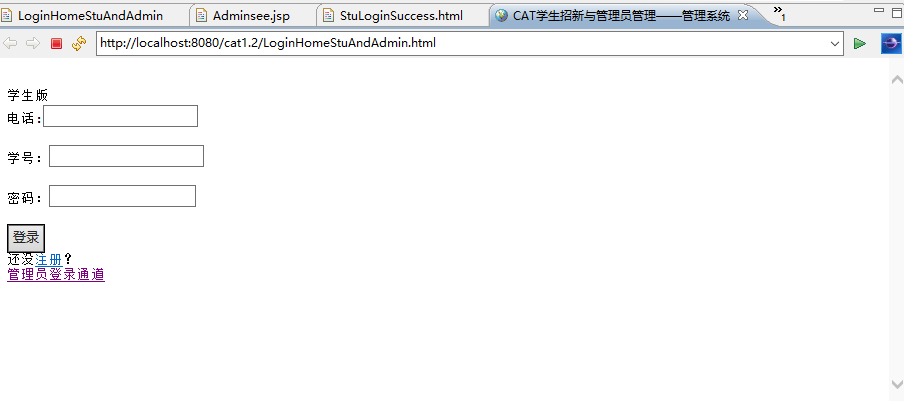
上面这个是主界面, tomcat 运行起来是下面这样的:
(其实html运行本不需要tomcat,但是马上要用到了,就先搞好来吧,怎么装自行网上学习)
5)
一系列的跳转:
先说管理员,因为他权限比较多,也是核心。点击管理员登录通道,就会跳转到CheckAdmin.html这个网页:(有正则表达式的知识,自行学习,也可以先不学,把下面script的东西先不当回事。)
<!DOCTYPE html PUBLIC "-//W3C//DTD HTML 4.01 Transitional//EN" "http://www.w3.org/TR/html4/loose.dtd">
<html>
<head>
<meta http-equiv="Content-Type" content="text/html; charset=UTF-8">
<title>管理员登录界面</title>
<script type="text/javascript">
function check(){
    var name=document.getElementById("name").value;
    var password=document.getElementById("password").value;

    var nameText=document.getElementById('nameText');
    if(name==''){
        nameText.innerHTML="<img src='wrong.png' width='16' height='15'/><span style='color:#cc0000'>账号不能为空</span>";
        return false;
    }
    else{
        nameText.innerHTML="<img src='right.png' width='16' height='8'/><span style='color:#00cc00'>格式正确</span>";

    }

    var passwordText=document.getElementById('passwordText');
    if(password==''){
        passwordText.innerHTML="<img src='wrong.png' width='16' height='15'/><span style='color:#cc0000'>密码不能为空</span>";
        return false;
    }
    else{
        passwordText.innerHTML="<img src='right.png' width='16' height='8'/><span style='color:#00cc00'>格式正确</span>";

    }

}

</script>
</head>
<body>
<form action='CheckAdminIfNull' method='post' >
<pre>
【你要是什么都不填,直接按登录,2秒后会自动转回来;
你若是填了,但是不符合要求,则会被正则提示。
有空不填也会被拦截。】
管理员版
账号:<input type='text' name='name' id='name' onblur='check()' /><span id='nameText'></span><br>
密码:<input type='text' name='password' id='password' onblur='check()' /><span id='passwordText'></span><br>
<input type ='submit' name='login' value='登录'>
</pre>
</form>
</body>
</html>
这里输入后台数据库已经设定好的管理员名称和密码,点击登录,几经跳转后跳转到管理员欢迎界面(增删改查操作界面):
(点击登录后,到登录成功显示欢迎界面,这中间有个CheckAdminIfNull.java的servlet,为了不打断思路,就先不讲。)
(不知道为什么,直接在tomcat里点击登录后台会报空指针异常,说是password为null,复制地址到浏览器里打开却不会,一脸懵逼=.=!)
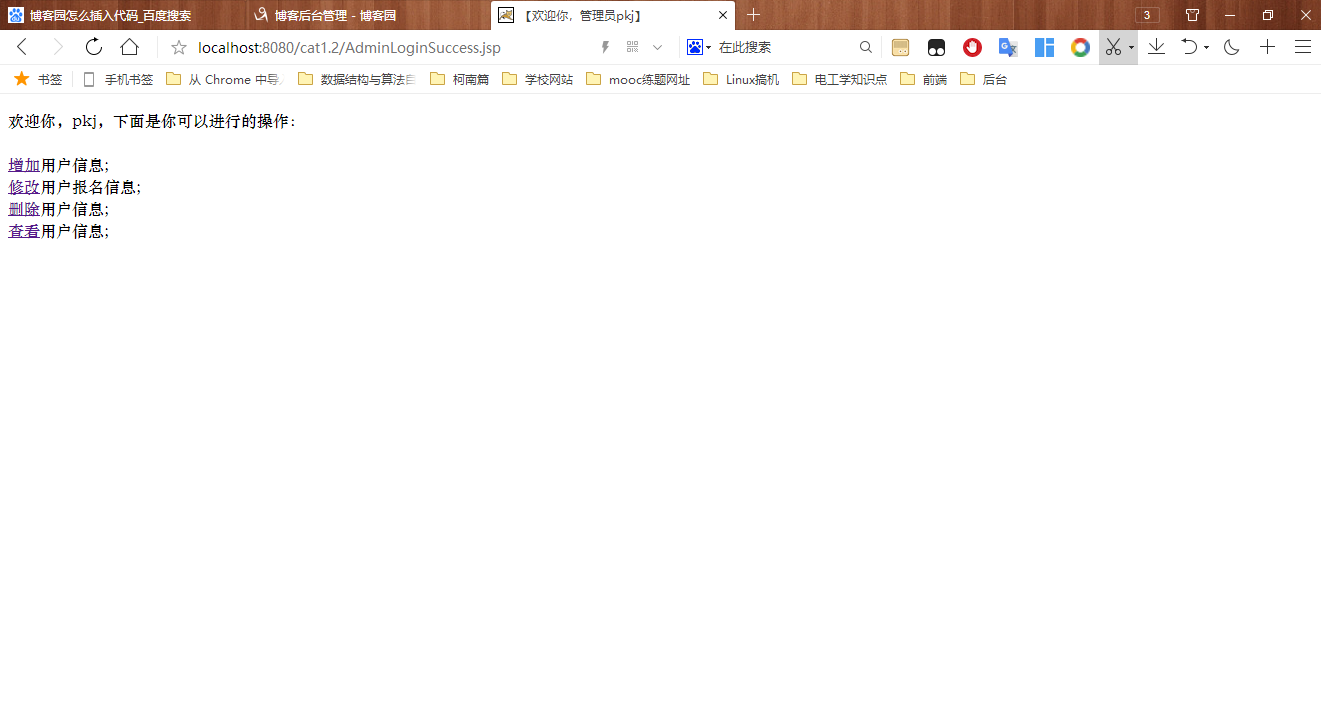
这个界面就是jsp啦!因为你也看到了,界面显示了管理员登录的名字, 我是暂时不知道身为静态网页的HTML怎样实现这一功能的咯~~~,于是就让jsp登场啦!
取名为AdminLoginSuccess,敲:
<%@ page language="java"
    pageEncoding="utf-8"%>
<!DOCTYPE html PUBLIC "-//W3C//DTD HTML 4.01 Transitional//EN" "http://www.w3.org/TR/html4/loose.dtd">
<html>
<head>
<meta http-equiv="Content-Type" content="text/html; charset=utf-8">
<%
    String name=(String)session.getAttribute("name1");
%>
<title>【欢迎你,管理员<%=name %>】</title>
</head>
<body>
<pre>
欢迎你,<%=name %>,下面是你可以进行的操作:
<!-- 注意:管理员同样不能修改学生和自己的登录信息,这是出于安全考虑(其实就是自己菜嘿嘿嘿),不予提供修改接口 -->
<a href="AdminAdd.html">增加</a>用户信息;
<a href="AdminChange.html">修改</a>用户报名信息;
<a href="Admindelete.html">删除</a>用户信息;
<a href="Adminsee.jsp">查看</a>用户信息;
</pre>
</body>
</html>
6)
你也看到了,上面有四个jsp/html,咋们来一个一个实现吧!
WebContent右键,新建以下四个jsp/HTML:
1】AdminAdd.html,敲:
<!DOCTYPE html PUBLIC "-//W3C//DTD HTML 4.01 Transitional//EN" "http://www.w3.org/TR/html4/loose.dtd">
<html>
<head>
<meta http-equiv="Content-Type" content="text/html; charset=UTF-8">
<title>管理员增加用户信息</title>
<script type="text/javascript">
function check(){
    var name=document.getElementById("name").value;
    var id=document.getElementById("id").value;
    //sex和ddecision是选择栏,不需要用正则
    var phone=document.getElementById("phone").value;

    var sid=document.getElementById("sid").value;

    var nameText=document.getElementById('nameText');
    if(name==''){
        nameText.innerHTML="<img src='wrong.png' width='16' height='15'/><span style='color:#cc0000'>名字不能为空</span>";
        return false;
    }
    else if(name.match(/^[\u4e00-\u9fa5]+$/)!=name){
        nameText.innerHTML="<img src='wrong.png' width='16' height='15'/><span style='color:#cc0000'>名字必须为汉字、空格或中文分隔符</span>";
        return false;
    }
    else {
        nameText.innerHTML="<img src='right.png' width='16' height='8'/><span style='color:#00cc00'>格式正确</span>";
        //return true;
    }

    var idText=document.getElementById('idText');
    if(id==''){
        idText.innerHTML="<img src='wrong.png' width='16' height='15'/><span style='color:#cc0000'>学号不能为空</span>";
        return false;
    }
    else if(id.match(/^[1-9]\d{5,19}$/)!=id){
        idText.innerHTML="<img src='wrong.png' width='16' height='15'/><span style='color:#cc0000'>学号必须是6-20位的数字</span>";
        return false;
    }
    else{
        idText.innerHTML="<img src='right.png' width='16' height='8'/><span style='color:#00cc00'>格式正确</span>";

    }

    var phoneText=document.getElementById('phoneText');
    if(phone==''){
        phoneText.innerHTML="<img src='wrong.png' width='16' height='15'/><span style='color:#cc0000'>联系电话不能为空</span>";
        return false;
    }
    //\d表示0-9中任一位,{9}表示有9个数字
    else if(phone.match(/^1\d{10}$/)!=phone){
        phoneText.innerHTML="<img src='wrong.png' width='16' height='15'/><span style='color:#cc0000'>联系电话必须是11位数字,且第一位必须是1</span>";
        return false;
    }
    else{
        phoneText.innerHTML="<img src='right.png' width='16' height='8'/><span style='color:#00cc00'>格式正确</span>";

    }

    var sidText=document.getElementById('sidText');
    if(sid==''){
        sidText.innerHTML="<img src='wrong.png' width='16' height='15'/><span style='color:#cc0000'>自我介绍不能为空</span>";
        return false;
    }
    else{
        sidText.innerHTML="<img src='right.png' width='16' height='8'/><span style='color:#00cc00'>格式正确</span>";

    }
}
</script>
</head>
<body>
<form action='AdminAdd' method='post' >
<!-- 上面的CheckAddAdd虽然不能直接点击跳转,但是在运行时可以跳转到Add.java,所以不用管。
另外,改了跳转页面,记得关闭eclipse在启动方可生效!
下面是普通的文本输入,写什么就输出什么    nameText是指span的id ,下同-->
<pre><!-- 电话和学号虽然属于学生登录信息,但是”超级“管理员有权限增加,虽然我觉得,管理员是不会那么闲去新增学生信息的-->
<h4>使用须知:
管理员增加学生信息,密码默认为null。
如果新增学生信息已经存在,检索时将会展现多个值;
另外,请不要留空,系统会保存最后一次的值,前一次的值将被覆盖 不可恢复。
</h4>
名字:<input type='text' name='name' id='name' onblur='check()' /><span id='nameText'></span><br>
电话(谨慎填写):<input type='text' name='phone' id='phone' onblur='check()' /><span id='phoneText'></span><br>
学号(谨慎填写):<input type='text' name='id' id='id' onblur='check()' /><span id='idText'></span><br>
性别:<input type='radio' name='sex' id='sex' value=“男”>男<input type='radio' name='sex' id='sex' value=“女”>女<br>
年级 专业班级:<input type='radio' name='grade' id='sex' value='18级'>18级<input type='radio' name='grade' id='sex' value='19级'>19级<br>
<input type ='text' name='profession&class' size='25' maxlength='100' value="填写你的年级班级"><br>
方向:<input type='radio' name='decision' id='decision' value='前端组'>前端组<input type='radio' name='decision' id='decision' value='后台组'>后台组<br>
自我介绍:<textarea rows="5" cols="19" id='sid' name='sid' onblur='check()'></textarea><span id='sidText'></span><br>
<input type ='submit' name='login' value='保存'>
</pre>
</form>
</body>
</html>
2】AdminChange.html,敲:
<!DOCTYPE html PUBLIC "-//W3C//DTD HTML 4.01 Transitional//EN" "http://www.w3.org/TR/html4/loose.dtd">
<html>
<head>
<meta http-equiv="Content-Type" content="text/html; charset=UTF-8">
<title>管理员修改用户信息</title>
<script type="text/javascript">
function check(){
    var name=document.getElementById("name").value;
    var id=document.getElementById("id").value;
    //sex和ddecision是选择栏,不需要用正则
    var phone=document.getElementById("phone").value;

    var sid=document.getElementById("sid").value;

    var nameText=document.getElementById('nameText');
    if(name==''){
        nameText.innerHTML="<img src='wrong.png' width='16' height='15'/><span style='color:#cc0000'>名字不能为空</span>";
        return false;
    }
    else if(name.match(/^[\u4e00-\u9fa5]+$/)!=name){
        nameText.innerHTML="<img src='wrong.png' width='16' height='15'/><span style='color:#cc0000'>名字必须为汉字、空格或中文分隔符</span>";
        return false;
    }
    else {
        nameText.innerHTML="<img src='right.png' width='16' height='8'/><span style='color:#00cc00'>格式正确</span>";
        //return true;
    }

    var idText=document.getElementById('idText');
    if(id==''){
        idText.innerHTML="<img src='wrong.png' width='16' height='15'/><span style='color:#cc0000'>学号不能为空</span>";
        return false;
    }
    else if(id.match(/^[1-9]\d{5,19}$/)!=id){
        idText.innerHTML="<img src='wrong.png' width='16' height='15'/><span style='color:#cc0000'>学号必须是6-20位的数字</span>";
        return false;
    }
    else{
        idText.innerHTML="<img src='right.png' width='16' height='8'/><span style='color:#00cc00'>格式正确</span>";

    }

    var phoneText=document.getElementById('phoneText');
    if(phone==''){
        phoneText.innerHTML="<img src='wrong.png' width='16' height='15'/><span style='color:#cc0000'>联系电话不能为空</span>";
        return false;
    }
    //\d表示0-9中任一位,{9}表示有9个数字
    else if(phone.match(/^1\d{10}$/)!=phone){
        phoneText.innerHTML="<img src='wrong.png' width='16' height='15'/><span style='color:#cc0000'>联系电话必须是11位数字,且第一位必须是1</span>";
        return false;
    }
    else{
        phoneText.innerHTML="<img src='right.png' width='16' height='8'/><span style='color:#00cc00'>格式正确</span>";

    }

    var sidText=document.getElementById('sidText');
    if(sid==''){
        sidText.innerHTML="<img src='wrong.png' width='16' height='15'/><span style='color:#cc0000'>自我介绍不能为空</span>";
        return false;
    }
    else{
        sidText.innerHTML="<img src='right.png' width='16' height='8'/><span style='color:#00cc00'>格式正确</span>";

    }
}
</script>
</head>
<body>
<form action='AdminChange' method='post' >
<!-- 上面的AdminChange虽然不能直接点击跳转,但是在运行时可以跳转到Add.java,所以不用管。
另外,改了跳转页面,记得关闭eclipse在启动方可生效!
下面是普通的文本输入,写什么就输出什么    nameText是指span的id ,下同-->
<pre><!-- 电话和学号虽然属于学生登录信息,但是”超级“管理员有权限增加,虽然我觉得,管理员是不会那么闲去新增学生信息的-->
<h4>使用须知:
请不要留空,系统会保存最后修改一次的值,前一次的值将被覆盖 不可恢复。
</h4>
名字:<input type='text' name='name' id='name' onblur='check()' /><span id='nameText'></span><br>
电话(谨慎填写):<input type='text' name='phone' id='phone' onblur='check()' /><span id='phoneText'></span><br>
学号(谨慎填写):<input type='text' name='id' id='id' onblur='check()' /><span id='idText'></span><br>
性别:<input type='radio' name='sex' id='sex' value=“男”>男<input type='radio' name='sex' id='sex' value=“女”>女<br>
年级 专业班级:<input type='radio' name='grade' id='sex' value='18级'>18级<input type='radio' name='grade' id='sex' value='19级'>19级<br>
<input type ='text' name='profession&class' size='25' maxlength='100' value="填写你的年级班级"><br>
方向:<input type='radio' name='decision' id='decision' value='前端组'>前端组<input type='radio' name='decision' id='decision' value='后台组'>后台组<br>
自我介绍:<textarea rows="5" cols="19" id='sid' name='sid' onblur='check()'></textarea><span id='sidText'></span><br>
<input type ='submit' name='login' value='保存'>
</pre>
</form>
</body>
</html>
3】Admindelete.html,敲:
<!DOCTYPE html PUBLIC "-//W3C//DTD HTML 4.01 Transitional//EN" "http://www.w3.org/TR/html4/loose.dtd">
<html>
<head>
<meta http-equiv="Content-Type" content="text/html; charset=UTF-8">
<title>管理员删除用户信息</title>
<script type="text/javascript">
function check(){
    var name=document.getElementById("name").value;
    var id=document.getElementById("id").value;
    //sex和ddecision是选择栏,不需要用正则
    var phone=document.getElementById("phone").value;

    var sid=document.getElementById("sid").value;

    var nameText=document.getElementById('nameText');
    if(name==''){
        nameText.innerHTML="<img src='wrong.png' width='16' height='15'/><span style='color:#cc0000'>名字不能为空</span>";
        return false;
    }
    else if(name.match(/^[\u4e00-\u9fa5]+$/)!=name){
        nameText.innerHTML="<img src='wrong.png' width='16' height='15'/><span style='color:#cc0000'>名字必须为汉字、空格或中文分隔符</span>";
        return false;
    }
    else {
        nameText.innerHTML="<img src='right.png' width='16' height='8'/><span style='color:#00cc00'>格式正确</span>";
        //return true;
    }

    var idText=document.getElementById('idText');
    if(id==''){
        idText.innerHTML="<img src='wrong.png' width='16' height='15'/><span style='color:#cc0000'>学号不能为空</span>";
        return false;
    }
    else if(id.match(/^[1-9]\d{5,19}$/)!=id){
        idText.innerHTML="<img src='wrong.png' width='16' height='15'/><span style='color:#cc0000'>学号必须是6-20位的数字</span>";
        return false;
    }
    else{
        idText.innerHTML="<img src='right.png' width='16' height='8'/><span style='color:#00cc00'>格式正确</span>";

    }

    var phoneText=document.getElementById('phoneText');
    if(phone==''){
        phoneText.innerHTML="<img src='wrong.png' width='16' height='15'/><span style='color:#cc0000'>联系电话不能为空</span>";
        return false;
    }
    //\d表示0-9中任一位,{9}表示有9个数字
    else if(phone.match(/^1\d{10}$/)!=phone){
        phoneText.innerHTML="<img src='wrong.png' width='16' height='15'/><span style='color:#cc0000'>联系电话必须是11位数字,且第一位必须是1</span>";
        return false;
    }
    else{
        phoneText.innerHTML="<img src='right.png' width='16' height='8'/><span style='color:#00cc00'>格式正确</span>";

    }

    var sidText=document.getElementById('sidText');
    if(sid==''){
        sidText.innerHTML="<img src='wrong.png' width='16' height='15'/><span style='color:#cc0000'>自我介绍不能为空</span>";
        return false;
    }
    else{
        sidText.innerHTML="<img src='right.png' width='16' height='8'/><span style='color:#00cc00'>格式正确</span>";

    }
}
</script>
</head>
<body>
<form action='Admindelete' method='post' >
<pre>
请输入要删除的学生名字:
学号:<input type='text' name='id' id='id' onblur='check()' /><span id='idText'></span><br>
<input type ='submit' name='login' value='确认删除'>
</pre>
</form>
</body>
</html>
4】Adminsee.jsp,敲:(这个也可以html的)
<%@ page language="java"
    pageEncoding="UTF-8"%>
<!DOCTYPE html PUBLIC "-//W3C//DTD HTML 4.01 Transitional//EN" "http://www.w3.org/TR/html4/loose.dtd">
<html>
<head>
<meta http-equiv="Content-Type" content="text/html; charset=UTF-8">
<title>Insert title here</title>
</head>
<body>
<form action='Adminsee' method='post' >
输入名字或者学号查看该学生信息:
系统会自动识别并检索出信息:
<h4>注:此页面没有使用正则表达式,输入含有小错误将导致查询不到信息。</h4>
<h4>如果想查询全部信息,请直接按下查询键,后台判空会直接查询全部信息。</h4>
名字或者学号:<input type='text' name='name' id='name' value='' /><span id='nameText'></span><br>
<input type ='submit' name='login' value='查询'>
</form>
</body>
</html>
7)
你也看到了,每个html/jsp都对应了一个servlet,也就是tomcat 能识别的Java文件,
先建一个pakage,取名为service,右键新建以下四个servlet:
1】AdminAdd.java,敲:
package service;

import java.io.IOException;
import java.io.PrintWriter;

import javax.servlet.ServletException;
import javax.servlet.http.HttpServlet;
import javax.servlet.http.HttpServletRequest;
import javax.servlet.http.HttpServletResponse;
import javax.servlet.http.HttpSession;

import pojo.student;

import Dao.Dao;

//引入Timestamp
import java.sql.Timestamp;
//引入DateFormat
import java.text.*;

/**
 * Servlet implementation class AdninAdd
 */
public class AdminAdd extends HttpServlet {
    private static final long serialVersionUID = 1L;

    /**
     * @see HttpServlet#HttpServlet()
     */
    protected void service(HttpServletRequest request, HttpServletResponse response){

        //获取当前系统时间
        Timestamp date=new Timestamp(System.currentTimeMillis());
        //定义格式,不显示毫秒
        DateFormat df = new SimpleDateFormat("yyyy-MM-dd  HH:mm:ss");
        //将当前系统时间转换为不显示毫秒情况,保存为string类型在dateNow中
        String dateNow= df.format(date);

        PrintWriter out = null;
        try {
            request.setCharacterEncoding("utf-8");
            response.setContentType("text/html;charset=utf-8");
            response.setCharacterEncoding("utf-8");

            out = response.getWriter();
            student stu=new student();
            String name=request.getParameter("name");

            if(name==""||name==null){
                out.println("你还没有填写任何东西哟!系统将自动跳转回添加主界面...");
                response.setHeader("refresh","2;AdminAdd.html"); //暂停2秒跳转到AdminAdd.html
            }
            else System.out.println("AdminAdd.service()");
            //因为我本来就在数据库里设置好了编码格式是utf-8或者gbk,所以这里就不用再去将iso8859-1去转码了。。
            //name=new String(name.getBytes("iso8859-1"),"utf-8");
            String id=request.getParameter("id");
            //id=new String(id.getBytes("iso8859-1"),"utf-8");
            String sex=request.getParameter("sex");
            //sex=new String(sex.getBytes("iso8859-1"),"utf-8");
            String grade=request.getParameter("grade");
            //grade=new String(grade.getBytes("iso8859-1"),"utf-8");
            String phone=request.getParameter("phone");
            //phone=new String(phone.getBytes("iso8859-1"),"utf-8");
            String decision=request.getParameter("decision");
            //decision=new String(decision.getBytes("iso8859-1"),"utf-8");
            String sid=request.getParameter("sid");//自我介绍
            //sid=new String(sid.getBytes("iso8859-1"),"utf-8");

            stu.setId(id);
            stu.setName(name);
            stu.setSex(sex);
            stu.setGrade(grade);
            stu.setPhone(phone);
            stu.setDecision(decision);
            stu.setSelfintroduction(sid);
            out.println("<html>");
            out.println("<head>");
            out.println("<meta charset='utf-8'>");//响应时以UFT-8格式输出
            out.println("<title>【后台系统处理中...】</title>");
            out.println("<body>");

            if(Dao.AddStudent(stu)==1){
                HttpSession hs=request.getSession();//注意,使用session
                hs.setAttribute("phone",request.getParameter("phone"));
//                hs.setAttribute("password",request.getParameter("password"));
                hs.setAttribute("name",request.getParameter("name"));
                hs.setAttribute("sex",request.getParameter("sex"));
                hs.setAttribute("id",request.getParameter("id"));
                hs.setAttribute("grade",request.getParameter("grade"));
                hs.setAttribute("decision",request.getParameter("decision"));
                hs.setAttribute("sid",request.getParameter("sid"));

                out.println("管理员"+request.getSession().getAttribute("name1")+",于"+dateNow+",向系统后台成功增加了学生招新信息!<br>");
                //就此打住,不跳转了。
            }
            else {
                out.println("服务器繁忙,请重试。");
                response.setHeader("refresh","2;/cat1.2/AdminAdd.html"); //暂停2秒跳转到AdminAdd.html
            }

        out.println("</body>");
        out.println("</head>");
        out.println("</html>");
        out.close();
        } catch (IOException e1) {
            // TODO Auto-generated catch block
            e1.printStackTrace();
            out.println("服务器繁忙,请重试。");
            response.setHeader("refresh","2;/cat1.2/AdminAdd.html"); //暂停2秒跳转到AdminAdd.html
        } catch (Exception e) {
            // TODO Auto-generated catch block
            e.printStackTrace();
            out.println("服务器繁忙,请重试。");
            response.setHeader("refresh","2;/cat1.2/AdminAdd.html"); //暂停2秒跳转到AdminAdd.html
        }
    }

    /**
     * @see HttpServlet#doGet(HttpServletRequest request, HttpServletResponse response)
     */
    protected void doGet(HttpServletRequest request, HttpServletResponse response) throws ServletException, IOException {
        // TODO Auto-generated method stub
    }

    /**
     * @see HttpServlet#doPost(HttpServletRequest request, HttpServletResponse response)
     */
    protected void doPost(HttpServletRequest request, HttpServletResponse response) throws ServletException, IOException {
        // TODO Auto-generated method stub
    }

}
2】AdminChange.java,敲:
package service;

import java.io.IOException;
import java.io.PrintWriter;
import java.sql.Timestamp;
import java.text.DateFormat;
import java.text.SimpleDateFormat;

import javax.servlet.ServletException;
import javax.servlet.http.HttpServlet;
import javax.servlet.http.HttpServletRequest;
import javax.servlet.http.HttpServletResponse;
import javax.servlet.http.HttpSession;

import pojo.student;
import Dao.Dao;

/**
 * Servlet implementation class AdminChange
 */
public class AdminChange extends HttpServlet {
    private static final long serialVersionUID = 1L;

    /**
     * 此方法使得一改全改。
     * @see HttpServlet#HttpServlet()
     */
    protected void service(HttpServletRequest request, HttpServletResponse response){
        response.setCharacterEncoding("UTF-8");//接收时以UFT-8格式接收

        //获取当前系统时间
        Timestamp date=new Timestamp(System.currentTimeMillis());
        //定义格式,不显示毫秒
        DateFormat df = new SimpleDateFormat("yyyy-MM-dd  HH:mm:ss");
        //将当前系统时间转换为不显示毫秒情况,保存为string类型在dateNow中
        String dateNow= df.format(date);

        try {
            PrintWriter out = response.getWriter();
            student stu=new student();
            String name=request.getParameter("name");
            //因为我本来就在数据库里设置好了编码格式是utf-8或者gbk,所以这里就不用再去将iso8859-1去转码了。。
            name=new String(name.getBytes("iso8859-1"),"utf-8");
            String id=request.getParameter("id");
            id=new String(id.getBytes("iso8859-1"),"utf-8");
            String sex=request.getParameter("sex");
            sex=new String(sex.getBytes("iso8859-1"),"utf-8");
            String grade=request.getParameter("grade");
            grade=new String(grade.getBytes("iso8859-1"),"utf-8");
            String phone=request.getParameter("phone");
            phone=new String(phone.getBytes("iso8859-1"),"utf-8");
            String decision=request.getParameter("decision");
            decision=new String(decision.getBytes("iso8859-1"),"utf-8");
            String sid=request.getParameter("sid");//自我介绍
            sid=new String(sid.getBytes("iso8859-1"),"utf-8");

            stu.setId(id);
            stu.setName(name);
            stu.setSex(sex);
            stu.setGrade(grade);
            stu.setPhone(phone);
            stu.setDecision(decision);
            stu.setSelfintroduction(sid);
            out.println("<html>");
            out.println("<head>");
            out.println("<meta charset='UTF-8'>");//响应时以UFT-8格式输出
            out.println("<title>【后台系统处理中...】</title>");
            out.println("<body>");

            if(Dao.UpdateStudent(stu)!=0){
                HttpSession hs=request.getSession();//注意,使用session
                hs.setAttribute("phone",request.getParameter("phone"));
                hs.setAttribute("password",request.getParameter("password"));
                hs.setAttribute("name",request.getParameter("name"));
                hs.setAttribute("sex",request.getParameter("sex"));
                hs.setAttribute("id",request.getParameter("id"));
                hs.setAttribute("grade",request.getParameter("grade"));
                hs.setAttribute("decision",request.getParameter("decision"));
                hs.setAttribute("sid",request.getParameter("sid"));

                out.println("管理员"+request.getSession().getAttribute("name1")+",于"+dateNow+",向系统后台成功修改了学生招新信息!");
                //就此打住,不跳转了。
            }
            else {
                out.println("你改的条目不存在,或者存在多条,系统无法修改。");
                response.setHeader("refresh","2;/cat1.2/AdminChange.html"); //暂停2秒跳转到AdminChange.html
            }

        out.println("</body>");
        out.println("</head>");
        out.println("</html>");
        out.close();
        } catch (IOException e1) {
            // TODO Auto-generated catch block
            e1.printStackTrace();
            PrintWriter out = null;
            try {
                out = response.getWriter();
            } catch (IOException e) {
                // TODO Auto-generated catch block
                e.printStackTrace();
            }
            out.println("您要修改的值在数据库值得信息超过两条,系统无法修改。");
            response.setHeader("refresh","2;/cat1.2/AdminChange.html"); //暂停2秒跳转到AdminChange.html
        } catch (Exception e) {
            // TODO Auto-generated catch block
            e.printStackTrace();
            PrintWriter out = null;
            try {
                out = response.getWriter();
            } catch (IOException e1) {
                // TODO Auto-generated catch block
                e1.printStackTrace();
            }
            out.println("您要修改的值在数据库值得信息超过两条,系统无法修改。");
            response.setHeader("refresh","2;/cat1.2/AdminChange.html"); //暂停2秒跳转到AdminChange.html
        }
    }

    /**
     * @see HttpServlet#doGet(HttpServletRequest request, HttpServletResponse response)
     */
    protected void doGet(HttpServletRequest request, HttpServletResponse response) throws ServletException, IOException {
        // TODO Auto-generated method stub
    }

    /**
     * @see HttpServlet#doPost(HttpServletRequest request, HttpServletResponse response)
     */
    protected void doPost(HttpServletRequest request, HttpServletResponse response) throws ServletException, IOException {
        // TODO Auto-generated method stub
    }

}
3】AdminDelete.java,敲:
package service;

import java.io.IOException;
import java.io.PrintWriter;
import java.sql.Timestamp;
import java.text.DateFormat;
import java.text.SimpleDateFormat;

import javax.servlet.ServletException;
import javax.servlet.http.HttpServlet;
import javax.servlet.http.HttpServletRequest;
import javax.servlet.http.HttpServletResponse;
import javax.servlet.http.HttpSession;

import pojo.student;
import Dao.Dao;

/**
 * Servlet implementation class Admindelete
 */
public class Admindelete extends HttpServlet {
    private static final long serialVersionUID = 1L;

    /**
     * @see HttpServlet#HttpServlet()
     */
    protected void service(HttpServletRequest request, HttpServletResponse response) {
        response.setCharacterEncoding("UTF-8");//接收时以UFT-8格式接收

        //获取当前系统时间
        Timestamp date=new Timestamp(System.currentTimeMillis());
        //定义格式,不显示毫秒
        DateFormat df = new SimpleDateFormat("yyyy-MM-dd  HH:mm:ss");
        //将当前系统时间转换为不显示毫秒情况,保存为string类型在dateNow中
        String dateNow= df.format(date);

        try {
            PrintWriter out = response.getWriter();
            student stu=new student();
//            String name=request.getParameter("name");
//            name=new String(name.getBytes("iso8859-1"),"utf-8");
            String id=request.getParameter("id");
            id=new String(id.getBytes("iso8859-1"),"utf-8");

//            stu.setName(name);
            stu.setId(id);
            out.println("<html>");
            out.println("<head>");
            out.println("<meta charset='UTF-8'>");//响应时以UFT-8格式输出
            out.println("<title>【后台系统处理中...】</title>");
            out.println("<body>");

            if(Dao.DeleteStudent(id)!=0){
                out.println("管理员"+request.getSession().getAttribute("name1")+",于"+dateNow+",向系统后台成功删除了学生招新信息!");
                //就此打住,不跳转了。
            }
            else {
                out.println("要删除的学生学号不存在,系统无法删除。");
                response.setHeader("refresh","2;/cat1.2/AdminLoginSuccess.jsp"); //暂停2秒跳转到StuLoginSuccess.html
            }

        out.println("</body>");
        out.println("</head>");
        out.println("</html>");
        out.close();
        } catch (IOException e1) {
            // TODO Auto-generated catch block
            e1.printStackTrace();
            PrintWriter out = null;
            try {
                out = response.getWriter();
            } catch (IOException e) {
                // TODO Auto-generated catch block
                e.printStackTrace();
            }
            out.println("要删除的学生学号不存在,系统无法删除。");
            response.setHeader("refresh","2;/cat1.2/AdminLoginSuccess.jsp");
        } catch (Exception e) {
            // TODO Auto-generated catch block
            e.printStackTrace();
            PrintWriter out = null;
            try {
                out = response.getWriter();
            } catch (IOException e1) {
                // TODO Auto-generated catch block
                e1.printStackTrace();
            }
            out.println("要删除的学生学号不存在,系统无法删除。");
            response.setHeader("refresh","2;/cat1.2/AdminLoginSuccess.jsp");
        }
    }

    /**
     * @see HttpServlet#doGet(HttpServletRequest request, HttpServletResponse response)
     */
    protected void doGet(HttpServletRequest request, HttpServletResponse response) throws ServletException, IOException {
        // TODO Auto-generated method stub
    }

    /**
     * @see HttpServlet#doPost(HttpServletRequest request, HttpServletResponse response)
     */
    protected void doPost(HttpServletRequest request, HttpServletResponse response) throws ServletException, IOException {
        // TODO Auto-generated method stub
    }

}
4】Adminsee.java,敲:
package service;

import java.io.IOException;
import java.io.PrintWriter;
import java.sql.Timestamp;
import java.text.DateFormat;
import java.text.SimpleDateFormat;
import java.util.ArrayList;

import javax.servlet.ServletException;
import javax.servlet.http.HttpServlet;
import javax.servlet.http.HttpServletRequest;
import javax.servlet.http.HttpServletResponse;
import javax.servlet.http.HttpSession;

import pojo.student;
import Dao.Dao;

/**
 * Servlet implementation class Adminsee
 */
public class Adminsee extends HttpServlet {
    private static final long serialVersionUID = 1L;

    /**
     * 时刻记住,这是一个servlet,要有service方法和doget,dopost方法!!!
     * @see HttpServlet#HttpServlet()
     */
    protected void service(HttpServletRequest request, HttpServletResponse response) {
        try {
            //获取当前系统时间
            Timestamp date=new Timestamp(System.currentTimeMillis());
            //定义格式,不显示毫秒
            DateFormat df = new SimpleDateFormat("yyyy-MM-dd  HH:mm:ss");
            //将当前系统时间转换为不显示毫秒情况,保存为string类型在dateNow中
            String dateNow= df.format(date);

            request.setCharacterEncoding("utf-8");
            response.setContentType("text/html;charset=utf-8");
            response.setCharacterEncoding("utf-8");

            PrintWriter out = response.getWriter();
            String name1=request.getParameter("name");
            //name1=new String(name1.getBytes("iso8859-1"),"utf-8");

            out.println("<html>");
            out.println("<head>");
            out.println("<meta charset='UTF-8'>");//响应时以UFT-8格式输出
            out.println("<title>【后台系统处理中...】</title>");
            out.println("<body>");
            out.println("<pre>");
            System.out.println(name1);//打印了一次
            //name1默认是空值,不可能为null。
            if(name1==""){
                //由于遍历输出要以表格形式,所以后台将结果输出到list,然后jsp处理
                ArrayList<student> list = new ArrayList<student>();
                list=Dao.ListStudentAll();
                request.setAttribute("list", list);

                //跳转jsp,这是很特殊的,不要用重定向,怕麻烦的话也不要用session
                request.getRequestDispatcher("AdminList.jsp").forward(request, response);
            }
            //此方法按照名字查询
            else if(Dao.ListStudent1(name1)!=null){
                student stu=Dao.ListStudent1(name1);
                HttpSession hs=request.getSession();//注意,使用session
                hs.setAttribute("name",name1);
                hs.setAttribute("id",stu.getId());
                hs.setAttribute("phone",stu.getPhone());
                hs.setAttribute("sex",stu.getSex());
                hs.setAttribute("grade",stu.getGrade());
                hs.setAttribute("decision",stu.getDecision());
                hs.setAttribute("sid",stu.getSelfintroduction());

                System.out.println("-------------"+name1);//打印了一次
                out.println("管理员,"+request.getSession().getAttribute("name1")+",于"+dateNow+",向系统后台查看了学生招新信息!<br>");
                //用一下session

                out.println("名字:"+name1);
                out.println("学号:"+hs.getAttribute("id"));
                out.println("性别:"+hs.getAttribute("sex"));
                out.println("电话:"+hs.getAttribute("phone"));
                out.println("年级:"+hs.getAttribute("grade"));
                out.println("方向:"+hs.getAttribute("decision"));
                out.println("密码:"+hs.getAttribute("password"));
           //     out.println("专业班级:"+hs.getAttribute("professionclass"));
                out.println("自我介绍:"+hs.getAttribute("sid")+"<br>");

            }
            //注意:这里的name是学号或名字皆可,此方法按照id查询,若有重复,只显示第一个
            else if(Dao.ListStudent2(name1)!=null){

                student stu=new student();
                stu=Dao.ListStudent2(name1);//注意,这里不要调用错了
                System.out.println(stu);

                HttpSession hs1=request.getSession();//注意,使用session
                hs1.setAttribute("name",stu.getName());//这里要注意下
                hs1.setAttribute("id",name1);//这里要注意下
                hs1.setAttribute("phone",stu.getPhone());
                hs1.setAttribute("sex",stu.getSex());
                hs1.setAttribute("grade",stu.getGrade());
                hs1.setAttribute("decision",stu.getDecision());
                hs1.setAttribute("sid",stu.getSelfintroduction());

                out.println("管理员,,"+request.getSession().getAttribute("name1")+",于"+dateNow+",向系统后台查看了学生招新信息!");
                //用一下session
                System.out.println(hs1.getAttribute("name"));
                out.println("名字:"+hs1.getAttribute("name"));
                out.println("学号:"+name1);//name1是你输入的那个名字或者学号
                out.println("性别:"+hs1.getAttribute("sex"));
                out.println("电话:"+hs1.getAttribute("phone"));
                out.println("年级:"+hs1.getAttribute("grade"));
                out.println("方向:"+hs1.getAttribute("decision"));
                out.println("密码:"+hs1.getAttribute("password"));
            //    out.println("专业班级:"+hs.getAttribute("professionclass"));
                out.println("自我介绍:"+hs1.getAttribute("sid"));

                //就此打住,不跳转了。
            }
            else {
                out.println("您要查看的信息不存在。");
                response.setHeader("refresh","2;/cat1.2/AdminLoginSuccess.jsp"); //暂停2秒跳转到AdminLoginSuccess.jsp
            }

        out.println("</pre>");
        out.println("</body>");
        out.println("</head>");
        out.println("</html>");
        out.close();
        } catch (IOException e1) {
            // TODO Auto-generated catch block
            e1.printStackTrace();
        } catch (Exception e) {
            // TODO Auto-generated catch block
            e.printStackTrace();
        }

    }

    /**
     * @see HttpServlet#doGet(HttpServletRequest request, HttpServletResponse response)
     */
    protected void doGet(HttpServletRequest request, HttpServletResponse response) throws ServletException, IOException {
        // TODO Auto-generated method stub
    }

    /**
     * @see HttpServlet#doPost(HttpServletRequest request, HttpServletResponse response)
     */
    protected void doPost(HttpServletRequest request, HttpServletResponse response) throws ServletException, IOException {
        // TODO Auto-generated method stub
    }

}
大家仔细对Adminsee.java这个servlet观察观察就会发现,他在查询数据库全部数据时,会调AdminList.jsp,这是为了便于后面的分页显示:
WebContent右键新建AdminList.jsp,敲:
<%@ page import="pojo.student" import="java.util.*"  %>
<%@ page language="java"
    pageEncoding="utf-8"%>

<!DOCTYPE html PUBLIC "-//W3C//DTD HTML 4.01 Transitional//EN" "http://www.w3.org/TR/html4/loose.dtd">
<html>
<head>
<meta http-equiv="Content-Type" content="text/html; charset=utf-8">
<title>Insert title here</title>
<script type="text/javascript">
    function goPage(pno,psize){
    var itable = document.getElementById("idData");//获取table
    var num = itable.rows.length;//得到记录总数
    var totalPage = 0;
    var pageSize = psize;//一页显示pageSize条记录
    //计算总页数
    if(num/pageSize > parseInt(num/pageSize)){
            totalPage=parseInt(num/pageSize)+1;
       }else{
           totalPage=parseInt(num/pageSize);
       }
     //当前页数
    var currentPage = pno;
    //获取当前页第一条、最后一条记录的行号
    var startRow = (currentPage - 1) * pageSize+1;
       var endRow = currentPage * pageSize;
       endRow = (endRow > num)? num : endRow;
    //修改table中当前页对应的行的属性为显示,非本页的记录为隐藏
    for(var i=1;i<(num+1);i++){
        var irow = itable.rows[i-1];
        if(i>=startRow && i<=endRow){
            irow.style.display = "block";
        }else{
            irow.style.display = "none";
        }
    }

    //分页页码列表
    var tempStr = "共"+num+"条记录 分"+totalPage+"页 当前第"+currentPage+"页";
    if(currentPage>1){
        tempStr += "<a href=\"#\" onClick=\"goPage("+(1)+","+psize+")\">首页</a>";
        tempStr += "<a href=\"#\" onClick=\"goPage("+(currentPage-1)+","+psize+")\"><上一页</a>"
    }else{
        tempStr += "首页";
        tempStr += "<上一页";
    }

    if(currentPage<totalPage){
        tempStr += "<a href=\"#\" onClick=\"goPage("+(currentPage+1)+","+psize+")\">下一页></a>";
        tempStr += "<a href=\"#\" onClick=\"goPage("+(totalPage)+","+psize+")\">尾页</a>";
    }else{
        tempStr += "下一页>";
        tempStr += "尾页";
    }
    document.getElementById("changePages").innerHTML = tempStr;
}
</script>
</head>
<body>
<input type="submit" value="分页查看" onclick="goPage(1,4)">

以下是所有信息:<br>
<table border="1"   >
<tr>
  <td width="100"><h4>名字</h4></td>
  <td width="100"><h4>性别</h4></td>
  <td width="100"><h4>学号</h4></td>
  <td width="150"><h4>联系电话</h4></td>
  <td width="100"><h4>年级</h4></td>
  <td width="100"><h4>方向</h4></td>
  <td width="500"><h4>自我介绍</h4></td>
</tr>
</table>
<table border="1" id="idData">
<%
ArrayList<student> list = new ArrayList<student>();
System.out.println("---");
System.out.println(request.getAttribute("list"));
list=(ArrayList<student>)request.getAttribute("list");//提醒强转有风险,,然后直接运行此界面会报空指针异常
for(student e: list) {
%>

<tr>
<td width="100"><%=e.getName() %></td>
<td width="100"><%=e.getSex() %></td>
<td width="100"><%=e.getId() %></td>
<td width="150"><%=e.getPhone() %></td>
<td width="100"><%=e.getGrade() %></td>
<td width="100"><%=e.getDecision() %></td>
<td width="500"><%=e.getSelfintroduction() %><br></td>
<%} %>
</tr>
</table>
 <table width="60%" align="right">
        <tr><td><div id="changePages" name="changePages"></div></td></tr>
</table>

</body>
</html>
引用说明:分页操作我基本都是从这篇 -》http://www.cnblogs.com/ygj0930/p/6134851.html 《-大神文章里复制粘贴过来的,Java大法好~~~
至此,管理员的任务全部结束,下面开始学生的任务:
-----------------------------------------------------------!=.=!我是无情的分割线----------------------------------------------------------------------------
我们回到最初的学生和管理员登录主界面,一开始当然要注册啦,点击注册会跳转到这个html:
<!DOCTYPE html PUBLIC "-//W3C//DTD HTML 4.01 Transitional//EN" "http://www.w3.org/TR/html4/loose.dtd">
<html>
<head>
<meta http-equiv="Content-Type" content="text/html; charset=UTF-8">
<title>学生注册</title>
<script type="text/javascript">
function check(){
	var id=document.getElementById("id").value;
	var phone=document.getElementById("phone").value;
	var password=document.getElementById("password").value;

	var phoneText=document.getElementById('phoneText');
	if(phone==''){
		phoneText.innerHTML="<img src='wrong.png' width='16' height='15'/><span style='color:#cc0000'>电话不能为空</span>";
		return false;
	}
	else{
		phoneText.innerHTML="<img src='right.png' width='16' height='8'/><span style='color:#00cc00'>格式正确</span>";

	}

	var idText=document.getElementById('idText');
	if(id==''){
		idText.innerHTML="<img src='wrong.png' width='16' height='15'/><span style='color:#cc0000'>学号不能为空</span>";
		return false;
	}
	else{
		idText.innerHTML="<img src='right.png' width='16' height='8'/><span style='color:#00cc00'>格式正确</span>";

	}

	var passwordText=document.getElementById('passwordText');
	if(password==''){
		passwordText.innerHTML="<img src='wrong.png' width='16' height='15'/><span style='color:#cc0000'>密码不能为空</span>";
		return false;
	}
	else{
		passwordText.innerHTML="<img src='right.png' width='16' height='8'/><span style='color:#00cc00'>格式正确</span>";

	}

}

</script>
</head>
<body>
<form action='StuAdd' method='post' >
<pre>
【你要是什么都不填,直接按登录,2秒后会自动转回来;
你若是填了,但是不符合要求,则会被正则提示。
有空不填也会被拦截。】
学生注册版
电话:<input type='text' name='phone' id='phone' onblur='check()' /><span id='phoneText'></span><br>
学号:<input type='text' name='id' id='id' onblur='check()' /><span id='idText'></span><br>
密码:<input type='text' name='password' id='password' onblur='check()' /><span id='passwordText'></span><br>
<input type ='submit' name='login' value='注册'>
</pre>
</form>
</body>
</html>
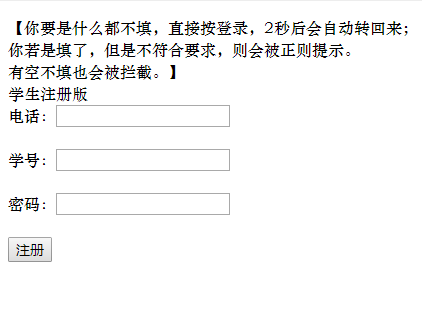
这个HTML会呈现如下丑的要死的界面:
好的,输入联系电话,学号,密码,注册,后台是跳转到StuAdd.java这个servlet去的,
service下新建StuAdd.java,敲:
package service;

import java.io.IOException;
import java.io.PrintWriter;
import java.io.UnsupportedEncodingException;

import javax.servlet.ServletException;
import javax.servlet.http.HttpServlet;
import javax.servlet.http.HttpServletRequest;
import javax.servlet.http.HttpServletResponse;

import Dao.Dao;

import pojo.student;

/**
 * Servlet implementation class StuAdd
 */
public class StuAdd extends HttpServlet {
    private static final long serialVersionUID = 1L;

    /**
     * @see HttpServlet#HttpServlet()
     */
    protected  void service(HttpServletRequest request, HttpServletResponse response){
        PrintWriter out = null;
        try {
            request.setCharacterEncoding("utf-8");
            response.setContentType("text/html;charset=utf-8");
            response.setCharacterEncoding("utf-8");

            out = response.getWriter();
            student stu=new student();

            String phone=request.getParameter("phone");
            String id=request.getParameter("id");
            String password=request.getParameter("password");

            if(phone==""||phone==null||id==""||id==null||password==""||password==null){
                out.println("你还有信息没有填写,系统将自动跳转回主界面...");
                response.setHeader("refresh","2;StuRegister.html"); //暂停2秒跳转到AdminAdd.html
            }
            else {
            stu.setPhone(phone);
            stu.setId(id);
            stu.setPassword(password);
            if(Dao.AddStudentStu(stu)==1){
                out.println("注册成功。");
            }
            else {
                out.println("您已经注册过或者账号密码存在冲突,系统注册失败");
                response.setHeader("refresh","2;StuRegister.html"); //暂停2秒跳转到AdminAdd.html
            }
            }
        } catch (UnsupportedEncodingException e) {
            // TODO Auto-generated catch block
            e.printStackTrace();
            out.println("您已经注册过或者账号密码存在冲突,系统注册失败");
            response.setHeader("refresh","2;StuRegister.html"); //暂停2秒跳转到AdminAdd.html
        }
        catch (IOException e) {
            // TODO Auto-generated catch block
            e.printStackTrace();
            out.println("您已经注册过或者账号密码存在冲突,系统注册失败");
            response.setHeader("refresh","2;StuRegister.html"); //暂停2秒跳转到AdminAdd.html
        } catch (Exception e) {
            // TODO Auto-generated catch block
            e.printStackTrace();
            out.println("您已经注册过或者账号密码存在冲突,系统注册失败");
            response.setHeader("refresh","2;StuRegister.html"); //暂停2秒跳转到AdminAdd.html
        }

    }
    /**
     * @see HttpServlet#doGet(HttpServletRequest request, HttpServletResponse response)
     */
    protected void doGet(HttpServletRequest request, HttpServletResponse response) throws ServletException, IOException {
        // TODO Auto-generated method stub
    }

    /**
     * @see HttpServlet#doPost(HttpServletRequest request, HttpServletResponse response)
     */
    protected void doPost(HttpServletRequest request, HttpServletResponse response) throws ServletException, IOException {
        // TODO Auto-generated method stub
    }

}
一般都会显示注册成功,如果有空没有填,就会出现:

倘若注册成功,返回登录。
按照刚才注册的电话、学号、密码填写,点击登录,后台这时会跳转到StuLoginSuccess.jsp,
敲:
<%@ page language="java"
    pageEncoding="utf-8"%>
<!DOCTYPE html PUBLIC "-//W3C//DTD HTML 4.01 Transitional//EN" "http://www.w3.org/TR/html4/loose.dtd">
<html>
<head>
<meta http-equiv="Content-Type" content="text/html; charset=utf-8">
<title>欢迎!CAT学生招新了!</title>
</head>
<body>
<%
//这里稍微用java储存下session哈

%>
<form action='StuAndAdminLoginSuccess' method='post' >
<pre>
 <!-- 电话和学号属于登录信息,报名中不再提供接口填写 -->
<h1>欢迎!CAT学生招新了!</h1>
请在下方填写您的信息:
名字:<input type='text' name='name' id='name' onblur='check()' /><span id='nameText'></span><br>
性别:<input type='radio' name='sex' id='sex' value='男'>男<input type='radio' name='sex' id='sex' value=“女”>女<br>
年级 专业班级:<input type='radio' name='grade' id='sex' value='18级'>18级<input type='radio' name='grade' id='sex' value='19级'>19级<br>
<input type ='text' name='professionclass' id='professionclass' size='25' maxlength='100' value="填写你的年级班级"><br>
方向:<input type='radio' name='decision' id='decision' value='前端组'>前端组<input type='radio' name='decision' id='decision' value='后台组'>后台组<br>
自我介绍:<textarea rows="5" cols="19" id='sid' name='sid' onblur='check()'></textarea><span id='sidText'></span><br>
<input type ='submit' name='login' value='保存'>
</pre>
</form>
<!-- 下面一行别放到form里面了,会警告 -->
修改报名信息只需要在此页面重新填写报名信息即可。
</body>
</html>
填写完信息后,会跳转到StuAndAdminLoginSuccess.java这个servlet:
service下右键新建一个servlet:
package service;

import java.io.IOException;
import java.io.PrintWriter;

import javax.servlet.ServletException;
import javax.servlet.http.HttpServlet;
import javax.servlet.http.HttpServletRequest;
import javax.servlet.http.HttpServletResponse;
import javax.servlet.http.HttpSession;

import pojo.student;
import Dao.Dao;

/**
 * Servlet implementation class StuAndAdminLoginSuccess
 */
public class StuAndAdminLoginSuccess extends HttpServlet {
	private static final long serialVersionUID = 1L;

    /**
     * 这个servlet用于学生的新增报名信息
     *
     * 1.2更新:由于超级管理员的存在,可以修改学生的登录信息,所以此界面管理员弃用,
     * 另外再开个界面供管理员调用。
     *
     * 调用DAO层ADD方法
     * @see HttpServlet#HttpServlet()
     */
    protected void service(HttpServletRequest request, HttpServletResponse response){
    	response.setCharacterEncoding("UTF-8");//接收时以UFT-8格式接收

    	HttpSession hs=request.getSession();
		try {
			PrintWriter out = response.getWriter();
			student stu=new student();
			String name=request.getParameter("name");
			name=new String(name.getBytes("iso8859-1"),"utf-8");
			String id=(String) hs.getAttribute("id");	//注意看这里,id/phone/password与众不同
			id=new String(id.getBytes("iso8859-1"),"utf-8");
			String sex=request.getParameter("sex");
			sex=new String(sex.getBytes("iso8859-1"),"utf-8");
			String grade=request.getParameter("grade");
			grade=new String(grade.getBytes("iso8859-1"),"utf-8");
			String phone=(String) hs.getAttribute("phone");
			phone=new String(phone.getBytes("iso8859-1"),"utf-8");
			String decision=request.getParameter("decision");
			decision=new String(decision.getBytes("iso8859-1"),"utf-8");
			String sid=request.getParameter("sid");//自我介绍
			sid=new String(sid.getBytes("iso8859-1"),"utf-8");
			String password=(String) hs.getAttribute("password");//自我介绍
			password=new String(password.getBytes("iso8859-1"),"utf-8");

			stu.setId(id);
			stu.setName(name);
			stu.setSex(sex);
			stu.setGrade(grade);
			stu.setPhone(phone);
			stu.setDecision(decision);
			stu.setSelfintroduction(sid);
			stu.setPassword(password);
			out.println("<html>");
			out.println("<head>");
			out.println("<meta charset='UTF-8'>");//响应时以UFT-8格式输出
			out.println("<title>【后台系统处理中...】</title>");
			out.println("<body>");

			if(Dao.UpdateStudent(stu)==1){
				//之前已经在checkstu里使用session储存了三个键值对
//		    	hs.setAttribute("phone",request.getParameter("phone"));
//		    	hs.setAttribute("password",request.getParameter("password"));
		    	hs.setAttribute("name",request.getParameter("name"));
		    	hs.setAttribute("sex",request.getParameter("sex"));
//		    	hs.setAttribute("id",request.getParameter("id"));
		    	hs.setAttribute("grade",request.getParameter("grade"));
		    	hs.setAttribute("decision",request.getParameter("decision"));
		    	hs.setAttribute("sid",request.getParameter("sid"));

		    	out.println("添加学生招新信息成功!");
		    	//因为学生和管理员都调用这个servlet,所以不知道完事后跳转到哪里,干脆不跳转了。
			}
			else {
				out.println("系统存在此电话一个以上的相同信息,无法新增或修改。");
				response.setHeader("refresh","2;/cat1.2/StuLoginSuccess.html"); //暂停2秒跳转到StuLoginSuccess.html
			}

		out.println("</body>");
		out.println("</head>");
		out.println("</html>");
		out.close();
		} catch (IOException e1) {
			// TODO Auto-generated catch block
			e1.printStackTrace();
		} catch (Exception e) {
			// TODO Auto-generated catch block
			e.printStackTrace();
		}
    }

	/**
	 * @see HttpServlet#doGet(HttpServletRequest request, HttpServletResponse response)
	 */
	protected void doGet(HttpServletRequest request, HttpServletResponse response) throws ServletException, IOException {
		// TODO Auto-generated method stub
	}

	/**
	 * @see HttpServlet#doPost(HttpServletRequest request, HttpServletResponse response)
	 */
	protected void doPost(HttpServletRequest request, HttpServletResponse response) throws ServletException, IOException {
		// TODO Auto-generated method stub
	}

}
(注意:StuChange.java这个servlet我原本是用作学生登录成功后修改信息调用的,但是后来我修改了学生修改信息的方式--就是直接重新新增啦,原理是数据库直接覆盖。。超级简单粗暴的~)
至此,本系统完成。
等等,还有检查登录的servlet还没有讲~这个就是随便写写,相信各位大佬肯定能自己写的啦!
还是贴出来吧:
CheckAdmin.java:
package service;

import java.io.IOException;
import java.io.PrintWriter;

import javax.servlet.ServletException;
import javax.servlet.http.HttpServlet;
import javax.servlet.http.HttpServletRequest;
import javax.servlet.http.HttpServletResponse;
import javax.servlet.http.HttpSession;

import Dao.Dao;

/**
 * Servlet implementation class CheckAdmin
 */
public class CheckAdmin extends HttpServlet {
    private static final long serialVersionUID = 1L;

    /**
     * @throws Exception
     * @throws IOException
     * @see HttpServlet#HttpServlet()
     */
    public static void CheckAdmin(HttpServletRequest request, HttpServletResponse response) throws IOException, Exception {
        HttpSession hs=request.getSession();
        hs.setAttribute("name1",request.getParameter("name"));
        hs.setAttribute("password",request.getParameter("password"));
        if(Dao.FindAdmin(request.getParameter("name"),request.getParameter("password"))==true){
            PrintWriter out = response.getWriter();
            out.println("登录成功,即将为您跳转");
            response.setHeader("refresh","1;/cat1.2/AdminLoginSuccess.jsp"); //成功暂停1秒跳转到StuLoginSuccess.jsp
        }
        else{
            PrintWriter out = response.getWriter();
            out.println("登录失败,即将为您跳转");
            response.setHeader("refresh","2;/cat1.2/CheckAdmin.html"); //失败暂停2秒跳转到CheckAdmin.html
        }
    }

    /**
     * @see HttpServlet#doGet(HttpServletRequest request, HttpServletResponse response)
     */
    protected void doGet(HttpServletRequest request, HttpServletResponse response) throws ServletException, IOException {
        // TODO Auto-generated method stub
    }

    /**
     * @see HttpServlet#doPost(HttpServletRequest request, HttpServletResponse response)
     */
    protected void doPost(HttpServletRequest request, HttpServletResponse response) throws ServletException, IOException {
        // TODO Auto-generated method stub
    }

}
CheckStu.java:
package service;

import java.io.IOException;
import java.io.PrintWriter;
import java.io.UnsupportedEncodingException;

import javax.servlet.ServletException;
import javax.servlet.http.HttpServlet;
import javax.servlet.http.HttpServletRequest;
import javax.servlet.http.HttpServletResponse;
import javax.servlet.http.HttpSession;

import Dao.Dao;

/**
 * Servlet implementation class CheckStu
 */
public class CheckStu extends HttpServlet {
    private static final long serialVersionUID = 1L;

    /**
     * 当出现空屏时,大多数是因为调用了doget和dopost方法,而没有调用service方法
     * @see HttpServlet#HttpServlet()
     */
    protected  void service(HttpServletRequest request, HttpServletResponse response) {
        //有这三行,肯定不会乱码,丢失一定要在printwriter之前
        try {
            request.setCharacterEncoding("utf-8");
            response.setContentType("text/html;charset=utf-8");
            response.setCharacterEncoding("utf-8");
        } catch (UnsupportedEncodingException e1) {
            // TODO Auto-generated catch block
            e1.printStackTrace();
        }

        PrintWriter out=null;
        try {
            out= response.getWriter();
            System.out.println(request.getParameter("password"));

            HttpSession hs=request.getSession();
            //这里不能再往session里添加id/phone/password,因为此时的id等已经为null
            System.out.println((String)hs.getAttribute("phone"));
            System.out.println((String)hs.getAttribute("id"));
            System.out.println((String)hs.getAttribute("password"));
            System.out.println("CheckStu.service()");
            if(Dao.FindStu(request.getParameter("phone"),(String)hs.getAttribute("password"),request.getParameter("id"))==true){

                out.println("登录成功,即将为您跳转");
                response.setHeader("refresh","1;/cat1.2/StuLoginSuccess.jsp"); //成功暂停1秒跳转到StuLoginSuccess.html
            }
            else{

                out.println("登录失败,,即将为您跳转");
                response.setHeader("refresh","3;/cat1.2/LoginHomeStuAndAdmin.html"); //失败暂停三秒跳转到LoginHomeStuAndAdmin.html
            }
        } catch (IOException e) {
            // TODO Auto-generated catch block
            e.printStackTrace();
            out.println("登录失败,即将为您跳转");
            response.setHeader("refresh","3;/cat1.2/LoginHomeStuAndAdmin.html"); //失败暂停三秒跳转到LoginHomeStuAndAdmin.html
        } catch (Exception e) {
            // TODO Auto-generated catch block
            e.printStackTrace();
            out.println("登录失败,即将为您跳转");
            response.setHeader("refresh","3;/cat1.2/LoginHomeStuAndAdmin.html"); //失败暂停三秒跳转到LoginHomeStuAndAdmin.html
        }
    }

    /**
     * @see HttpServlet#doGet(HttpServletRequest request, HttpServletResponse response)
     */
    protected void doGet(HttpServletRequest request, HttpServletResponse response) throws ServletException, IOException {
        // TODO Auto-generated method stub
        service(request,response);
    }

    /**
     * @see HttpServlet#doPost(HttpServletRequest request, HttpServletResponse response)
     */
    protected void doPost(HttpServletRequest request, HttpServletResponse response) throws ServletException, IOException {
        // TODO Auto-generated method stub
        service(request,response);
    }

}
另外,为了处理判空白屏(就是不知道怎么回事,提交的数据为null的情况),在src右键新建了一个pakage,取名为contronller,旗下新建CheckAdminIfNull.java:
package contronller;

import java.io.IOException;
import java.io.PrintWriter;

import javax.servlet.ServletException;
import javax.servlet.http.HttpServlet;
import javax.servlet.http.HttpServletRequest;
import javax.servlet.http.HttpServletResponse;
import javax.servlet.http.HttpSession;

import service.CheckAdmin;

/**
 * Servlet implementation class CheckAdminIfNull
 */
public class CheckAdminIfNull extends HttpServlet {
    private static final long serialVersionUID = 1L;

    /**
     * @see HttpServlet#HttpServlet()
     */
    protected void service(HttpServletRequest request, HttpServletResponse response){

        try {
            request.setCharacterEncoding("utf-8");
            response.setContentType("text/html;charset=utf-8");
            response.setCharacterEncoding("utf-8");

            PrintWriter out = response.getWriter();
            HttpSession hs=request.getSession();
            hs.setAttribute("name",request.getParameter("name"));
            hs.setAttribute("password",request.getParameter("password"));

            //判空,若什么都没写就点发送,正则表达式会拦截,
            //若有Null的情况(实际上我也不知道什么情况会发生这种情况),触发三秒后跳转回去
            //(类似于重定向,使用了setHeader,具体怎么用我没去查,此方法百度复制粘贴来的)
            if(request.getParameter("name")==""||request.getParameter("password")==""){

            out.println("你还有信息没有填完哦!记住是学号、电话和密码都要填写。<br>系统将自动跳转回登录主界面...");
            response.setHeader("refresh","2;CheckAdmin.html"); //暂停2秒跳转到LoginHomeStuAndAdmin.html
            }
            else{
                CheckAdmin.CheckAdmin(request, response);
            }

        } catch (IOException e1) {
            // TODO Auto-generated catch block
            e1.printStackTrace();
        } catch (Exception e) {
            // TODO Auto-generated catch block
            e.printStackTrace();
        }

    }

    /**
     * @see HttpServlet#doGet(HttpServletRequest request, HttpServletResponse response)
     */
    protected void doGet(HttpServletRequest request, HttpServletResponse response) throws ServletException, IOException {
        // TODO Auto-generated method stub
    }

    /**
     * @see HttpServlet#doPost(HttpServletRequest request, HttpServletResponse response)
     */
    protected void doPost(HttpServletRequest request, HttpServletResponse response) throws ServletException, IOException {
        // TODO Auto-generated method stub
    }

}
还有CheckStuIfNull.java:
package contronller;
import java.io.IOException;
import java.io.PrintWriter;
import javax.servlet.ServletException;
import javax.servlet.http.HttpServlet;
import javax.servlet.http.HttpServletRequest;
import javax.servlet.http.HttpServletResponse;
import javax.servlet.http.HttpSession;
/**
* Servlet implementation class CheckStu
*/
public class CheckStuIfNull extends HttpServlet {
private static final long serialVersionUID = 1L;
/**
* 首先,不用判断空值,因为html中js正则表达式的存在不允许空值,但是要考虑到null,
* 此servlet仅仅判断是否为null,若不为null,紧接着就直接跳转到CheckStu.java,
* 此过程没有使用到session
* @see HttpServlet#HttpServlet()
*/
protected void service(HttpServletRequest request, HttpServletResponse response){
System.out.println(request.getParameter("password"));
try {
//有这三行,肯定不会乱码,丢失一定要在printwriter之前
request.setCharacterEncoding("utf-8"); //1
response.setContentType("text/html;charset=utf-8"); //2
response.setCharacterEncoding("utf-8"); //3
PrintWriter out = response.getWriter();
if(request.getParameter("password")==""||request.getParameter("phone")==""||request.getParameter("id")==""){
out.println("你还没有填写任何东西哟!系统将自动跳转回登录主界面...");
response.setHeader("refresh","3;/cat1.2/LoginHomeStuAndAdmin.html"); //暂停三秒跳转到LoginHomeStuAndAdmin.html
}
else if(request.getParameter("password")==null||request.getParameter("phone")==null||request.getParameter("id")==null){
out.println("你还没有填写任何东西哟!系统将自动跳转回登录主界面...");
response.setHeader("refresh","3;/cat1.2/LoginHomeStuAndAdmin.html"); //暂停三秒跳转到LoginHomeStuAndAdmin.html
}
else {
//放行,service层checkstu()方法
try {
HttpSession hs=request.getSession();//本系统第一次使用session
hs.setAttribute("phone",request.getParameter("phone"));
hs.setAttribute("password",request.getParameter("password"));
hs.setAttribute("id",request.getParameter("id"));
//此处不能重定向,request和session会丢失、、、
request.getRequestDispatcher ("CheckStu"). forward(request, response);
} catch (Exception e) {
// TODO Auto-generated catch block
e.printStackTrace();
}
}
} catch (IOException e1) {
// TODO Auto-generated catch block
e1.printStackTrace();
}
//判空,若什么都没写就点发送,正则表达式会拦截,
//若有Null的情况(实际上我也不知道什么情况会发生这种情况),触发三秒后跳转回去
//(类似于重定向,使用了setHeader,具体怎么用我没去查,此方法百度复制粘贴来的)
}
/**
* @see HttpServlet#doGet(HttpServletRequest request, HttpServletResponse response)
*/
protected void doGet(HttpServletRequest request, HttpServletResponse response) throws ServletException, IOException {
// TODO Auto-generated method stub
}
/**
* @see HttpServlet#doPost(HttpServletRequest request, HttpServletResponse response)
*/
protected void doPost(HttpServletRequest request, HttpServletResponse response) throws ServletException, IOException {
// TODO Auto-generated method stub
}
}
最后的最后,要求做个过滤器,做个嘛,,,我也不是很大,就随便写了个:
也不知道算不算过滤器哦,就是形式上做做而已啦!~
src下右键新建一个叫filter的pakage,然后新建一个叫filter的filter,敲:
package fliter;
import java.io.IOException;
import javax.servlet.Filter;
import javax.servlet.FilterChain;
import javax.servlet.FilterConfig;
import javax.servlet.ServletException;
import javax.servlet.ServletRequest;
import javax.servlet.ServletResponse;
/**
* Servlet Filter implementation class filter
*/
public class filter implements Filter {
/**
* Default constructor.
*/
public filter() {
// TODO Auto-generated constructor stub
}
/**
* @see Filter#destroy()
*/
public void destroy() {
// TODO Auto-generated method stub
}
/**
* @see Filter#doFilter(ServletRequest, ServletResponse, FilterChain)
*/
public void doFilter(ServletRequest request, ServletResponse response, FilterChain chain) throws IOException, ServletException {
// TODO Auto-generated method stub
//设置字符编码
request.setCharacterEncoding("UTF-8");
response.setCharacterEncoding("UTF-8");
// pass the request along the filter chain
chain.doFilter(request, response);
}
/**
* @see Filter#init(FilterConfig)
*/
public void init(FilterConfig fConfig) throws ServletException {
// TODO Auto-generated method stub
}
}
由于,,,(废话有点多)正则用到了两张照片,就是下面这两个,所以直接粘贴到WebContent下就行了:


还有一点就是:
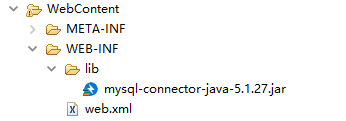
记得在lib那里加上数据库连接jar包哟,百度即有。
祝生活愉快!
招新系统(jsp+servlet,实现简略前端网页注册登录+后台增删改查,分学生和管理员,Java语言,mysql数据库连接,tomcat服务器)的更多相关文章
- 后台增删改查的实现——java基础、jsp、servlet、数据库
1.前台和后台的关系: 后台是由工作人员操作的,通过后台系统对数据库实行增删改查等操作,通过前台系统访问数据库,将数据库中的信息通过前台显示. 2.功能实现: (1)显示全部商品信息: home.js ...
- 使用Servlet和JSp在浏览器上实现对数据库表的增删改查(新手)
第一步:用户输入网址进入一个登陆界面. 里面要有账号密码输入. 登陆界面链接到登陆的Servlet类中. Servlet类 --> 1.接收参数(账户密码) 2.调用DAO层的 SQL语句 验 ...
- 优秀前端工程师必备: cookie的增删改查Demo!
1 cookie可以很好地解决微信浏览器登录状态的保存,具体教程看下面链接: https://www.cnblogs.com/autoXingJY/p/10456767.html 2 参考了w3c等的 ...
- JSP+Servlet+JavaBean实现数据库的增删改查
基本思想:JSP文件显示页面,使用form或href超链接传值到Servlet中方法,在Servlet方法中调用Dao层的类对象,实现对数据库里的数据的增删改查,之后重新返回到JSP输出操作完的结果. ...
- JavaWeb后端jsp之增删改查
今日主题:JavaWeb后端jsp之增删改查 实体类: Student.java: package cn.itcast.model.entity; public class Student { pri ...
- java+jsp+sqlserver实现简单的增删改查操作 连接数据库代码
1,网站系统开发需要掌握的技术 (1)网页设计语言,html语言css语言等 (2)Java语言 (3)数据库 (4)等 2,源程序代码 (1) 连接数据库代码 package com.jaovo.m ...
- 前端使用AngularJS的$resource,后端ASP.NET Web API,实现增删改查
AngularJS中的$resource服务相比$http服务更适合与RESTful服务进行交互.本篇后端使用ASP.NET Web API, 前端使用$resource,实现增删改查. 本系列包括: ...
- web项目总结——通过jsp+servlet实现对oracle的增删改查功能
1.DAO模式 分包:依次建立 entity:实体包,放的是跟oracle数据库中表结构相对应的对象的属性,也就是这个对象有什么 dao:增删改查接口,实现增删改查的具体方法 service:同dao ...
- Java Web项目案例之---登录注册和增删改查(jsp+servlet)
登录注册和增删改查(jsp+servlet) (一)功能介绍 1.用户输入正确的密码进行登录 2.新用户可以进行注册 3.登录后显示学生的信息表 4.可以添加学生 5.可以修改学生已有信息 6.可以删 ...
随机推荐
- Java中的split和join
Javascript中的用于字符串和数组之间转换的split和join函数使用起来非常方便,在Java中也有这两个函数,只不过join是在apache commons的lang库里实现的. impor ...
- Day 18 正则表达式.
一.字符 .匹配除换行符以外的任意字符. \w 匹配字母数字或者下划线. \s 匹配任意的空白符 \d 匹配数字 \n 匹配一个换行符 \t 匹配一个制表符 ^ 匹配字符串的开始. $ 匹配字符串的结 ...
- 1. scrapy的安装
1.安装lxml pip install lxml 2.安装twisted 在https://www.lfd.uci.edu/~gohlke/pythonlibs/#twisted网站搜索twiste ...
- ES六
来自:http://es6.ruanyifeng.com/#docs/style 1,=> // bad console.log([1,2,3,4].map(function(x){return ...
- string的相关问题
http://blog.csdn.net/seu_calvin/article/details/51404589 http://rednaxelafx.iteye.com/blog/774673 ht ...
- pods报错修复方法
### Error ``` RuntimeError - [!] Xcodeproj doesn't know about the following attributes {"inputF ...
- 【GDKOI2017】小队任务 莫比乌斯反演+杜教筛
题目大意:给你n,求$\sum_{i=1}^{n}\sum_{j=i}^{n}[gcd(i,j)=1](i+1)(j+1)$ 子任务一:暴力 子任务二:$T=50000,n≤10^7$ 子任务三:$T ...
- .Net Core 发布WindowsServices
项目代码文件夹 执行命令 dotnet publish -c Release -r win-x64
- MyEclipse:详细使用教程
http://www.56.com/u18/v_MTQwNzY1MTU5.html?fromvsogou=1
- java数据结构之三叉链表示的二叉树
三叉链表示的二叉树定义所畏的三叉链表示是指二叉树由指向左孩子结点.右孩子结点.父亲结点[三叉]的引用(指针)数据和数据组成. package datastructure.tree.btree; ...