
PostgreSQL timeline
磨砺技术珠矶,践行数据之道,追求卓越价值
回到上一级页面: PostgreSQL基础知识与基本操作索引页 回到顶级页面:PostgreSQL索引页
关于timeline,有如下的说法
http://www.postgresql.org/docs/current/static/continuous-archiving.html
24.3.. Timelines

The ability to restore the database to a previous point in time creates some complexities that are akin to science-fiction stories about time travel and parallel universes. For example, in the original history of the database, suppose you dropped a critical table at :15PM on Tuesday evening, but didn't realize your mistake until Wednesday noon. Unfazed, you get out your backup, restore to the point-in-time 5:14PM Tuesday evening, and are up and running. In this history of the database universe, you never dropped the table. But suppose you later realize this wasn't such a great idea, and would like to return to sometime Wednesday morning in the original history. You won't be able to if, while your database was up-and-running, it overwrote some of the WAL segment files that led up to the time you now wish you could get back to. Thus, to avoid this, you need to distinguish the series of WAL records generated after you've done a point-in-time recovery from those that were generated in the original database history.

To deal with this problem, PostgreSQL has a notion of timelines. Whenever an archive recovery completes, a new timeline is created to identify the series of WAL records generated after that recovery. The timeline ID number is part of WAL segment file names so a new timeline does not overwrite the WAL data generated by previous timelines. It is in fact possible to archive many different timelines. While that might seem like a useless feature, it's often a lifesaver. Consider the situation where you aren't quite sure what point-in-time to recover to, and so have to do several point-in-time recoveries by trial and error until you find the best place to branch off from the old history. Without timelines this process would soon generate an unmanageable mess. With timelines, you can recover to any prior state, including states in timeline branches that you abandoned earlier.

Every time a new timeline is created, PostgreSQL creates a "timeline history" file that shows which timeline it branched off from and when. These history files are necessary to allow the system to pick the right WAL segment files when recovering from an archive that contains multiple timelines. Therefore, they are archived into the WAL archive area just like WAL segment files. The history files are just small text files, so it's cheap and appropriate to keep them around indefinitely (unlike the segment files which are large). You can, if you like, add comments to a history file to record your own notes about how and why this particular timeline was created. Such comments will be especially valuable when you have a thicket of different timelines as a result of experimentation.

The default behavior of recovery is to recover along the same timeline that was current when the base backup was taken. If you wish to recover into some child timeline (that is, you want to return to some state that was itself generated after a recovery attempt), you need to specify the target timeline ID in recovery.conf. You cannot recover into timelines that branched off earlier than the base backup.
经过我的实验,发现是这样的,一旦开始第一次的restore,那么就产生了一个交叉点,于是"平行宇宙"诞生了。但是还有一个问题:
参见下图:
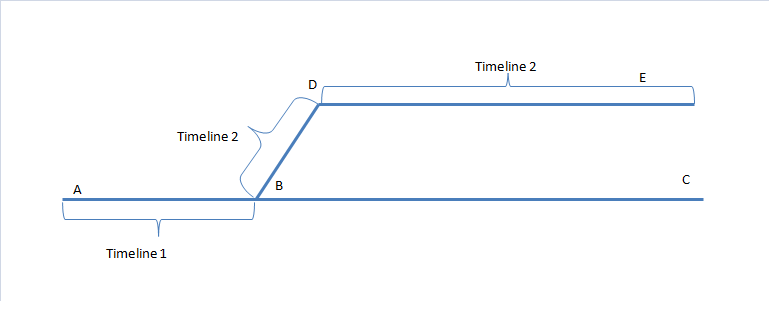
如果我当初在A点与B点之间插入数据,又在B点和C点之间插入数据。
然后,在B点所在的时间点处Restore,那么,Timeline2就产生了。
我可以接着在B点和D点至今插入数据,又在D点和E点之间插入数据。
可以说A到B是 timeline2, B到D到E是timeline1。
到达了D点或E点后,我是无法再次Restore到 B点和C点之间了。
这是因为:
B点到C点已经成为不存在了。
(虽然所有的archive wal log我都有,但是某些数据是保留在online wal log中,这部分的数据变化,经过timeline2的处理后,其实是永远失去了)
回到上一级页面: PostgreSQL基础知识与基本操作索引页 回到顶级页面:PostgreSQL索引页
磨砺技术珠矶,践行数据之道,追求卓越价值
PostgreSQL timeline的更多相关文章
- replication_slot and PostgreSQL Replication
主库IP:192.168.230.128 备库IP:192.168.230.129 PostgreSQL版本: 主备机PostgreSQL源码包均位于/opt/soft_bak OS:CentOS5 ...
- PostgreSQL Cascade Replication
PostgreSQL Cascade Replication node1:master:10.2.208.10:repclia(user) node2:upstreamnode:10.2.208.11 ...
- PostgreSQL Replication之第十五章 与Walbouncer 一起工作
与Walbouncer 一起工作 在本书的最后一章,将引导您通向2014年发布的一个工具,称为walbouncer.本书中的大多数技巧说明了如何复制整个数据库实例,如何分片,等等.在最后一章,是关于w ...
- PostgreSQL 同步复制(1master+2standby)
OS: Red Hat Enterprise Linux Server release 6.5 (Santiago) PostgreSQL: postgresql-9.4.5.tar.bz2 mast ...
- postgreSQL 时间线
“时间线”(Timeline)是PG一个很有特色的概念,在备份恢复方面的文档里面时有出现.但针对这个概念的详细解释却很少,也让人不太好理解,我们在此仔细解析一下. 时间线的引入 为了理解引入时间线的背 ...
- UNDERSTANDING POSTGRESQL.CONF: CHECKPOINT_SEGMENTS, CHECKPOINT_TIMEOUT, CHECKPOINT_WARNING
While there are some docs on it, I decided to write about it, in perhaps more accessible language – ...
- postgresql如何维护WAL日志/归档日志
WAL日志介绍 wal全称是write ahead log,是postgresql中的online redo log,是为了保证数据库中数据的一致性和事务的完整性.而在PostgreSQL 7中引入的 ...
- PostgreSQL数据库单机扩展为流复制
primary:10.189.102.118 standby:10.189.100.195 1. 配置ssh互信机制 在primary主库执行 $ ssh-keygen -t rsa $ cp ~/. ...
- PostgreSQL主备流复制机制
原文出处 http://mysql.taobao.org/monthly/2015/10/04/ PostgreSQL在9.0之后引入了主备流复制机制,通过流复制,备库不断的从主库同步相应的数据,并在 ...
随机推荐
- 命令模式-实现undo和redo
这次实验主要是实现多次redo和undo,即程序的撤回和恢复,这里只实现加法的撤回和恢复. 程序的撤回和恢复就是由所使用的软件来记录操作步骤,可以将数据恢复到某个操作状态. 撤回这个指令很常见,Win ...
- log4j配置详解(非常详细)
Log4J的配置文件(Configuration File)就是用来设置记录器的级别.存放器和布局的,它可接key=value格式的设置或xml格式的设置信息.通过配置,可以创建出Log4J的运行环境 ...
- Oracle EBS 更改物料说明后,在MTL_SYSTEM_ITEMS_B表中无变化
需要再中文和英文环境同时修改: 程序里,可以通过初始session语言环境来解决.
- ASM Disk Discovery 最佳实践
ASM DISK 的Discovery PATH ASM实例的ASM_DISKSTRING初始化参数使用一个逗号分割的字符串限制ASM实例发现的DISK可以用于ASM DISK, 该字符串支持通配符如 ...
- Windows Pre-commit hook for comment length Subversion
@echo off :: Stops commits that have empty log messages. @echo off setlocal rem Subversion sends thr ...
- Windows未能启动:0xc00000e9错误
问题:计算机无法启动,错误代码为:0xc00000e9 解决方法: 1.如报错所示,\Windows\System31\config\system 文件丢失或损坏: 2.如许修复此问题,需在打开此目录 ...
- win10 虚拟机 hyper-v 安装 centos 7
一.win 10 企业版 自带虚拟机 hyper-v 1.控制面板-->程序和功能-->启用或关闭Windows功能 勾上 hyper-v 确定就ok了 2.安装成功后会发现在 左下角“开 ...
- Win10下安装sulley
sulley是一款针对网络协议的fuzz框架,记录下安装过程备忘 1.安装MinGW 下载:https://github.com/develersrl/gccwinbinaries/releases/ ...
- 【问题记录】centos 开机启动命令未执行
查看日志 /var/log/boot.log 看具体原因,有可能脚本执行有问题, 当你在系统已经启动的时候,脚本执行没问题不代表开机启动能运行
- golang xorm应用
github.com/go-xorm/xorm xorm库 http://www.xorm.io/docs/ 手册 xorm是一个简单而强大的Go语言ORM库. 通过它可以使数据库操作非常简便.xo ...