
在Kubernetes上使用Traefik
本节内容:
- Traefik介绍
- 部署测试用的两个服务
- Role Based Access Control configuration (Kubernetes 1.6+ only)
- 部署Traefik
- 部署 Ingress
- 部署Traefik UI
- 访问测试
- 健康检查
一、Traefik介绍
traefik 是一个前端负载均衡器,对于微服务架构尤其是 kubernetes 等编排工具具有良好的支持;同 nginx 等相比,traefik 能够自动感知后端容器变化,从而实现自动服务发现。
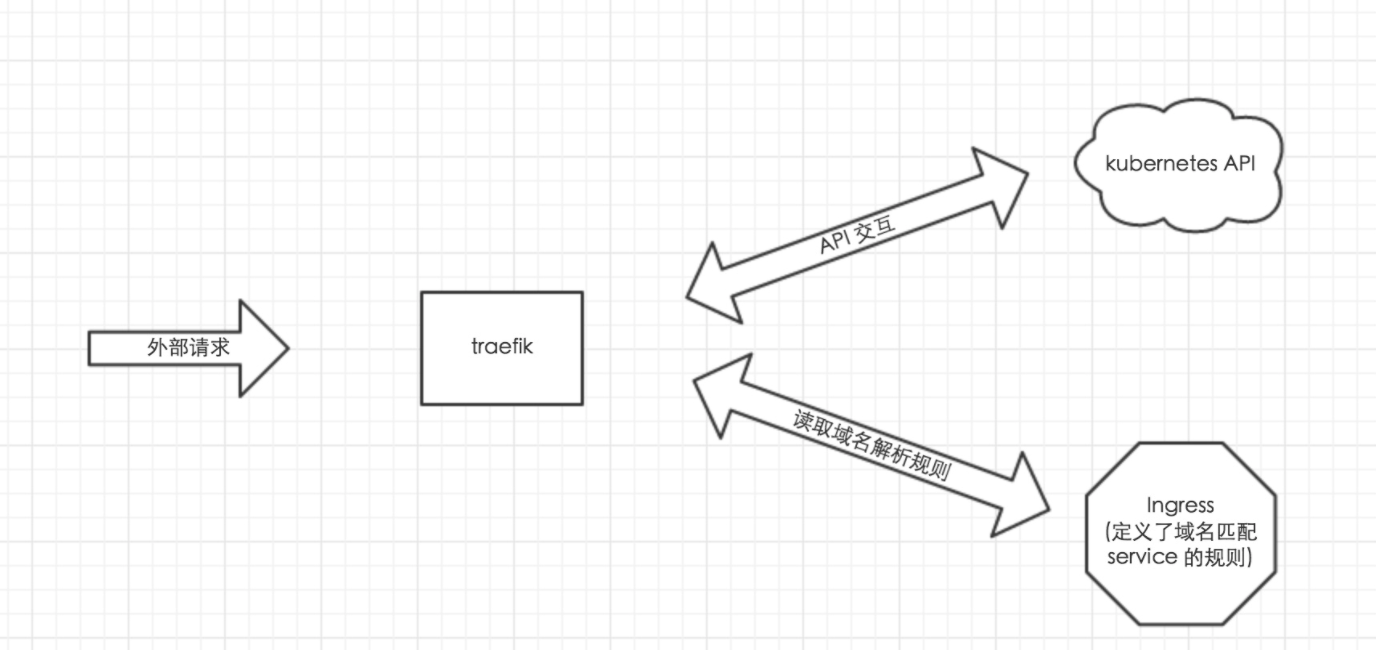
由于微服务架构以及 Docker 技术和 kubernetes 编排工具最近几年才开始逐渐流行,所以一开始的反向代理服务器比如 nginx、apache 并未提供其支持,毕竟他们也不是先知;所以才会出现 Ingress Controller 这种东西来做 kubernetes 和前端负载均衡器如 nginx 之间做衔接;即 Ingress Controller 的存在就是为了能跟 kubernetes 交互,又能写 nginx 配置,还能 reload 它,这是一种折中方案;而 traefik 天生就是提供了对 kubernetes 的支持,也就是说 traefik 本身就能跟 kubernetes API 交互,感知后端变化,因此可以得知: 在使用 traefik 时,Ingress Controller 已经没什么用了,整体架构如下:
二、部署测试用的两个服务
部署两个服务nginx1-7和nginx1-8,后面用Traefik去负载这两个服务:
apiVersion: v1

kind: Service

metadata:

  name: frontend

spec:

  ports:

    - port: 80

      targetPort: 80

  selector:

    app: nginx1-7

---

apiVersion: apps/v1beta1

kind: Deployment

metadata:

  name: nginx1-7-deployment

spec:

  replicas: 2

  template:

    metadata:

      labels:

        app: nginx1-7

    spec:

      containers:

      - name: nginx

        image: nginx:1.7.9

        ports:

        - containerPort: 80
nginx1-7.yaml
apiVersion: v1

kind: Service

metadata:

  name: my-nginx

spec:

  ports:

    - port: 80

      targetPort: 80

  selector:

    app: nginx1-8

---

apiVersion: apps/v1beta1

kind: Deployment

metadata:

  name: nginx1-8-deployment

spec:

  replicas: 2

  template:

    metadata:

      labels:

        app: nginx1-8

    spec:

      containers:

      - name: nginx

        image: nginx:1.8

        ports:

        - containerPort: 80
nginx1-8.yaml
运行两个服务:
[root@node1 nginx_ingress]# kubectl create -f nginx1-.yaml

service "frontend" created

deployment "nginx1-7-deployment" created

[root@node1 nginx_ingress]# kubectl create -f nginx1-.yaml

service "my-nginx" created

deployment "nginx1-8-deployment" created
三、Role Based Access Control configuration (Kubernetes 1.6+ only)
我这里部署的是1.6.0集群,开启了RBAC,授权需要使用角色和绑定角色。
[root@node1 traefik]# pwd

/opt/traefik
[root@node1 traefik]# vim ingress-rbac.yaml

apiVersion: v1

kind: ServiceAccount

metadata:

  name: ingress

  namespace: kube-system

---

kind: ClusterRoleBinding

apiVersion: rbac.authorization.k8s.io/v1beta1

metadata:

  name: ingress

subjects:

  - kind: ServiceAccount

    name: ingress

    namespace: kube-system

roleRef:

  kind: ClusterRole

  name: cluster-admin

  apiGroup: rbac.authorization.k8s.io
ingress-rbac.yaml
四、部署Traefik
[root@node1 traefik]# pwd

/opt/traefik
[root@node1 traefik]# vim traefik-deploy.yaml

apiVersion: extensions/v1beta1

kind: Deployment

metadata:

  name: traefik-ingress-lb

  namespace: kube-system

  labels:

    k8s-app: traefik-ingress-lb

spec:

  template:

    metadata:

      labels:

        k8s-app: traefik-ingress-lb

        name: traefik-ingress-lb

    spec:

      terminationGracePeriodSeconds: 60

      hostNetwork: true

      restartPolicy: Always

      serviceAccountName: ingress

      containers:

      - image: traefik

        name: traefik-ingress-lb

        resources:

          limits:

            cpu: 200m

            memory: 30Mi

          requests:

            cpu: 100m

            memory: 20Mi

        ports:

        - name: http

          containerPort: 80

          hostPort: 80

        - name: admin

          containerPort: 8580

          hostPort: 8580

        args:

        - --web

        - --web.address=:8580

        - --kubernetes
traefik-deploy.yaml
其中 traefik 监听 node 的 80 和 8580 端口,80 提供正常服务,8580 是其自带的 UI 界面,原本默认是 8080,因为环境里端口冲突了,所以这里临时改一下。
【注意】:这里用的是Deploy类型,没有限定该pod运行在哪个主机上。
五、部署 Ingress
[root@node1 traefik]# cat traefik.yaml

apiVersion: extensions/v1beta1

kind: Ingress

metadata:

  name: traefik-ingress

  namespace: default

spec:

  rules:

  - host: traefik.nginx.io

    http:

      paths:

      - path: /

        backend:

          serviceName: my-nginx

          servicePort: 80

  - host: traefik.frontend.io

    http:

      paths:

      - path: /

        backend:

          serviceName: frontend

          servicePort: 80
traefik.yaml
其中的backend中要配置default namespace中启动的service名字,如果你没有配置namespace名字,默认使用default namespace,如果你在其他namespace中创建服务想要暴露到kubernetes集群外部,可以创建新的ingress.yaml文件,同时在文件中指定该namespace,其他配置与上面的文件格式相同。path就是URL地址后的路径,如traefik.frontend.io/path,service将会接受path这个路径,host最好使用service-name.filed1.filed2.domain-name这种类似主机名称的命名方式,方便区分服务。
根据实际环境中部署的service的名字和端口自行修改,有新service增加时,修改该文件后可以使用kubectl replace -f traefik.yaml来更新。
六、部署Traefik UI
traefik 本身还提供了一套 UI 供我们使用,其同样以 Ingress 方式暴露,只需要创建一下即可。
[root@node1 traefik]# cat traefik-ui-service.yaml

apiVersion: v1

kind: Service

metadata:

  name: traefik-web-ui

  namespace: kube-system

spec:

  selector:

    k8s-app: traefik-ingress-lb

  ports:

  - name: web

    port: 80

    targetPort: 8580

---

apiVersion: extensions/v1beta1

kind: Ingress

metadata:

  name: traefik-web-ui

  namespace: kube-system

spec:

  rules:

  - host: traefik-ui.local

    http:

      paths:

      - path: /

        backend:

          serviceName: traefik-web-ui

          servicePort: web
traefik-ui-service.yaml
最后一起创建:
[root@node1 traefik]# kubectl create -f .

serviceaccount "ingress" created

clusterrolebinding "ingress" created

deployment "traefik-ingress-lb" created

service "traefik-web-ui" created

ingress "traefik-web-ui" created

ingress "traefik-ingress" created
七、访问测试
查看traefik pod被分配到了哪台主机上:
[root@node1 traefik]# kubectl get pods -n kube-system -l k8s-app=traefik-ingress-lb -o wide

NAME                                  READY     STATUS    RESTARTS   AGE       IP             NODE

traefik-ingress-lb--1dg9n   /       Running             2m        172.16.7.152   172.16.7.152
浏览器输入http://172.16.7.152:8580/,将可以看到dashboard。
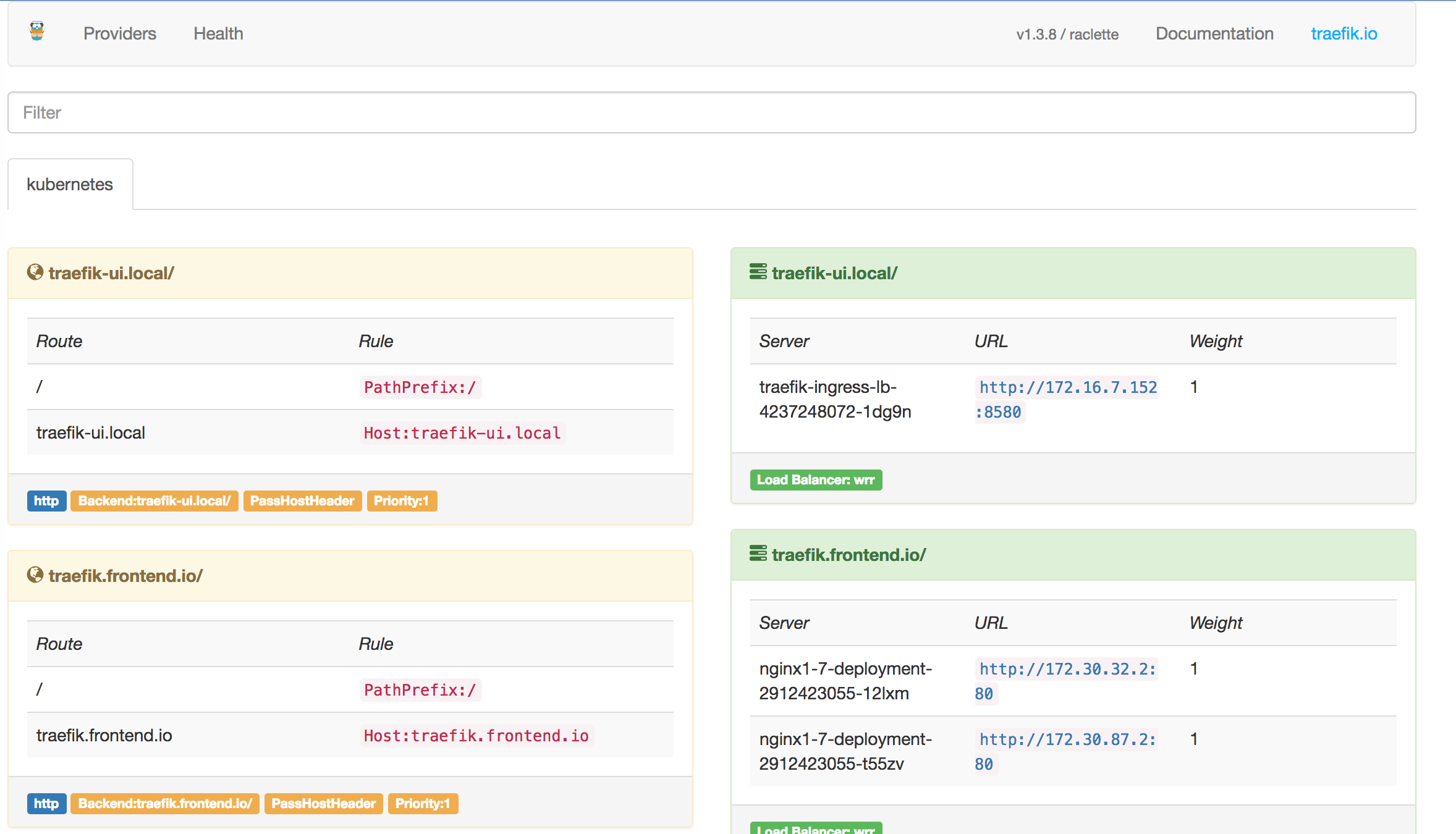
左侧黄色部分部分列出的是所有的rule,右侧绿色部分是所有的backend。
在Kubernetes集群的任意一个节点上执行。假如现在我要访问nginx的"/"路径。
curl -H Host:traefik.nginx.io http://172.16.7.152/
如果需要在kubernetes集群以外访问就需要设置DNS,或者修改本机的hosts文件。
172.16.7.152 traefik.nginx.io

172.16.7.152 traefik.frontend.io
所有访问这些地址的流量都会发送给172.16.7.152这台主机,就是我们启动traefik的主机。
Traefik会解析http请求header里的Host参数将流量转发给Ingress配置里的相应service。
修改hosts后就就可以在kubernetes集群外访问以上两个service。
八、健康检查
关于健康检查,测试可以使用 kubernetes 的 Liveness Probe 实现,如果 Liveness Probe检查失败,则 traefik 会自动移除该 pod。
【示例】:我们定义一个 test-health 的 deployment,健康检查方式是 cat /tmp/health,容器启动 2 分钟后会删掉这个文件,模拟健康检查失败。
test-health的deployment:
[root@node1 traefik]# cat test-health-deploy.yaml

apiVersion: v1

kind: Deployment

apiVersion: extensions/v1beta1

metadata:

  name: test

  namespace: default

  labels:

    test: alpine

spec:

  replicas: 1

  selector:

    matchLabels:

      test: alpine

  template:

    metadata:

      labels:

        test: alpine

        name: test

    spec:

      containers:

      - image: mritd/alpine:3.4

        name: alpine

        resources:

          limits:

            cpu: 200m

            memory: 30Mi

          requests:

            cpu: 100m

            memory: 20Mi

        ports:

        - name: http

          containerPort: 80

        args:

        command:

        - "bash"

        - "-c"

        - "echo ok > /tmp/health;sleep 120;rm -f /tmp/health"

        livenessProbe:

          exec:

            command:

            - cat

            - /tmp/health

          initialDelaySeconds: 20
test-health-deploy.yaml
test-health 的 service:
[root@node1 traefik]# vim test-health-service.yaml

apiVersion: v1

kind: Service

metadata:

  name: test

  labels:

    name: test

spec:

  ports:

  - port: 8123

    targetPort: 80

  selector:

    name: test
test-health-service.yaml
test-health的 Ingress:
[root@node1 traefik]# vim test-health-ingress.yaml

apiVersion: extensions/v1beta1

kind: Ingress

metadata:

  name: test

spec:

  rules:

  - host: test.com

    http:

      paths:

      - path: /

        backend:

          serviceName: test

          servicePort: 8123
test-health-ingress.yaml
全部创建好以后,进入 traefik ui 界面,可以观察到每隔 2 分钟健康检查失败后,kubernetes 重建 pod,同时 traefik 会从后端列表中移除这个 pod。
在Kubernetes上使用Traefik的更多相关文章
- Step by Step!教你如何在k3s集群上使用Traefik 2.x
本文来自边缘计算k3s社区 作者简介 Cello Spring,瑞士人.从电子起步,拥有电子工程学位.尔后开始关注计算机领域,在软件开发领域拥有多年的工作经验. Traefik是一个十分可靠的云原生动 ...
- 在单机Docker上安装 Traefik 反向代理-负载均衡器
一.创建Traefik和容器应用的连接网络 sudo docker network create traefik-net 二.下载Traefik样本配置文件wget https://raw.githu ...
- 微服务开发有道之把项目迁移到Kubernetes上的5个小技巧
我们将在本文中提供5个诀窍帮你将项目迁移到Kubernetes上,这些诀窍来源于过去12个月中OpenFaas社区的经验.下文的内容与Kubernetes 1.8兼容,并且已经应用于OpenFaaS ...
- 在Kubernetes上运行SAP UI5应用(下): 一个例子体会Kubernetes内容器的高可用性和弹性伸缩
上一篇文章 在Kubernetes上运行SAP UI5应用(上),我介绍了如何在Docker里运行一个简单的SAP UI5应用,并且已经成功地将一个包含了这个UI5应用的docker镜像上传到Dock ...
- 深度学习框架TensorFlow在Kubernetes上的实践
什么是TensorFlow TensorFlow是谷歌在去年11月份开源出来的深度学习框架.开篇我们提到过AlphaGo,它的开发团队DeepMind已经宣布之后的所有系统都将基于TensorFlow ...
- 在Kubernetes上运行SAP UI5应用(上)
2018年只剩最后30天了.Jerry在2017年的最后一天,曾经立下一个目标:这个微信公众号在2018年保证至少每周发布一篇SAP原创技术文章. 从Jerry在后台统计的2018全年文章数量来看,这 ...
- 利用 istio 来对运行在 Kubernetes 上的微服务进行管理
尝试在一个准生产环境下,利用 istio 来对运行在 Kubernetes 上的微服务进行管理. 这一篇是第一篇,将一些主要的坑和环境准备工作. 内容较多,因此无法写成手把手教程,希望读者有一定 Ku ...
- 实例演示:如何在Kubernetes上大规模运行CI/CD
本周四晚上8:30,第二期k3s在线培训如约开播!本期课程将介绍k3s的核心架构,如高可用架构以及containerd.一起来进阶探索k3s吧! 报名及观看链接:http://z-mz.cn/PmwZ ...
- 把Spring Cloud Data Flow部署在Kubernetes上,再跑个任务试试
1 前言 欢迎访问南瓜慢说 www.pkslow.com获取更多精彩文章! Spring Cloud Data Flow在本地跑得好好的,为什么要部署在Kubernetes上呢?主要是因为Kubern ...
随机推荐
- PHP变量的传值和引用
问题: 1.PHP变量的存储.取值方式如何? 2.变量赋值时,普通传值和引用传值分别是什么意思?有何区别? 3.unset被赋值的变量会对两种赋值后原值和新值的影响? 变量的存储.取值形式: 变量 ...
- JS中的异步与回调
问题的引出:在js中使用异步调用时,有可能会出现在异步的回调函数中设置调用之外的变量值,但在异步调用完成后去使用变量,却发现这些变量值并没有被成功设置的情况.如: google map中的地理编码,地 ...
- codevs 3327 选择数字
3327 选择数字 时间限制: 1 s 空间限制: 256000 KB 题目描述 Description 给定一行n个非负整数a[1]..a[n].现在你可以选择其中若干个数,但不能有超过k个连续 ...
- 拟牛顿法/Quasi-Newton,DFP算法/Davidon-Fletcher-Powell,及BFGS算法/Broyden-Fletcher-Goldfarb-Shanno
拟牛顿法/Quasi-Newton,DFP算法/Davidon-Fletcher-Powell,及BFGS算法/Broyden-Fletcher-Goldfarb-Shanno 转载须注明出处:htt ...
- python日记---day1
Life is short,Test in python 一.输入输出 1.用print()在括号中加上字符串,就可以向屏幕上输出指定的文字.比如输出'hello, world' print('h ...
- 经典全屏滚动插件fullPage.js
要写简单可以写的很简单,对着github上面的参数和注释随便写了个demo.这个插件十分高端大气上档次,配上良好的配色和布局,简单几笔就可以把网站装扮得十分洋气. 唯一的缺点就是,感觉对移动端的兼容性 ...
- IDEA 2017 破解
一.windows 1.进入hosts文件中:C:\Windows\System32\drivers\etc\hosts 2.将"0.0.0.0 account.jetbrains.com& ...
- JavaScript数组的概念
数组 1.数组是什么? 数组就是一组变量存放在里面就是数组. 例如:var list=['apple','goole','alibaba',520] (1.这些数据有一些相关性的. ( ...
- c++ STL 常用容器元素类型相关限制 指针 引用
c++ 的 STL 中主要有 vector , list, map, set , multimap,multiset 这些容器完全支持使用内置类型和指针(指针注意内存泄露问题). 就是说乱用智能指针 ...
- Electron build 无法下载 winCodeSign 等资源
将 7z 文件下载到 以下 cache 目录并解压 macOS: ~/Library/Caches/electron-builder Linux: ~/.cache/electron-builder ...