
封装,策略,Asp换脸
封装、策略
using System;

using System.Collections.Generic;

using System.Linq;

using System.Text;

namespace 算

{

    public interface Isuan

    {

         int calculate(int a, int b);

    }

    public  class add : Isuan

    {

        public int calculate(int a,int b)

        {

            return a + b;

        }

    }

    public class sub : Isuan

    {

        public int calculate(int a, int b)

        {

            return a - b;

        }

    }

    public class mal : Isuan

    {

        public int calculate(int a, int b)

        {

            return a * b;

        }

    }

    public class div : Isuan

    {

        public int calculate(int a, int b)

        {

            return a / b;

        }

    }

}
using System;

using System.Collections.Generic;

using System.Linq;

using System.Text;

using System.IO;

namespace 算

{

    class fuhao

    {

        private Isuan fh;

        public fuhao(string a)

        {

            switch(a)

            {

                case"+":

                    fh = new add();

                    break;

                case "-":

                    fh = new sub();

                    break;

                case "*":

                    fh = new mal();

                    break;

                case "/":

                    fh = new div();

                    break;

            }

        }

        public int jisuan(int a, int b)

        {

            return fh.calculate(a, b);

        }

    }

}
using System;

using System.Collections.Generic;

using System.ComponentModel;

using System.Data;

using System.Drawing;

using System.Linq;

using System.Text;

using System.Windows.Forms;

using System.IO;

namespace 算

{

    public partial class Form1 : Form

    {

        public Form1()

        {

            InitializeComponent();

        }

        private int An;

        private void button2_Click(object sender, EventArgs e)

        {

            this.Close();

        }

        private void button1_Click(object sender, EventArgs e)

        {
            fuhao clacuter = new fuhao(comboBox1.Text);
            An = clacuter.jisuan(int.Parse(textBox1.Text), int.Parse(textBox2.Text));

            if (textBox3.Text == An.ToString())

            {

                MessageBox.Show("回答正确!");

            }

            else

            {

                MessageBox.Show("回答错误!");

            }

            textBox1.Clear();

            textBox2.Clear();

            comboBox1.Text = "";

            textBox3.Clear();

        }

        private void textBox3_KeyDown(object sender, KeyEventArgs e)

        {

            if (e.KeyCode == Keys.Enter)

            {

                fuhao clacuter = new fuhao(comboBox1.Text);

                An = clacuter.jisuan(int.Parse(textBox1.Text), int.Parse(textBox2.Text));

                if (textBox3.Text == An.ToString())

                {

                    MessageBox.Show("回答正确!");

                }

                else

                {

                    MessageBox.Show("回答错误!");

                }

                textBox1.Clear();

                textBox2.Clear();

                comboBox1.Text = "";

                textBox3.Clear();

            }

        }

    }

}

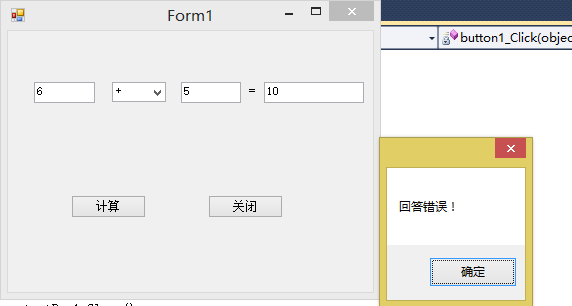
asp换脸
using System;

using System.Collections.Generic;

using System.Linq;

using System.Web;

/// <summary>

///fuhao 的摘要说明

/// </summary>

public class fuhao

{

    private Isuan s;

    public fuhao(string a)

    {

        switch (a)

        {

            case"+":

                s = new add();

                break;

            case "-":

                s = new sub();

                break;

            case "*":

                s = new cml();

                break;

            case "/":

                s = new div();

                break;

        }

    }

    public int suan(int a, int b)

    {

        return s.cla(a,b);

    }

}
using System;

using System.Collections.Generic;

using System.Linq;

using System.Web;

/// <summary>

///suan 的摘要说明

/// </summary>

     public interface Isuan

    {

         int cla(int a, int b);

    }

    public class add:Isuan

    {

        public int cla(int a, int b)

        {

            return a + b;

        }

    }

    public class sub:Isuan

    {

        public int cla(int a, int b)

        {

            return a - b;

        }

    }

    public class cml:Isuan

    {

        public int cla(int a, int b)

        {

            return a * b;

        }

    }

    public class div:Isuan

    {

        public int cla(int a, int b)

        {

            return a / b;

        }

    }
using System;

using System.Collections.Generic;

using System.Linq;

using System.Web;

using System.Web.UI;

using System.Web.UI.WebControls;

public partial class _Default : System.Web.UI.Page

{

    private int An;

    protected void Page_Load(object sender, EventArgs e)

    {

    }

    protected void Button1_Click(object sender, EventArgs e)

    {

        fuhao b = new fuhao(TextBox2.Text);

        An=b.suan(int.Parse(TextBox1.Text),int.Parse(TextBox3.Text));

        if (TextBox4.Text == An.ToString())

        {

            Response.Write("回答正确!");

        }

        else

        {

            Response.Write("回答错误!");

        }

    }

}

封装,策略,Asp换脸的更多相关文章
- 封装,策略模式,Asp换脸
1.简单封装 1>计算类 using System; using System.Collections.Generic; using System.Linq; using System.Text ...
- Angular2-三种样式封装策略的区别
Angular2有三种样式封装方式,分别是None.Native.Emulated. 可用元数据“encapsulation”配置,配置方式如下: encapsulation: ViewEncapsu ...
- Wpf+数据库代码封装+策略模式封装
运行界面: 数据库保存的题: 数据库封装代码: using System; using System.Collections.Generic; using System.Linq; using Sys ...
- 计算器简单封装和ASP.net
封装: using System; using System.Collections.Generic; using System.Linq; using System.Text; namespace ...
- 自己封装的ASP.NET的MYSQL的数据库操作类
/** * 作者:牛腩 * 创建时间:2010年3月7日17时35分 * 类说明:对MYSQL数据库的操作类 */ using System; using System.Data; using MyS ...
- 使用NetBox实现ASP网页封装为EXE教程
简单的形容就是把ASP文件打包 成一个EXE文件,并且不需要在调试的机器上安装IIS即可正常调试.如果按照说明书来操作的话,观看比较繁琐,本人为方便大家使用,现制作一个简单的使用教程. 封装过程 1. ...
- 在 ASP.NET Core Web API中使用 Polly 构建弹性容错的微服务
在 ASP.NET Core Web API中使用 Polly 构建弹性容错的微服务 https://procodeguide.com/programming/polly-in-aspnet-core ...
- javascript设计模式:策略模式
前言 策略模式有效利用组合.委托.多态等技术和思想,可以有效避免多重条件选择语句. 策略模式对开放-封闭原则提供了很好的支持,将算法封装在strategy中,使得他们易于切换.理解.扩展. 策略模式中 ...
- IOS之Objective-C学习 策略模式
对于策略模式,我个人理解策略模式就是对各种规则的一种封装的方法,而不仅仅是对算法的封装与调用而已.与工厂模式中简单工厂有点类似,但是比简单工厂更有耦合度,因为策略模式以相同的方法调用所有的规则,减少了 ...
随机推荐
- JavaScript-闭包函数(理解)
JavaScript-闭包函数(理解) var foo = function (a) { return function inner () { console.log(a) } } var faa = ...
- EasyX_无法填充圆颜色的问题
官网:https://www.easyx.cn/ 在线帮助文档:https://docs.easyx.cn/ 目标:生成一个边框为黄色,填充为蓝色的圆 遇到的问题:使用以下代码,只能生成边框为黄色的圆 ...
- easyui div 上下布局 最大化按钮 隐藏标题
背景:easyui在做上下布局的时候,上面是数据列表,下面是数据图表.如下图 需要在上下面板右上角加上最大化按钮,以便可以全屏显示.逻辑就是当上面点击最大化时候,隐藏下面,主意:此时需要将下面的div ...
- Kali渗透测试1-Netcat
What is Netcat? Netcat is a featured networking utility which reads and writes data across network c ...
- 基于 Keras 用深度学习预测时间序列
目录 基于 Keras 用深度学习预测时间序列 问题描述 多层感知机回归 多层感知机回归结合"窗口法" 改进方向 扩展阅读 本文主要参考了 Jason Brownlee 的博文 T ...
- Django model字段类型(转)
AutoField 一个 IntegerField, 添加记录时它会自动增长. 你通常不需要直接使用这个字段; 如果你不指定主键的话,系统会自动添加一个主键字段到你的 model.(参阅 _自 ...
- AGC 018 F - Two Trees
F - Two Trees 链接 题意: 给定两棵都是N个节点的有根树,节点均从1~N标号.给每个标号定一个权值(类似一号点的权值是x,那么两棵树中1号点的权值都是x),使在两棵树满足以任意节点为根的 ...
- 奇技淫巧之 unordered_map
哇,虽然我不知道到为什么这个东西比map快(快了一倍),注意unordered_map要在c++11以上的编译环境下才能用,如c++11,GNU G++11 5.1.0,GNU G++14 .
- 3.PO如何给开发团队讲好故事
敏捷开发系列文章目录 讲出符合开发团队味口的故事. 上一章说了敏捷开发团队的构成与迭代过程,本章重点说一下迭代第一天的计划会议.熟话说“好的开始就成功了一半”,一个迭代的计划会议做得好不好确实直接注定 ...
- Git使用教程(一)---本地git管理
之前写过不少小demo,因为没有很好的整理,很多demo都找不到了,必要的时候又要重新写这些demo:这是一个很头疼的问题,很烦躁.网上看到git的版本控制以及托管,很nice.开始学习使用git,关 ...