
封装,策略,Asp换脸
封装、策略
using System;

using System.Collections.Generic;

using System.Linq;

using System.Text;

namespace 算

{

    public interface Isuan

    {

         int calculate(int a, int b);

    }

    public  class add : Isuan

    {

        public int calculate(int a,int b)

        {

            return a + b;

        }

    }

    public class sub : Isuan

    {

        public int calculate(int a, int b)

        {

            return a - b;

        }

    }

    public class mal : Isuan

    {

        public int calculate(int a, int b)

        {

            return a * b;

        }

    }

    public class div : Isuan

    {

        public int calculate(int a, int b)

        {

            return a / b;

        }

    }

}
using System;

using System.Collections.Generic;

using System.Linq;

using System.Text;

using System.IO;

namespace 算

{

    class fuhao

    {

        private Isuan fh;

        public fuhao(string a)

        {

            switch(a)

            {

                case"+":

                    fh = new add();

                    break;

                case "-":

                    fh = new sub();

                    break;

                case "*":

                    fh = new mal();

                    break;

                case "/":

                    fh = new div();

                    break;

            }

        }

        public int jisuan(int a, int b)

        {

            return fh.calculate(a, b);

        }

    }

}
using System;

using System.Collections.Generic;

using System.ComponentModel;

using System.Data;

using System.Drawing;

using System.Linq;

using System.Text;

using System.Windows.Forms;

using System.IO;

namespace 算

{

    public partial class Form1 : Form

    {

        public Form1()

        {

            InitializeComponent();

        }

        private int An;

        private void button2_Click(object sender, EventArgs e)

        {

            this.Close();

        }

        private void button1_Click(object sender, EventArgs e)

        {
            fuhao clacuter = new fuhao(comboBox1.Text);
            An = clacuter.jisuan(int.Parse(textBox1.Text), int.Parse(textBox2.Text));

            if (textBox3.Text == An.ToString())

            {

                MessageBox.Show("回答正确!");

            }

            else

            {

                MessageBox.Show("回答错误!");

            }

            textBox1.Clear();

            textBox2.Clear();

            comboBox1.Text = "";

            textBox3.Clear();

        }

        private void textBox3_KeyDown(object sender, KeyEventArgs e)

        {

            if (e.KeyCode == Keys.Enter)

            {

                fuhao clacuter = new fuhao(comboBox1.Text);

                An = clacuter.jisuan(int.Parse(textBox1.Text), int.Parse(textBox2.Text));

                if (textBox3.Text == An.ToString())

                {

                    MessageBox.Show("回答正确!");

                }

                else

                {

                    MessageBox.Show("回答错误!");

                }

                textBox1.Clear();

                textBox2.Clear();

                comboBox1.Text = "";

                textBox3.Clear();

            }

        }

    }

}

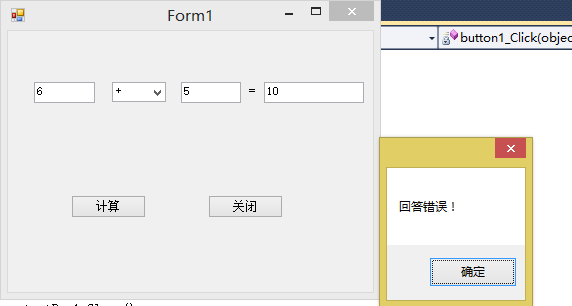
asp换脸
using System;

using System.Collections.Generic;

using System.Linq;

using System.Web;

/// <summary>

///fuhao 的摘要说明

/// </summary>

public class fuhao

{

    private Isuan s;

    public fuhao(string a)

    {

        switch (a)

        {

            case"+":

                s = new add();

                break;

            case "-":

                s = new sub();

                break;

            case "*":

                s = new cml();

                break;

            case "/":

                s = new div();

                break;

        }

    }

    public int suan(int a, int b)

    {

        return s.cla(a,b);

    }

}
using System;

using System.Collections.Generic;

using System.Linq;

using System.Web;

/// <summary>

///suan 的摘要说明

/// </summary>

     public interface Isuan

    {

         int cla(int a, int b);

    }

    public class add:Isuan

    {

        public int cla(int a, int b)

        {

            return a + b;

        }

    }

    public class sub:Isuan

    {

        public int cla(int a, int b)

        {

            return a - b;

        }

    }

    public class cml:Isuan

    {

        public int cla(int a, int b)

        {

            return a * b;

        }

    }

    public class div:Isuan

    {

        public int cla(int a, int b)

        {

            return a / b;

        }

    }
using System;

using System.Collections.Generic;

using System.Linq;

using System.Web;

using System.Web.UI;

using System.Web.UI.WebControls;

public partial class _Default : System.Web.UI.Page

{

    private int An;

    protected void Page_Load(object sender, EventArgs e)

    {

    }

    protected void Button1_Click(object sender, EventArgs e)

    {

        fuhao b = new fuhao(TextBox2.Text);

        An=b.suan(int.Parse(TextBox1.Text),int.Parse(TextBox3.Text));

        if (TextBox4.Text == An.ToString())

        {

            Response.Write("回答正确!");

        }

        else

        {

            Response.Write("回答错误!");

        }

    }

}

封装,策略,Asp换脸的更多相关文章
- 封装,策略模式,Asp换脸
1.简单封装 1>计算类 using System; using System.Collections.Generic; using System.Linq; using System.Text ...
- Angular2-三种样式封装策略的区别
Angular2有三种样式封装方式,分别是None.Native.Emulated. 可用元数据“encapsulation”配置,配置方式如下: encapsulation: ViewEncapsu ...
- Wpf+数据库代码封装+策略模式封装
运行界面: 数据库保存的题: 数据库封装代码: using System; using System.Collections.Generic; using System.Linq; using Sys ...
- 计算器简单封装和ASP.net
封装: using System; using System.Collections.Generic; using System.Linq; using System.Text; namespace ...
- 自己封装的ASP.NET的MYSQL的数据库操作类
/** * 作者:牛腩 * 创建时间:2010年3月7日17时35分 * 类说明:对MYSQL数据库的操作类 */ using System; using System.Data; using MyS ...
- 使用NetBox实现ASP网页封装为EXE教程
简单的形容就是把ASP文件打包 成一个EXE文件,并且不需要在调试的机器上安装IIS即可正常调试.如果按照说明书来操作的话,观看比较繁琐,本人为方便大家使用,现制作一个简单的使用教程. 封装过程 1. ...
- 在 ASP.NET Core Web API中使用 Polly 构建弹性容错的微服务
在 ASP.NET Core Web API中使用 Polly 构建弹性容错的微服务 https://procodeguide.com/programming/polly-in-aspnet-core ...
- javascript设计模式:策略模式
前言 策略模式有效利用组合.委托.多态等技术和思想,可以有效避免多重条件选择语句. 策略模式对开放-封闭原则提供了很好的支持,将算法封装在strategy中,使得他们易于切换.理解.扩展. 策略模式中 ...
- IOS之Objective-C学习 策略模式
对于策略模式,我个人理解策略模式就是对各种规则的一种封装的方法,而不仅仅是对算法的封装与调用而已.与工厂模式中简单工厂有点类似,但是比简单工厂更有耦合度,因为策略模式以相同的方法调用所有的规则,减少了 ...
随机推荐
- ios 开发UI篇—UITextView
概述 UITextView可滚动的多行文本区域 UITextView支持使用自定义样式信息显示文本,并支持文本编辑.您通常使用文本视图来显示多行文本,例如在显示大型文本文档的正文时. UITextVi ...
- 一、用Delphi10.3模拟读取百度网页,并读取相关头部信息
一.读取网页的如下: uses TxHttp, Classes, TxCommon, Frm_WebTool, SysUtils; var m_Url: string; m_Http: TTxHttp ...
- 搜集到的一些python资料
1,MOOC课程-Python语言程序设计(嵩天)http://www.icourse163.org/course/BIT-268001 2,Python123网站(嵩天老师的教学网站):https: ...
- FFT/NTT/MTT学习笔记
FFT/NTT/MTT Tags:数学 作业部落 评论地址 前言 这是网上的优秀博客 并不建议初学者看我的博客,因为我也不是很了解FFT的具体原理 一.概述 两个多项式相乘,不用\(N^2\),通过\ ...
- 【python3】将视频转换为代码视频
一.环境准备 1.需要安装opencv,直接安装 pip install opencv-python 2.需要安装ffmpeg ,直接解压免安装,下载传送门: 将 ffmpeg.exe 的路径复制,替 ...
- 13-[函数进阶]-列表生成式,生成器&迭代器
1.列表生成式 Python一种独特的语法,相当于语法糖的存在,可以帮你在某些场合写出比较精简酷炫的代码.但没有它,也不会有太多的影响. 语法糖(Syntactic sugar),也译为糖衣语法,是由 ...
- 13-[Mysql]--pymysql模块
1.介绍 之前我们都是通过MySQL自带的命令行客户端工具mysql来操作数据库,那如何在python程序中操作数据库呢?这就用到了pymysql模块,该模块本质就是一个套接字客户端软件,使用前需要事 ...
- 实验二:ICMP重定向攻击
-:实验原理 ICMP重定向信息是路由器向主机提供实时的路由信息,当一个主机收到ICMP重定向信息时,它就会根据这个信息来更新自己的路由表.由于缺乏必要的合法性检查,如果一个黑客想要被攻击的主机修改它 ...
- Excel表格生成sql语句
假如excel表格中有A.B.C三列数据,希望导入到数据库users表中,对应的字段分别是name,sex,age ,在你的excel表格中增加一列,利用excel的公式自动生成sql语句,方法如下: ...
- Spring学习(十八)----- Spring AOP+AspectJ注解实例
我们将向你展示如何将AspectJ注解集成到Spring AOP框架.在这个Spring AOP+ AspectJ 示例中,让您轻松实现拦截方法. 常见AspectJ的注解: @Before – 方法 ...