
Lab 3-2
Analyze the malware found in the file Lab03-02.dll using basic dynamic analysis tools.
Questions and Short Answers
How can you get this malware to install itself?
A: To install the malware as a service, run the malware’s exported installA function via rundll32.exe with rundll32.exe Lab03-02.dll,installA.
How would you get this malware to run after installation?
A: To run the malware, start the service it installs using the net command net start IPRIP.
How can you find the process under which this malware is running?
A: Use Process Explorer to determine which process is running the service. Since the malware will be running within one of the svchost.exe files on the system, hover over each one until you see the service name, or search for Lab03-02.dll using the Find DLL feature of Process Explorer.
Which filters could you set in order to use procmon to glean information?
A: In procmon you can filter on the PID you found using Process Explorer.

What are the malware’s host-based indicators?
A: By default, the malware installs as the service IPRIP with a display name of Intranet Network Awareness (INA+) and description of “Depends INA+, Collects and stores network configuration and location information, and notifies applications when this information changes.” It installs itself for persistence in the registry at HKLM\SYSTEM\CurrentControlSet\Services\IPRIP Parameters\ServiceDll: %CurrentDirectory%\Lab03-02.dll. If you rename Lab03-02.dll to something else, such as malware.dll, then it writes malware.dll into the registry key, instead of using the name Lab03-02.dll.
Are there any useful network-based signatures for this malware?
A: The malware resolves the domain name practicalmalwareanalysis.com and connects to that host over port 80 using what appears to be HTTP. It does a GET request for serve.html and uses the User-Agent %ComputerName% Windows XP 6.11.
Detailed Analysis
We begin with basic static analysis by looking at the PE file structure and strings. Figure 3-5L shows that this DLL has five exports, as listed from \({\color{red}1}\) and below. The export ServiceMain suggests that this malware needs to be installed as a service in order to run properly.

Figure 3-5L: PEview of Lab03-02.dll exports
The following listing shows the malware’s interesting imported functions in bold.

These include service-manipulation functions, such as CreateService, and registry-manipulation functions, such as RegSetValueEx. Imported networking functions, such as HttpSendRequest, suggest that the malware uses HTTP.
Next, we examine the strings, as shown in the following listing.
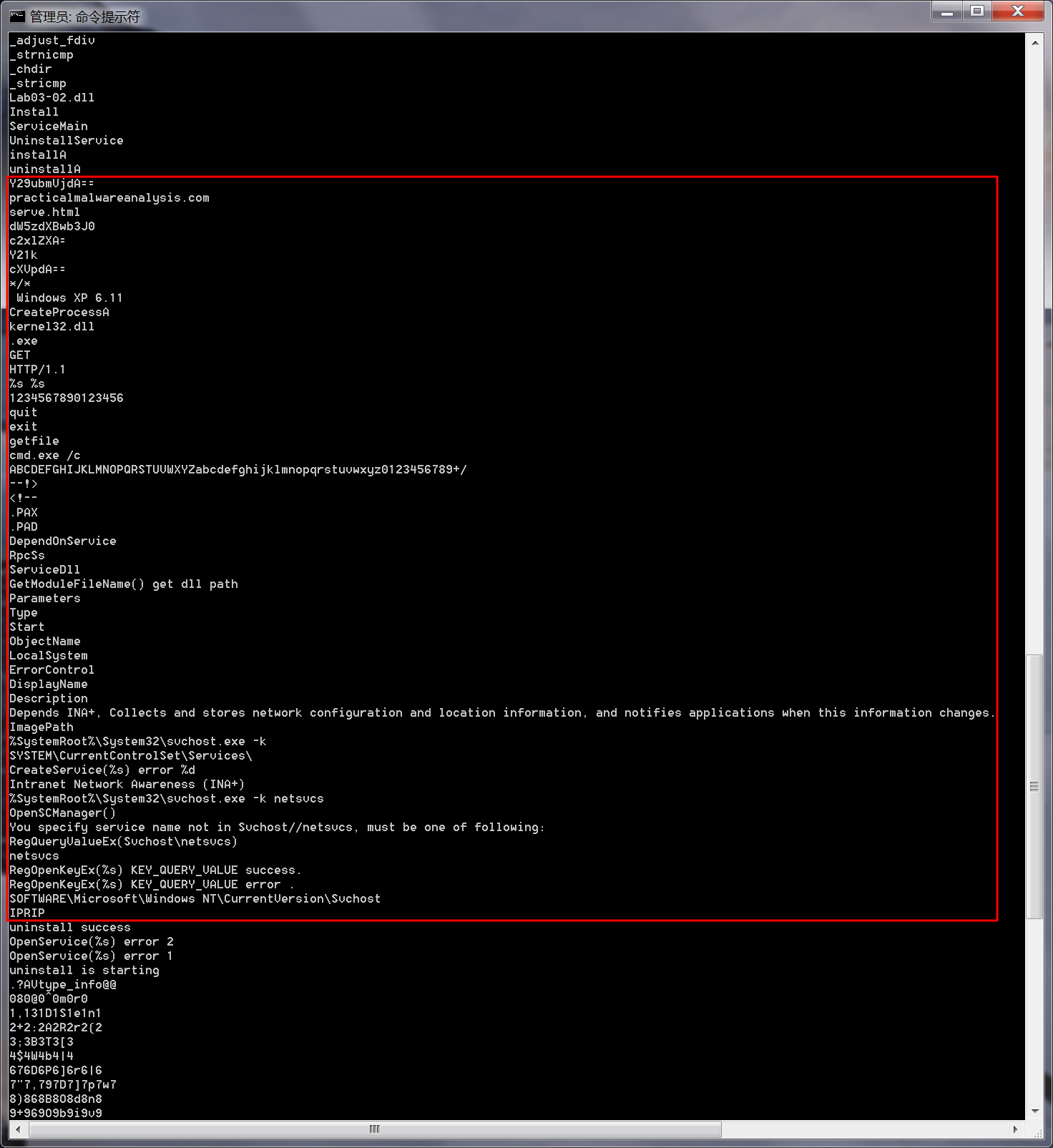
We see several interesting strings, including registry locations, a domain name, unique strings like IPRIP and serve.html, and a variety of encoded strings. Basic dynamic techniques may show us how these strings and imports are used.
The results of our basic static analysis techniques lead us to believe that this malware needs to be installed as a service using the exported function installA. We’ll use that function to attempt to install this malware, but before we do that, we’ll launch Regshot to take a baseline snapshot of the registry and use Process Explorer to monitor the processes running on the system. After setting up Regshot and Process Explorer, we install the malware using rundll32.exe, as follows:
C:\>rundll32.exe Lab03-02.dll,installA
注:win7中无法复现,使用Windows XP可成功复现。
After installing the malware, we use Process Explorer to confirm that it has terminated by making sure that rundll32.exe is no longer in the process listing. Next, we take a second snapshot with Regshot to see if the malware installed itself in the registry.
The edited Regshot results are shown in the following listing.
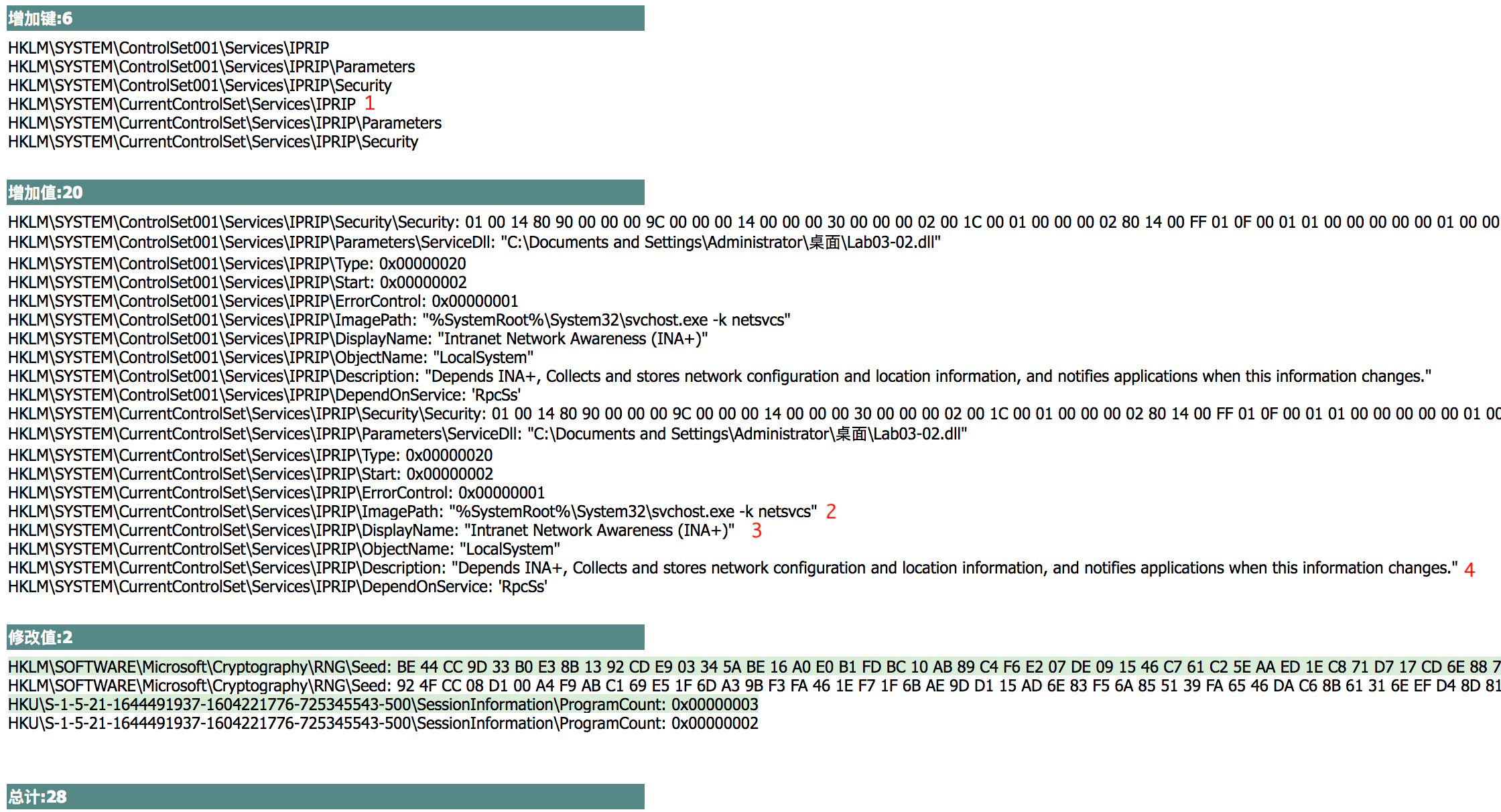

The Keys added section shows that the malware installed itself as the service IPRIP at \({\color{red}1}\). Since the malware is a DLL, it depends on an executable to launch it. In fact, we see at \({\color{red}2}\) that the ImagePath is set to svchost.exe, which means that the malware will be launched inside an svchost.exe process. The rest of the information, such as the DisplayName and Description at \({\color{red}3}\) and \({\color{red}4}\), creates a unique fingerprint that can be used to identify the malicious service.
If we examine the strings closely, we see SOFTWARE\Microsoft\Windows NT CurrentVersion\SvcHost and a message "You specify service name not in Svchost// netsvcs, must be one of following". If we follow our hunch and examine the \SvcHost\netsvcs registry key, we can see other potential service names we might use, like 6to4 AppMgmt. Running Lab03-02.dll,installA 6to4 will install this malware under the 6to4 service instead of the IPRIP service, as in the previous listing.
After installing the malware as a service, we could launch it, but first we’ll set up the rest of our basic dynamic tools. We run procmon (after clearing out all events); start Process Explorer; and set up a virtual network, including ApateDNS and Netcat listening on port 80 (since we see HTTP in the strings listing).
Since this malware is installed as the IPRIP service, we can start it using the net command in Windows, as follows:
C:\>net start IPRIP
The Intranet Network Awareness (INA+) service is starting.
The Intranet Network Awareness (INA+) service was started successfully.
The fact that the display name (INA+) matches the information found in the registry tells us that our malicious service has started.
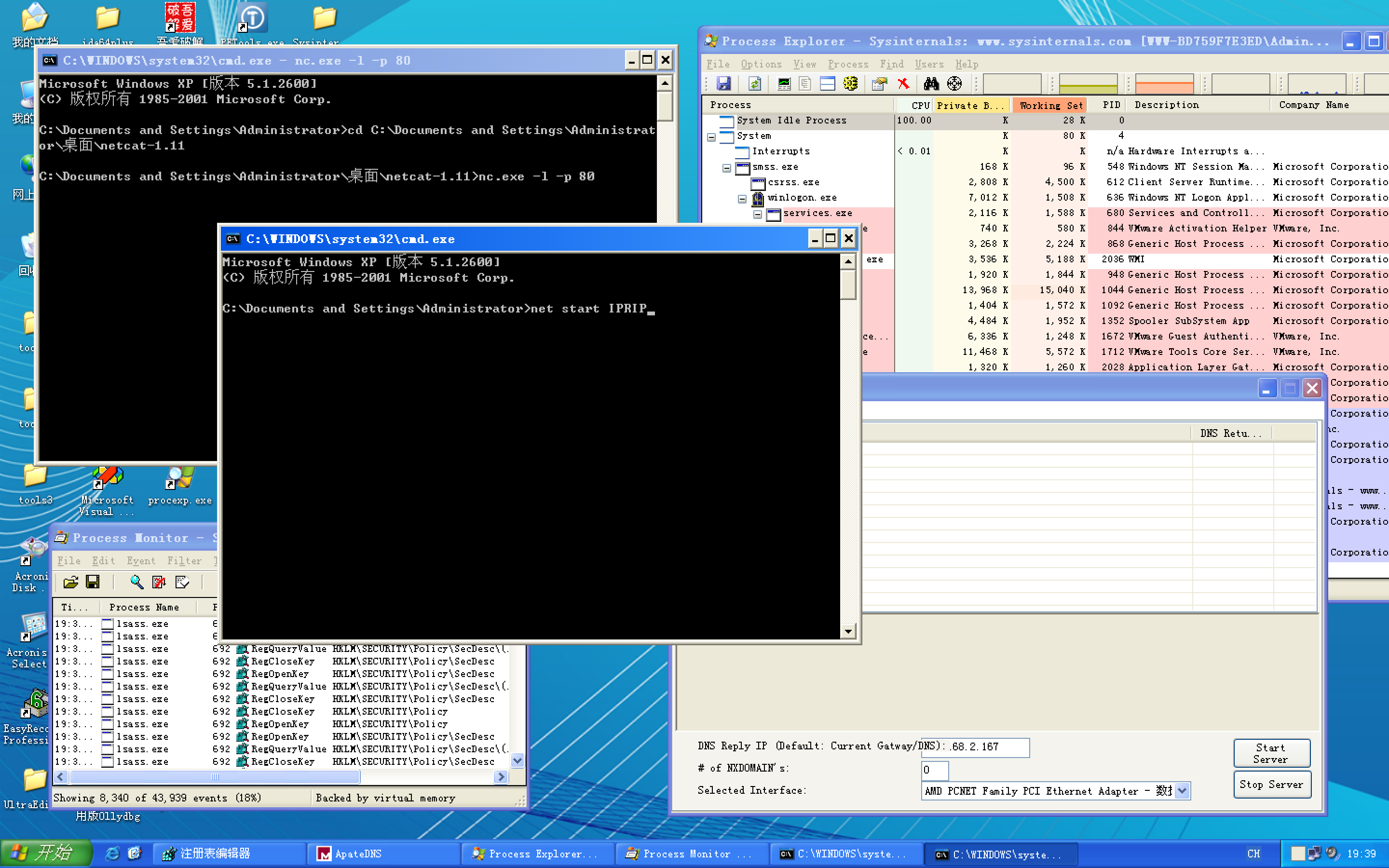
注:上图按 Enter 键前,记得ApateDNS软件点击Start Server。

Next, we open Process Explorer and attempt to find the process in which the malware is running by selecting Find -> Find Handle or DLL to open the dialog shown in Figure 3-6L. We enter Lab03-02.dll and click Search. As shown in the figure, the result tells us that Lab03-02.dll is loaded by svchost.exe with the PID 1044. (The specific PID may differ on your system.)
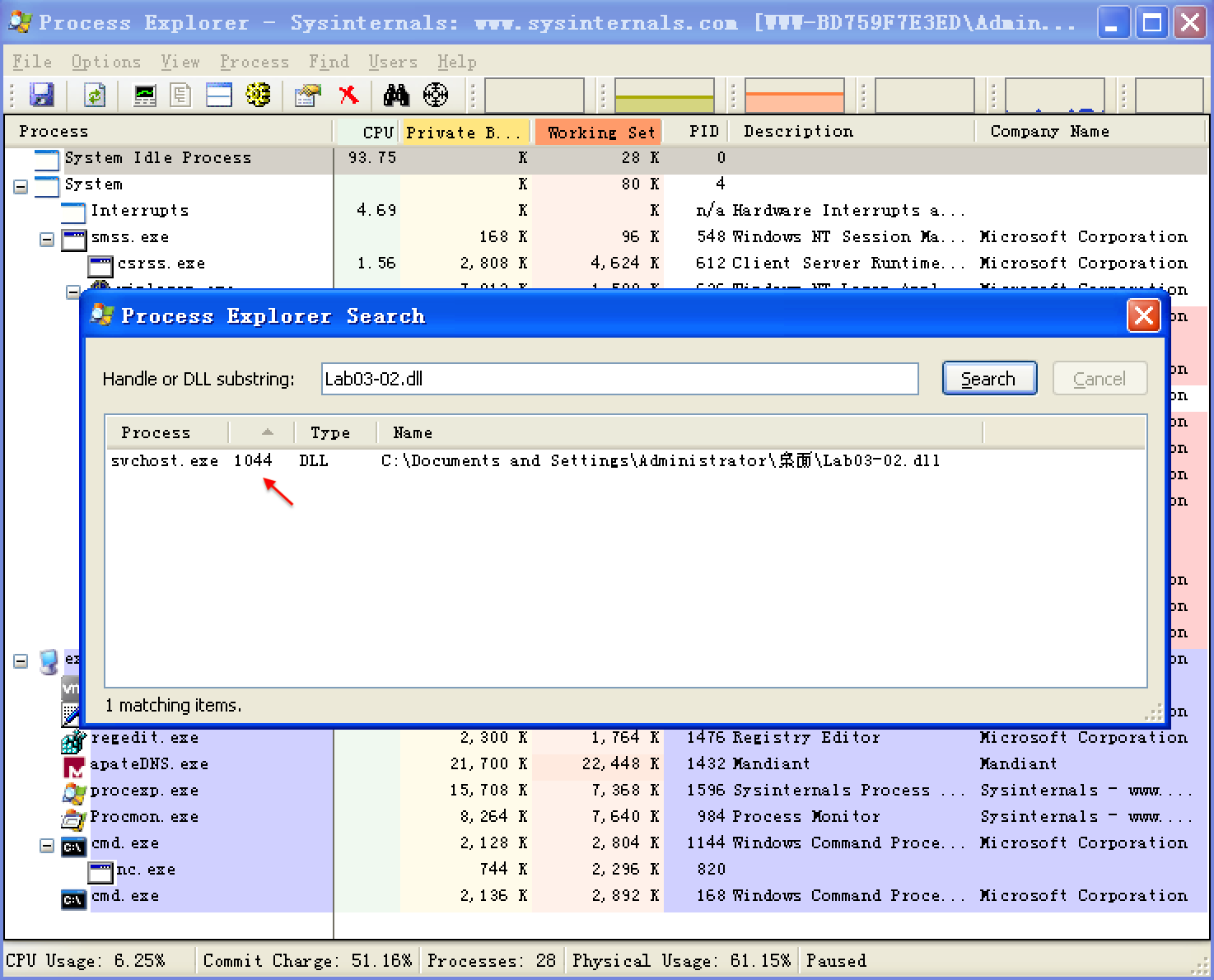
Figure 3-6L: Searching for a DLL in Process Explorer
In Process Explorer, we select View -> Lower Pane View -> DLLs and choose the svchost.exe running with PID 1044. Figure 3-7L shows the result. The display name Intranet Network Awareness (INA+) shown at \({\color{red}1}\) confirms that the malware is running in svchost.exe, which is further confirmed when we see at \({\color{red}2}\) that Lab03-02.dll is loaded.

Figure 3-7L: Examining service malware in Process Explorer
Next, we turn our attention to our network analysis tools. First, we check ApateDNS to see if the malware performed any DNS requests. The output shows a request for practicalmalwareanalysis.com, which matches the strings listing shown earlier.
NOTE
It takes 60 seconds after starting the service to see any network traffic (the program does a Sleep(60000) before attempting network access). If the networking connection fails for any reason (for example, you forgot to set up ApateDNS), it waits 10 minutes before attempting to connect again.
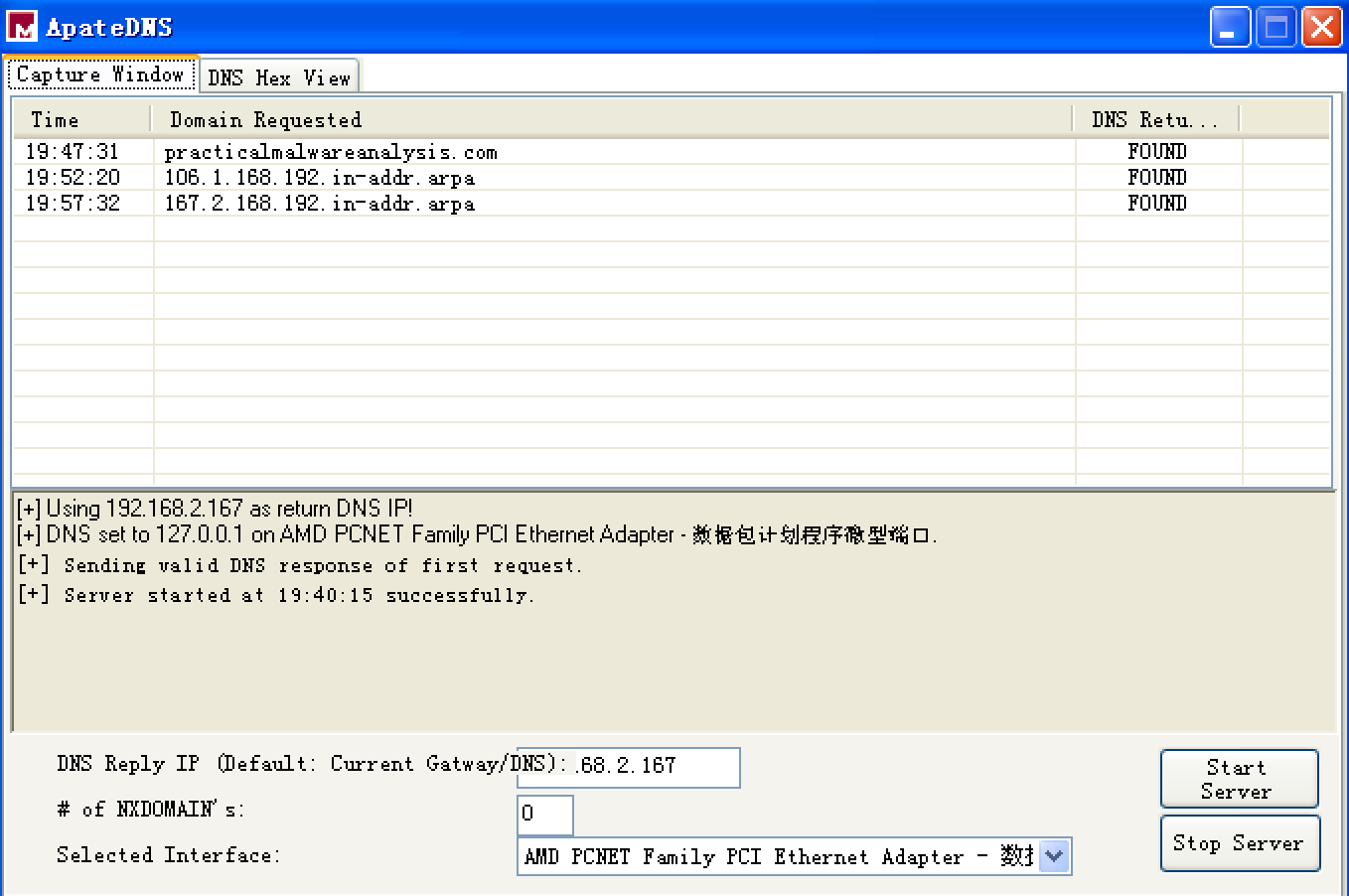
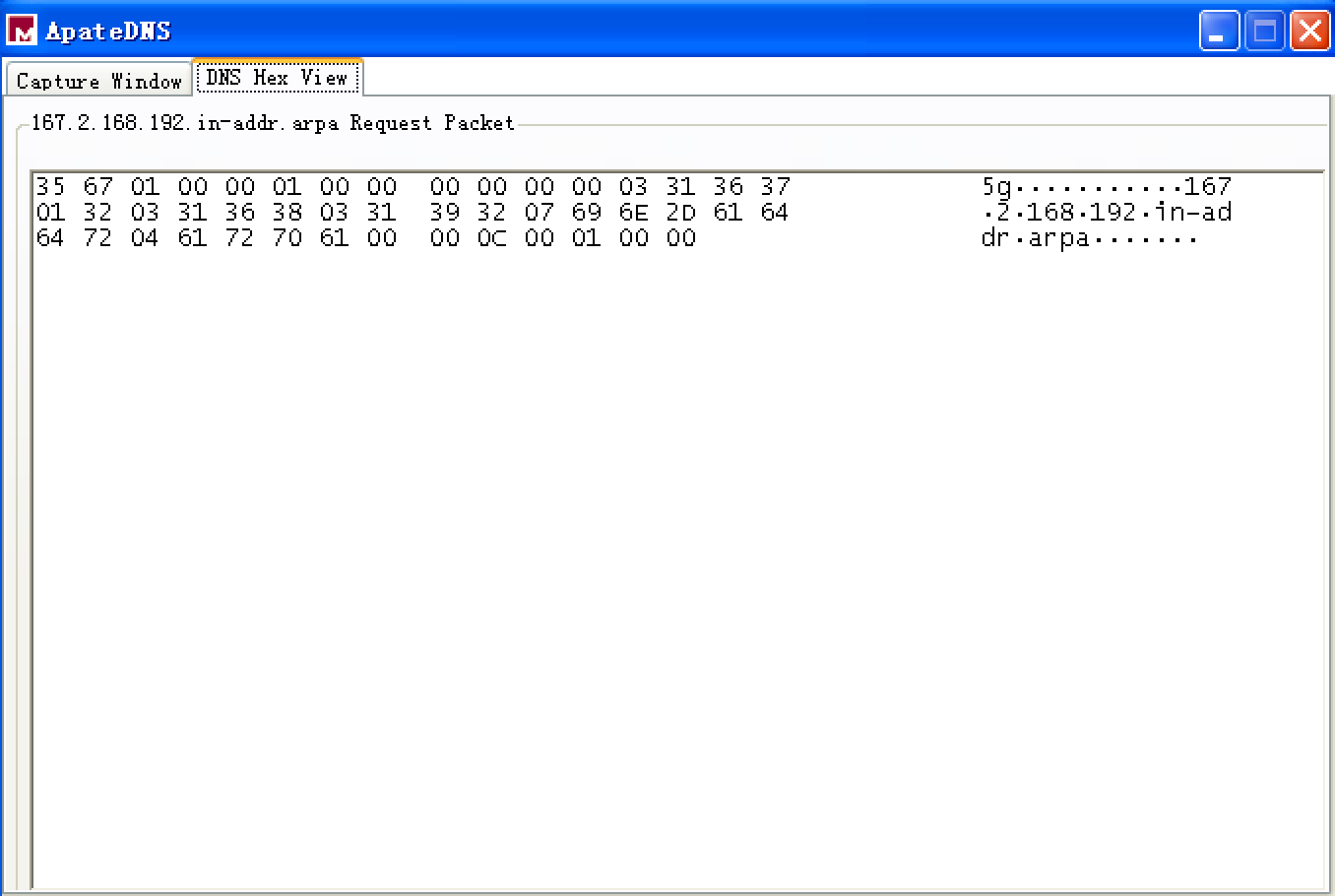
双击 ApateDNS 的 Capture Window 窗口的 Domain Requested 相应条目,显示 DNS Hex View,如下:
最后 ApateDNS 点击 Stop Server,在服务器端,快捷键 control + c 结束服务器,查看生成的日志文件 report.3385.txt 如下:

We complete our network analysis by examining the Netcat results, as follows:

书中的结果是如下:

We see that the malware performs an HTTP GET request over port 80 (we were listening over port 80 with Netcat since we saw HTTP in the string listing). We run this test several times, and the data appears to be consistent across runs.
We can create a couple of network signatures from this data. Because the malware consistently does a GET request for serve.html, we can use that GET request as a network signature. The malware also uses the User-Agent MalwareAnalysis2 Windows XP 6.11. MalwareAnalysis2 is our malware analysis virtual machine’s name (so this portion of the User-Agent will be different on your machine). The second part of the User-Agent (Windows XP 6.11) is consistent and can be used as a network signature.
Preference
Lab 3-2的更多相关文章
- MIT 6.828 JOS学习笔记18. Lab 3.2 Part B: Page Faults, Breakpoints Exceptions, and System Calls
现在你的操作系统内核已经具备一定的异常处理能力了,在这部分实验中,我们将会进一步完善它,使它能够处理不同类型的中断/异常. Handling Page Fault 缺页中断是一个非常重要的中断,因为我 ...
- MIT 6.828 JOS学习笔记17. Lab 3.1 Part A User Environments
Introduction 在这个实验中,我们将实现操作系统的一些基本功能,来实现用户环境下的进程的正常运行.你将会加强JOS内核的功能,为它增添一些重要的数据结构,用来记录用户进程环境的一些信息:创建 ...
- MIT 6.828 JOS学习笔记16. Lab 2.2
Part 3 Kernel Address Space JOS把32位线性地址虚拟空间划分成两个部分.其中用户环境(进程运行环境)通常占据低地址的那部分,叫用户地址空间.而操作系统内核总是占据高地址的 ...
- MIT 6.828 JOS学习笔记15. Lab 2.1
Lab 2: Memory Management lab2中多出来的几个文件: inc/memlayout.h kern/pmap.c kern/pmap.h kern/kclock.h kern/k ...
- MIT 6.828 JOS学习笔记10. Lab 1 Part 3: The kernel
Lab 1 Part 3: The kernel 现在我们将开始具体讨论一下JOS内核了.就像boot loader一样,内核开始的时候也是一些汇编语句,用于设置一些东西,来保证C语言的程序能够正确的 ...
- MIT 6.828 JOS学习笔记7. Lab 1 Part 2.2: The Boot Loader
Lab 1 Part 2 The Boot Loader Loading the Kernel 我们现在可以进一步的讨论一下boot loader中的C语言的部分,即boot/main.c.但是在我们 ...
- python opencv 利用Lab空间把春天的场景改为秋天
前一段时间实现了Reinhard颜色迁移算法,感觉挺有意思的,然后在代码上随意做了一些更改,有了一些发现,把Lab通道的a通道值改为127左右,可以将绿色改为黄色,而对其他颜色的改动非常小,因此可以将 ...
- Acadia Lab 228 + Lab 222
又是一对串烧实验,布好线后非常方便就可以一起完成. 连线方案一模一样: Lab 228 数码管骰子 核心代码如下: def loop() : global cnt global btn_read,se ...
- Acadia Lab 203 + Lab 231
在做完 Lab 6 之后,惊觉选做实验缺口很大,于是遍历了一遍夏任务,找到了一条最省力的路线. 做完 Lab 6 的连线不用拆,可以接下来做以下两个实验: Lab 203 网络时钟 核心代码如下: v ...
- GJM : 【技术干货】给The Lab Renderer for Unity中地形添加阴影
感谢您的阅读.喜欢的.有用的就请大哥大嫂们高抬贵手"推荐一下"吧!你的精神支持是博主强大的写作动力以及转载收藏动力.欢迎转载! 版权声明:本文原创发表于 [请点击连接前往] ,未经 ...
随机推荐
- 总结: 在fc23中, 安装音频mp3 视频flv 的播放插件其实很简单, 只要一步就可以了: dnf install gstreamer1-libav
同样是 firefox, 单词的在线发音, 跟 百度mp3的在线播放不是一样的!!! 百度/优酷 的在线播放, 用的确实是 flash player , 所以 你安装好libflashplayer后, ...
- P4213 【模板】杜教筛(Sum)(杜教筛)
根据狄利克雷卷积的性质,可以在低于线性时间复杂度的情况下,求积性函数前缀和 公式 \[ 求\sum_{i=1}^{n}\mu(i) \] 因为\(\mu*I=\epsilon\) 所以设\(h=\mu ...
- 题解——洛谷P3390 【模板】矩阵快速幂(矩阵乘法)
模板题 留个档 #include <cstdio> #include <algorithm> #include <cstring> #define int long ...
- JavaScript中 call和apply
call()方法和apply()方法的作用相同,他们的区别在于接收参数的方式不同. 对于call(),第一个参数是this值没有变化,变化的是其余参数都直接传递给函数.(在使用call()方法时,传递 ...
- JVM介绍
1. 什么是JVM? JVM是Java Virtual Machine(Java虚拟机)的缩写,JVM是一种用于计算设备的规范,它是一个虚构出来的计算机,是通过在实际的计算机上仿真模拟各种计算机功能来 ...
- re模块与subprocess模块介绍
一:re模块 处理正则表达式的模块,正则表达式就是一些带有特殊含义的符号或者符号的组合. 作用:对字符串进行过滤,在一堆字符串中找到你所关心的内容,你就需要告诉计算机你的过滤的 规则是什么 ...
- python3 items() 与 python2 中iteritems()的区别
在Python2.x中, iteritems() 用于返回本身字典列表操作后的迭代 Python 3.x 里面, iteritems() 方法已经废除了,而 items() 得到的结果是和 2.x 里 ...
- zzulioj 1206 字符串的修改 (字符串修改)
不难,理解一下直接过,代码如下: #include<stdio.h> #include<string.h> #include<math.h> #include< ...
- VS2010_DLL_共享数据段
1.问题:写了一个DLL,自己一直测试不成功(程序A设置了 数值之后,程序B 始终读不到 读出来的都是初始化时的数值...) 具体过程: (1).DLL当初没想要用 共享数据段,测试使用 一直都是OK ...
- Excel 常用设置
首行固定 视图->冻结窗口