
58Ajax
Ajax
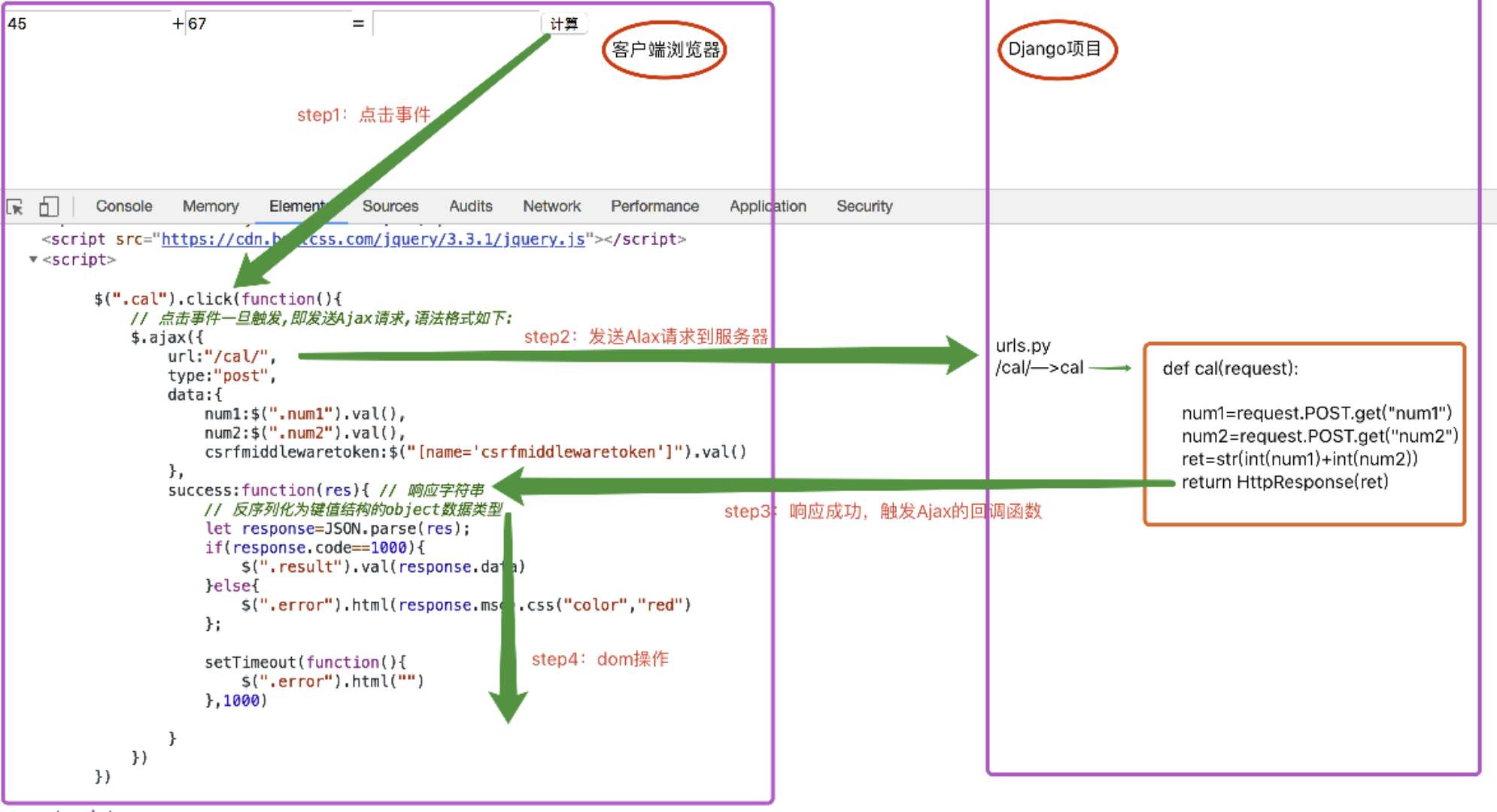
1 .客户端浏览器通过执行一段JS代码向服务器发送请求,服务器路由对应的视图函数返回一个json字符串作为响应,
浏览器接受响应后会触发该ajax请求的回调函数success,参数为响应字符串,success内通过DOM操作讲结果反映到页面上,
实现局部刷新,不再向之前的请求会将响应覆盖整个页面上。
2 .ajax请求不要返回render,redirect这些响应,就返回json字符串的HttpResponse!
1.AJAX 发送请求的两大特点:
1.异步交互
2.局部刷新
AJAX(Asynchronous Javascript And XML)翻译成中文就是“异步Javascript和XML”。即使用Javascript语言与服务器进行异步交互,传输的数据为XML(当然,传输的数据不只是XML,现在更多使用json数据)。
- 同步交互:客户端发出一个请求后,需要等待服务器响应结束后,才能发出第二个请求;
- 异步交互:客户端发出一个请求后,无需等待服务器响应结束,就可以发出第二个请求。
2. ajax 提交请求的两种方式
1.get
2.post
3.在前后端数据处理函数
python:
json.dumps()
json.loads()
JS:
JSON.stringfy([]) -------- json字符串
JSON.stringfy({}) -------- json字符串
JSON.stringfy('') -------- json字符串
JSON.parse(json字符串) ----> JS数据类型(数组,对象)
对数据处理的另一种形式:
1.python:
视图文件 views.py 文件中:
from django.http import JsonResponse
def login(request):

    from django.http import JsonResponse

    if request.method=="GET":

        return render(request,"login.html")

    else:

        res={"user":None,"msg":None}

        user=request.POST.get("user")

        pwd=request.POST.get("pwd")

        user_obj=UserInfo.objects.filter(user=user,pwd=pwd).first()

        if user_obj:

            # 登陆成功!

            res["user"]=user_obj.user

        else:

            # 登录失败

            res["msg"]='用户名或者密码错误!'

        return JsonResponse(res)
2.前端页面ajax 代码
<script>

    $(".login_btn").click(function () {

        // 发送Ajax请求

         $.ajax({

             url:"/login/",

             type:"post",

             data:{

                 user:$(".user").val(),

                 pwd:$(".pwd").val(),

                 csrfmiddlewaretoken:$("[name='csrfmiddlewaretoken']").val(),

             },

             success:function (res) {

                 console.log(res);

                 console.log(typeof res); # 由于服务端用的是JsonResponse(res)返回的数据,前端得到的数据类型是对象类型,直接点就可以取值,前端不需要用JSON.parse())

                 if(res.user){

                     location.href="/books/" // 跳转到books 页面

                 }else{

                     $('.error').html(res.msg).css("color","red");

                     setTimeout(function () {

                         $('.error').html('')

                     },1000)

                 };

             }

         })

    })

</script>
4.客户端浏览器给服务端发请求的形式:
1 地址栏输入url 回车 默认是get请求方式
2 form表单,用户点击submit按钮
--- get
--- post
3 超链接标签(a标签) 默认是get请求方式
4 Ajax请求
---get
---post
(1) 异步
(2) 局部刷新
5.文件上传
请求头 ContentType指的是请求体的编码类型,常见的类型共有3种:
(1)application/x-www-form-urlencoded
常见的post提交数据方式
form 表单默认时,不是设置enctype时
body 数据格式 user=yuan&age=22
(2)multipart/form-data
常见的post 提交数据方式
必须让 <form> 表单的 enctype 等于 multipart/form-data
(3)application/json
JSON 格式支持比键值对复杂得多的结构化数据
前端通过这个格式提交的数据,在后端 data =request.body中而不是在request.POST中,且得到的data为btyes 类型,需要decode 转化成json字符串格式,再通过json.loads(data)
前端:
 <input type="button" class="ajax_btn" value="submit_json">

//js 代码:通过ajax 发请求

$(".ajax_btn2").click(function () {

        $.ajax({

            url:"/put1/",

            type:"post",

            contentType:"json",

            data:JSON.stringify({

                a:1,

                b:2

            }),

            success:function (res) {

                console.log(res)

            }

        })

    })
视图中:
def put1(request):

    print(request.POST)#

    print(request.body)#ret =request.body

    import json

    data=json.loads(request.body.decode())

    print(data,type(data))

    return HttpResponse("OK")
2.基于ajax 方式的文件上传
注意的点:需要注销配置中的安全机制的中间键,或者前端页面上{% csrf_token %} ,ajax data字典中加上 csrfmiddlewaretoken:$("[name='csrfmiddlewaretoken']") j键值 不然会报错,下面代码是用的注销的中间键
1.前端代代码:
<body>

<input type="file" class="file"><input type="text" class="user"><input type="button" value="提交" class="button">

{#{% csrf_token %}#}

<script>

    $(".button").click(function () {

        alert(122);

        var user =$(".user").val();

        var file =$(".file")[0].files[0];  //$(".file")得到的是一个集合,$(".file")[0]取第一个file类型的input标签,然后点files方法,去其中的第一个

        console.log(file);
      //new 一个formdata对象

        var formdata= new FormData();
      // formdata 对象通过,append 方法 ,append("键”,"值”)

        formdata.append("user",user);

        formdata.append("file",file);

        $.ajax({

            url:"/file/",

            type:"post",

            contentType:false,

            processData:false,

            data:formdata,

            success:function (res) {

                console.log(res);

            }

      })

    })

</script>

</body>
2.后端(需要再配置文件注释掉安全机制)
MIDDLEWARE = [

    'django.middleware.security.SecurityMiddleware',

    'django.contrib.sessions.middleware.SessionMiddleware',

    'django.middleware.common.CommonMiddleware',

    # 'django.middleware.csrf.CsrfViewMiddleware',

    'django.contrib.auth.middleware.AuthenticationMiddleware',

    'django.contrib.messages.middleware.MessageMiddleware',

    'django.middleware.clickjacking.XFrameOptionsMiddleware',

]
settings配置中注释掉
from django.contrib import admin

from django.urls import path

from app1 import views

urlpatterns = [

    path('admin/', admin.site.urls),

    path('file/', views.file),

]
urls.py 文件中
视图中:
from django.shortcuts import render,HttpResponse

# Create your views here.

import os

def file(request):

    if request.method=="GET":

        return render(request,"file.html")

    else:

        user = request.POST.get("user")

        file_obj = request.FILES.get("file")  #得到一个文件句柄

        print(request.POST)

        print(file_obj.name) #得到文件名

        with open(os.path.join("media","images",file_obj.name),"wb") as f:

            for line in file_obj:

                f.write(line)

        return HttpResponse("上传成功!")
3.基于form 表单的文件上传
key:前端中,form表单中需要设置 enctype 属性 enctype="multipart/form-data"
<!DOCTYPE html>

<html lang="en">

<head>

    <meta charset="UTF-8">

    <title>Title</title>

    <script src="/static/jquery-3.3.1.js"></script>

</head>

<body>

<form action="" method="post" enctype="multipart/form-data">

    <input type="file" name="file"> <input type="text" name="user"><input type="submit">

</form>

</body>

</html>
视图:
#form 上传文件的视图

def file2(request):

    if request.method=="GET":

        return render(request,"file2.html")

    else:

        print(request.POST)

        # print(request.body)

        # print(request.FILES)

        file_obj=request.FILES.get("file")

        with open(os.path.join("media","images",file_obj.name),"wb") as f:

            for line in file_obj:

                f.write(line)

        return HttpResponse("上传成功")
6.ajax的请求流程
58Ajax的更多相关文章
随机推荐
- Bootstrap3基础 navbar 导航条 简单示例
内容 参数 OS Windows 10 x64 browser Firefox 65.0.2 framework Bootstrap 3.3.7 editor ...
- CICD 基础
代码测试覆盖率 最近在负责相关插件的集成,今天第一次接触到"代码覆盖率"这个概念,那么,就做些简单的笔记吧. 好文 如何提高一个研发团队的"代码速度"? 代碼覆 ...
- Nvme固体硬盘Intel750,SM961分别使用一段时间以后对比
在SM961使用了一年半(2017年1月17日购买)后,再次测试,这次测试使用AS_SSD_Benchmark工具进行测试 感觉CrystalDiskMark工具测出来的分数在所以工具中分数最高 看图 ...
- 【做题】neerc2017的A、C、I、L
A - Archery Tournament 一开始往化简公式的方向去想,结果没什么用. 考虑与一条垂线相交的圆的个数.不难YY,当圆的个数最多时,大概就是这个样子的: 我们稍微推一下式子,然后就能发 ...
- Caused by: org.apache.ibatis.reflection.ReflectionException: There is no getter for property named 'zoneId' in 'class java.lang.String'
本文为博主原创,未经允许不得而转载: 异常展示: dao层定义的接口为: public int getClientTotal(); 在mybatis中的sql为: <select id=&quo ...
- js运算符的一些特殊应用
作者: 小文 来源: http://www.cnblogs.com/daysme/ 时间: 2017/3/2 17:21:03 本文集合了了js运算符的一些特殊应用. js位运行符的运用. js运算符 ...
- PHP 时间函数time、date和microtime的区别
一.time.date 和 microtime函数 time----返回当前的 Unix 时间戳 date----格式化一个本地时间/日期 microtime----返回当前的 Unix 时间戳和微秒 ...
- commons-beanutils使用介绍
commons-beanutils是Apache开源组织提供的用于操作JAVA BEAN的工具包.使用commons-beanutils,我们可以很方便的对bean对象的属性进行操作.今天为大家介绍一 ...
- Spring-MVC依赖
<dependency> <groupId>javax.servlet</groupId> <artifactId>javax.servlet-api& ...
- URL helper 逆向破解思路+详细过程 利用messagebox破解
先了解一下软件的运行: 打开后是这样的,要注册 随便输入假注册码,看他怎么响应: 会弹出一个信息窗(massageBox)提示注册失败.到这里就行了,关掉,然后用OD打开,按F9跑起来: 这里输入假码 ...