
CSS3中新增的对文本和字体的设置
文字阴影
text-shadow: 水平偏移 垂直偏移 模糊 颜色
兼容性:IE10+
<!DOCTYPE html>

<html lang="en" manifest="index.manifest">

<head>

<meta charset="UTF-8">

<title>Document</title>

<style>

    p{

        color:blue;

        text-shadow: 3px 3px 3px black;

    }

</style>

</head>

<body>

    <p>这是一段测试文本鸭</p>

</body>

</html>

css3 换行
word-break: normal | break-all | keep-all
对于英文文本:normal 和 keep-all 效果相同;break-all 即字母和字母见换行,不考虑单词的影响
对于中文文本:normal 和 break-all 效果相同;keep-all 即根据标点符号换行
<!DOCTYPE html>

<html lang="en" manifest="index.manifest">

<head>

<meta charset="UTF-8">

<title>Document</title>

<style>

    p{width:500px;}

    span{background:#abcdef;}

    p:nth-child(1){word-break:normal;}

    p:nth-child(2){word-break:break-all;}

    p:nth-child(3){word-break:keep-all;}

    p:nth-child(5){word-break:normal;}

    p:nth-child(6){word-break:break-all;}

    p:nth-child(7){word-break:keep-all;}

</style>

</head>

<body>

    <p><span>[word-break:normal]</span> I have a dream that one day on the red hills of Georgia, the sons of former slaves and the sons of former slave owners will be able to sit down together at the table of brotherhood.</p>

    <p><span>[word-break:break-all]</span> I have a dream that one day on the red hills of Georgia, the sons of former slaves and the sons of former slave owners will be able to sit down together at the table of brotherhood.</p>

    <p><span>[word-break:keep-all]</span> I have a dream that one day on the red hills of Georgia, the sons of former slaves and the sons of former slave owners will be able to sit down together at the table of brotherhood.</p>

<hr>

    <p><span>[word-break:normal]</span> 我梦想有一天,这个国家会站立起来,真正实现其信条的真谛:“我们认为人人生而平等的真理不言而喻。”我梦想有一天,在佐治亚的红山上,从前奴隶的后嗣将能够和奴隶主的后嗣坐在一起,共叙兄弟情谊。</p>

    <p><span>[word-break:break-all]</span> 我梦想有一天,这个国家会站立起来,真正实现其信条的真谛:“我们认为人人生而平等的真理不言而喻。”我梦想有一天,在佐治亚的红山上,从前奴隶的后嗣将能够和奴隶主的后嗣坐在一起,共叙兄弟情谊。.</p>

    <p><span>[word-break:keep-all]</span> 我梦想有一天,这个国家会站立起来,真正实现其信条的真谛:“我们认为人人生而平等的真理不言而喻。”我梦想有一天,在佐治亚的红山上,从前奴隶的后嗣将能够和奴隶主的后嗣坐在一起,共叙兄弟情谊。</p>

</body>

</html>

word-wrap 针对连续的英文长单词或者url网址(中文无效)
word-wrap:normal | break-word;
<!DOCTYPE html>

<html lang="en" manifest="index.manifest">

<head>

<meta charset="UTF-8">

<title>Document</title>

<style>

    p{width:200px;}

    span{background:#abcdef;}

    p:nth-child(1){word-wrap:normal;}

    p:nth-child(2){word-wrap:break-word;}

</style>

</head>

<body>

    <p><span>[word-wrap:normal]</span> <br>aaaaaaaaaaaaaaaaaaaaaaaaaaaaaaaaaaaaaa</p>

    <p><span>[word-wrap:break-word]</span> <br>aaaaaaaaaaaaaaaaaaaaaaaaaaaaaaaaaaaaaa</p>

</body>

</html>

text-align-last 文本最后一行如何对齐
只有IE支持,火狐需要加-moz-前缀,谷歌50+支持
<!DOCTYPE html>

<html lang="en" manifest="index.manifest">

<head>

<meta charset="UTF-8">

<title>Document</title>

<style>

    p{width:800px;}

    span{background:#abcdef;}

    p:nth-child(1){text-align-last:auto;}

    p:nth-child(2){text-align-last:left;}

    p:nth-child(3){text-align-last:right;}

    p:nth-child(4){text-align-last:center;}

    p:nth-child(5){text-align-last:justify;}

    p:nth-child(6){text-align-last:start;}

    p:nth-child(7){text-align-last:right;}

    p:nth-child(8){text-align-last:initial;}

    p:nth-child(9){text-align-last:inherit;}

</style>

</head>

<body>

    <p><span>auto</span>HTML称为超文本标记语言,是一种标识性的语言。它包括一系列标签.通过这些标签可以将网络上的文档格式统一,使分散的Internet资源连接为一个逻辑整体。HTML文本是由HTML命令组成的描述性文本,HTML命令可以说明文字,图形、动画、声音、表格、链接等。</p>

    <p><span>left</span>HTML称为超文本标记语言,是一种标识性的语言。它包括一系列标签.通过这些标签可以将网络上的文档格式统一,使分散的Internet资源连接为一个逻辑整体。HTML文本是由HTML命令组成的描述性文本,HTML命令可以说明文字,图形、动画、声音、表格、链接等。</p>

    <p><span>right</span>HTML称为超文本标记语言,是一种标识性的语言。它包括一系列标签.通过这些标签可以将网络上的文档格式统一,使分散的Internet资源连接为一个逻辑整体。HTML文本是由HTML命令组成的描述性文本,HTML命令可以说明文字,图形、动画、声音、表格、链接等。</p>

    <p><span>center</span>HTML称为超文本标记语言,是一种标识性的语言。它包括一系列标签.通过这些标签可以将网络上的文档格式统一,使分散的Internet资源连接为一个逻辑整体。HTML文本是由HTML命令组成的描述性文本,HTML命令可以说明文字,图形、动画、声音、表格、链接等。</p>

    <p><span>justify</span>HTML称为超文本标记语言,是一种标识性的语言。它包括一系列标签.通过这些标签可以将网络上的文档格式统一,使分散的Internet资源连接为一个逻辑整体。HTML文本是由HTML命令组成的描述性文本,HTML命令可以说明文字,图形、动画、声音、表格、链接等。</p>

    <p><span>start</span>HTML称为超文本标记语言,是一种标识性的语言。它包括一系列标签.通过这些标签可以将网络上的文档格式统一,使分散的Internet资源连接为一个逻辑整体。HTML文本是由HTML命令组成的描述性文本,HTML命令可以说明文字,图形、动画、声音、表格、链接等。</p>

    <p><span>end</span>HTML称为超文本标记语言,是一种标识性的语言。它包括一系列标签.通过这些标签可以将网络上的文档格式统一,使分散的Internet资源连接为一个逻辑整体。HTML文本是由HTML命令组成的描述性文本,HTML命令可以说明文字,图形、动画、声音、表格、链接等。</p>

    <p><span>initial</span>HTML称为超文本标记语言,是一种标识性的语言。它包括一系列标签.通过这些标签可以将网络上的文档格式统一,使分散的Internet资源连接为一个逻辑整体。HTML文本是由HTML命令组成的描述性文本,HTML命令可以说明文字,图形、动画、声音、表格、链接等。</p>

    <p><span>inherit</span>HTML称为超文本标记语言,是一种标识性的语言。它包括一系列标签.通过这些标签可以将网络上的文档格式统一,使分散的Internet资源连接为一个逻辑整体。HTML文本是由HTML命令组成的描述性文本,HTML命令可以说明文字,图形、动画、声音、表格、链接等。</p>

</body>

</html>
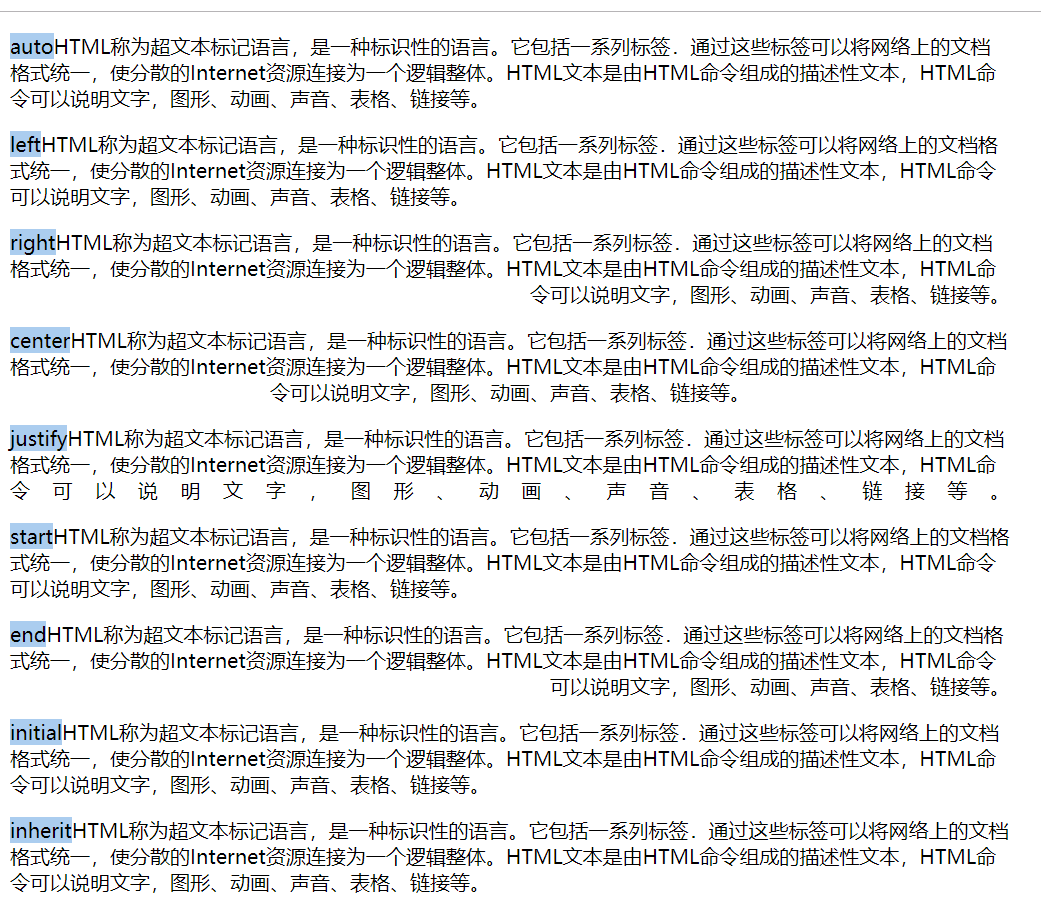
text-align-last 只在text-align:justify 时才有效
text-overflow
使用时需要设置元素为overflow:hidden;
中文无效,英文短单词无效,只对英文长单词有效
<!DOCTYPE html>

<html lang="en" manifest="index.manifest">

<head>

<meta charset="UTF-8">

<title>Document</title>

<style>

    div{width:800px;overflow:hidden;}

    span{background:#abcdef;}

    div:nth-child(1){text-overflow:clip;}

    div:nth-child(2){text-overflow:ellipsis;}

    div:nth-child(3){text-overflow:">>";}

    div:nth-child(4){text-overflow:clip;}

    div:nth-child(5){text-overflow:ellipsis;}

    div:nth-child(6){text-overflow:">>";}

    div:nth-child(7){text-overflow:clip;}

    div:nth-child(8){text-overflow:ellipsis;}

    div:nth-child(9){text-overflow:">>";}

</style>

</head>

<body>

    <div><span>clip</span>HTML称为超文本标记语言,是一种标识性的语言。它包括一系列标签.通过这些标签可以将网络上的文档格式统一,使分散的Internet资源连接为一个逻辑整体。HTML文本是由HTML命令组成的描述性文本,HTML命令可以说明文字,图形、动画、声音、表格、链接等。</div>

    <div><span>ellipsis</span>HTML称为超文本标记语言,是一种标识性的语言。它包括一系列标签.通过这些标签可以将网络上的文档格式统一,使分散的Internet资源连接为一个逻辑整体。HTML文本是由HTML命令组成的描述性文本,HTML命令可以说明文字,图形、动画、声音、表格、链接等。</div>

    <div><span>string</span>HTML称为超文本标记语言,是一种标识性的语言。它包括一系列标签.通过这些标签可以将网络上的文档格式统一,使分散的Internet资源连接为一个逻辑整体。HTML文本是由HTML命令组成的描述性文本,HTML命令可以说明文字,图形、动画、声音、表格、链接等。</div>

    <div><span>clip</span>I have a dream that one day on the red hills of Georgia, the sons of former slaves and the sons of former slave owners will be able to sit down together at the table of brotherhood.</div>

    <div><span>ellipsis</span>I have a dream that one day on the red hills of Georgia, the sons of former slaves and the sons of former slave owners will be able to sit down together at the table of brotherhood.</div>

    <div><span>string</span>I have a dream that one day on the red hills of Georgia, the sons of former slaves and the sons of former slave owners will be able to sit down together at the table of brotherhood.</div>

    <div><span>clip</span>aaaaaaaaaaaaaaaaaaaaaaaaaaaaaaaaaaaaaaaaaaaaaaaaaaaaaaaaaaaaaaaaaaaaaaaaaaaaaaaaaaaaaaaaaaaaaaaaaaaaaaaaaaaaaaaaaaaaaaaaaaaaaaaaaaaaaaaaaaaaaaaaaaaaaaaaaaaaaaaaaaaaa</div>

    <div><span>ellipsis</span>aaaaaaaaaaaaaaaaaaaaaaaaaaaaaaaaaaaaaaaaaaaaaaaaaaaaaaaaaaaaaaaaaaaaaaaaaaaaaaaaaaaaaaaaaaaaaaaaaaaaaaaaaaaaaaaaaaaaaaaaaaaaaaaaaaaaaaaaaaaaaaaaaaaaaaaaaaaaaaaaaaaaa</div>

    <div><span>string</span>aaaaaaaaaaaaaaaaaaaaaaaaaaaaaaaaaaaaaaaaaaaaaaaaaaaaaaaaaaaaaaaaaaaaaaaaaaaaaaaaaaaaaaaaaaaaaaaaaaaaaaaaaaaaaaaaaaaaaaaaaaaaaaaaaaaaaaaaaaaaaaaaaaaaaaaaaaaaaaaaaaaaa</div>

</body>

</html>
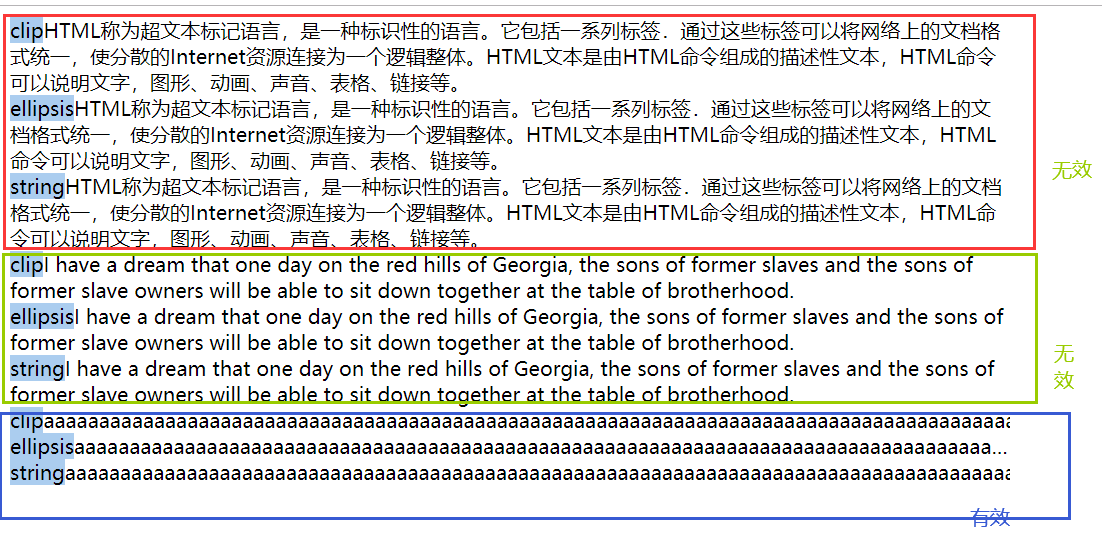
text-overflow:clip; 隐藏
text-overflow:ellipsis; 省略号
text-overflow:string; 指定字符,只在火狐浏览器有效
<!DOCTYPE html>

<html lang="en" manifest="index.manifest">

<head>

<meta charset="UTF-8">

<title>Document</title>

<style>

    div{width:800px;overflow:hidden;}

    span{background:#abcdef;}

    div:nth-child(1){text-overflow:clip;}

    div:nth-child(2){text-overflow:ellipsis;}

    div:nth-child(3){text-overflow:">>";}

    div:nth-child(4){text-overflow:clip;}

    div:nth-child(5){text-overflow:ellipsis;}

    div:nth-child(6){text-overflow:">>";}

    div:nth-child(7){text-overflow:clip;}

    div:nth-child(8){text-overflow:ellipsis;}

    div:nth-child(9){text-overflow:">>";}

</style>

</head>

<body>

    <div><span>clip</span>aaaaaaaaaaaaaaaaaaaaaaaaaaaaaaaaaaaaaaaaaaaaaaaaaaaaaaaaaaaaaaaaaaaaaaaaaaaaaaaaaaaaaaaaaaaaaaaaaaaaaaaaaaaaaaaaaaaaaaaaaaaaaaaaaaaaaaaaaaaaaaaaaaaaaaaaaaaaaaaaaaaaa</div>

    <div><span>ellipsis</span>aaaaaaaaaaaaaaaaaaaaaaaaaaaaaaaaaaaaaaaaaaaaaaaaaaaaaaaaaaaaaaaaaaaaaaaaaaaaaaaaaaaaaaaaaaaaaaaaaaaaaaaaaaaaaaaaaaaaaaaaaaaaaaaaaaaaaaaaaaaaaaaaaaaaaaaaaaaaaaaaaaaaa</div>

    <div><span>string</span>aaaaaaaaaaaaaaaaaaaaaaaaaaaaaaaaaaaaaaaaaaaaaaaaaaaaaaaaaaaaaaaaaaaaaaaaaaaaaaaaaaaaaaaaaaaaaaaaaaaaaaaaaaaaaaaaaaaaaaaaaaaaaaaaaaaaaaaaaaaaaaaaaaaaaaaaaaaaaaaaaaaaa</div>

</body>

</html>

overflow: visible | hidden | scroll | auto | inherit
鼠标悬浮时显示隐藏的文字
<!DOCTYPE html>

<html lang="en" manifest="index.manifest">

<head>

<meta charset="UTF-8">

<title>Document</title>

<style>

    div{width:800px;overflow:hidden;text-overflow:ellipsis;}

    div:hover{overflow:visible;}

</style>

</head>

<body>

    <div>aaaaaaaaaaaaaaaaaaaaaaaaaaaaaaaaaaaaaaaaaaaaaaaaaaaaaaaaaaaaaaaaaaaaaaaaaaaaaaaaaaaaaaaaaaaaaaaaaaaaaaaaaaaaaaaaaaaaaaaaaaaaaaaaaaaaaaaaaaaaaaaaaaaaaaaaaaaaaaaaaaaaa</div>

</body>

</html>

@font-face 兼容性 IE9+
字体格式
TrueType .ttf 无优化 兼容性IE9+
OpenType .otf 是ttf的升级版,不兼容IE
.woff web版本最佳字体格式 是TrueType/OpenType的压缩格式 兼容性IE9+ 但是不能兼容手机端!
.eot IE专用字体格式
.svg svg字体格式 IE和火狐都不兼容
自定义字体通用模板
<!DOCTYPE html>

<html lang="en" manifest="index.manifest">

<head>

<meta charset="UTF-8">

<title>Document</title>

<style>

    @font-face{

        font-family:"myFont";

        src:url('font/myFont.eot'),/*兼容IE9+*/

            url('font/myFont.eot?#iefix') format('embedded-opentype'),/*兼容IE6-8*/

            url('font/myFont.ttf') format('truetype'),/*兼容手机端*/

            url('font/myFont.woff') format('woff'),/*兼容所有浏览器*/

            url('font/myFont.svg#myFont') format('svg');/*针对ios开发*/

    }

    p{font-family: 'myFont';}

</style>

</head>

<body>

<p>这是我的自定义字体呀~</p>

</body>

</html>
获取特殊字体的网站:https://www.fontsquirrel.com/tools/webfont-generator
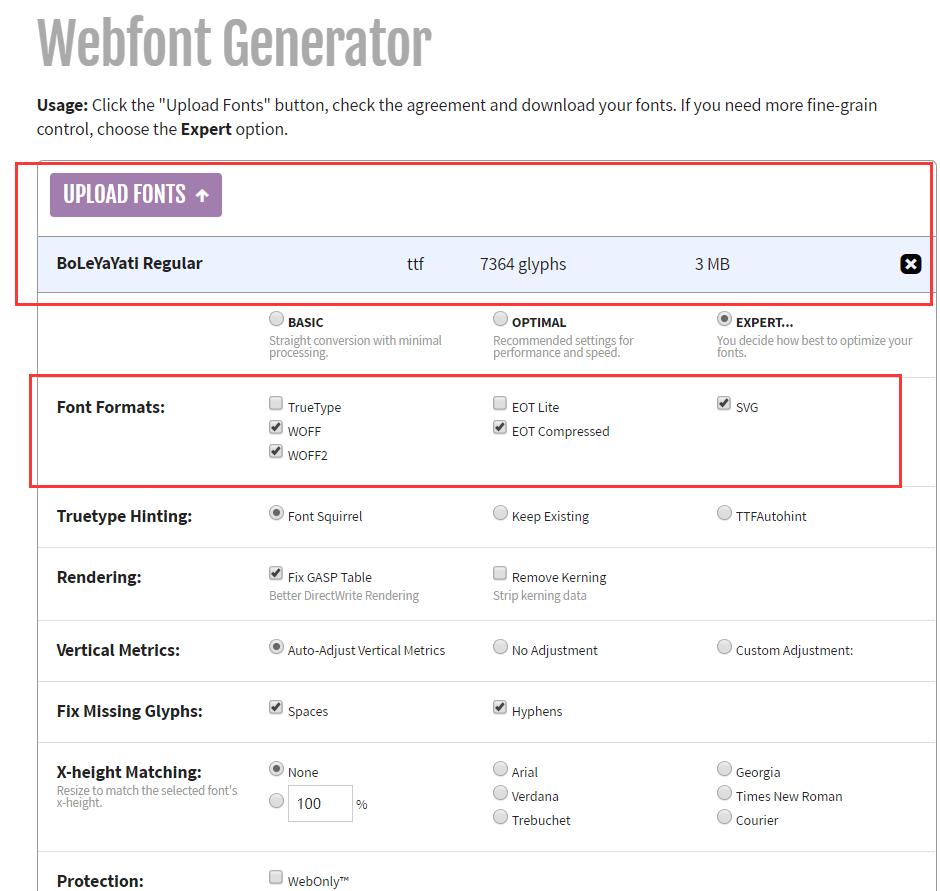

由于是国外服务器,因此下载速度比较慢
注意:经我个人发现,这个软件转换出来的字体格式,都只支持英文版
建议还是使用其他国内的在线转换工具或者网址
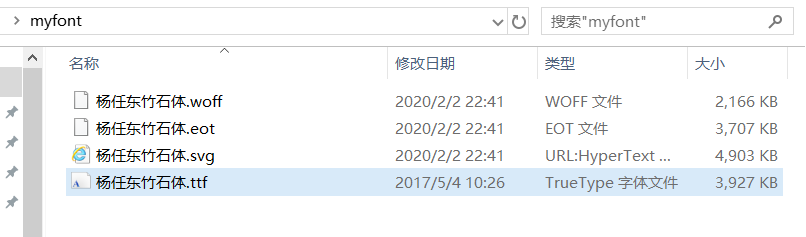
字体文件
<!DOCTYPE html>

<html lang="en" manifest="index.manifest">

<head>

<meta charset="UTF-8">

<title>Document</title>

<style>

    @font-face {

        font-family: '杨任东竹石体';

        src:url('myfont/杨任东竹石体.eot'),/*兼容IE9+*/

            url('myfont/杨任东竹石体.eot?#iefix') format('embedded-opentype'),/*兼容IE6-8*/

            url('myfont/杨任东竹石体.ttf') format('truetype'),/*兼容手机端*/

            url('myfont/杨任东竹石体.woff') format('woff'),/*兼容所有浏览器*/

            url('myfont/杨任东竹石体.svg#杨任东竹石体') format('svg');/*针对ios开发*/

    }

    p{font-family: '杨任东竹石体';font-size:24px;}

</style>

</head>

<body>

    <p>HELLO THIS IS MY FONT~这是我的自定义字体~</p>

</body>

</html>

成功~~~
CSS3中新增的对文本和字体的设置的更多相关文章
- 妙味css3课程---1-2、css3中新增的伪类和伪元素有哪些
妙味css3课程---1-2.css3中新增的伪类和伪元素有哪些 一.总结 一句话总结: 1.div:target{}是什么意思? 比如a标签的锚点链接到div,div:target{}就可以找到这个 ...
- CSS3中新增的内容
(整理中······) 一.选择器 新增的伪类 1.p:first-of-type 选择属于其父元素的首个 <p> 元素的每个 <p> 元素. 2.p:last-of-ty ...
- css3中新增的样式使用方法
在PC版开发中由于IE原因,我们很少用到css3,但随着平板和智能手机进入我们的生活,以及现在越来越流行,在手机版和平板版开发中我们就可以大胆的使用了,下面我们探讨常用几个css3属性: 1.css3 ...
- html5--6-23 CSS3中的文字与字体
html5--6-23 CSS3中的文字与字体 text-overflow 设置是否使用一个省略标记(...)标示对象内文本的溢出 clip: 默认值当对象内文本溢出时不显示省略标记(...),而是将 ...
- html5--6-19 CSS3中的文字与字体
html5--6-19 CSS3中的文字与字体 学习要点 掌握文字与字体的设置 颜色值查询方法: 百度查询,很多网站有提供 下载相关手册等需要时查表 运用绘图工具中的拾色器 CSS中常用的字体属性设置 ...
- css3新增属性有哪些?css3中常用的新增属性总结
css3新增属性有哪些?来提问这个问题的人都应该知道css3是css的升级版本,那么,css3既然是升级版本,自然是会新增一些属性,接下来本篇文章将给大家介绍关于css3中常用的新增属性. 一.css ...
- CSS3中的弹性流体盒模型技术详解
先回顾一下CSS1 和 CSS2中都已经定义了哪些布局方面的属性,这样也会增加我们理解弹性布局. 其实我们现在有很多一部分人,你们刚刚接触CSS层叠样式表,或者接触有一段时间了,但是却没有很好的去 ...
- css3中的布局相关样式
web页面中的布局是指在页面中如何对标题.导航栏.主要内容.脚注.表单等各种构成要素进行合理编辑.在css3之前,主要使用float属性或position属性进行页面中的简单布局,但是也存在一些缺点, ...
- CSS3的新增边框属性
一.CSS3 新增的边框属性 属性 版本 简介 border-image CSS3 设置或检索对象的边框使用图像来填充 border-image-source CSS3 设置或检索对象的边框是否用图像 ...
随机推荐
- 【Nginx入门系列】第四章 通过域名匹配虚拟主机,不修改端口
域名访问原理 我们在显示生活中,我们怎样通过一个域名来访问到我们所需要的网站呢? 例如www.baidu.com,我们在浏览器输入百度网址会先发送请求到DNS服务器,DNS会通过我们的域名解析百度对应 ...
- hive安装启动错误总结
错误一: Exception in thread "main" java.lang.NoClassDefFoundError: jline/console/completer/Ar ...
- HDU_5045_状态压缩dp
http://acm.hdu.edu.cn/showproblem.php?pid=5045 i从1到m依次更新,dp[i][j]表示更新到i题时,j表示每个人的答题状态,分别用0和1表示(因为每个人 ...
- android项目上传github
很简单
- C# WinForm 使用SMTP协议发送QQ邮箱验证码
文章来自:https://blog.csdn.net/IT_xiao_guang_guang/article/details/104336604 前言 在程序设计中,发送验证码是常见的一个功能,用 ...
- num05---装饰模式
当系统需要新的功能的时候,一般都是向旧的类中添加新的代码.比如一个人这个类,需要新增穿衣的功能,那么就会在人这个类中去添加对应的穿衣方法代码,用来增强人这个类的行为功能.但是这样做,会因为新加入的字段 ...
- Python - os.walk()详细使用
os.walk() 方法简单介绍 主要用来遍历一个目录内各个子目录和子文件 是一个简单易用的文件.目录遍历器,可以帮助我们高效的处理文件.目录方面的事情. 方法参数介绍 os.walk(top[, t ...
- FTP的连接方式(防火墙的配置)
FTP是仅基于TCP的服务,不支持UDP.与众不同的是FTP使用2个端口,一个数据端口和一个命令端口(也可叫做控制端口).通常来说这两个端口是21(命令端口)和20(数据端口). ...
- 修改定时清理 /tmp 目录下的文件
初衷 默认系统是超过 30 天不访问的文件自动清除的,但是有时候硬盘用得紧可以考虑修改周期 设置方法 编辑配置文件:vim /etc/cron.daily/tmpwatch #! /bin/sh fl ...
- Mysql 命令 操作
1.user表 如果需要从其他机器连接 mysql 服务器报这个错“ERROR 1130: Host 'root' is not allowed to connect to this M ...